Theming and customization is a huge aspect of the Linux world.
No other operating system offers such kind of flexibility
customizing the desktop. Every desktop environment is great for
customizing the look of the Linux system. The Xfce desktop
environment is no exception. Instead, it has a massive library of
themes and large community support. They are consistently
developing Xfce themes for your desktop. Installing and customizing
Xfce themes for Linux is also very easy. This article is going to
be a handbook for Xfce desktop customization and tweaks. [1]
Best Xfce Themes for
Linux
The huge Xfce themes library leads to the biggest confusion of
choosing the best Xfce themes for one’s desktop. No one can try out
every free theme and experiment with them. But we got you covered.
We have enlisted the best 20 Xfce themes here to get you started
with the Linux customization game. Though the taste of every
individual is different, we believe that this list will be
sufficient for anyone to give their desktop a gorgeous and unique
look.
1. PRO Dark
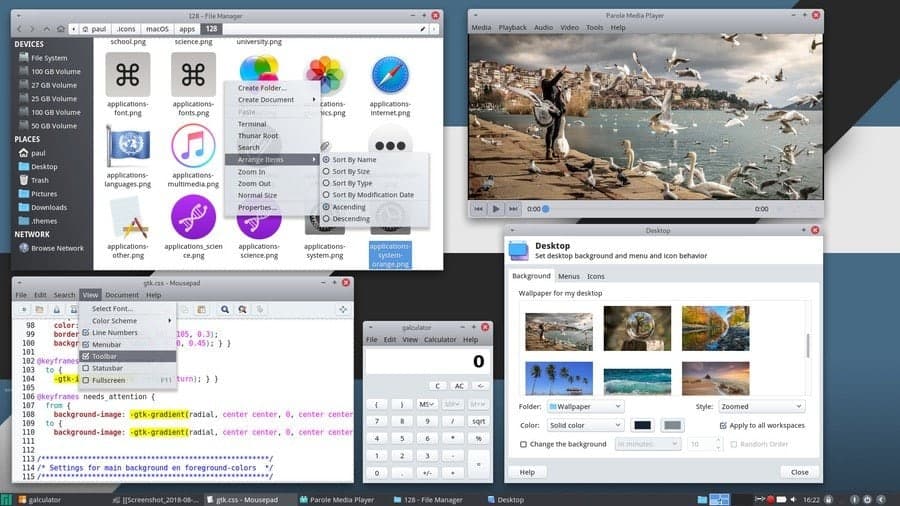
PRO Dark is one of the most popular Xfce themes for Linux. It is
compatible with any version of the Xfce desktop environment since
it has three different editions for different versions of GTK and
Thunar file manager. It is very clean and doesn’t strain the eyes.
This is why it is very useful for those who use their desktop
regularly. GTK2 and GTK3 applications look no different in this
theme. Users can customize different aspects of this theme. PRO
Dark uses the Xfwm window manager as the compositor.
[2]
2. Prof
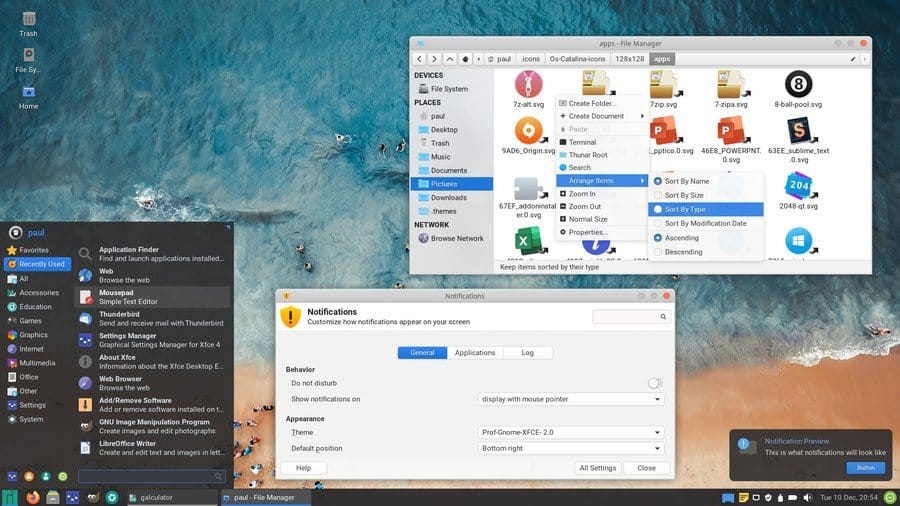
Prof is a simple and minimalist theme for the Xfce desktop
environment. The author of the theme is “PaulXfce,” and he is
famous for another popular theme PRO Dark. The motto of the creator
is to create such kind of themes that does not cause any strain on
eyes. So, you will see that this theme doesn’t have modern dark
color schemes.
Rather it uses a light color scheme and clean typography. It has
a translucent application launcher and notification panel which has
a black tint on to that. The custom icons make it a beautiful flat
Xfce theme for the admirers of flat design language.
3. Dots Theme
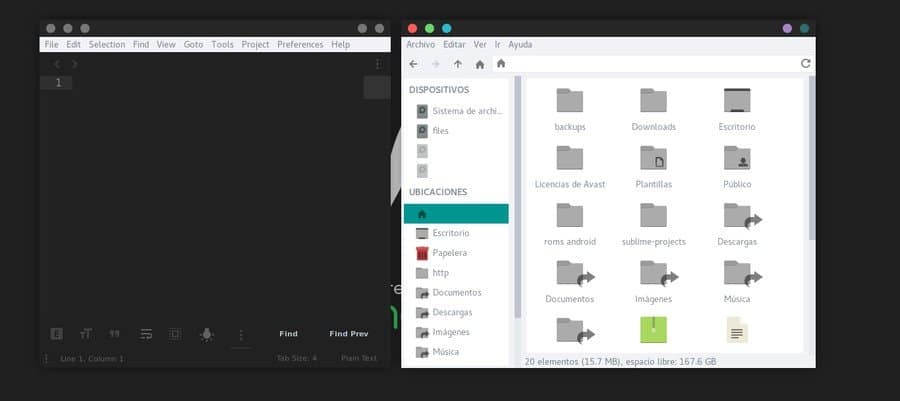
Dots is a popular flat theme for Linux. This Xfce theme will not
completely change the look of your desktop environment. It will
only change the window panels. There are two color schemes, black,
and white used in this theme. The title bar buttons will be
replaced by red, green and blue in the white variant.
In the dark variant, all the buttons will be gray colored. You
can separately control the color scheme of the background and title
bar color. The users can enter into the Linux Window Manager and
apply this amazing theme.
4. OneColor
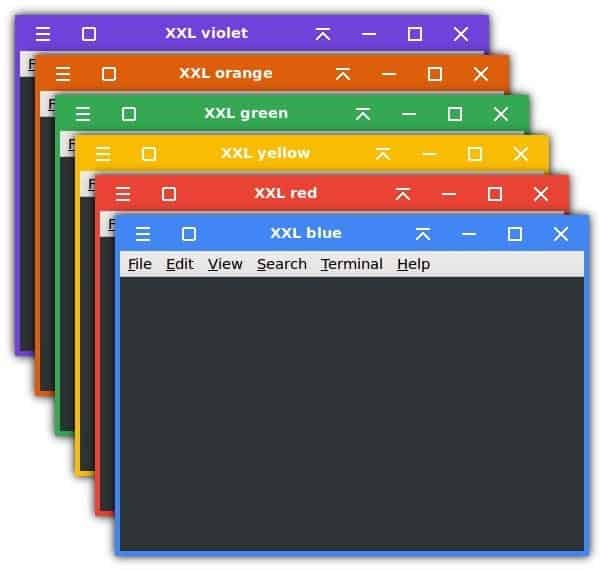
OneColor is an interesting Xfce theme for the Linux users. It is
very simple and lightweight. It will bring a unique and colorful
attire to your window title bar. The buttons will look just like
the buttons from Windows operating system. But the design is a bit
rounded, which we see on the material design language of the
Android operating system.
It will give a modern flat look to your desktop. You can choose
from six different bright and bold colors for the window title bar
and border, such as red, blue, yellow, green, orange, and violet.
It has a HiDPI version for 4K displays and is XXL version for the
touch screen devices included with the package. You can set it up
with solid flat colored wallpapers to get a minimal desktop
setup.
5. McOS CTLina
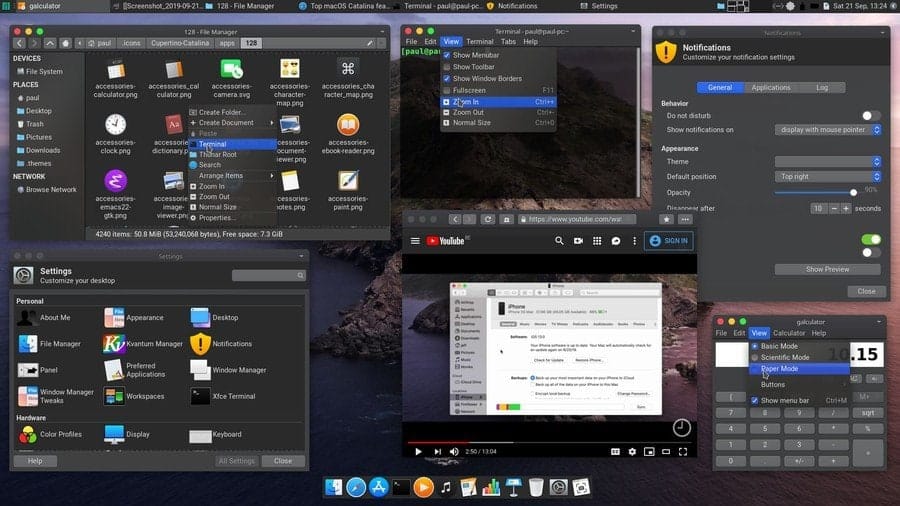
This is a clone of Cupertino’s flagship operating system. It is
based on the latest version of macOS named Catalina. The creator
tried to replicate every single detail to give almost the same look
and feel of macOS for the Linux users. It has two different
variants that are dark and light.
This theme works great with the latest Xfce version 4.14. The
default application icons are customized to look like Apple’s
icons. This theme also changes the look of the title bar and
buttons. You can move the taskbar to the top of the screen and add
a dock panel to get the complete macOS feeling.
6. City
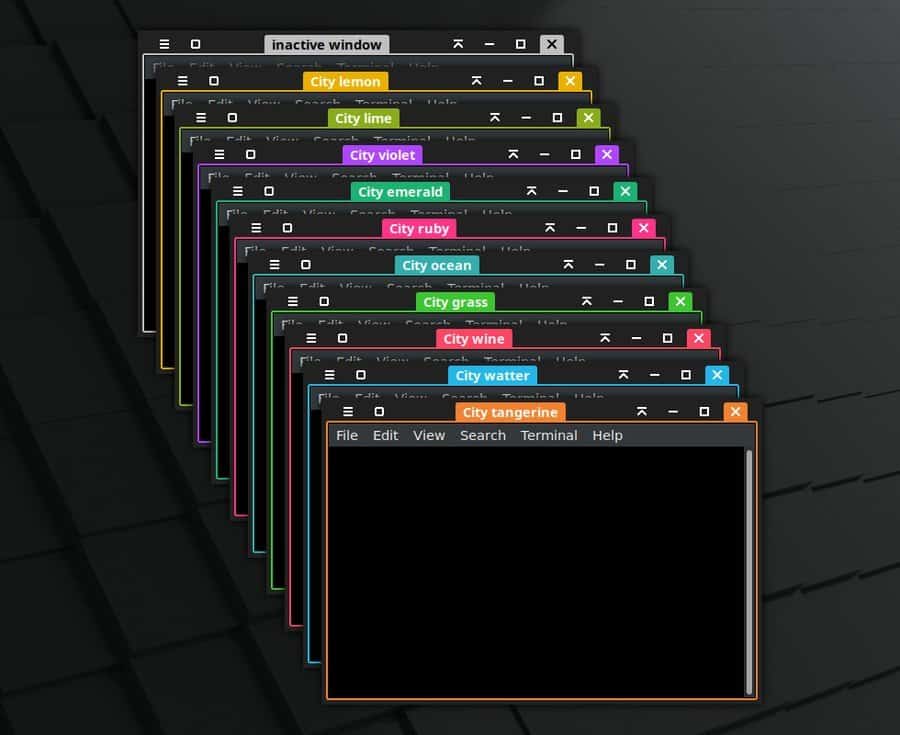
The City is a beautiful and elegant dark theme for Xfce desktop.
It effectively changes the color of the title bar and window panel.
This theme is from the same author who created the OneColor theme.
The buttons and icons of this theme are similar to those on
OneColor. But unlike OneColor, it doesn’t pain the whole title
bar.
Rather it colors the close button, window title, and the window
borders. There are more than ten variants of this theme, including
Wine, Grass, Ocean, Ruby, Emerald, etc. There is an additional
version of this theme that doesn’t include any preset color. Users
can freely customize the color of their choice.
7. Arctodon
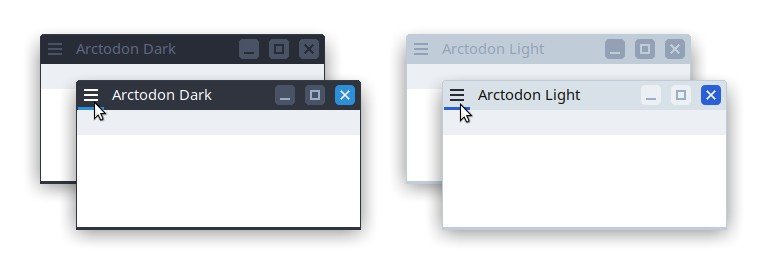
Arctodon is a simple changemaker for the Xfwm window manager,
which is a default for the Xfce desktop environment. For this
reason, this theme changes the look of the window and title bar of
different applications. It is one of the best add on for the
popular Arc theme. It also looks good with the Qogir theme.
The title bar buttons are flat with colored highlights. The
title bar icons look like old school Windows XP icons. But the
total attire of this theme is quite modern and eye-soothing. It has
both dark and light variants to choose from.
8. Plano
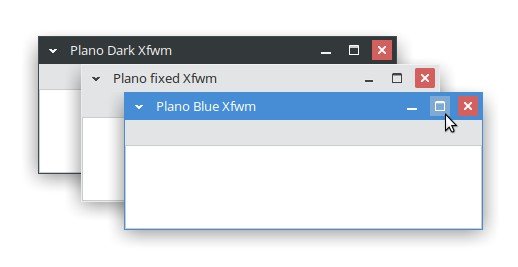
Plano is a neat and clean Xfce flat theme. This window manager
theme is highly inspired by Microsoft’s very own Windows OS. It has
three different variants, including Normal, Modern, and XP. The
latest XP variant brings back the classic maximize button along
with 2px borders. On the other hand, the Modern variant is
borderless to bring an immersive vibe to the window panels. Users
can use Alt+RMB+drag to change the window
size in the Modern variant. This flat theme has three different
colored versions called Fixed, Blue, and Dark.
9. Pop
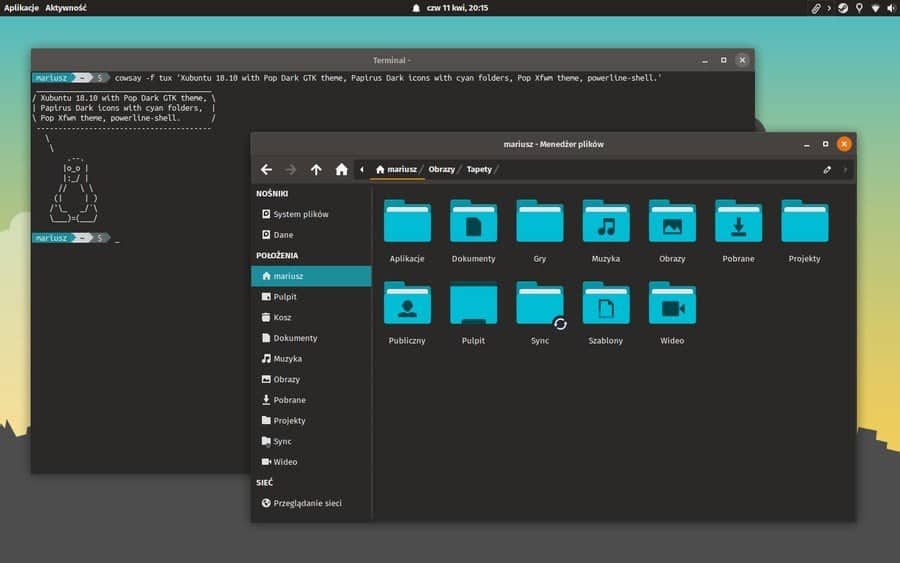
Pop is a simple and minimal theme for the Xfce desktop
environment. It is highly inspired by the Pop GTK theme[11] from the Pop! OS. It
has two variants that are light and dark. The dark variant is the
default and normal variant for this theme. The title bar buttons
are placed nicely in this theme.
The icons are inspired by material design language. There is
rounded padding on the close button. The active and inactive
windows show different colors on their exit buttons. You can set it
up with the Pop GTK theme to get the complete experience of the
theme.
10. Neon Knights
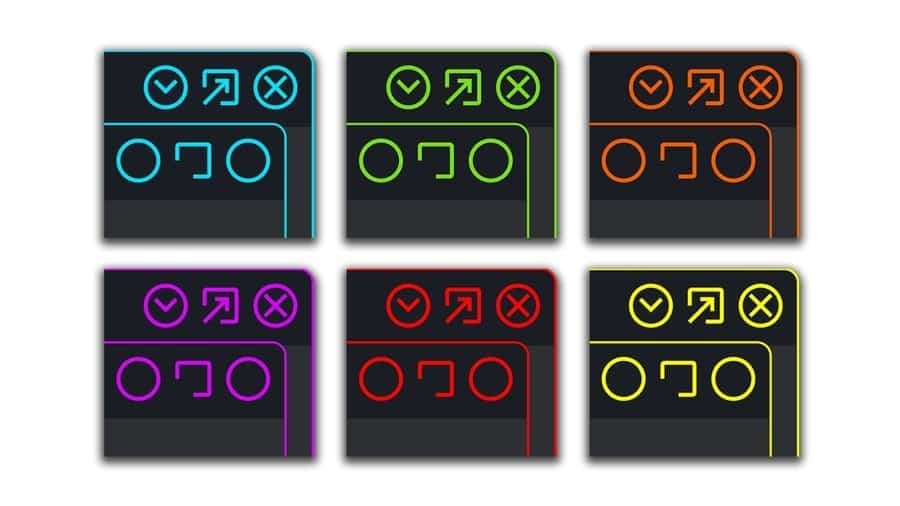
Neon Knights is a modern-looking theme inspired by neon light
design. It looks beautiful with complete dark or pitch-black
backgrounds. The title bar buttons have a very minimal appearance
in this theme. There are two different variants for the button
icons. One set is rounded with less detail, and another set has got
a better detail on them.
There are several customization colors for the theme, including
blue, green, red, yellow, and orange. The author of this theme
recommends Neon Knights GTK theme, Neon Knights folder icons, and
Neon Knights wallpapers two used with this window manager
theme.
11. Azenis
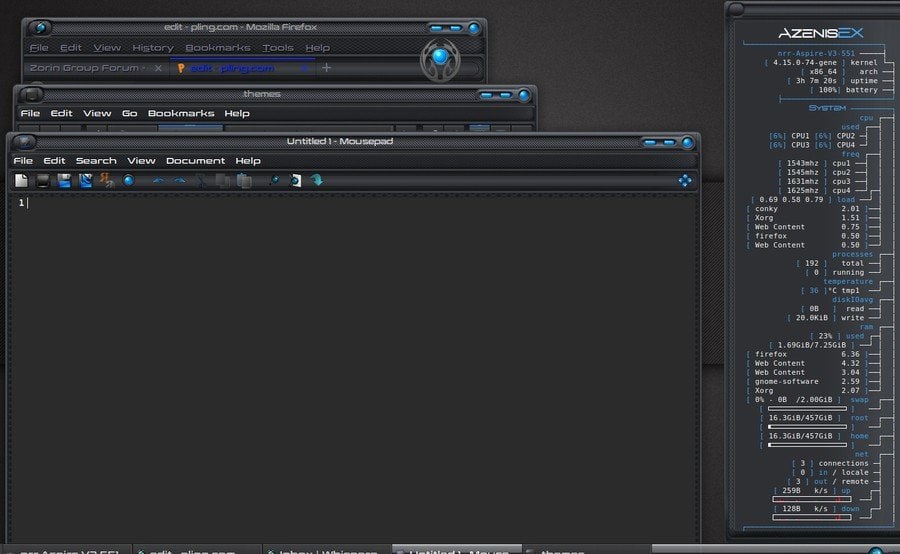
Azenis is a different looking theme. It has a futuristic techno
vibe into it. The window of applications has beveled edges. The
title bar is quite modern and beautiful. The buttons have got a 3D
effect on them. The title bar has a carbon fiber texture painted on
it. The default typeface is a modern designed san serif font.
For this reason, the total setup will remind you of the
supercomputer from a sci-fi movie. The window panels and title bars
can be customized through the window manager software. The improved
version of this theme has repositioned title bars and bold borders
with more ergonomic spacing.
12. Ninja
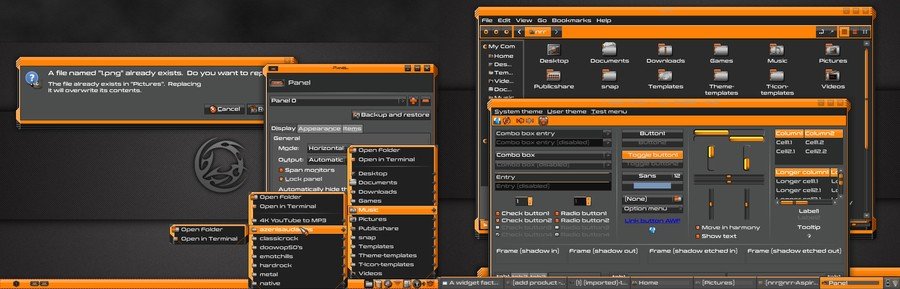
Ninja is one of the most vibrant looking Xfce themes for Linux.
But it was originally developed for the Windows operating system.
Later it was ported for Linux distributions. This theme is all
black, but its orange accent helps it to bring a bold and elegant
look into it. You can easily customize the toggle buttons and other
aspects by using the Xfce theme manager. The folder icons have
stainless steel like metallic texture on them. It is also
compatible with the popular customization tool, A Widget
Factory.
13. Alien Evolution
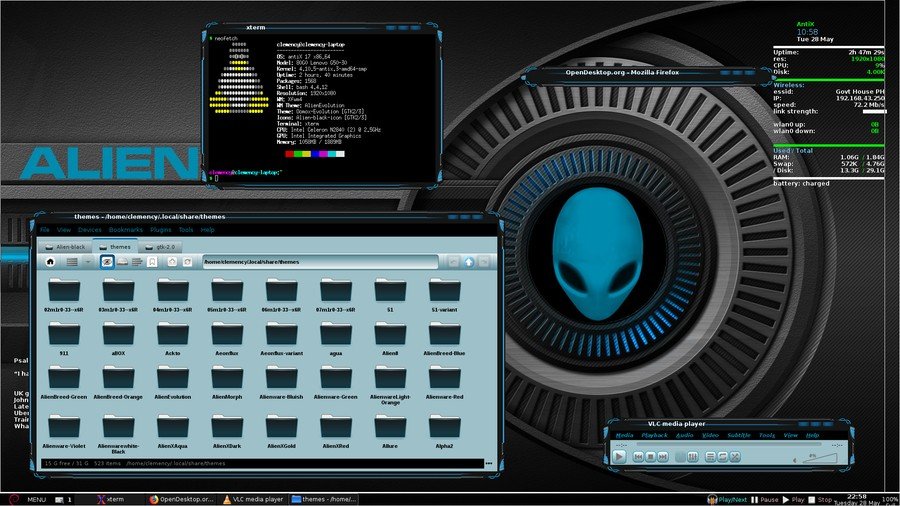
It is a very popular theme for Linux. It is highly inspired by a
Windows paid skin named Alienware Evolution. The theme has a dark
color scheme with blue accent. But the background of the
applications has a light cyan tint. All of the title bar buttons
use the same icons, and there is no visible difference between
them. This thing can confuse some users. The window panel borders
have a beautiful design. The windows are not rectangular, like
other Xfce themes. Instead, the unconventional look will make your
desktop setup unique and gorgeous.
14. CopperDeck
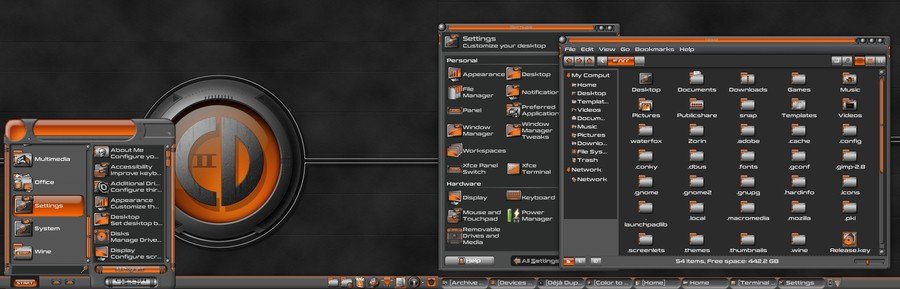
CopperDeck is a heavily customized appearance for the Xfce
desktop environment. It has an orange accent on its dark
background. The default application icons and folder icons are
heavily customized to blend with this theme. The folder icons are
metallic textured.
The buttons have fine detailed highlights and shadows so that it
brings some depth to the design. The theme is very clean and has
enough ergonomic spacing though the creator tried to keep it
compact. Very few themes are as complete and versatile as this
theme. Those who want a robotic vibe into their desktop can give it
a shot.
15. Hitori
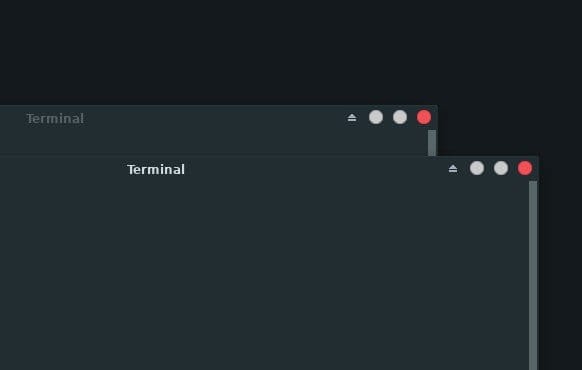
It is a newly released flat theme for Linux. Hitori is a very
simple and minimal theme compatible with the latest version of the
Xfce desktop environment. It is an Xfwm window manager theme that
matches the color palette of popular GTK theme Adapta[18]. The title bar of the
theme is blended with the main background because it has a
borderless material design. The title bar buttons are rounded and
flat. The button arrangements, window title alignment, and title
bar font style can be adjusted using the Xfce theme manager.
16. Midnight
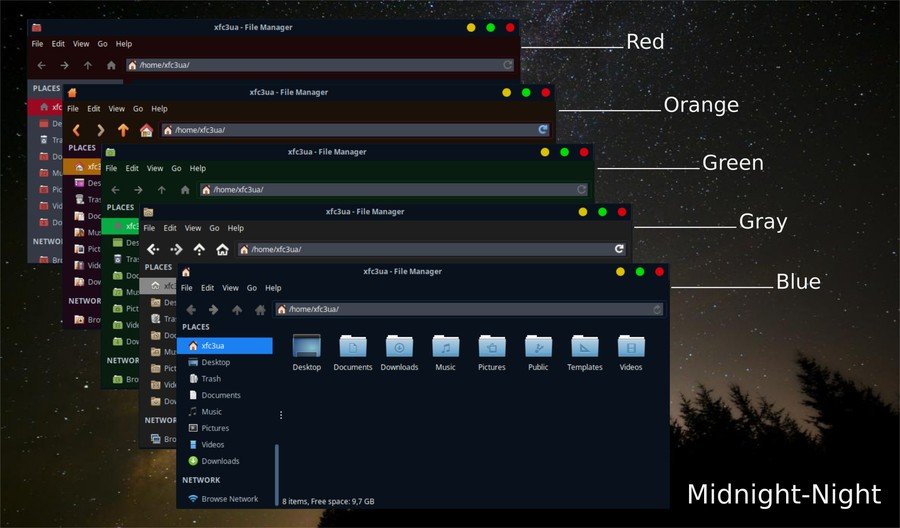
Midnight is one of the most popular Xfce themes for Linux. The
author created it on the base of the popular GTK theme Arc. It is
fully compatible with the Xfwm4 window manager. The title bar
buttons have bold and bright colors, just like the macOS. The
application background, title bar, and search bar have different
color schemes. There are five different color variants of this
theme, such as Red, Orange, Green, Gray, and Blue. Each color
variant has both light and dark modes from which the users can
choose their favorite one.
17.
Futurist-Hackerist
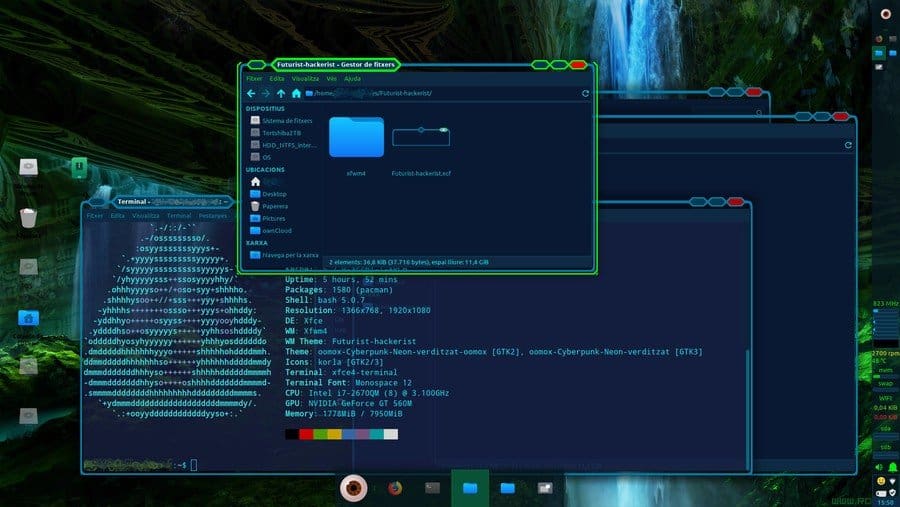
As the name suggests, this theme will bring a futuristic hacker
vibe into your desktop. It will remind you of the popular video
game Watchdogs. This theme is compatible with the Xfce desktop
environment. The backgrounds have a dark blue tint. The inactive
window has cyan borders, while the active window will be visible in
with glowing green borders. The title bar buttons have a hexagonal
shape, which is kind of unconventional. But the overall look and
feel of the theme are pretty classy.
18. Cyanogen
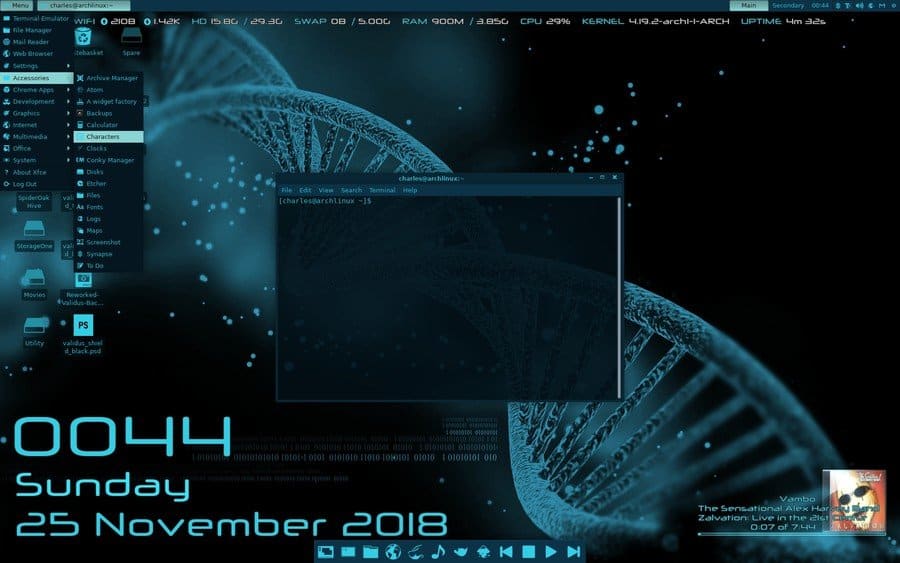
Cyanogen is a complete theme package for Linux. It works great
with the Xfce desktop environment. You have to install Adwaita and
Murrine theme engines before installing this theme. It has got
another version named Cyanogen Mini for the smaller screen
devices.
The windows, app icons, wallpapers, launcher, and almost
everything is painted with Cyan color in this theme. The color is
refreshing and eye-soothing. The buttons, menu, borders, and other
aspects can be customized by using the software named A Widget
Factory.
19.
Chr-title-buttons
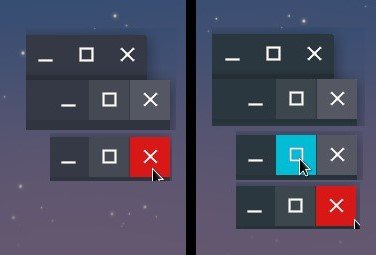
This theme resembles the title button of Google’s very own
Chrome OS. This is a full HD version, and this is why it looks
great, even on large displays. Adapta and Arc are two of the very
popular Linux desktop themes. Chr-title-buttons has two extra
variants that blend with Adapta and Arc themes[23]. The original variant
has blue, gray, and dark buttons to suit best with any flat themes
out there. This modern Xfce theme will be like by every minimal
setup lovers.
20. JacWin10
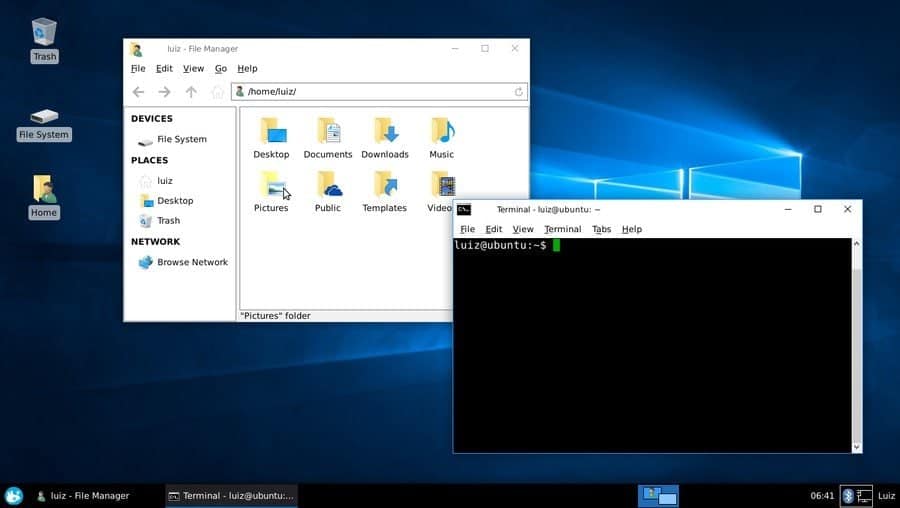
JacWin10 stands for “Just a copy of Windows 10.” As the name
suggests, this theme resembles the visual aspects of Microsoft’s
Windows 10. If anyone wants to get back to a familiar Windows look,
this is the best option to go for. The developer tried to replicate
even the fine details as far as he could.
The layout of this theme is fixed for the Xfwm window manager to
resemble Windows 10 correctly. Application icon and window title
are left-aligned while the Maximize, minimize, and close buttons
are right-aligned. You can set this up with Windows 10 icon pack to
get the full experience.
How to Customize the Look of Xfce
Themes
The default look of the Xfce desktop environment is not bad. But
if you want your desktop to look even cooler, you can customize the
look by downloading Xfce themes and tweaking them. The above list
has some great themes to get started with the customization of the
Xfce desktop. You can even use some third-party applications like
the Xfce theme manager to tweak the theme. Now its time to learn
how to get a gorgeous desktop attire.
1. Downloading the Theme
File
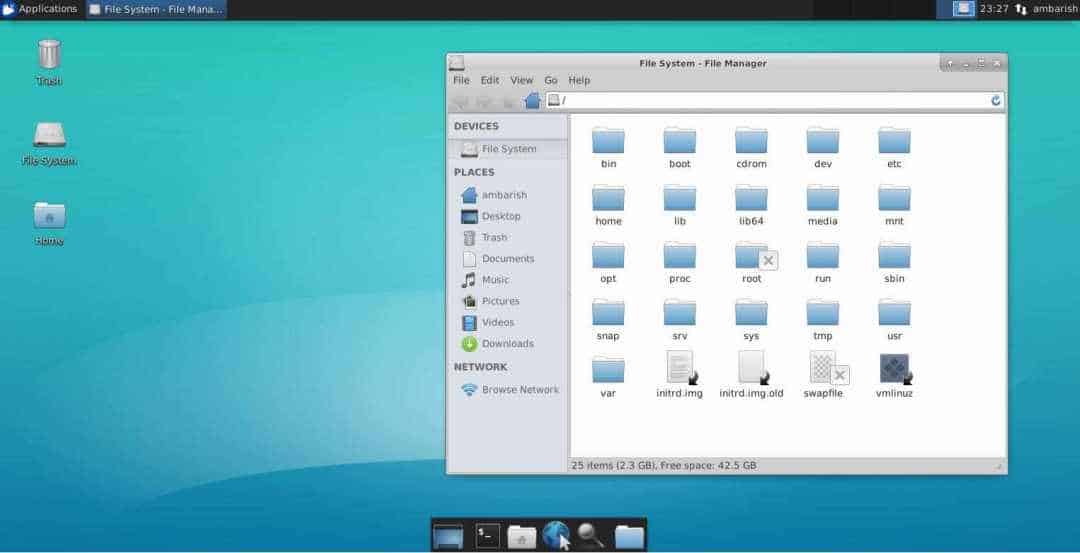
Firstly, you have to download the theme file from your desired
website. You can use the download buttons of the above list to
download the best Xfce themes. Normally the theme files are in a
compressed file format like ZIP, RAR, GZ, etc. For this reason, you
have to extract the files in your desired directory, after
downloading them by using any of your favorite extractor
software.
2. Applying the Desired
Theme
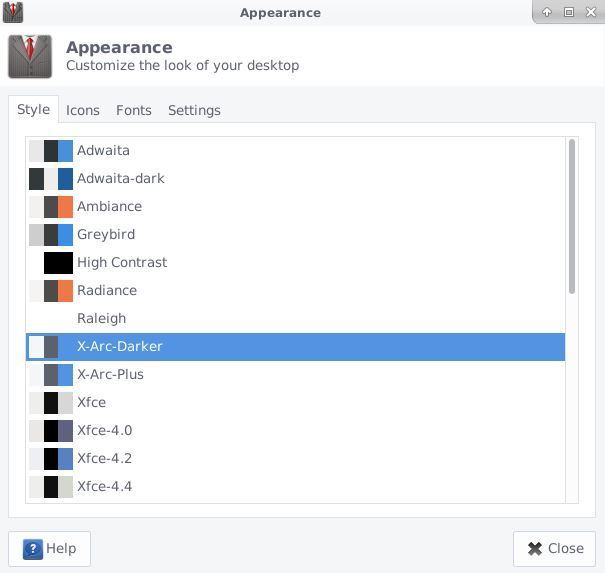
For applying the downloaded Xfce themes, you have to place the
extracted files into the .theme folder
located in your home directory. Then, open the Settings app and go
to Appearance > Style. Here you will find all
the installed themes, including the one you have recently
downloaded and placed inside the .theme
folder. Just select the theme, and you are done. Now log out of
your account and log back in to see the changes.
3. Tweaking the Applied
Theme
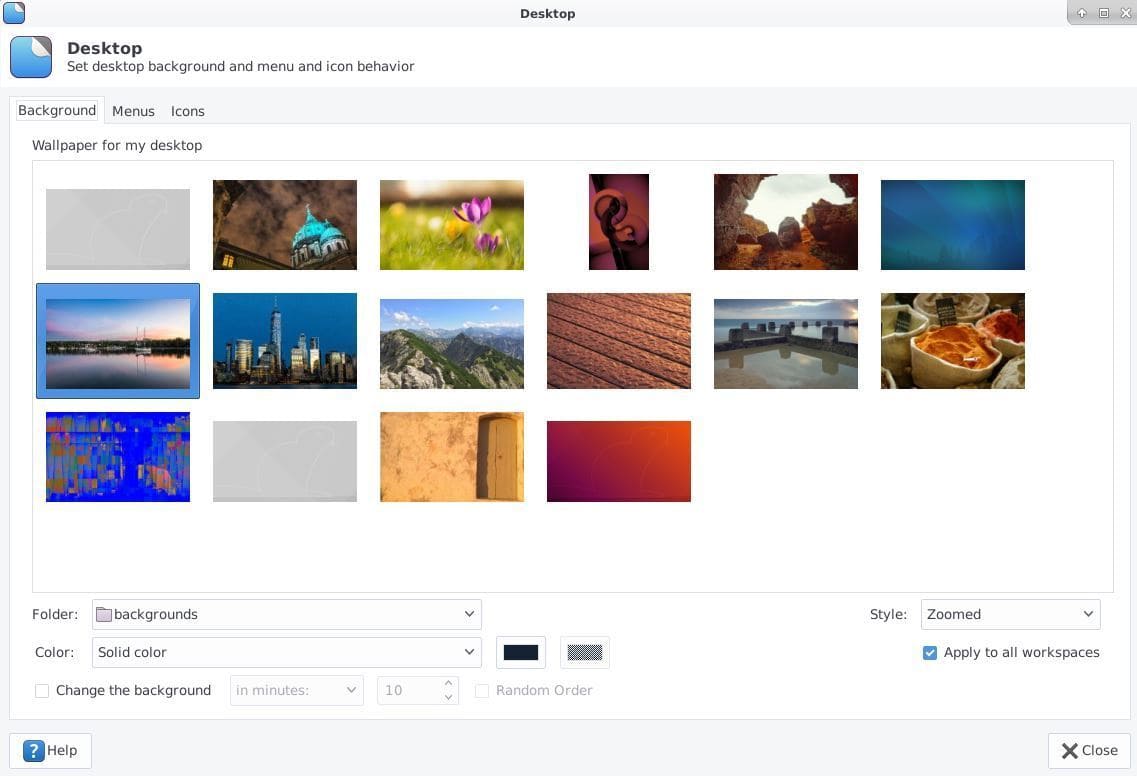
Different themes bring different changes to your overall look.
The out of the box theme package won’t change everything of your
desktop. You may want to change the wallpaper, fonts, and set up
custom matching icons to bring the completeness in your desktop
customization. [26]
To change the wallpaper, right-click on the desktop and
click on Desktop Settings.
Choose Background from the folder option and
select your desired wallpaper. There are thousands of free
wallpapers available on the internet. You can always download and
apply them.
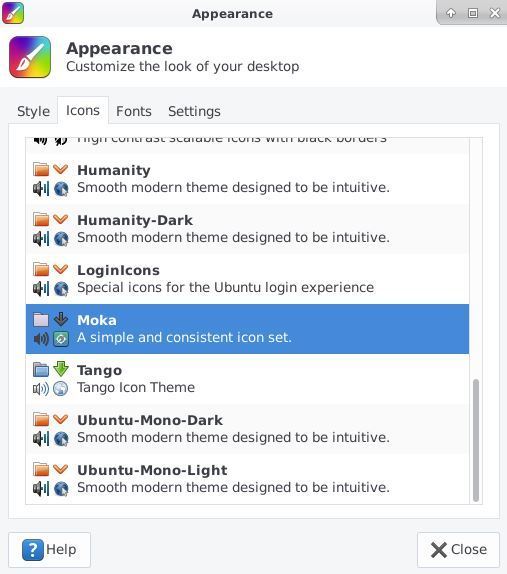
Customizing the icons brings a huge change to the overall look.
You can download your favorite icon packs, just like the themes
from the internet after downloading the icon file extract and put
it in your home directory under .icons
directory. Then go to Settings > Appearance >
Icons to select that icon theme. You can even change the
typeface of your system, just like this method.
Wrapping Things Up
Linux distributions offer a huge
customization option. The Xfce desktop environment is no different.
Those who have to work on a computer regularly can get bored seeing
the same old desktop. Trying out new themes is like reshuffling the
furniture of your living room. It will drive you away from the
monotony. The above list of the best Xfce themes will give your
desktop a new life. Just install and try them out. [27]
As you saw that, installing themes and tweaking the look is not
rocket science. Anyone with basic navigation knowledge of Linux can
do it. When you get stuck, the above guide is always here to
accompany your customization journey. Share your favorite Xfce
themes in the comment below, or if you are a theme developer, don’t
forget to share your creation with us.
References
- ^
Best
Linux Desktop Environment: 15 Reviewed and Compared
(www.ubuntupit.com) - ^
Best 20
Linux Window Managers: A Comprehensive List for Linux Users
(www.ubuntupit.com) - ^
Download
(www.xfce-look.org) - ^
Download
(www.xfce-look.org) - ^
Download
(www.xfce-look.org) - ^
Download
(www.xfce-look.org) - ^
Download
(www.xfce-look.org) - ^
Download
(www.xfce-look.org) - ^
Download
(www.xfce-look.org) - ^
Download
(www.xfce-look.org) - ^
Top 15
Best Gnome Shell Themes for Your Gnome Desktop
(www.ubuntupit.com) - ^
Download
(www.xfce-look.org) - ^
Download
(www.xfce-look.org) - ^
Download
(www.xfce-look.org) - ^
Download
(www.xfce-look.org) - ^
Download
(www.xfce-look.org) - ^
Download
(www.xfce-look.org) - ^
How to
Install Adapta KDE Theme on Ubuntu KDE Plasma
(www.ubuntupit.com) - ^
Download
(www.xfce-look.org) - ^
Download
(www.xfce-look.org) - ^
Download
(www.xfce-look.org) - ^
Download
(www.xfce-look.org) - ^
Install Arc Theme and Icon on Ubuntu,
Fedora and Other Linux Desktop
(www.ubuntupit.com) - ^
Download
(www.xfce-look.org) - ^
Download
(www.xfce-look.org) - ^
The
10+ Best Linux Wallpaper Changer Software in 2020
(www.ubuntupit.com) - ^
Best
Linux Distro: Top 10 Recommendation To Boost Up Your Linux
Experience (www.ubuntupit.com)
Read more https://www.ubuntupit.com/best-xfce-themes-for-linux/