
like a 1-click solution that doesn’t require any installation or
configuration…a platform that can scale up your research time…
technology that can provide data-driven explanations… well, your
search is over!
Israeli cybersecurity and malware researchers today at Black
Hat[1] conference launch a
revolutionary machine learning and artificial intelligence-powered
malware researcher platform that aims to help users identify
unknown malware samples before they strike.
Dubbed SNDBOX[2], the free online
automated malware analysis system allows anyone to upload a file
and access its static, dynamic and network analysis in an
easy-to-understand graphical interface.
The loss due to malware attacks is reported to be more than $10
billion every year, and it’s increasing. Despite the significant
improvement of cyber security mechanisms, malware is still a
powerful and effective tool used by hackers to compromise systems
because of its considerably improved evasion ability.
In recent years, artificial intelligence and machine learning
technologies have evolved tremendously and emerged as one of the
most promising technique to detect never-seen-before malware by
studying the behavior of various samples.
However, since analyzing malware behavior is a post-attack
technique that requires the execution of the malicious code at
first place, the approach cannot be used as a defense mechanism;
instead, you always need an isolated and controlled environment to
monitor and examine its behavior.
Developed by cybersecurity researchers Dr. Ran Dubin[3]
and Ariel
Koren[4], SNDBOX makes the
approach of behavior-based malware research more easier than ever
before and accessible to everyone.
What is SNDBOX and How Does It Work?
SNDBOX is a powerful, multi-vector, cloud-based AI technology
platform that is not just capable of analyzing files against
different attributes and vectors by monitoring their behavior, but
it also converts dynamic behavioral inputs into searchable vectors,
allowing users to search its vast online malware analysis database
with excellent visibility.
For efficient monitoring, SNDBOX executes submitted binaries in a
controlled environment using an invisible kernel-mode agent, which
deceives malware into believing that it is being executed in a real
system it wants to attack.
Located between the User mode and Kernel mode, SNDBOX’s
invisible kernel-mode agent tricks malware into executing its full
range of intended functionality, revealing its true malicious
nature and capabilities.
SNDBOX monitors executables behavior, ranging from simple
modifications of system resources to advanced network activities,
and then leverages machine learning algorithms to process a large
amount of gathered data, which could be over 200MB for a small
binary of 10KB, into easy-to-digest results.
You might be wondering, what about computer viruses that wait
for remote commands before activating their malicious payloads?
“Even if it is waiting for a long period, we know how to gracefully
trigger long sleep or events, making the malware execute its full
potential of malicious code immediately by altering its behavior to
receive maximum information regarding its true nature,” researchers
told The Hacker News.
knowledge and understanding on several aspects, behavioral
patterns, vectors, attributes, classification, and signatures over
time by investigating samples submitted to it.
“Multi-vector AI detection mechanisms and behavioral indicators
work together to detect malicious activity and aggregate data to
provide decisive conclusions about the nature of the file,”
researchers told The Hacker News.
security platforms.
How to Use SNDBOX Malware Analysis Platform?
Available at https://app.sndbox.com[5], the SNDBOX platform can
be accessed by just creating a free online account.
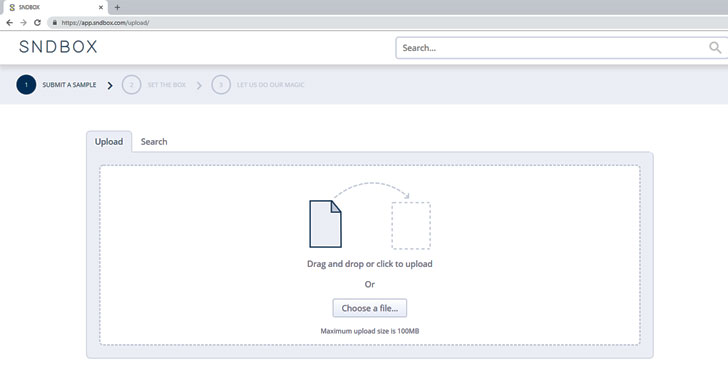
a sample for automated scanning or search the database for
previously analyzed malware samples classified into different
keywords and behavior tags.
The analysis result dashboard has been beautifully designed to
provide high visibility and data-driven explanations to scale
malware research capabilities and reduce research time.
As shown in the screenshots below that researchers shared
exclusively with The Hacker News, which can also be accessed live
at SNDBOX website, the dashboard has been split into four primary
sections, with their clickable subsections, as shown below:
- Scoring system
Mutex Handle File exists Process Tree
- Static
Static Analysis Metadata Import/Export tables
- Dynamic Analysis
Process Tree Behavioral Indicators (WMI, Anti-VM, Abnormal
Behavior, etc.) API Windows Info and Insight Tabs
- Network Analysis
Network and DNS traffic with its payload information The scoring
system displays [top left] the final malicious score, in
percentage, for an uploaded file, which it calculates after
comparing results with previously analyzed data.

malware without executing the malware.
The Dynamic analysis tab displays the complete process tree that
reveals the lateral movement happens on a target machine upon
execution, for example, process hollowing, process creation,
process injection, and so on.
“We support all newest forms of lateral movement signatures
(Including AtomBombing[6]
and ProcessDoppelganging[7], which are relatively
new methods of ways to create processes and avoid antivirus
detection),” the researchers say.
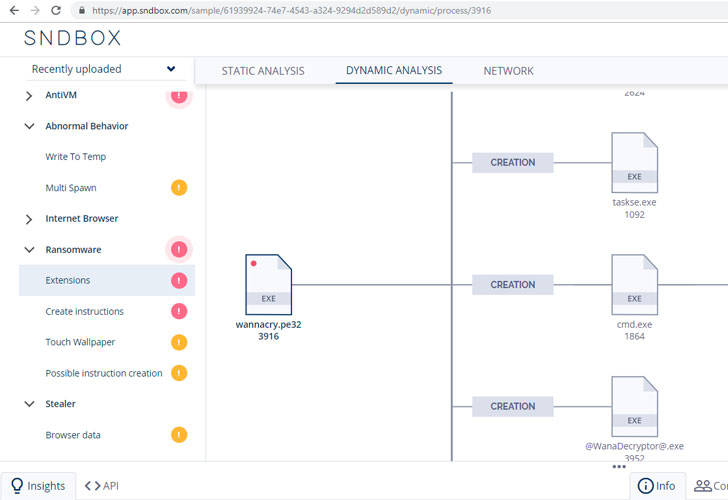
malicious executable:
- uses any process injection or hollowing techniques,
- drops files,
- checks for installed processes,
- uses any anti-VM technique,
- modifies any Windows firewall or registry rule,
- steals sensitive information, like browser data,
- encrypts files as ransomware does,
- gains persistence,
- performs any abnormal behavioral on the system,
- and much more indicator.
Every part of the process tree is clickable, which reveals more
information about each process under insight, API and info
tabs.
“For each behavior indicator we find, we provide the full pseudo
code triggered this behavior. This is one way we provide huge
visibility on what happened on the machine,” researchers told The
Hacker News.
for some infamous malware, listed below:
- Spora
Ransomware[8], SNDBOX shows how it
abuses Windows Management Instrumentation (WMI). - Zeus Banking
Malware[9], SNDBOX shows exciting
information, such as visibility for “Hollowing,” and “Injection”
lateral movement on the system. - WannaCry
Ransomware[10], highlighting its
behavior of changing registry settings, using file encryption and
creating files with different extensions.
SNDBOX also intercepts network connections and DNS requests
originating from the infected virtual machine while monitoring the
submitted samples and displays results in the network analysis tab,
revealing detailed information about source port, target IP
address, target port, transport protocol service, duration, and
timestamp.
Besides this, the network section also reveals suspicious and
strange activities based upon various signatures and vectors, like
indicating if the malware uses Tor network for encrypted
communication.
SNDBOX’s Malware Analysis Database Is Searchable
Every malware sample submitted to SNDBOX platform using a free
account and their results are publicly accessible through its
powerful search feature. As I mentioned earlier, SNDBOX uses
machine learning techniques to categorize and label analyzed
malware samples based on extracted attributes, helping search
feature to display relevant results more accurately.
“Our reputation engine works alongside AI search to reduce false
positives. Highly similar results are returned and scored based on
their relevance,” the researchers said.
“All research data, conclusions, and corresponding expert
explanations are available in our open research platform,
supporting the community’s ability to scale efforts to combat
evasive malware collectively.”
It’s Publicly Available and Downloadable!
Moreover, users can also view and download the full report for any
submitted malware sample, its PCAP file (captured network traffic),
as well as the sample file itself—even for files submitted by other
free account users.
“Furthermore, with full access to our data, all levels of your
team can leverage information necessary for complete malware
remediation and new research possibilities, while sharing insights,
public samples and IOC’s through our community platform.”
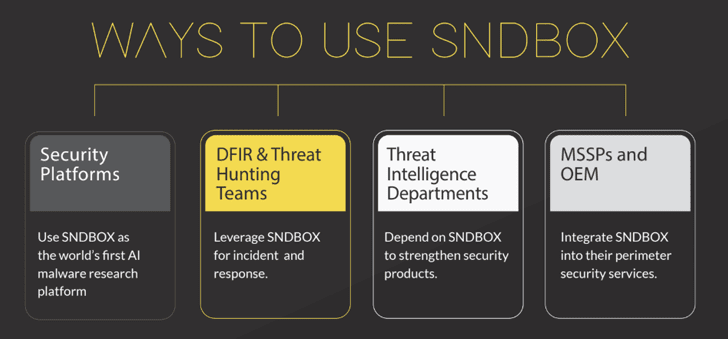
companies, allowing them to upload samples privately without
sharing their results with anyone.
“We also provide an on-premises version of our platform, where
you can analyze your file in a completely off the network
environment, on your organization, connect anything you want to the
solution,” researchers said.
What Security Researchers Have to Say About SNDBOX?
 |
| SNDBOX Founders, Dr. Ran Dubin and Ariel Koren, at Black Hat 2018 |
We reached out to a few cybersecurity and malware researchers to
learn what they think about SNDBOX platform after using it. Here’s
what they said:
Matthew
Hickey[11], Co-founder of Hacker
House
“As a platform, I think this brings a new useful capability for
binary analysis that goes beyond the signature and simple
heuristics typically seen in the cuckoo sandbox, categorizing
samples through instrumentation both dynamically and statically is
useful, and it also can provide a fast overview of a new sample to
determine its behavior.”
“It’s a very useful new tool to add to the malware analysts
toolkit and helps to categorize threats for which a signature might
not yet exist. Simplifying this analysis process and providing a
high-level overview of the samples behaviors is excellent. It is
something I will be using going forward, much like cuckoo sandbox
and VirusTotal it brings another rapid assessment capability to the
hands of malware analysts.”
Ido Naor[12] – Researcher at
Kaspersky Lab and Co-founder VirusBay
“SNDBOX is a game changer in how malware sandboxes operate
today. It contains additional technical layers which cannot be
found in other available services.”
“In addition, the team behind the solution are nothing but
top-notch experts who knows well how to detonate malicious samples
and extract the most valuable parts without a hassle.”
(Note: We update this article to add feedback from more
researchers, as soon as we hear something back.)
References
- ^
Black Hat
(www.blackhat.com) - ^
SNDBOX
(app.sndbox.com) - ^
Dr. Ran Dubin
(twitter.com) - ^
Ariel Koren
(twitter.com) - ^
https://app.sndbox.com
(app.sndbox.com) - ^
AtomBombing
(thehackernews.com) - ^
ProcessDoppelganging
(thehackernews.com) - ^
Spora Ransomware
(app.sndbox.com) - ^
Zeus Banking Malware
(app.sndbox.com) - ^
WannaCry Ransomware
(app.sndbox.com) - ^
Matthew Hickey
(twitter.com) - ^
Ido Naor
(twitter.com)
Read more http://feedproxy.google.com/~r/TheHackersNews/~3/dpl6QICRwwc/sndbox-malware-analysis-tool.html