One of the many features of an Active Directory Password Policy
is the maximum password age. Traditional Active Directory
environments have long using password aging as a means to bolster
password security. Native password aging in the default Active
Directory Password Policy is relatively limited in configuration
settings.
Let’s take a look at a few best practices that have changed in
regards to password aging. What controls can you enforce in regards
to password aging using the default Active Directory Password
Policy? Are there better tools that organizations can use regarding
controlling the maximum password age for Active Directory user
accounts?
What password aging best practices have changed?
Password aging for Active Directory user accounts has long been
a controversial topic in security best practices.
While many organizations still apply more traditional password
aging rules, noted security organizations have provided updated
password aging guidance. Microsoft has said that they are dropping[1] the password-expiration
policies from the Security baseline for Windows 10 v1903 and
Windows Server v1903. The National Institute of Standards
and Technology (NIST) has long offered a cybersecurity
framework and security best practice recommendations.
As updated in SP 800-63B Section 5.1.1.2 of the
Digital Identity Guidelines –
Authentication and Lifecycle Management[2], note the following
guidance:
“Verifiers SHOULD NOT require memorized secrets to be
changed arbitrarily (e.g., periodically). However, verifiers SHALL
force a change if there is evidence of compromise of the
authenticator.” NIST helps to explain the guidance change in
their FAQ page[3]
covering the Digital Identity Guidelines.
It states: “Users tend to choose weaker memorized secrets
when they know that they will have to change them in the near
future. When those changes do occur, they often select a secret
that is similar to their old memorized secret by applying a set of
common transformations such as increasing a number in the password.
This practice provides a false sense of security if any of the
previous secrets has been compromised since attackers can apply
these same common transformations. But if there is evidence that
the memorized secret has been compromised, such as by a breach of
the verifier’s hashed password database or observed fraudulent
activity, subscribers should be required to change their memorized
secrets. However, this event-based change should occur rarely, so
that they are less motivated to choose a weak secret with the
knowledge that it will only be used for a limited period of
time.”
With the new guidance from the above organizations and many
others, security experts acknowledge that password aging, at least
in itself, is not necessarily a good strategy to prevent the
compromise of passwords in the environment.
The recent changes in password aging guidance also apply to
traditional Microsoft Active Directory Password Policies.
Active Directory Password Policy Password Aging
The capabilities of the password change policies in default
Active Directory Password Policies are limited. You can configure
the maximum password age, and that is all. By default, Active
Directory includes the following Password Policy settings:
- Enforce password history
- Maximum password age
- Minimum password age
- Minimum password length
- Minimum password length audit
- Password must meet complexity requirements
- Store passwords using reversible encryption
When you double click the maximum password age, you can
configure the maximum number of days a user can use the same
password.
When you look at the explanation given for the password age, you
will see the following in the Group Policy setting:
“This security setting determines the period of time (in
days) that a password can be used before the system requires the
user to change it. You can set passwords to expire after a number
of days between 1 and 999, or you can specify that passwords never
expire by setting the number of days to 0. If the maximum password
age is between 1 and 999 days, the minimum password age must be
less than the maximum password age. If the maximum password age is
set to 0, the minimum password age can be any value between 0 and
998 days.”
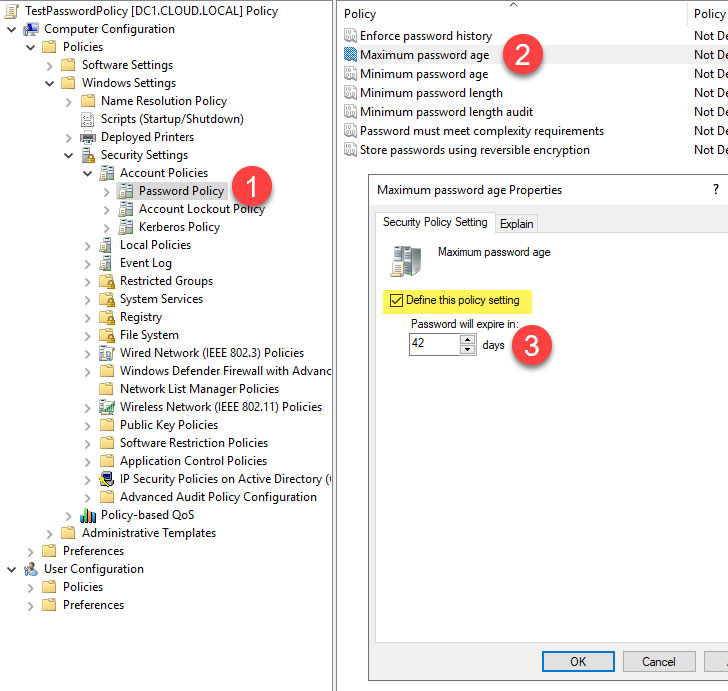 |
| Defining the maximum password age with Active Directory Password Policy |
With the default policy setting, you really can either turn the
policy on or off and then set the number of days before the user
password expires. What if you had further options to control the
maximum password age and set different values based on the password
complexity?
Specops Length Based Password Policy
As mentioned, recent guidance from many cybersecurity best
practice authorities recommends against forced password changes and
details the reasons for this change. However, many organizations
may still leverage password aging as a part of their overall
password security strategy to protect against user passwords
falling into the wrong hands. What if IT admins had features in
addition to what is provided by Active Directory?
Specops Password Policy[4]
provides many additional features when compared to the default
Active Directory Password Policy settings, including password
expiration. One of the options contained in the Specops Password
Policy is called “Length based password aging.
Using this setting, organizations can define different “levels”
of password expiration based on the user password’s length. It
allows much more granularity in how organizations configure
password aging in an Active Directory environment compared to using
the default Active Directory Password Policy configuration
settings.
It also allows targeting the weakest passwords in the
environment and forcing these to age out the quickest. You will
note in the screenshot. The length-based password aging in Specops
Password Policy is highly configurable.
It includes the following settings:
- Number of expiration levels – Enter how many
expiration levels there will be. An expiration level determines how
many extra days the user will have until their password expires and
they are required to change it. This depends on how long the user’s
password is. To increase the number of levels, move the slider to
the right. The maximum number of expiration levels that can exist
is 5. - Characters per level – The number of
additional characters per level that define the extra days in
password expiration - Extra days per level – How many additional
expiration days each level is worth. - Disable expiration for the last level –
Passwords that meet the requirements for the final expiration level
in the list will not expire.
 |
| Configuring the Length based password policy in Specops Password Policy |
Specops allows easily notifying end-users when their password is
close to expiring. It will inform end-users at login or by way of
sending an email notification. You can configure the days before
expiration value for each of these settings.
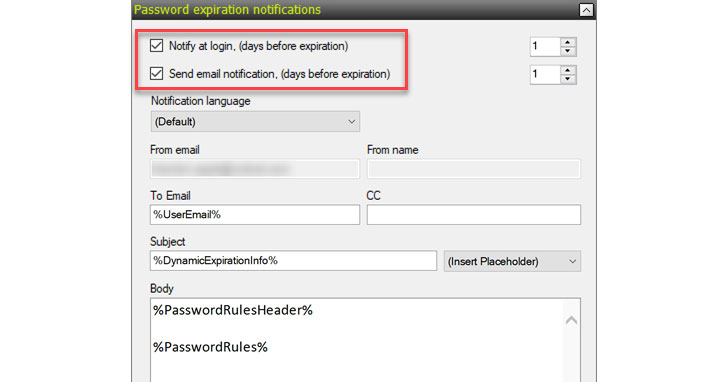 |
| Configuring password expiration notifications in Specops Password Policy |
Organizations define the minimum and maximum password length
configurations in the Password Rules area of the Specops
Password Policy configuration. If you change the minimum and
maximum password length configuration, the password length values
in each level of the length-based password expiration will change
as well.
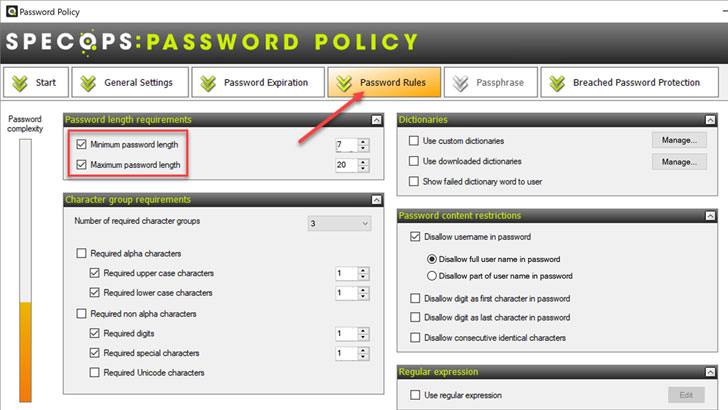 |
| Configuring the minimum and maximum password length |
Combined with other Specops Password Policy features, such as
breached password protection, the length-based
password expiration strengthens enterprise password policies for
both on-premises and remote workers.
Wrapping Up
Password aging has long been a feature of Active Directory
Password Policies in most enterprise environments. However, as
attackers get better at compromising passwords, new security best
practice guidance is no longer recommending organizations make use
of standard password aging.
Specops Password Policy provides compelling password aging
capabilities that allow extending password aging features compared
to default Active Directory Password Policies. By adding expiration
levels, Specops Password Policy allows effectively targeting weak
passwords in the environment by quickly aging these passwords out.
End-users can use strong passwords much longer.
Organizations can even decide never to expire specific passwords
that meet the defined password length. Using Specops Password
Policy features, including length-based password expiration, helps
to ensure more robust password security in the environment. Click
here[5]
to learn more.
References
- ^
said
that they are dropping (docs.microsoft.com) - ^
Digital
Identity Guidelines – Authentication and Lifecycle Management
(pages.nist.gov) - ^
FAQ
page (pages.nist.gov) - ^
Specops
Password Policy (specopssoft.com) - ^
here
(specopssoft.com)