
Spoiler Alert: Organizations with 10,000 SaaS users that use
M365 and Google Workspace average over 4,371 additional connected
apps.
SaaS-to-SaaS (third-party) app installations are growing
nonstop at organizations around the world. When an
employee needs an additional app to increase their efficiency or
productivity, they rarely think twice before installing. Most
employees don’t even realize that this SaaS-to-SaaS connectivity,
which requires scopes like the ability to read, update, create, and
delete content, increases their organization’s attack surface in a
significant way.
Third-party app connections typically take place outside the
view of the security team, are not vetted to understand the level
of risk they pose.
Adaptive Shield’s latest report, Uncovering the Risks & Realities of
Third-Party Connected Apps[1], dives into the data on
this topic. It reviews the average number of SaaS-to-SaaS apps
organizations have, and the level of risk they present. Here are
the top 5 findings.
Finding #1: Connected Apps Run Deep
The report focuses on Google Workspace and Microsoft 365 (M365),
as it paints a clear picture of the scope of applications that are
integrating with the two applications.
On average, a company with 10,000 SaaS users using M365 has
2,033 apps connected to its suite of applications. Companies of
that size using Google Workspace have more than three-times the
amount, averaging 6,710 connected applications.
Even smaller companies aren’t immune. The report found that
companies using M365 average 0.2 applications per user, while those
using Google Workspace average 0.6 applications per user.
Finding #2: The More Employees, the More Apps
In contrast to most growth curves, the research shows that the
number of apps per user doesn’t level off or plateau once reaching
a critical mass of users. Rather, the number of applications
continues to grow with the number of users.
As seen in figure 1, companies using Google Workspace with
10,000-20,000 employees average nearly 14,000 unique connected
applications. This continued growth is shocking to security teams,
and makes it nearly impossible for them to manually discover and
manage the high volume of applications.
 |
| Figure 1: Average number of apps integrated with Google Workspace by users |
For the full 2023 SaaS-to-SaaS
Access Report, click here.[2]
Finding #3: SaaS-to-SaaS App Risk is High
When third-party apps integrate with core SaaS apps, they gain
access using an OAuth process. As part of this process,
applications request specific scopes. These scopes hand over a lot
of power to the apps.
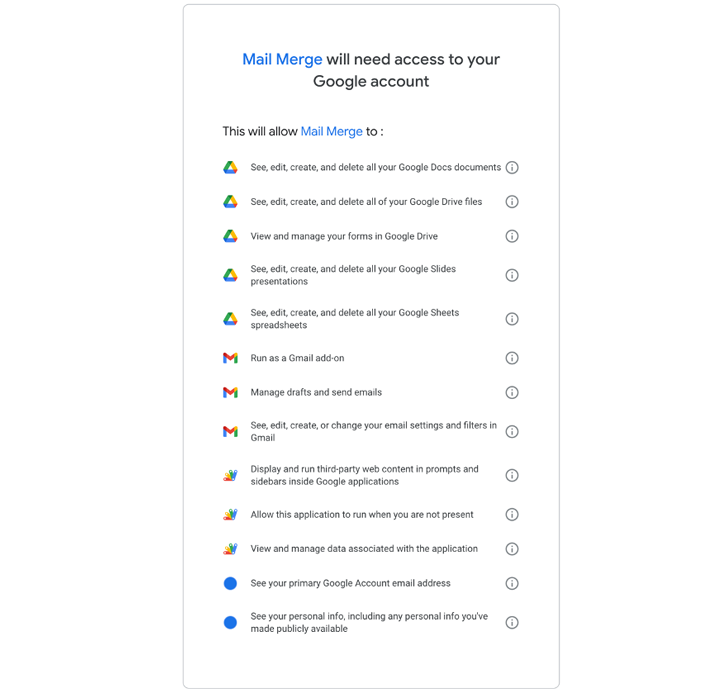
Among high-risk scopes, 15% of M365 applications request the
authority to delete all files that the user can access. It gets
even scarier in Google Workspace applications, where 40% of
high-risk scopes receive the ability to delete all Google Drive
files.
As shown in this permission tab, the application explicitly
requests permission to see, edit, create, and delete all Google
Docs documents, Google Drive files, Google Slides presentations,
and Google Sheets spreadsheets.
For security teams accustomed to controlling the data,
permission sets like these are unsettling. Considering that many
applications are created by individual developers who may not have
prioritized security in their software development, these
permissions provide threat actors with everything they need to
access and steal or encrypt company data. Even without a threat
actor, a bug in the software can have disastrous consequences for a
company’s data.
Figure 2: High-Risk Permission Request from a
third-party application
Finding #4: Connected Apps Also Have Tremendous Breadth
While the report deep dives into the big two SaaS apps, it does
also release research into Salesforce (and Slack). Salesforce
averages 41 integrated apps per instance. The implication of this
is noteworthy.
Salesforce is primarily used by a small subset of the company.
In that regard, it’s similar to Workday, Github, and ServiceNow,
which are used by HR, developers, and finance teams. A typical
company with 10,000 employees has over 350 SaaS applications in its
stack, many of which are used by smaller departments like the apps
discussed here.
Assuming Salesforce is typical of similar applications, those
350 apps integrating with 40 apps each adds an additional 14,000
third-party applications into the equation.
Finding #5: M365 and Google Workspace Have Similar Number of
High-Risk Apps
One of the more interesting takeaways was the high volume of
high-risk apps connecting to Microsoft compared to Google
Workspace. Apps request high-risk permissions from M365 39% of the
time; Google Workspace apps only request high-risk permissions 11%
of the time. In terms of real numbers, an average installation in a
company with 10,000 SaaS users using M365 will have 813 high-risk
apps, while Google Workspace will have 738 apps that are considered
high-risk.
In all likelihood, this disparity is caused due to the app
creation process. Google requires apps requesting high-risk (it
calls them Restrictive) permissions to be reviewed. The review
process is far easier for those requesting medium, or sensitive,
permissions. Microsoft doesn’t label requested scopes with severity
levels. This lack of oversight makes it much easier for apps that
connect with M365 to request high-risk scopes.
SaaS Security is Far More Complex than Most Recognize
The overall takeaway from reading the report is the immense
challenge of securing SaaS software. It’s clear that security teams
need visibility into the thousands of apps being connected to the
SaaS stack, and make a cost-benefit analysis for each high-risk
connected app.
SaaS security solutions, like Adaptive Shield, provide security
teams with the visibility needed to see connected applications and
their scopes, among other important SaaS security capabilities.
Armed with this information, security teams will be in a far better
position to harden their applications’ security posture and prevent
data from falling into the wrong hands.
Schedule a demo to see how many SaaS-to-SaaS
apps are connected to your SaaS Stack[3]
Found this article interesting? Follow us on Twitter [4]
and LinkedIn[5]
to read more exclusive content we post.
References
- ^
Uncovering the Risks & Realities of
Third-Party Connected Apps
(www.adaptive-shield.com) - ^
For the
full 2023 SaaS-to-SaaS Access Report, click here.
(www.adaptive-shield.com) - ^
Schedule
a demo to see how many SaaS-to-SaaS apps are connected to your SaaS
Stack (www.adaptive-shield.com) - ^
Twitter
(twitter.com) - ^
LinkedIn
(www.linkedin.com)
Read more https://thehackernews.com/2023/02/shocking-findings-from-2023-third-party.html