
to read this piece carefully.
The massively popular video conferencing software has patched a
security loophole that could have allowed anyone to remotely
eavesdrop on unprotected active meetings, potentially exposing
private audio, video, and documents shared throughout the
session.
Besides hosting password-protected virtual meetings and
webinars, Zoom also allows users to set up a session for
non-pre-registered participants who can join an active meeting by
entering a unique Meeting ID, without requiring a password or going
through the Waiting Rooms.
Zoom generates this random meeting ID, comprised of 9, 10, and
11-digit numbers, for each meeting you schedule or create. If
leaked beyond an individual or intended group of people, merely
knowing Meeting IDs could allow unwelcome guests joining meetings
or webinars.
This could be bad news for anyone expecting their conversations
to be private.
additional
controls[1] under the password
settings for meetings and webinars, which according to Check Point,
was the result of research on security loophole the security firm
responsibly reported to the company in July 2019.
In a report shared with The Hacker News prior to its release,
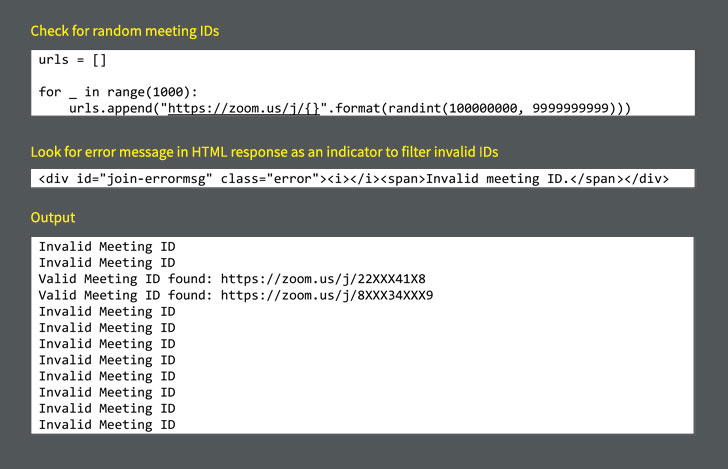
Check Point researchers demonstrated an effective automated but
unsophisticated enumeration attack to identify valid random Meeting
IDs rather than using the brute force technique.
“A hacker could pre-generate a long list of Zoom Meeting IDs, use
automation techniques to quickly verify if a respective Zoom
Meeting ID was valid or not, and then gain entry into Zoom meetings
that were not password protected,” researchers claimed[2].
“We were able to predict ~4% of randomly generated Meeting IDs,
which is a very high chance of success, compared to the pure brute
force.”
As a result of Check Point’s disclosure, Zoom introduced the
following security features and functionalities into its
cloud-based video conferencing service:
- Default Passwords — Zoom now, by default, automatically
generates a six-digit numeric
password[3] for each meeting you
create that participants need to enter when joining by manually
entering the meeting ID. - Account and Group Level Password Enforcement — Under new
controls, three new password settings are now enforceable at the
account, group, and user levels by the account admin. - Meeting ID Validation — Zoom will no longer
automatically indicate if a meeting ID is valid or invalid, making
it harder for automated scripts to determine active meetings. For
each connection, the page will load and attempt to join the
meeting. Thus, a bad actor will not be able to quickly narrow the
pool of meetings to attempt to join. - Device blocker — To prevent brute force attacks,
repeated attempts to scan for meeting IDs will cause a device to be
blocked for some time.
In July last year, Zoom made headlines following a serious security
vulnerability[4]
in its client app for macOS that allowed remote attackers or
malicious websites to turn on users’ device camera without their
permission or knowledge.
References
- ^
additional controls
(support.zoom.us) - ^
claimed
(research.checkpoint.com) - ^
six-digit numeric password
(medium.com) - ^
serious security vulnerability
(thehackernews.com)
Read more http://feedproxy.google.com/~r/TheHackersNews/~3/diw7xXDLpJc/zoom-meeting-password.html