
Creating workflows around verifying password resets can be
challenging for organizations, especially since many have shifted
work due to the COVID-19 global pandemic.
With the numbers of cyberattacks against businesses exploding
and compromised credentials often being the culprit, companies have
to bolster security around resetting passwords on user
accounts.
How can organizations bolster the security of password resets
for remote workers? One security workflow might involve having
manager approval before IT helpdesk technicians can change a remote
worker’s password. In this way, the user’s manager is involved in
the process.
Additionally, some organizations might opt to allow managers
themselves the ability to change end-user passwords. How can this
be configured in Active Directory? Also, is there a more seamless
solution for requiring manager approval for password resets?
Why password reset security is critical
This past year has undoubtedly created many IT helpdesk staff
challenges, including supporting a workforce containing mainly
remote workers. One of the difficulties associated with remote
employees is a security challenge surrounding password resets.
Cybercriminals are increasingly using identity attacks to
compromise environments. It often provides the “path of least
resistance” into an environment. If valid credentials are
compromised, this is often the easiest means to attack and
compromise business-critical data and systems.
With employees working remotely, IT helpdesk technicians
supporting account unlock and password changes no longer have a
face-to-face interaction with employees working “inside” the
on-premises environment.
Organizations may be large enough that IT technicians may not
personally know each employee who may be working remotely. It
introduces the possibility of an attacker impersonating a
legitimate employee and social engineering helpdesk staff to reset
a legitimate account password.
Additionally, a compromised end-user client device can lead to
illegitimate password resets of end-user accounts.
Recognizing new identity threats facing organizations today, IT
admins may want to get managerial approval for employee account
password resets. This task may even be delegated to managers of
end-users working in their departments. How can password resets by
department managers quickly be configured using built-in features
in Active Directory?
Delegating password reset permissions in Active Directory
Microsoft Active Directory contains a feature that allows
delegating permissions to certain users or groups to carry
out very granular tasks. These tasks include password
resets. To configure delegation of password reset
permissions, you can following the process below.
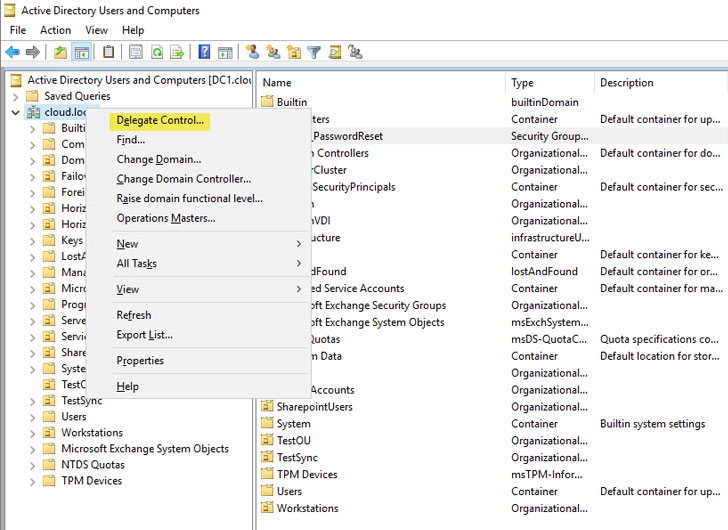 |
| Beginning to configure the Delegate Control options in Active Directory |
It launches the Delegation of Control Wizard,
which first allows choosing a user or group you want to assign
permissions. Here you click Add… to add a user or
group. We have already added the group shown below –
DLGRP_PasswordReset, a domain local group created
in Active Directory. As a best practice, it is always better to use
groups for managing permissions delegation. It allows quickly and
easily adding or removing specific users without having to go
through the permissions delegation wizard each time.
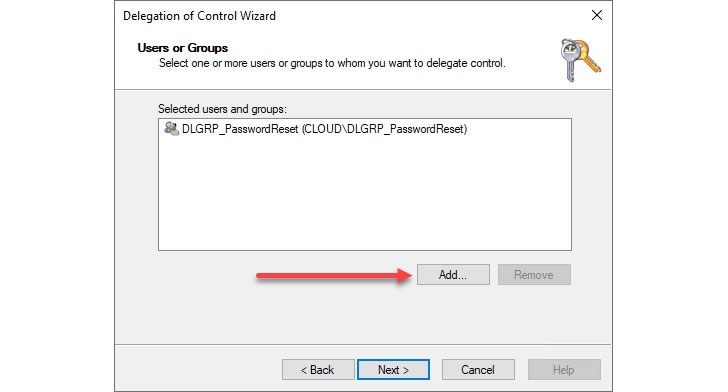 |
| Choose the users and groups who will assume the permissions |
On the Tasks to Delegate screen, under
Delegate the following common tasks, choose
Reset user passwords and force password change at the next
logon option. Click
Next.
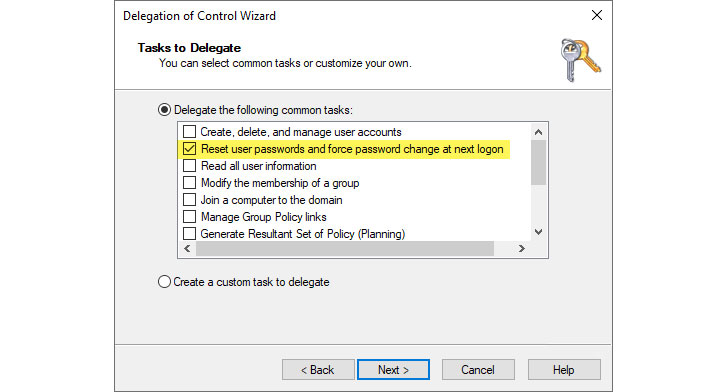 |
| Choosing the Reset user passwords and force password change at next logon option |
Finish out the delegation of control wizard.
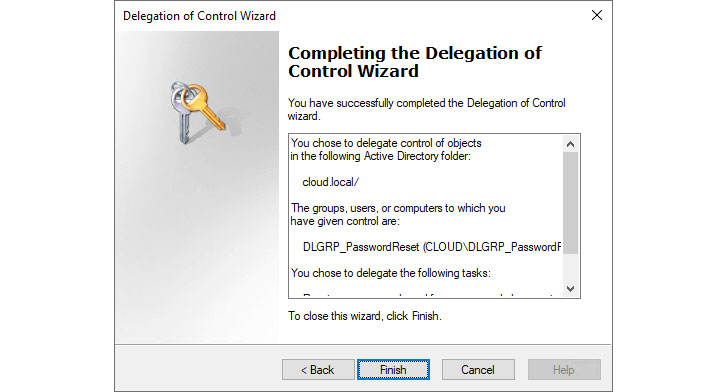 |
| Complete the Delegation of Control Wizard |
Assigning managers to reset passwords
Using the process shown above, administrators can add managers
to the group delegated the reset passwords permission. It allows
pointing to a specific user or group for delegating permissions to
reset passwords.
As mentioned, it is always best practice when creating a
permissions delegation in Active Directory to assign this to a
group, even if you are delegating permissions to one user. Doing it
this way makes the lifecycle management of the permissions
delegation much more manageable.
However, the Active Directory group resource is fairly static in
this context. Outside of Microsoft Exchange Server and dynamic
distribution groups, Active Directory does not have a native
way built-in to create dynamic security groups
that are populated based on Active Directory attributes.
Is there a way to have dynamic security groups in
Active Directory by using a scripted approach? Yes, there is. Using
PowerShell and the get-aduser cmdlet and a few
other Active Directory related PowerShell cmdlets, you can
effectively query Active Directory for users containing specific
characteristics and then add or remove those users from specific
groups.
You can create custom PowerShell scripts to accomplish this.
However, a couple of resources can quickly get you up to speed with
a customized PowerShell script to adding and removing users from
security groups based on user location, attributes, and other
features.
Let’s think about a use case related to managerial approval for
password resets. Suppose you wanted to grant managers the
permissions to reset passwords. In that case, you could do some
PowerShell scripting in conjunction with the delegation wizard and
have an automated process to add and remove managers from Active
Directory into a group configured for password resets.
Notice the following PowerShell resources for this:
Below is an example based on the Windows OSHub
code[1] of how you could use
PowerShell and search for “Manager” in the title
attribute.
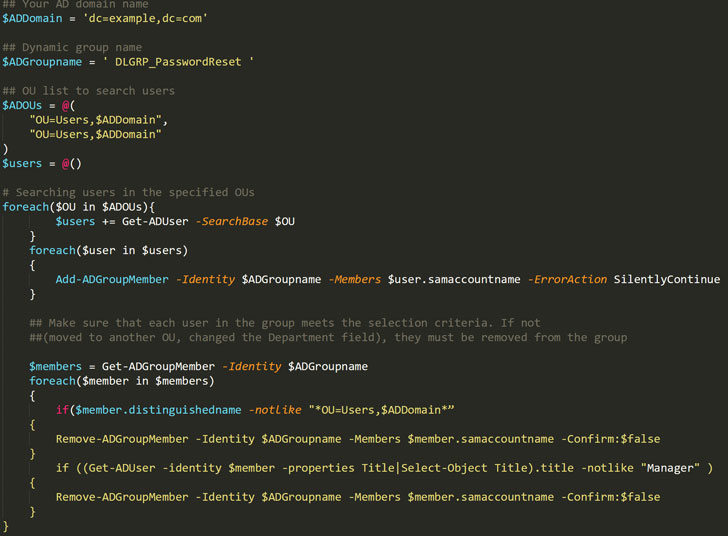
You could schedule the above PowerShell script to run at
scheduled intervals with a scheduled task to add or remove users
from the group delegated password reset permissions
dynamically.
Specops uReset – A better approach to password reset manager
approvals
Specops Software provides a much better automated approach to
enable manager approval for password resets. Specops uReset is a
fully-featured self-service password reset (SSPR)
solution[2] that allows end-users to
reset their passwords securely.
Also, with Specops uReset, you can add the ability for
Manager Identification. When a user authenticates
with Manager Identification, the authentication request sends to
their manager in the form of a text message or email communication.
The manager of the user must then confirm the user’s identity for
approving the password reset request.
It dramatically enhances the security of password reset
functionality since two people are involved. It also helps to
provide a change control workflow for password reset requests and an audit
trail[3].
There are two requirements needed by Specops to use the manager
approval:
- Each user account must have a manager assigned to them
in Active Directory. - Each manager account must have an email address/mobile phone
number associated with their account in Active Directory, to be
able to receive authentication requests from users.
To assign a manager using PowerShell to all the Active Directory
group members, you can use the following Powershell code.
get-aduser -filter “department -eq ‘Accounting’ -AND
samaccountname | set-aduser -manager jdoe
In the Specops uReset administration Identity
Services configuration, you can configure Manager
Identification. You can select between email and text
notifications.
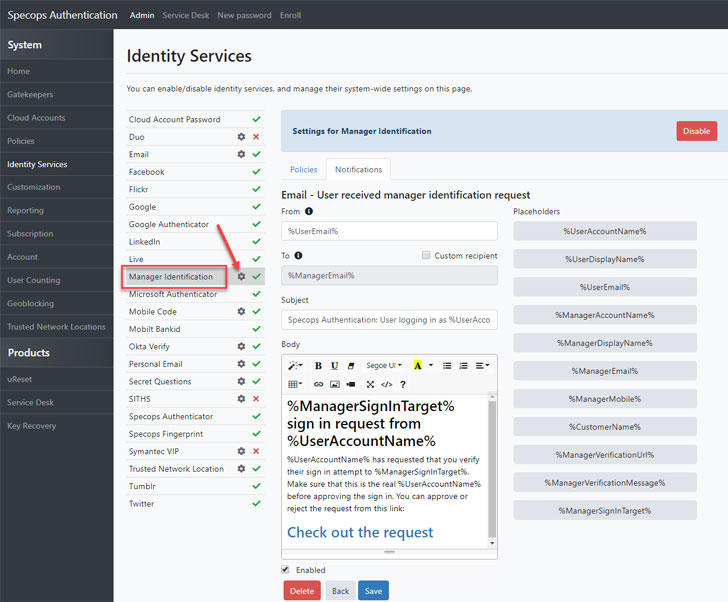 |
| Configuring Manager Identification in Specops uReset |
Wrapping Up
Securing password resets is a critical area of security
organizations need to address for securing remote end-user
accounts. While you can use a scripted PowerShell approach to
create dynamic Active Directory security groups, it can be
problematic to maintain and doesn’t scale very well.
Specops uReset provides an easy way to implement self-service
password resets (SSPR) with additional security checks such as
manager approval. Using Specops uReset, businesses can easily
require managers to approve password reset requests for
end-users.
Learn more about Specops uReset self-service password
resets[4] with manager approval
features.
References
- ^
Windows OSHub code
(pastebin.com) - ^
self-service password reset (SSPR)
solution (specopssoft.com) - ^
password
reset requests and an audit trail
(specopssoft.com) - ^
Specops
uReset self-service password resets
(specopssoft.com)
Read more http://feedproxy.google.com/~r/TheHackersNews/~3/yaql6jCSb-4/using-manager-attribute-in-active.html