Over the last several years, there have been numerous
high-profile security breaches. These breaches have underscored the
fact that traditional cyber defenses have become woefully
inadequate and that stronger defenses are needed. As such, many
organizations have transitioned toward a zero trust security
model.
A zero trust security model is based on the idea that no IT
resource should be trusted implicitly. Prior to the introduction of
zero trust security, a user who authenticated into a network was
trustworthy for the duration of their session, as was the user’s
device.
In a zero trust model, a user is no longer considered to be
trustworthy just because they entered a password at the beginning
of their session. Instead, the user’s identity is verified through
multi-factor authentication, and the user may be prompted to
re-authenticate if they attempt to access resources that are
particularly sensitive or if the user attempts to do something out
of the ordinary.
How Complicated is it to Implement Zero Trust Within Your
Organization?
Zero trust security tends to be difficult to implement for
several reasons. First, zero trust security often means operating
in a vastly different manner than what IT and the organization’s
users are used to. For the IT department, this almost always means
learning new skills and giving up certain privileges. For
end-users, the transition to zero trust security may mean working
in a far more restrictive environment.
Another thing that makes zero trust security difficult to
implement is that zero trust might best be thought of as a state
that organizations aspire to achieve. There is no product that an
organization can purchase that will instantly transition the
organization into a zero trust model. Similarly, there is no
procedure that an organization can follow to configure their IT
resources for zero trust. The way in which zero trust is
implemented varies widely from one organization to the next.
What types of additional security does a zero trust model
provide?
While it is sometimes tempting to think of the zero trust model
as being user-centric, zero trust really means making sure that all
actions can be validated and that no actions can be performed
without the proper validation. Every zero trust implementation is
different, but here are several attributes that are commonly
included in zero trust:
- Multi-factor authentication is required for all user accounts.
Additionally, users may be required to prove their identities if
they stay logged in for an excessive amount of time, attempt to do
something unusual, or try to access sensitive information. - Devices are validated to ensure that they are not compromised.
At one time, users logged in almost solely from domain-joined
corporate desktops that were hardened by group policies and other
security mechanisms. Today it is just as common for a user to log
in from a personal device. The zero trust model often focuses on
making sure that a device meets certain criteria before allowing it
to access the network. In the case of a Windows device for example,
the device might be required to have the Windows Firewall enabled,
antivirus software installed, and the latest Windows updates
installed. - Least Privileged Access is the norm. Users are given access to
only those resources that are needed for a user to do their job,
and nothing more. Additionally, users only receive write access to
a resource if such access is necessary. - AI is used to enhance security. Artificial Intelligence and
machine learning monitor the network and detect any sort of
abnormal behavior that might signal a security issue.
Any examples where a zero trust model would have prevented a
cyber-attack?
Most security breaches could conceivably have been stopped by a
zero trust model. Consider, for example, the infamous data breach of retailer Target in
2013[1]. The attackers gained
access to Target’s gateway by using stolen credentials and then
exploited various weaknesses to gain access to the customer service
database.
The zero trust principle of multi-factor authentication could
have stopped stolen credentials from being used in the first place.
Even if the attacker had managed to log in, however, implementing
least privilege access successfully might have stopped the attacker
from accessing the database or planting malware (which was also
part of the attack). Additionally, security-oriented machine
learning mechanisms might have been able to detect the unusual
activity and put a halt to the attack.
What about trusting the IT staff?
Although the zero trust model is most often applied to IT
systems, it is also important to realize that there are numerous
ways for employees to compromise an organization’s security without
having to attack an IT system directly. Even something as simple as
a call to the organization’s service desk can put an organization’s
security in jeopardy.
If a user were to contact an organization’s service desk for
assistance with an issue such as a password reset, the technician
would likely take steps to try to confirm the user’s identity. This
might involve asking the user a security question such as their
employee ID number. The problem with this is that there are any
number of ways that an attacker can source this information and use
it to impersonate a legitimate user and obtain access to their
account via a fake password reset.
The service desk agent can also pose a threat to the
organization’s security. After all, there is often nothing stopping
the technician from simply resetting a user’s password (without
receiving a password reset request) and then using the reset
password to gain access to the user’s account.
Specops Secure Service Desk[2] can help to eliminate
these types of security risks, which is in keeping with zero trust
security principles. For example, the helpdesk technician might
verify the user’s identity by sending a single-use code to the
user’s mobile device or by using a third-party authentication
service such as Okta Verify, PingID, Duo Security, or Symantec VIP
to verify the user’s identity. At the same time, this tool can
prohibit the technician from resetting the user’s password unless
the user has verified their identity, thus confirming that the user
has requested the password reset as opposed to the technician going
rogue.
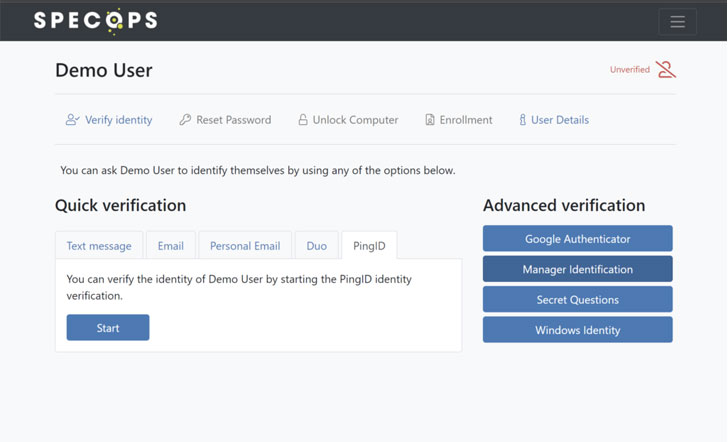 |
| Specops Secure Service Desk on the backend |
Conclusion
Although IT systems need to be configured in accordance with
zero trust principles, an organization’s security is ultimately in
the hands of the users and IT staff. Software such as Specops Secure Service Desk[3] can help to make sure
that users and helpdesk technicians are complying with the
organization’s security requirements.
References
- ^
data
breach of retailer Target in 2013
(www.nbcnews.com) - ^
Specops
Secure Service Desk (specopssoft.com) - ^
Specops
Secure Service Desk (specopssoft.com)
Read more http://feedproxy.google.com/~r/TheHackersNews/~3/TD8dPwSf7Ds/the-gap-in-your-zero-trust.html