Debuggers are a group of software used to analyze computer
programs. They are very important from a software engineering point
of view since they allow us to find problems in our code. There are
several kinds of Linux debuggers, including memory debuggers,
source debuggers, profilers, and so on. Common usage of these tools
includes finding bugs, optimizing codebases, controlling runtime
parameters, etc. Today, our editors have compiled a helpful
resource outlining 20 of the best debuggers for Linux-based
developers and software engineers. Take a look at them below to
find out the perfect toolkit for your programming arsenal.
Best Linux Debuggers
Our picks include Linux c++ debuggers, disassemblers, PHP, and
JavaScript[1]
debuggers alongside many more. Although you can find many different
types of debuggers, only a few of them are useful to most
developers. Luckily, you’ll be able to pinpoint the best debugger
for your needs after completing this guide. So, continue reading
and take a close look at the below programs.
1. GDB
GDB, aka The GNU Debugger, is arguably the best Linux debugger
ever built. It was developed by the pioneer of modern open-source
movement – Richard Stallman and serves as the best debugger utility
to this date. The GDB is known for its portability, which allows it
to run across almost every Unix-based system alongside Windows. You
can easily set up breakpoints, step through code blocks, and
inspect dynamic properties using GDB. Moreover, it plays very well
with standard development tools like Linux code editors[2].
Features of GNU Debugger
- It is one of the best Linux c++ debuggers and allows developers
to optimize their programs alongside patching unwanted bugs. - GNU Debugger runs on a variety of hardware, including x86,
AMD64, ARM, MIPS as well as most embedded platforms like Arduino[3]. - It comes with in-built support for remote debugging, which
enables developers to debug programs running in another system from
remote clients. - Despite no official GUI, GDB offers seamless integration with
several modern frontends like Emacs, CodeBlocks, and Qt
Creator.
2. DDD
DDD or the Data Display Debugger is another excellent choice for
debugging complex, modern-day software. Actually, it’s not a
debugger itself, rather a frontend to several powerful debuggers
such as GDB, XDB, and DBX. It is a compelling tool that allows
developers to monitor running programs and offers features like
machine-level debugging, hypertext navigation, debugging remote
hosts, and so on. DDD is also a GNU official project. So, you can
use it without encountering common problems faced in other
debuggers.
Features of DDD
- DDD can be used to debug programs written in C, C++, Java,
Fortran, Perl, Python, Modula, Ada, and Linux Bash scripts[5]. - The interactive graphical user interface is very robust and can
display graphical data such as graphs and charts. - Thanks to a massive amount of helpful resources, developers can
adapt to this Linux debugger pretty easily. - DDD also offers excellent CLI interfaces with editing, checking
history, and completion abilities.
3. Interactive
Disassembler
Interactive Disassembler is one of the best Linux debuggers for
professional developers due to the number of features it offers.
This multi-platform debugger makes it easy to maintain large-scale
systems where different components run on different
infrastructures. The primary selling point of this debugger is its
ability to produce assembly code from compiled binary files such as
standard ELF executables. However, IDA is not a free software like
GDB or DDD. The developers offer multiple pricing plans, which you
can view on their website.
Features of Interactive
Disassembler
- IDA supports a wide variety of computing hardware, including
the Intel 8086 family, ARM, DEC Alpha & PDP-11, JVM, SPARC, and
PowerPC. - It can disassemble several executable formats such as ELF,
Mach-O, COFF, NE, MZ, COM, and even raw binary files. - IDA pro comes with pre-built support for remote target
debugging, code graphing, and flirt(fast library identification &
recognition technology). - The plugin-based architecture of this debugger allows it to be
extended in a very short time.
Get
Interactive Disassembler[7]
4. Ghidra
Ghidra is an extremely powerful, feature-rich disassembler
written by NSA researchers. It has gained immense popularity since
its open-source release and facilitates compelling reverse
engineering tasks. Our editors found this to be a suitable
alternative to the paid IDA Pro. Ghidra is multi-platform and still
being developed actively. So, even you can contribute to the
project and learn to debug complex programs. Moreover, you’re
guaranteed to get world-class features from a debugger written in
the NSA labs.

Features of Ghidra
- Ghidra comes with an astounding set of features, including
assembly, disassembly, decompilation, scripting, and graphing
abilities. - Developers can run Ghidra on all major platforms and use it
either interactively or via headless automation. - The API-based architecture of this reverse engineering tool
allows developers to build custom Ghidra plugins very easily. - Ghidra is extensively customizable and supports third-party
extensions written in Java, Python, or the Jython[8]
implementation.
5. Nemiver
Nemiver is a stand-alone debugger for the C and C++ programming
languages. It’s a compelling project which enables developers to
optimize their codebases in a practical but straightforward. Thus
it has become a popular choice for Linux c++ debugger to many
developers. Our editors really liked the GUI interface of this tool
and suggested it heavily for starting C++ programmers. Nemiver is
built for the GNOME environment[10] and provides a backend
for the GNU debugger or GDB.
Features of Nemiver
- Nemiver is exceptionally extendible and allows developers to
customize the software using plugins and dynamically loaded
modules. - It provides all basic debugging features such as creating
breakpoints, stepping through codes, inspecting dynamic properties,
conditions, etc. - Nemiver is written in C++ and requires very low memory, thus
delivering a blazing fast debugging experience for
programmers. - It features an integrated disassembler that can be used to
define automatic disassembly instructions and supports assembly
mode alongside mixed sources.
6. Valgrind
Valgrind is a multi-purpose debugger that runs on Linux and other Unix-based
systems[12] and offers several
features for detecting memory leaks, source debugging, and
optimization. It’s written in a combination of C and Assembly,
which helps it to be extremely resource-efficient. The Valgrind
development team is actively working on new features and provides
excellent issue tracking service. Moreover, experienced developers
can build quite powerful dynamic analysis tools on top of Valgrind,
thanks to its modular and opensource design.
Features of Valgrind
- Valgrind can catch any misuse of the standard POSIX Pthreads[13] API, lock ordering
problems, and data races very effectively. - It’s essentially a Java Virtual Machine(JVM) that utilizes
JIT-compilation and hosts several modular tools like Memcheck,
Cachegrind, and Massif. - The Memcheck utility detects any usage of uninitialized memory
addresses, overflows, misuse of malloc, or similar dynamic
allocation methods. - Cachegrind is a capable cache profiler that provides a detailed
simulation of the traditional L1, D1, and L2 caches.
7. PurifyPlus
PurifyPlus is one of the best enterprise Linux debuggers for
modern-day developers due to a number of reasons. Firstly, it
offers excellent features for catching dynamic memory errors like
overflow, leaks, and heap misuses. It is a multi-platform software
that allows memory allocation verifications and can detect problems
involving operating system calls. Moreover, PurifyPlus enables
developers to find many non-fatal errors. It’s a common contrast
with traditional Linux C++ debuggers since they’re usually used for
detecting only fatal errors.
Features of PurifyPlus
- PurifyPlus supports several advanced memory debugging features,
such as pointing error locations and the size of the corrupted
memory. - Developers can easily utilize PurifyPlus for optimizing memory
usage and speed up their debugging process. - PurifyPlus highlights the potential bottlenecks of your
programs and assists seamlessly in improving software speed. - It comes with outstanding support for the integration of
third-party libraries, without even requiring source access.
8. BASHDB
Shells in Linux and other Unix-like
systems[16] are so popular because
they enable users to control their machines using sophisticated
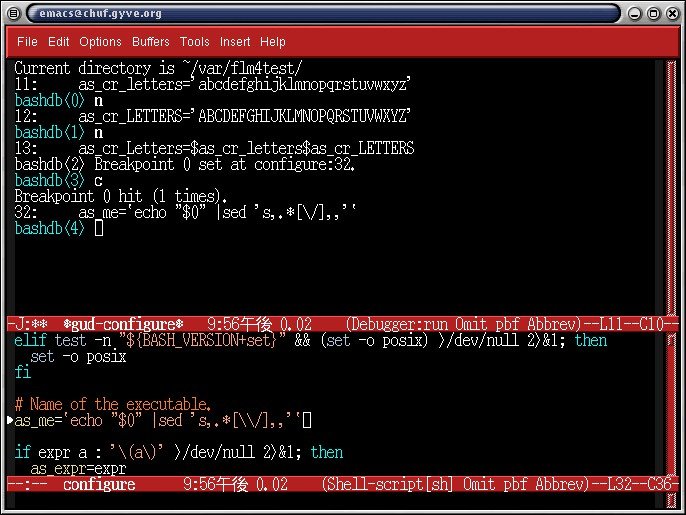
scripting languages. BASHDB is a compelling source-level debugger
for scripts written using Bash. Our editors really liked this tool
due to its simple yet practical use cases. Developers can use it to
create breakpoints, trace errors, remove performance reducing
bottlenecks. So, if you’re working extensively with Linux bash
scripts, do not forget to check it out.
Features of BASHDB
- BASHDB is extremely resource-efficient and thus a suitable
choice for debugging resource-constrained remote servers. - The open-source GNU GPL license of this tool enables developers
to modify or extend the software as they see fit. - It comes with excellent documentation to help developers
getting up and running within a few minutes. - BASHDB enables developers to change things inside their code
during runtime, allowing them to find the effect of bug fixes.
9. Bugzilla
Bugzilla is a modern-day issue tracking software that is used
intensively for tracking bugs in software products. It’s not your
traditional Linux debugger since it’s built to monitor bug
resolving instead of tracking the bugs itself. A lot of
professionals use Bugzilla to maintain their software up to date
and patch future vulnerabilities. Bugzilla was developed for
the Mozilla project[18] and has proven to be a
big success. Overall, it’s an excellent alternative to paid
products like JIRA and Lighthouse.
Features of Bugzilla
- Bugzilla comes with robust, customizable workflow and supports
Unicode, custom fields, and full-text search. - It allows project developers to edit conflict warnings and
supports LDAP-based authentication. - Developers can control it using several interfaces such as
email, command-line, GUI, and robust REST APIs. - Bugzilla supports integration with many version control platforms[19], including Git,
Mercurial, Bazaar, Subversion, and CVS.
10. TotalView
TotalView is a sophisticated, high-performance debugger built
for analyzing complex programs. It is a well-suited tool for
handling large, multi-threaded programs and can also analyze GPU
clusters. TotalView is a proprietary solution and is endorsed by
industry leaders like Nvidia. It integrates seamlessly with Linux
applications written in C, C++, Fortran, and Python. In fact, it’s
one of the best Linux C++ debuggers for developers of video games
and similar resource-intensive applications. So, take a glance at
this software if you’re looking for enterprise debuggers.
Features of TotalView
- TotalView allows developers to debug host and device code in a
single session and provides full visibility of GPU threads in
Linux. - It can detect memory leaks, race conditions, deadlocks, etc.
using complex validation methods and verified calculations. - TotalView can debug multi-language programs more accurately
than many traditional Linux debuggers. - The reverse connects feature enables developers to debug
multiple computing nodes and clusters effectively.
11. strace
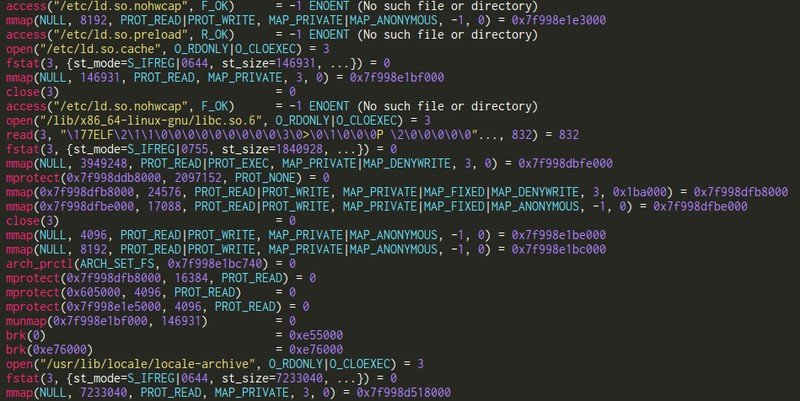
strace is another compelling analysis tool used for diagnosing
and debugging Linux applications. It provides an excellent
userspace solution that can be used to monitor processes and
manipulate interactions between processes and system calls. It is
written in the C programming language, so performance should not be
an issue. Moreover, strace is under active development and rolls
out newer features quite frequently. It also supports path tracing
and path decoding for file descriptors. So, if you’re looking for a
lightweight yet full-fledged debugger, give it a try.
Features of strace
- strace allows developers to monitor all system calls between
processes and the Linux kernel to reveal potential coding
pitfalls. - Developers can easily specify a filter of system calls
alongside a list of paths for tracing and analyze execution
properties. - It allows programmers to print out stack traces, modify error
codes, and inject signals based on execution flows. - The open-source nature of strace encourages developers to
extend the software as they require.
12. LLDB
LLDB is, without any doubt, one of the best Linux debuggers, you
can get your hands on. It’s part of the LLVM project[23], which provides a
robust collection of compiler and software development
technologies. The LLDB debugger is a high-performance analyzer that
can handle programs written in C, C++, and Objective C. It’s the
default debugger component in macOS’s Xcode. LLDB tries to utilize
Just in Time(JIT) techniques for expressions when supported and
reverts to intermediate representation when it’s unavailable.
Features of LLDB
- Developers can use Python to access and manage the public APIs
of this debugger thanks to its SWIG-based script bridging. - The plugin-based architecture of this Linux debugger makes it
easily extendible beyond everyday debugging workflows. - LLDB allows debugging programs in remote systems using its
compelling debug server component. - This debugging toolkit comes with extensive documentation for
helping kickstart your project.
13. Electric Fence
Electric Fence is a useful memory debugger for the C programming
language. It can check dynamic memory allocation problems caused by
methods like malloc or free. Electric Fence utilizes the virtual
memory of your environment for detecting these errors and is very
successful at finding stack-based buffer overflows. It works best
when combined with full-fledged Linux debuggers like the GDB.
Developers can simply link a program with Electric Fence’s dynamic
library and inspect the program whenever a memory error occurs.
Features of Electric Fence
- Unlike many C debuggers, Electric Fence allows developers to
find the exact location of memory errors. - It causes a segmentation fault whenever a program overruns the
boundary of a dynamically defined buffer. - Electric Fence often increases program size due to the linking
of its dynamic libraries to C programs. - It is available in most Linux distros and offers ready-made
packages for Ubuntu and Fedora.
14. Xdebug
Xdebug is a quite powerful debugging utility for PHP
programmers. It is an extension that offers seamless debugging and
profiling support. It provides numerous error detecting facilities
such as stack tracing, recording function calls, and variable
invocation details. Moreover, developers can easily extend the
functionality of this debugger due to its open-source codebase. The
software is maintained actively and releases newer features every
now and then. So, if you’re a PHP developer in search of a capable
debugger, keep Xdebug in your wishlist.
Features of Xdebug
- Xdebug comes with a robust, in-built profiler and offers code
coverage for the PHPUnit testing framework. - It provides stack traces for warnings, errors, notices, and
exceptions as well as full parameter display for functions. - Xdebug implements several features for checking memory
allocation and offers protection for unending recursions. - It utilizes the DBGp protocol for maintaining communication
between the debugger engine and PHP IDEs for Linux.
15. KDbg
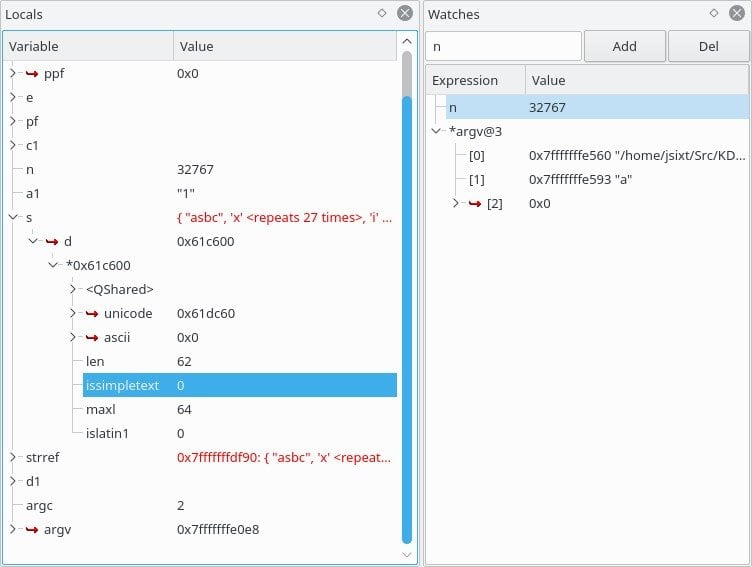
The KDbg project offers a simple yet intuitive GUI frontend for
the GNU debugger. Programmers can easily create breakpoints, set
conditions, step through codes, and inspect dynamic values using
this tool. Our editors found this to be the ideal solution for
starting programmers. However, KDbg depends on the K Desktop Environment or KDE[27], which is infamous for
its resource usage. So, it might not be the best choice if you’re
on an older, resource-constrained machine. But it’s still the best
choice for beginners with little knowledge of traditional Linux
debuggers.
Features of KDbg
- KDbg makes debugging core dumps extremely easy and allows
developers to attach running processes. - It provides intuitive keybindings for common debugging methods
like next, set, step, clear, until, and so on. - This cross-platform debugger is quite fast but may lag in
older, legacy PCs. - KDbg comes with excellent documentation support and makes it
easy to operate for beginners.
16. dbx
dbx is an old but extremely capable source-level debugger for
Linux and BSD systems[29]. It can be used to
debug programs written in several programming languages, including
C, ++, Fortran, Java, and Pascal. dbx allows debuggers to step one
line of source code or machine instruction at a time alongside many
standard functionalities like variable and expression manipulation.
It was initially developed at the University of California,
Berkeley, and has found its way into every major operating system
since then.
Features of dbx
- It can be used for examining source codes, object files,
machine instructions, core dumps, and so on. - dbx is one of the most widely used Linux C++ compilers of the
past generation and has inspired many modern alternatives. - It utilizes symbolic variables for finding errors in
executables and provide robust MVS dumps. - dbx exposes a massive list of subcommands and a nice, intuitive
GUI interface for new programmers.
17. JSwat
JSwat is a simple but productive Java debugger built on top of
the Java Platform Debugger
Architecture(JPDA)[31]. It’s an excellent
toolkit for Java developers due to its robust feature set, which
includes the ability to create conditional breakpoints, monitoring
threads, system calls, and so on. Moreover, since it’s open-source
software, developers can extend it to fit their projects if
required. So, if you’re tired of handling monolithic Java IDEs for
debugging purposes, you can try JSwat for a change.
Features of JSwat
- JSwat comes with a robust command-line interface apart from the
standard GUI frontend and supports headless automation. - It comes with a permissive CDDL(Common Development and Distribution
License)[32] license to enable
further customization. - The command-line interface exposes some additional features
such as Java-like expression evaluation and method invocation. - This software is no longer being maintained actively, but still
provides a simple way to debug Java applications.
18. Affinic Debugger
The Affinic Debugger is an intuitive graphical frontend for the
GNU debugger and the LLVM debugger. It aims to help developers
unleash the maximum potential of their favorite Linux debuggers.
Although it’s a paid software, you can get the lite version for
free of charge. Moreover, the interface is pretty fast and provides
an enjoyable user experience. Since you can use all the
functionalities of GDB and LLDB from this debugger, it is extremely
well-suited to enterprise projects.
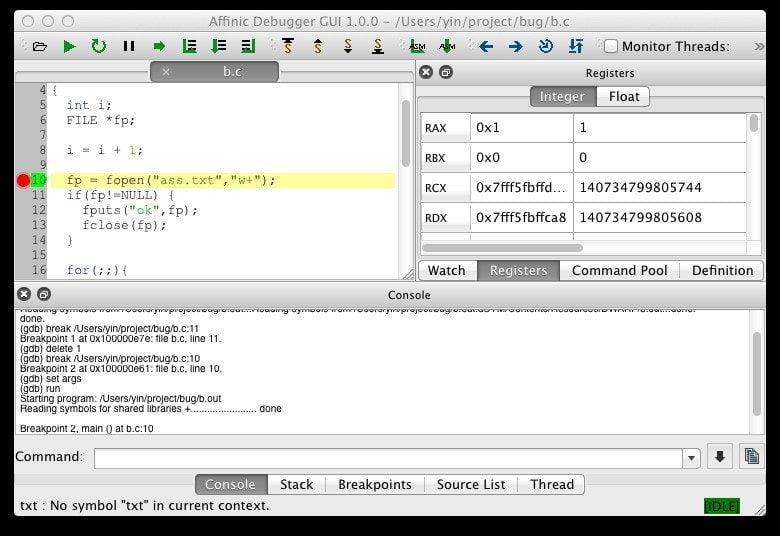
Features of Affinic Debugger
- Developers get direct access to all commonly used
functionalities from the well-placed toolbars and menus. - Affinic Debugger provides a cursor-traced printing mechanism
that helps understanding codebases much faster. - It features compelling assembly-level graphical debugging with
access to multiple views, vector instructions, and so on. - Affinic Debugger comes with in-built support for assembly to
binary conversion, easy thread view, and remote debugging, among
many more.
19. Insure++
Insure++ is an extremely powerful memory debugger for C and C++
programs. It features some astounding functionalities including a
state of the art code parser, robust reporting methods, and
hundreds of pre-built heuristics. Insure++ is aimed at
professionals working in enterprise projects and offers excellent
optimization support. It’s a paid software suitable for finding it
hard to catch memory overflows, leaks, pointer misuse, and so on.
Our editors highly recommend this debugger to developers who are
looking for full-fledged enterprise products.
Features of Insure++
- Insure++ supports detecting memory leaks, buffer overflows &
underflows, stack traces, and many more enterprise features. - It can report information like bug types, problematic
expressions, corrupted memory blocks, local or global stack data,
and so on. - Developers can easily visualize the contents that are creating
problems or may cause future program crashes. - It comes with excellent documentation support in the forms of
professional whitepapers and manual for developers.
20. D.U.M.A
D.U.M.A or Detect Unintended Memory Access is another
open-source addition to our list. It’s a compelling debugger for
programs written in C and C++. This is a fork of the Electric Fence
debugger with several added functionalities and can be used to
perform dynamic memory checking, finding leaks, illegal memory
accesses, and so on. Like Electric Fence, it also utilizes virtual
level memory for detecting memory-based errors. So, take a look at
D.U.M.A if you’re browsing for a capable Linux C++ debugger.
Features of D.U.M.A
- It works by overloading all traditional memory allocation
methods like malloc, calloc, memalign, and their deallocation
counterparts. - D.U.M.A uses the memory management unit of the Linux kernel for
protecting against illegal memory access. - Developers can test out bug fixes without requiring to change
the source or recompiling it. - The open-source GNU GPL license sported by this tool allows
seamless third-party customizations.
Ending Thoughts
Linux debuggers consist of a vital part in modern system and
software development. The demand for capable debuggers is always
high, and being able to handle a versatile set of debuggers is
mandatory if you’re looking for high-paying computer science
jobs[37]. Since Linux offers a
variety of debuggers for different purposes, beginners often find
it hard to choose the appropriate solutions for them. The GNU
Debugger alongside LLDB and IDA are definitely the most powerful
ones you can get. However, you may also choose from a number of
tools built for solving language or system-specific programming
problems such as strace.
References
- ^
The 30
Best JavaScript Frameworks and Libraries in 2020
(www.ubuntupit.com) - ^
Best
Linux Code Editor: Top 10 Reviewed and Compared
(www.ubuntupit.com) - ^
embedded
platforms like Arduino (www.ubuntupit.com) - ^
Get GDB
(www.gnu.org) - ^
Linux
Bash scripts (www.ubuntupit.com) - ^
Get DDD
(www.gnu.org) - ^
Get Interactive Disassembler
(www.hex-rays.com) - ^
Jython
(www.jython.org) - ^
Get
Ghidra (github.com) - ^
Best
Linux Desktop Environment: 15 Reviewed and Compared
(www.ubuntupit.com) - ^
Get
Nemiver (gitlab.gnome.org) - ^
Linux
and other Unix-based systems
(www.ubuntupit.com) - ^
Pthreads
(en.wikipedia.org) - ^
Get Valgrind
(valgrind.org) - ^
Get
PurifyPlus (teamblue.unicomsi.com) - ^
Shells
in Linux and other Unix-like systems
(www.ubuntupit.com) - ^
Get BASHDB
(bashdb.sourceforge.net) - ^
the
Mozilla project (www.mozilla.org) - ^
many
version control platforms
(www.ubuntupit.com) - ^
Get Bugzilla
(github.com) - ^
Get
TotalView (www.roguewave.com) - ^
Get strace
(strace.io) - ^
the LLVM project
(llvm.org) - ^
Get LLDB
(lldb.llvm.org) - ^
Get Electric Fence
(elinux.org) - ^
Get Xdebug
(xdebug.org) - ^
K
Desktop Environment or KDE
(www.ubuntupit.com) - ^
Get KDbg
(www.kdbg.org) - ^
Linux
and BSD systems (www.ubuntupit.com) - ^
Get
dbx (www.oracle.com) - ^
Java
Platform Debugger Architecture(JPDA)
(docs.oracle.com) - ^
CDDL(Common Development and
Distribution License) (en.wikipedia.org) - ^
Get
JSwat (sourceforge.net) - ^
Get Affinic Debugger
(www.affinic.com) - ^
Get
Insure++ (www.parasoft.com) - ^
Get D.U.M.A
(duma.sourceforge.net) - ^
high-paying computer science jobs
(www.ubuntupit.com)
Read more https://www.ubuntupit.com/best-linux-debuggers-for-modern-software-engineers/