Every particle of the universe obeys the rules of physics. This
is why physics is called the most fundamental branch of science. If
physics is considered the theory, then every other branch of
science is the application of it. If we want to understand our
universe and, most importantly, ourselves, we must learn physics.
The knowledge of physics is very practical. So, if we’re going to
understand physics from the deep inside, we must discover it by
experimenting and analyzing recorded data. And that is the moment
when we need to use some computer programs. There are many
open-source physics tools available out there on the internet.
Almost all of them are compatible with Linux. So, if you were
looking for the best physics tools for Linux, you are in the right
place.
 There are
different types of applications of Linux physics software in the
study and research of theoretical and applied physics. So, it’s
very difficult to call a single piece of software the best. Here we
have enlisted a collection of 15 best Physics tools for Linux.
Some of them are for analyzing data, some for numerical
applications, some for simulation, and even some will help you in
programming the solution of different physics-related problems. We
are certain that no matter what your requirement is, you are going
to love this curated collection of Linux physics software.
1. ROOT
The world-famous research facility CERN develops it. It is a
programming library that works based on the object-oriented method.
It is used for solving many problems of high-energy physics. ROOT
was initially being developed for analyzing the data of
particle-physics. But after the gradual development process, now it
is used in solving some astronomical problems and
data mining. [1][2]

Key Features of ROOT
- It provides histograms and graphs to visualize different
functions. - ROOT can render various 2D and 3D geometric shapes to visualize
data. - Regression analysis or curve fitting and function minimization
tool. - Four-vectors computation system for using in high-energy
physics. - Advanced neural networks option for multivariate data
analysis. - Users can use the distributed computing feature for the
opportunity of parallel data analysis. - Built-in two directions Python and Ruby programming[3]
interface.
2. OpenFOAM
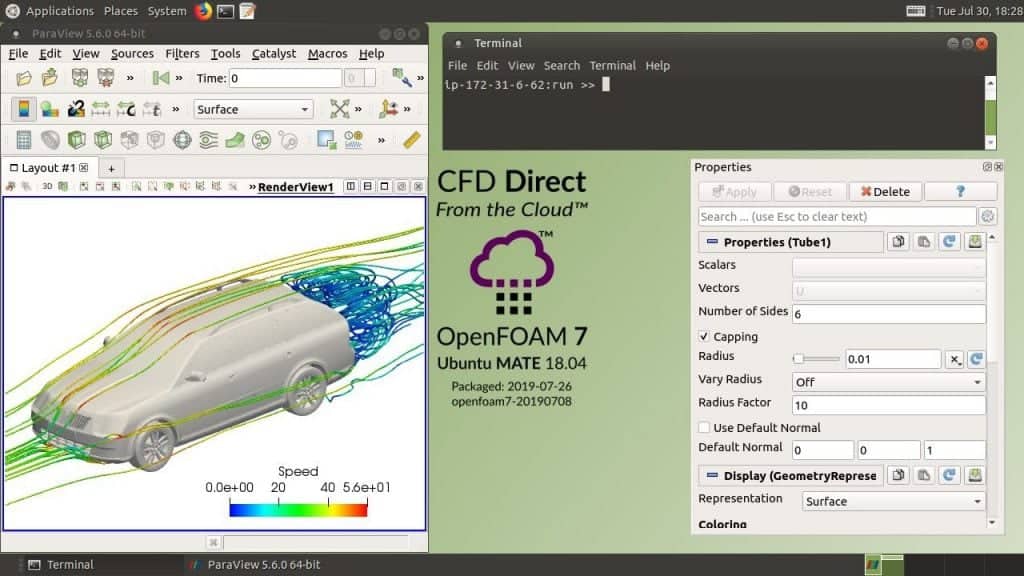
OpenFOAM is a very popular Physics tool for Linux. It is a C++
library and simulation engine. Partial differential equations can
be solved by it without any hassle. It has numerous built-in C++
classes for finite volume, finite elements, and Lagrangian particle
tracking. It uses the top-level code that gives you the direct
representation of the equation being solved.
Key Features of OpenFOAM
- It has built-in solving programs like combustion, heat
transfers, electromagnetics, solid dynamics, etc. - It has the option to customize pre-installed programs and even
create new programs. - The integrated C++ GUI named FoamX can be used to manage case
files. - Support for different types of modeling, including lagrangian
modeling, thermophysical modeling, multiphase modeling, etc. - This tool can generate meshes and convert or manipulate them
accordingly. - OpenFOAM has a huge set of libraries that you will get for
using straight out of the box.
3. McStas
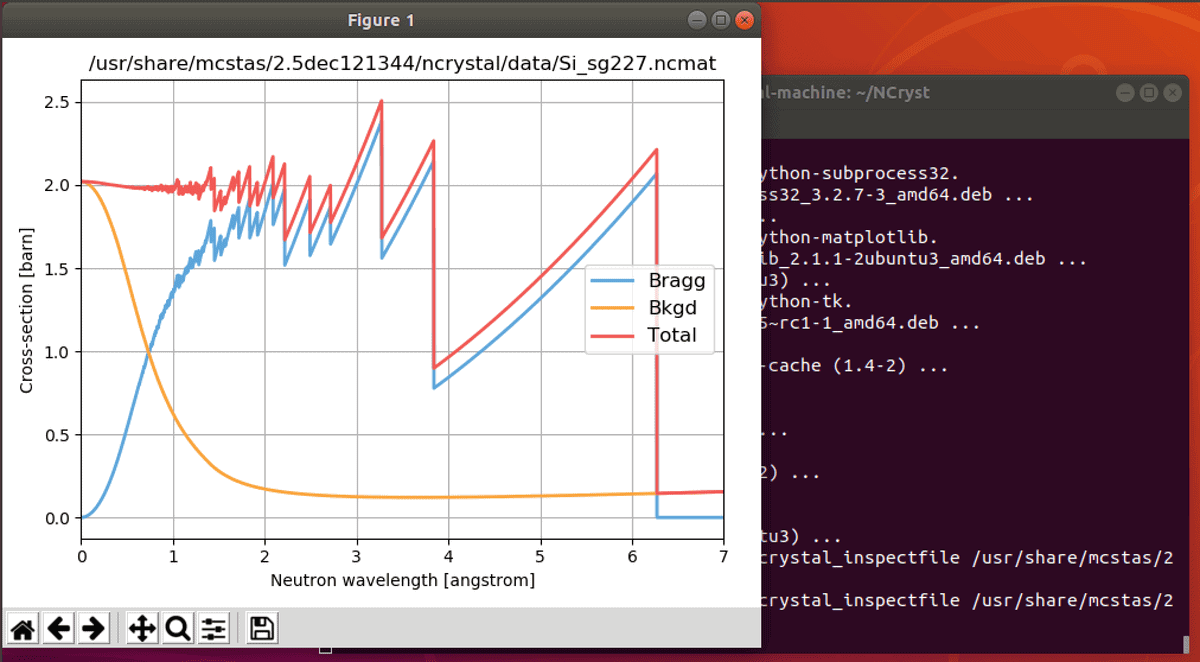
It is a neutron ray-trace simulation software for Linux. This
open-source tool is used in different experiments regarding neutron
scattering. This tool supports high-level language, and this is why
it is very easy to use. It has a built-in compiler that will
translate your instructions to the ANSI-C language.
Key Features of McStas
- It runs fast and smooth on any type of device.
- McStas supports triple-axis features and time-of-flight
instruments. - It features a huge library of components including steady-state
and pulsed sources, monochromators/analyzers, guides, collimators,
etc. for neutron scattering. - It generates easy to read histograms in different formats.
4. Octopus
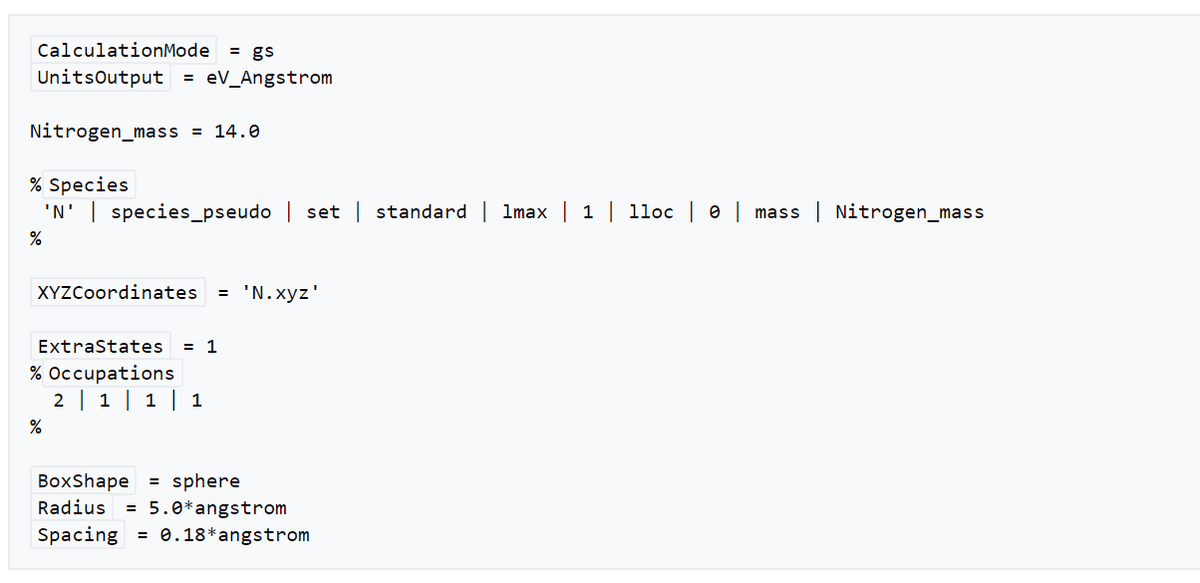
Octopus is a very popular Physics tool for Linux. It is
specially used for the simulations of electron-ion dynamics. The
electromagnetic fields used for it are totally dependent on time.
Many static properties can be obtained by this tool. It can also
use the graphical processing units (GPUs) of a computer through
OpenCL and CUDA.
Key Features of Octopus
- It works on 1D, 2D, and 3D mode.
- It supports periodic boundary conditions in 1, 2, or 3
directions. - Octopus supports different types of linear and non-linear
responses, including, through time-propagation, Marc Casida’s
formulation, Sterheimer linear response formalism, etc. - This tool runs both in single and double precision.
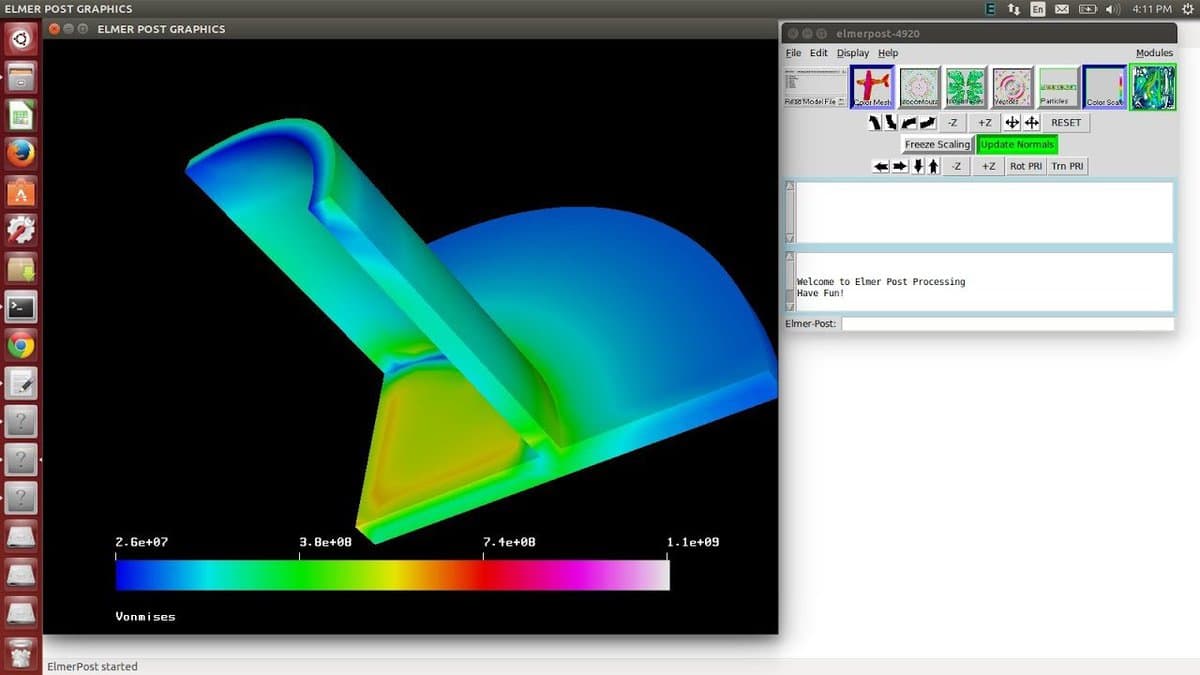
5. Elmer
This one is a free simulation tool used in the field of Physics.
It was created by a Finnish organization. Elmer is used for
simulating mechanics of fluid matters, mechanics of solid
structures, transportation of heats, etc. It features a modern GUI
which can be programmed according to one’s need.
Key Features of Elmer
- This software package contains a huge collection of
problem-solvers for different problems regarding physics. - It has a large collection of modern numerical methods.
- It has time integration schemes for the first and second-order
equations. - Elmer features solution methods for eigenvalue problems.
- This tool provides BEM solvers without multipole
acceleration.
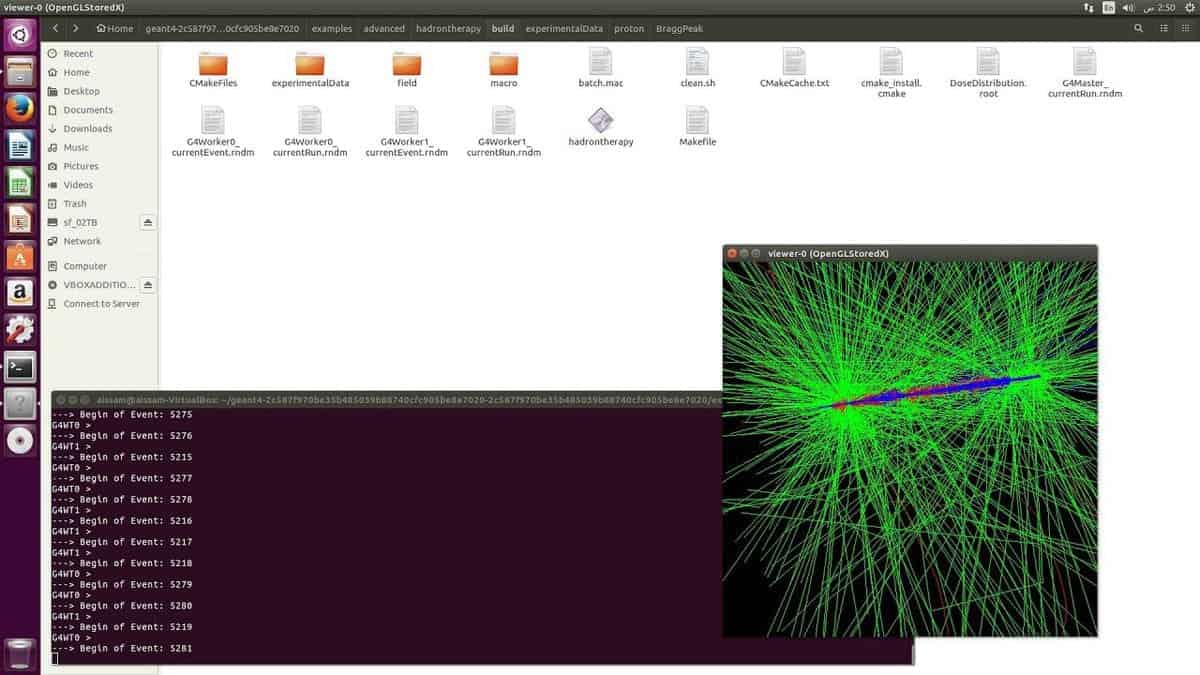
6. Geant4
Geant4 originally stands for GEometry[9]
ANd Tracking. This Linux physics software is used for the
simulation of the passage of particles through matter. CERN helped
in the process of developing this software series. It implements
object-oriented programming to solve the problems of physics. Apart
from theoretical physics, this tool is mostly used in medical and
space science.
Key Features of Geant4
- It has the facility for nicely handling object geometry.
- The response of the detector is recorded when the particles
pass through it. - It even approximates how a real detector would respond in such
cases. - It uses the GPU power of the computer for data visualization
using OpenGL. - Geant4 has a powerful random number generator for different
purposes.
7. CP2K
It is a free and open-source solid-state physics tool for Linux.
It is even popular for research in the field of chemistry and
biology. It can perform complex simulations of the different states
of matters. This tool can run pure plane-wave or Gaussian
calculations. CP2K is an ab-initio simulator for molecular
dynamics.

Key Features of CP2K
- For the linear scaling of molecular systems, it uses a wave
method named ALMO-SCF, which is a very convenient method. - It has built-in hybrid and double hybrid XC functions. It can
even load additional XC functionals via the LibXC library. - This tool supports HF, MP2, and DFT forces and energies for
solving complex problems.
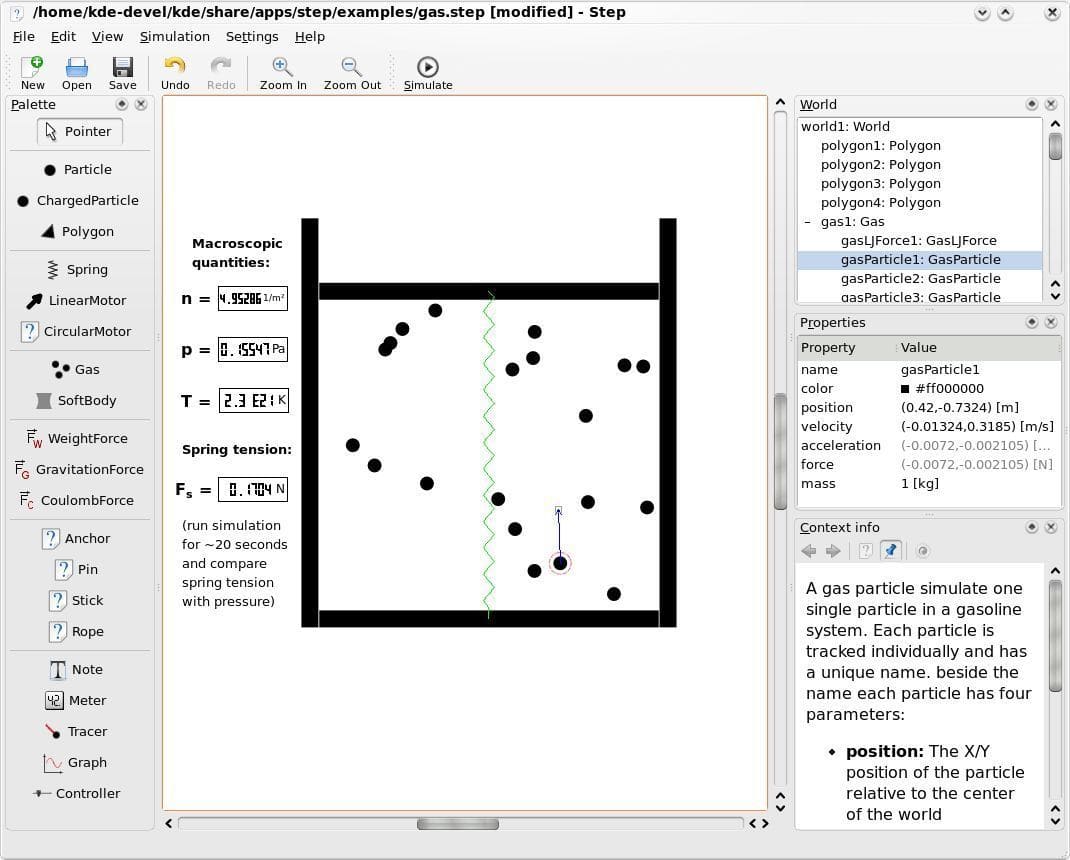
8. Step
“Step” is an interactive simulator-based physics software for
Linux. It will help you to feel the essence of physics. You can
create a sample scene with different objects in this program. Then
you can simulate the effects of different forces, such as gravity
or spring load on those objects. You can even bring changes in
real-time while it is simulating the effects.
Key Features of Step
- Support for two-dimensional simulations of mechanical
phenomenons. - Different types of force generators, including gravity, spring
load, particles, and coulomb forces. - It has an advanced collision detection feature built right into
the simulator. - Step can automatically convert between units and can perform
expression calculations. - It supports solving equations up to 8th order, whether it is
explicit or implicit. - This tool can visualize results via a graph, meter, or
tracer.
9. PYTHIA
It is an open-source physics tool for Linux based computers.
PYTHIA is used to create some high-energy events for the research
purpose. It has a built-in library of theories and models for
various aspects of physics. It can simulate the experimental
consequences of theoretical models. It can also be used for the
development of search strategies and interpretation of experimental
data.
Key Features of PYTHIA
- It can simulate different phenomenons, including fragmentation,
multiparton interactions, Parton distributions, etc. - Though it borrows many formulae, it is largely based on
original research. - This tool also supports 3rd party computer programs via
in-built interfaces. - It can use elementary particles to show the high-energy
collisions between themselves.
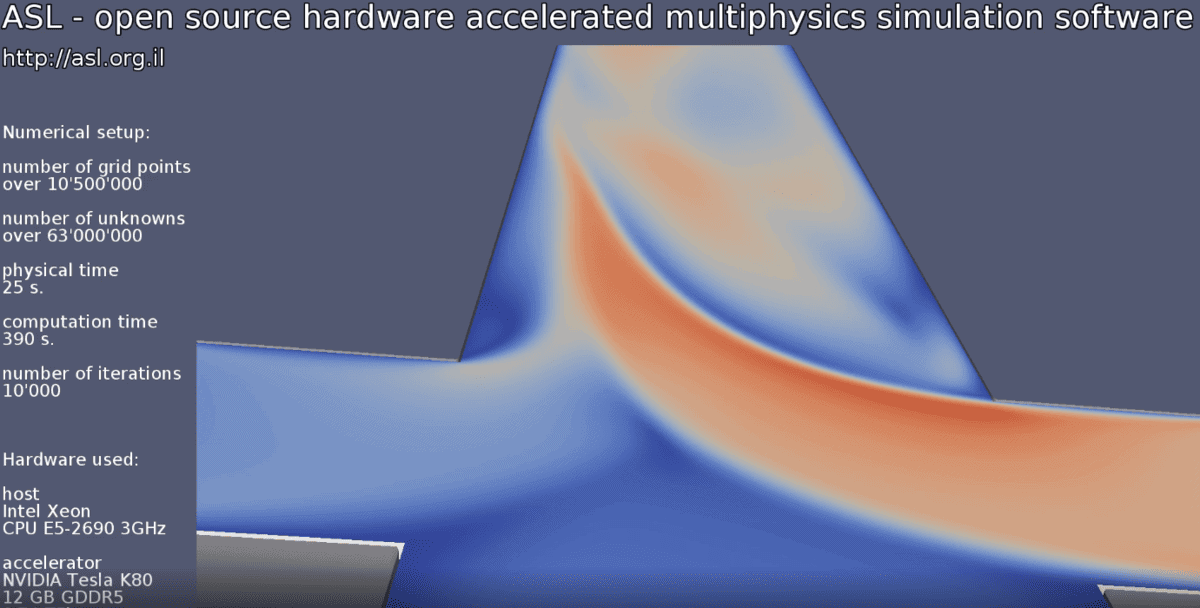
10. ASL- Advanced Simulation
Library
This open-source physics tool is a multiphysics simulation
platform. It is also capable of computing differential equations,
especially complex PDEs. Though the computational engine of this
Linux physics software is written in OpenCL, users don’t need to
have prior knowledge of OpenCL. Because it is nicely hidden under
some C++ classes. It allows anyone to move from computer-aided
design to simulation directly, which reduces pre-processing
efforts.
Key Features of ASL
- It can be used to analyze virtual sensing, image-guided
surgery, space exploration designs, etc. - ASL supports different types of numerical methods including,
Finite Difference, Lattice Boltzmann, Immersed Boundary. - It can import and export files into various formats and
supports different popular computer programs. - It has a mesh-free, immersed boundary approach that supports
importing CAD files directly.
11. FastJet
FastJet is a C++ based open-source physics tool for Linux. It
provides a wide range of tools for finding and analysis of the
jets. It has different types of jet algorithms built right into it.
Apart from that, it can load additional third-party jet algorithms
through its plugin mechanism. It provides extra tools for
determining the jet areas and controlling the level of jet
noise.

Key Features of FastJet
- FastJet has some built-in jet algorithms, including
“Cambridge/Aachen Jet Algorithm,” “Longitudinally Invariant
kt Jet Algorithm,” and much more. - It has an advanced plugin manager for installing third-party
algorithms. - It has got MassDropTagger, CASubJetTagger, etc. for tagging
purposes. - Support for background estimation and subtraction using
JetMedianBackgroundEstimator and
GridMedianBackgroundEstimator.
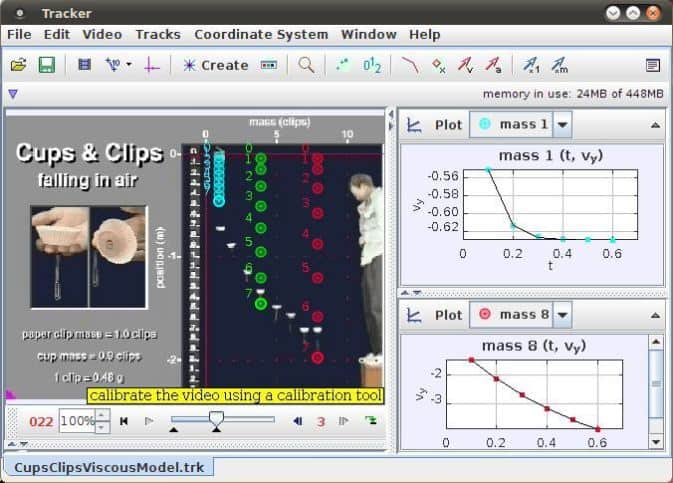
12. Tracker
This is a modeling cum video analyzer tool built with Java
programming language. Though it is designed for the college
students of Physics, it is highly popular amongst the
professionals. It works as a video editing software[16], but it can be
effectively used in the field of physics. Because in various
experiments, you need to analyze the video files to get the desired
result.
Key Features of Tracker
- This tool can reduce noise in a video and can add special
effects or enhancements. - Users can analyze the red, green, and blue colors in the
spectrum and can obtain line profiles for them. - If you work with the high-energy particles, the multiple
reference frame views of collisions and other motions will help you
to get the exact simulation. - It supports various formats, including mov, avi, Flv, mp4, WMV,
etc. - Tracker can copy and print images of any frame of the video
from any angle for use in labs and other documents.
13. CompHEP
CompHEP is a high-energy physics tool for Linux computers. This
software package is used for automatic computations, which consist
of symbolic and numerical programs. Users can create new physical
models using a tool named LanHEP. Apart from that, the processes
computed by CompHEP can be interfaced with PYTHIA and HERWIG as new
external processes.

Key Features of CompHEP
- This program can generate Feynman diagrams and display
them. - It has a built-in symbolic calculator that can be used to
calculate expressions based on the squared matrix. - CompHEP can generate optimized C codes for further numerical
calculations. - This tool can identify outgoing or incoming particles and can
select the process accordingly.
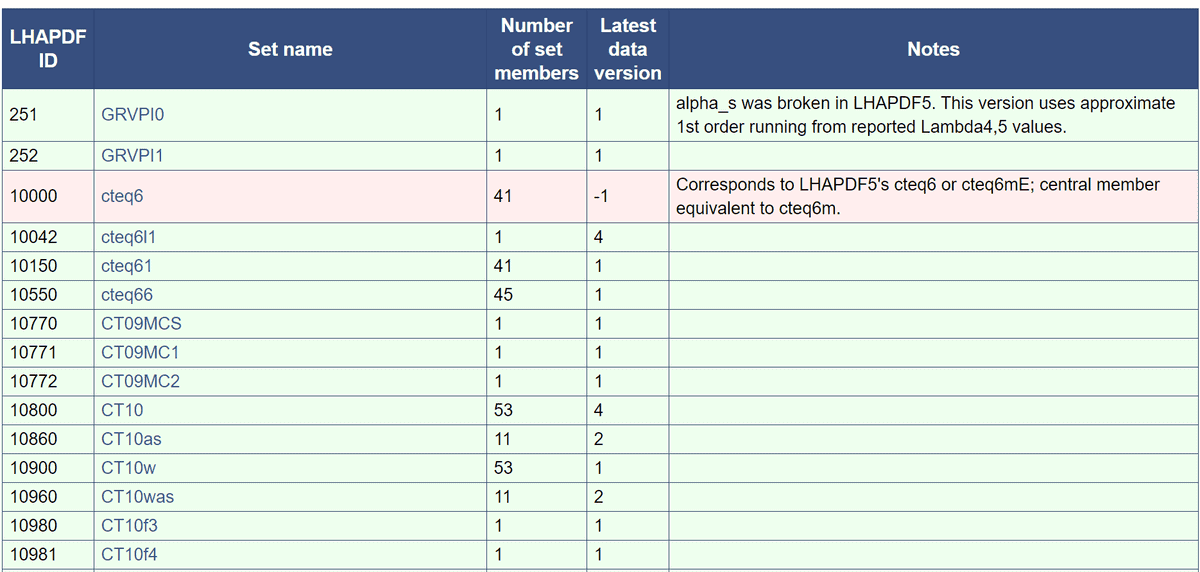
14. LHAPDF
It is a popular Linux physics software for evaluating PDFs from
discretized data files. Users can access this library by writing
code in C++. It also supports Python and Fortran languages to a
limited extent. The latest version, LHAPDF6, has overcome some
limitations of its predecessor. Now it has no restrictions on the
number of concurrent PDFs. It also supports the option to load a
single file rather than a whole set.
Key Features of LHAPDF
- Support for importing zipped data files.
- It allows Parton contents through the PDG ID code scheme, which
makes it a more efficient process. - This tool uses a flexible metadata system that fixes many
fundamental metadata errors. - You can use your existing codes on this open-source physics
tool that is compatible with the previous version.
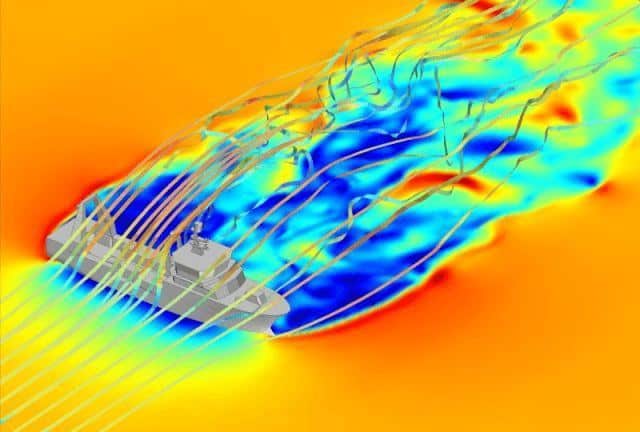
15. Gerris Flow
Solver
This tool is a simulator used in simulating the flowing state of
a matter. It can even deal with arbitrarily complex solid
boundaries automatically. This Linux physics software is supported
by the National Institute of Water and Atmospheric research and
Institut Jean le Rond d’Alembert. Gerris uses an advanced “embedded
boundary” technique for solving the flow problems.
Key Features of Gerris Flow
Solver
- The adaptive mesh refinement feature helps to adapt the
resolution dynamically to the features of the flow. - It supports an unlimited number of diffused passive
tracers. - It has a flexible object-oriented specification of boundary
conditions. - Gerris Flow Solver can solve time-dependent incompressible
variable-density Euler, Stokes or Navier-Stokes equations.
Final Thoughts
Without the help of computer programs, modern physics would not
have come this far. The above tools are very useful in the field of
modern physics. These physics tools for your Linux system are very
capable of dealing with high-energy physics phenomena. Ultimately,
it is the user who can make the best use of a tool. So, choose your
desired software wisely by trying and testing out different
options. If you have any particular favorite open-source physics
tool, you can comment below to let others know.
References
- ^
Top 20
Best Astronomy Software For Linux To Explore Space With
(www.ubuntupit.com) - ^
Top 20
Best Data Mining Software for Linux in 2020
(www.ubuntupit.com) - ^
Top 50
Frequently Asked Ruby Interview Questions and Answers
(www.ubuntupit.com) - ^
Get ROOT
(root.cern.ch) - ^
Get OpenFOAM
(www.openfoam.com) - ^
Get McStas
(www.mcstas.org) - ^
Get Octopus
(octopus-code.org) - ^
Get Elmer
(www.elmerfem.org) - ^
The 10
Best Geometry Software for Linux System in 2020
(www.ubuntupit.com) - ^
Get Geant4
(www.geant4.org) - ^
Get CP2K
(www.cp2k.org) - ^
Get Step
(edu.kde.org) - ^
Get
PYTHIA (home.thep.lu.se) - ^
Get ASL
(asl.org.il) - ^
Get FastJet
(fastjet.fr) - ^
Top 10
Best Video Editing Software for Ubuntu: How to Install Those
(www.ubuntupit.com) - ^
Get Tracker
(physlets.org) - ^
Get
CompHEP (theory.sinp.msu.ru) - ^
Get LHAPDF
(lhapdf.hepforge.org) - ^
Get
Gerris (gfs.sourceforge.net)
Every particle of the universe obeys the rules of physics. This
is why physics is called the most fundamental branch of science. If
physics is considered the theory, then every other branch of
science is the application of it. If we want to understand our
universe and, most importantly, ourselves, we must learn physics.
The knowledge of physics is very practical. So, if we’re going to
understand physics from the deep inside, we must discover it by
experimenting and analyzing recorded data. And that is the moment
when we need to use some computer programs. There are many
open-source physics tools available out there on the internet.
Almost all of them are compatible with Linux. So, if you were
looking for the best physics tools for Linux, you are in the right
place.
There are
different types of applications of Linux physics software in the
study and research of theoretical and applied physics. So, it’s
very difficult to call a single piece of software the best. Here we
have enlisted a collection of 15 best Physics tools for Linux.
Some of them are for analyzing data, some for numerical
applications, some for simulation, and even some will help you in
programming the solution of different physics-related problems. We
are certain that no matter what your requirement is, you are going
to love this curated collection of Linux physics software.
1. ROOT
The world-famous research facility CERN develops it. It is a
programming library that works based on the object-oriented method.
It is used for solving many problems of high-energy physics. ROOT
was initially being developed for analyzing the data of
particle-physics. But after the gradual development process, now it
is used in solving some astronomical problems and
data mining. [1][2]
Key Features of ROOT
- It provides histograms and graphs to visualize different
functions. - ROOT can render various 2D and 3D geometric shapes to visualize
data. - Regression analysis or curve fitting and function minimization
tool. - Four-vectors computation system for using in high-energy
physics. - Advanced neural networks option for multivariate data
analysis. - Users can use the distributed computing feature for the
opportunity of parallel data analysis. - Built-in two directions Python and Ruby programming[3]
interface.
2. OpenFOAM
OpenFOAM is a very popular Physics tool for Linux. It is a C++
library and simulation engine. Partial differential equations can
be solved by it without any hassle. It has numerous built-in C++
classes for finite volume, finite elements, and Lagrangian particle
tracking. It uses the top-level code that gives you the direct
representation of the equation being solved.
Key Features of OpenFOAM
- It has built-in solving programs like combustion, heat
transfers, electromagnetics, solid dynamics, etc. - It has the option to customize pre-installed programs and even
create new programs. - The integrated C++ GUI named FoamX can be used to manage case
files. - Support for different types of modeling, including lagrangian
modeling, thermophysical modeling, multiphase modeling, etc. - This tool can generate meshes and convert or manipulate them
accordingly. - OpenFOAM has a huge set of libraries that you will get for
using straight out of the box.
3. McStas
It is a neutron ray-trace simulation software for Linux. This
open-source tool is used in different experiments regarding neutron
scattering. This tool supports high-level language, and this is why
it is very easy to use. It has a built-in compiler that will
translate your instructions to the ANSI-C language.
Key Features of McStas
- It runs fast and smooth on any type of device.
- McStas supports triple-axis features and time-of-flight
instruments. - It features a huge library of components including steady-state
and pulsed sources, monochromators/analyzers, guides, collimators,
etc. for neutron scattering. - It generates easy to read histograms in different formats.
4. Octopus
Octopus is a very popular Physics tool for Linux. It is
specially used for the simulations of electron-ion dynamics. The
electromagnetic fields used for it are totally dependent on time.
Many static properties can be obtained by this tool. It can also
use the graphical processing units (GPUs) of a computer through
OpenCL and CUDA.
Key Features of Octopus
- It works on 1D, 2D, and 3D mode.
- It supports periodic boundary conditions in 1, 2, or 3
directions. - Octopus supports different types of linear and non-linear
responses, including, through time-propagation, Marc Casida’s
formulation, Sterheimer linear response formalism, etc. - This tool runs both in single and double precision.
5. Elmer
This one is a free simulation tool used in the field of Physics.
It was created by a Finnish organization. Elmer is used for
simulating mechanics of fluid matters, mechanics of solid
structures, transportation of heats, etc. It features a modern GUI
which can be programmed according to one’s need.
Key Features of Elmer
- This software package contains a huge collection of
problem-solvers for different problems regarding physics. - It has a large collection of modern numerical methods.
- It has time integration schemes for the first and second-order
equations. - Elmer features solution methods for eigenvalue problems.
- This tool provides BEM solvers without multipole
acceleration.
6. Geant4
Geant4 originally stands for GEometry[9]
ANd Tracking. This Linux physics software is used for the
simulation of the passage of particles through matter. CERN helped
in the process of developing this software series. It implements
object-oriented programming to solve the problems of physics. Apart
from theoretical physics, this tool is mostly used in medical and
space science.
Key Features of Geant4
- It has the facility for nicely handling object geometry.
- The response of the detector is recorded when the particles
pass through it. - It even approximates how a real detector would respond in such
cases. - It uses the GPU power of the computer for data visualization
using OpenGL. - Geant4 has a powerful random number generator for different
purposes.
7. CP2K
It is a free and open-source solid-state physics tool for Linux.
It is even popular for research in the field of chemistry and
biology. It can perform complex simulations of the different states
of matters. This tool can run pure plane-wave or Gaussian
calculations. CP2K is an ab-initio simulator for molecular
dynamics.
Key Features of CP2K
- For the linear scaling of molecular systems, it uses a wave
method named ALMO-SCF, which is a very convenient method. - It has built-in hybrid and double hybrid XC functions. It can
even load additional XC functionals via the LibXC library. - This tool supports HF, MP2, and DFT forces and energies for
solving complex problems.
8. Step
“Step” is an interactive simulator-based physics software for
Linux. It will help you to feel the essence of physics. You can
create a sample scene with different objects in this program. Then
you can simulate the effects of different forces, such as gravity
or spring load on those objects. You can even bring changes in
real-time while it is simulating the effects.
Key Features of Step
- Support for two-dimensional simulations of mechanical
phenomenons. - Different types of force generators, including gravity, spring
load, particles, and coulomb forces. - It has an advanced collision detection feature built right into
the simulator. - Step can automatically convert between units and can perform
expression calculations. - It supports solving equations up to 8th order, whether it is
explicit or implicit. - This tool can visualize results via a graph, meter, or
tracer.
9. PYTHIA
It is an open-source physics tool for Linux based computers.
PYTHIA is used to create some high-energy events for the research
purpose. It has a built-in library of theories and models for
various aspects of physics. It can simulate the experimental
consequences of theoretical models. It can also be used for the
development of search strategies and interpretation of experimental
data.
Key Features of PYTHIA
- It can simulate different phenomenons, including fragmentation,
multiparton interactions, Parton distributions, etc. - Though it borrows many formulae, it is largely based on
original research. - This tool also supports 3rd party computer programs via
in-built interfaces. - It can use elementary particles to show the high-energy
collisions between themselves.
10. ASL- Advanced Simulation
Library
This open-source physics tool is a multiphysics simulation
platform. It is also capable of computing differential equations,
especially complex PDEs. Though the computational engine of this
Linux physics software is written in OpenCL, users don’t need to
have prior knowledge of OpenCL. Because it is nicely hidden under
some C++ classes. It allows anyone to move from computer-aided
design to simulation directly, which reduces pre-processing
efforts.
Key Features of ASL
- It can be used to analyze virtual sensing, image-guided
surgery, space exploration designs, etc. - ASL supports different types of numerical methods including,
Finite Difference, Lattice Boltzmann, Immersed Boundary. - It can import and export files into various formats and
supports different popular computer programs. - It has a mesh-free, immersed boundary approach that supports
importing CAD files directly.
11. FastJet
FastJet is a C++ based open-source physics tool for Linux. It
provides a wide range of tools for finding and analysis of the
jets. It has different types of jet algorithms built right into it.
Apart from that, it can load additional third-party jet algorithms
through its plugin mechanism. It provides extra tools for
determining the jet areas and controlling the level of jet
noise.
Key Features of FastJet
- FastJet has some built-in jet algorithms, including
“Cambridge/Aachen Jet Algorithm,” “Longitudinally Invariant
kt Jet Algorithm,” and much more. - It has an advanced plugin manager for installing third-party
algorithms. - It has got MassDropTagger, CASubJetTagger, etc. for tagging
purposes. - Support for background estimation and subtraction using
JetMedianBackgroundEstimator and
GridMedianBackgroundEstimator.
12. Tracker
This is a modeling cum video analyzer tool built with Java
programming language. Though it is designed for the college
students of Physics, it is highly popular amongst the
professionals. It works as a video editing software[16], but it can be
effectively used in the field of physics. Because in various
experiments, you need to analyze the video files to get the desired
result.
Key Features of Tracker
- This tool can reduce noise in a video and can add special
effects or enhancements. - Users can analyze the red, green, and blue colors in the
spectrum and can obtain line profiles for them. - If you work with the high-energy particles, the multiple
reference frame views of collisions and other motions will help you
to get the exact simulation. - It supports various formats, including mov, avi, Flv, mp4, WMV,
etc. - Tracker can copy and print images of any frame of the video
from any angle for use in labs and other documents.
13. CompHEP
CompHEP is a high-energy physics tool for Linux computers. This
software package is used for automatic computations, which consist
of symbolic and numerical programs. Users can create new physical
models using a tool named LanHEP. Apart from that, the processes
computed by CompHEP can be interfaced with PYTHIA and HERWIG as new
external processes.
Key Features of CompHEP
- This program can generate Feynman diagrams and display
them. - It has a built-in symbolic calculator that can be used to
calculate expressions based on the squared matrix. - CompHEP can generate optimized C codes for further numerical
calculations. - This tool can identify outgoing or incoming particles and can
select the process accordingly.
14. LHAPDF
It is a popular Linux physics software for evaluating PDFs from
discretized data files. Users can access this library by writing
code in C++. It also supports Python and Fortran languages to a
limited extent. The latest version, LHAPDF6, has overcome some
limitations of its predecessor. Now it has no restrictions on the
number of concurrent PDFs. It also supports the option to load a
single file rather than a whole set.
Key Features of LHAPDF
- Support for importing zipped data files.
- It allows Parton contents through the PDG ID code scheme, which
makes it a more efficient process. - This tool uses a flexible metadata system that fixes many
fundamental metadata errors. - You can use your existing codes on this open-source physics
tool that is compatible with the previous version.
15. Gerris Flow
Solver
This tool is a simulator used in simulating the flowing state of
a matter. It can even deal with arbitrarily complex solid
boundaries automatically. This Linux physics software is supported
by the National Institute of Water and Atmospheric research and
Institut Jean le Rond d’Alembert. Gerris uses an advanced “embedded
boundary” technique for solving the flow problems.
Key Features of Gerris Flow
Solver
- The adaptive mesh refinement feature helps to adapt the
resolution dynamically to the features of the flow. - It supports an unlimited number of diffused passive
tracers. - It has a flexible object-oriented specification of boundary
conditions. - Gerris Flow Solver can solve time-dependent incompressible
variable-density Euler, Stokes or Navier-Stokes equations.
Final Thoughts
Without the help of computer programs, modern physics would not
have come this far. The above tools are very useful in the field of
modern physics. These physics tools for your Linux system are very
capable of dealing with high-energy physics phenomena. Ultimately,
it is the user who can make the best use of a tool. So, choose your
desired software wisely by trying and testing out different
options. If you have any particular favorite open-source physics
tool, you can comment below to let others know.
References
- ^
Top 20
Best Astronomy Software For Linux To Explore Space With
(www.ubuntupit.com) - ^
Top 20
Best Data Mining Software for Linux in 2020
(www.ubuntupit.com) - ^
Top 50
Frequently Asked Ruby Interview Questions and Answers
(www.ubuntupit.com) - ^
Get ROOT
(root.cern.ch) - ^
Get OpenFOAM
(www.openfoam.com) - ^
Get McStas
(www.mcstas.org) - ^
Get Octopus
(octopus-code.org) - ^
Get Elmer
(www.elmerfem.org) - ^
The 10
Best Geometry Software for Linux System in 2020
(www.ubuntupit.com) - ^
Get Geant4
(www.geant4.org) - ^
Get CP2K
(www.cp2k.org) - ^
Get Step
(edu.kde.org) - ^
Get
PYTHIA (home.thep.lu.se) - ^
Get ASL
(asl.org.il) - ^
Get FastJet
(fastjet.fr) - ^
Top 10
Best Video Editing Software for Ubuntu: How to Install Those
(www.ubuntupit.com) - ^
Get Tracker
(physlets.org) - ^
Get
CompHEP (theory.sinp.msu.ru) - ^
Get LHAPDF
(lhapdf.hepforge.org) - ^
Get
Gerris (gfs.sourceforge.net)
Read more https://www.ubuntupit.com/best-physics-tools-for-linux/