
Organizations today must give attention to their cybersecurity
posture, including policies, procedures, and technical solutions
for cybersecurity challenges.
This often results in a greater burden on the IT service desk
staff as end-users encounter issues related to security software,
policies, and password restrictions.
One of the most common areas where security may cause challenges
for end-users is password policies and password changes. What are
these issues? How can organizations reduce end-user password change
frustration? First, let’s consider the standard password policy,
its role, and general settings affecting end-users.
What are password policies?
Most organizations today have a password policy in place. So,
what is a password policy? Password policies define the types and
content of passwords allowed or required of end-users in an
identity and access management system. Various aspects of the
password that businesses control may include the password’s
required length, composition (requiring certain characters),
password age, and disallowing the reuse of passwords used
before.
Microsoft’s Active Directory Domain Services is arguably the
most prevalent identity and access management system servicing
on-premises environments today. Active Directory Password Policies
allow businesses to control basic characteristics of end-user
passwords with configurable password settings.
These settings include:
- Enforce password history
- Maximum password age
- Minimum password age
- Minimum password length
- Minimum password length audit
- Password must meet complexity requirements
- Store passwords using reversible encryption
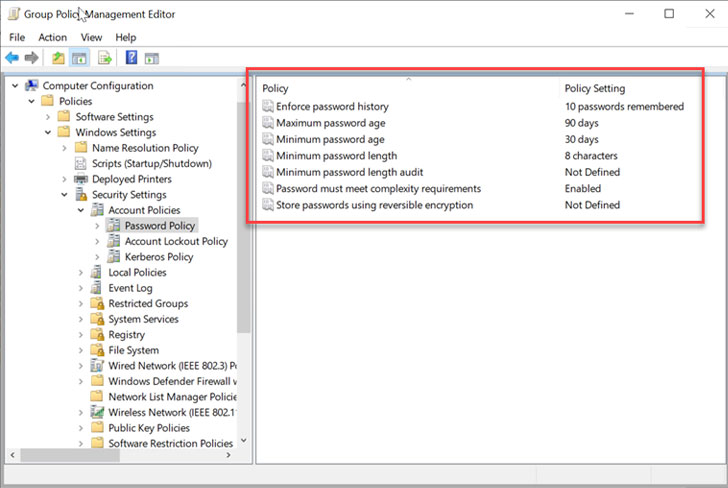 |
| Configuring Active Directory Password Policy |
Active Directory Password Policies are enforced as part of
Microsoft Active Directory Domain Services Group Policy. Group
Policies can apply to a specific OU in Active Directory and
filtered to apply to a particular user, group, or computer.
How password changes cause frustration for end-users
While password policies are significantly crucial to the overall
cybersecurity posture of your organization, they can certainly lead
to an increased burden on the IT service desk. The service desk
fields the bulk of issues with password changes and account
lockouts. Often, frustration results when end-users change their
passwords as a result of password policy enforcement.
Many organizations choose to implement password policies that
define password aging as part of policy enforcement. Password aging
requires end-users to change passwords when the password’s age
reaches the days configured in the policy.
End-users who are required to change their passwords may mistype
their password during the password change. It can lead to the
account becoming locked out when they attempt to enter the password
they “think” is correct. Also, end-users can encounter challenges
simply setting their password. They may not fully understand the
password policy requirements.
This ultimately leads to employees who cannot log in; meaning
they are unable to be productive. In addition to being an expensive
problem for that department (lost work); it also impacts the
service desk.
Password Change Frustration – Costly for your business
Out of all the issues that service desk agents triage, the
end-user password change can be among the most time-consuming and
costly to the business. According to the Gartner Group[1], between 20% to 50% of
all service desk calls are for password resets, while Forrester Research[2]
states that the average help desk labor cost for a single password
reset is about $70.
Aside from the labor cost involved with the service desk,
business continuity can be affected if a key user is locked out of
their account or is experiencing application issues due to a
changed password.
This situation can amount to less tangible costs associated with
a password change. Additionally, if end-users are affected by a
password change, this can trickle down to customers.
Reduce end-user password change frustration
Businesses cannot simply ignore security best practices simply
for the convenience of end-users, no matter the seniority of the
user calling the service desk. However, there are tools that can
help reduce end-user password change frustration caused by a lack
of clear messaging on why the password is being rejected.
Aside from providing a much more robust solution than the
simplistic Active Directory Password Policy settings found natively
in ADDS, Specops Password Policy[3]
is one tool that can provide this ability to reduce end-user
password change frustration.
It includes the following two components that work together to
provide much greater transparency to the end-user of password
requirements and upcoming password changes required. These
include:
- Client message configuration
- Specops Authentication Client
In Specops Password Policy, IT admins can configure the
Client message to customize user feedback on
failed password change attempts. Specops Password Policy can be
configured to provide dynamic feedback to end-users, using the
following settings:
- Show all rules
- Show only failed rules
- Show only custom messages
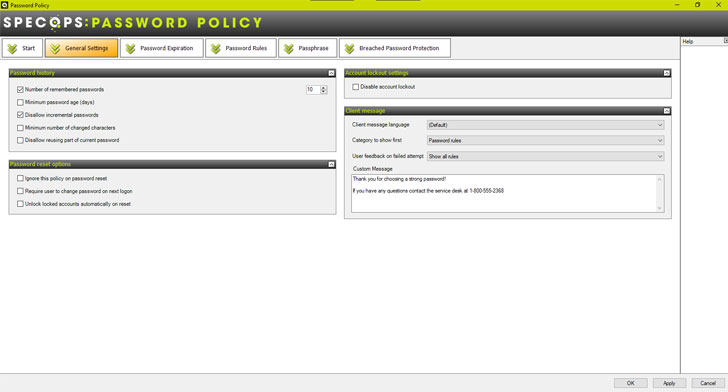 |
| Configuring the Client message in Specops Password Policy |
The Specops Authentication Client tool works with the
above-configured setting to allow Specops to display the password
policy rules when a user fails to meet the policy criteria when
changing their password. The Client will also notify users when
their passwords are about to expire.
The standard “change a password” screen in Windows can be a real
source of end-user frustration. With no guidance on a password
policy, previous password history, or dictionaries, a user often
resorts to the service desk for help.
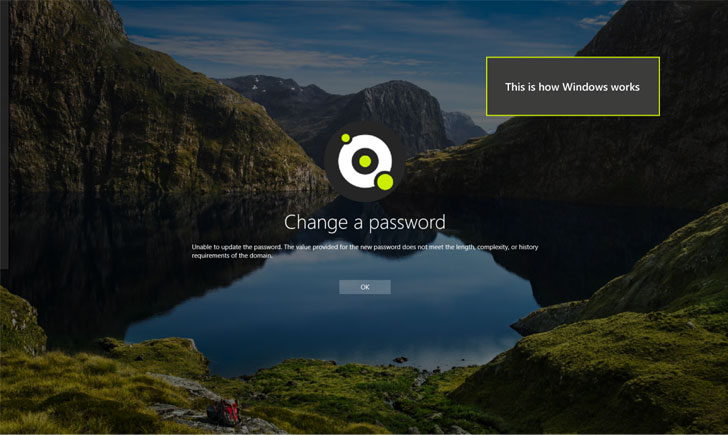 |
| The standard Windows password change user experience |
When users have visibility into the specific reason why the
password they are attempting to change to is failing, this can help
the end-user better understand the password policy requirements and
align the passwords they use with the corporate policy. Specops
Password Policy has recently implemented dynamic feedback at
password change.
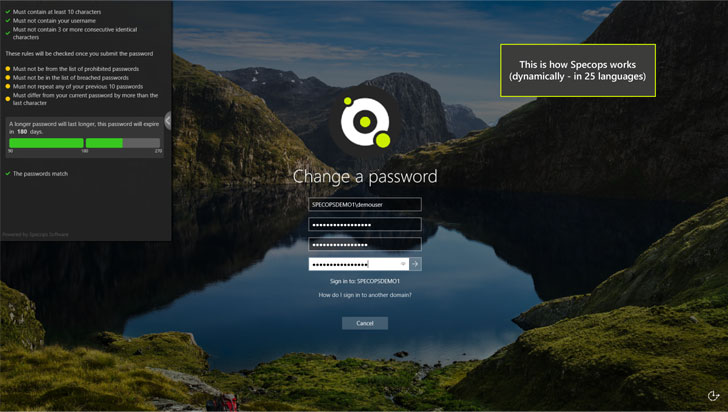 |
| Dynamic feedback at password change for Specops Password Policy end-users |
This capability also helps alleviate the burden on the IT
service desk when end-users can better understand what is required
of their corporate password. A better understanding of the rules
reduces not only end-user frustration but also minimizes costly
calls to the IT service desk.
Final Thoughts
Password security and policies are required to maintain an
effective cybersecurity posture for organizations today. However,
password policies and forced account password changes can create an
extra burden on the IT service desk, as service desk agents triage
and troubleshoot account password issues in the environment.
Reducing end-user password change frustration can be facilitated by
effective dynamic feedback from your password policy source.
Natively, Windows displays very vague messaging related to why a
particular password is not allowed by a password policy. Specops
Password Policy fixes this gap by enabling organizations to
implement customizable dynamic feedback to the end-user.
For example, when they attempt to set a password that does not
meet all the requirements configured in the password policy, it
provides much greater detail into why the password set operation
failed if it is not successful.
References
- ^
Gartner
Group (www.infosecurity-magazine.com) - ^
Forrester Research
(searchenterprisedesktop.techtarget.com) - ^
Specops
Password Policy (specopssoft.com) - ^
Learn
more about Specops Password Policy
(specopssoft.com)
Read more http://feedproxy.google.com/~r/TheHackersNews/~3/rcOYj6ymYvY/reduce-end-user-password-change.html