Feb 01, 2023Ravie Lakshmanan
A new exploit has been devised to “unenroll” enterprise- or
school-managed Chromebooks from administrative control.
Enrolling ChromeOS devices makes it possible to enforce device
policies as set by the organization via the Google Admin console[1], including the features
that are available to users.
“Each enrolled device complies with the policies you set until
you wipe or deprovision it,” Google states[2]
in its documentation.
That’s where the exploit[3]
– dubbed Shady Hacking 1nstrument Makes Machine Enrollment Retreat
aka SH1MMER – comes in, allowing users to bypass
these admin restrictions.
The method is also a reference to shim, a Return Merchandise
Authorization (RMA) disk image used by service center technicians
to reinstall the operating system and run diagnosis and repair
programs.
The Google-signed shim image[4]
is a “combination of existing Chrome OS factory bundle[5]
components” – namely a release image, a toolkit, and the firmware,
among others – that can be flashed to a USB drive.
A Chromebook can then be booted in developer mode with the drive
image to invoke the recovery options. A shim image can either be
universal or specific to a Chromebook board[6].
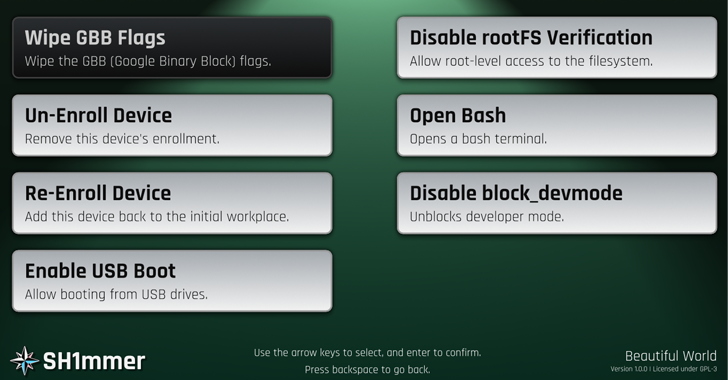
SH1MMER takes advantage of a modified RMA shim image to create a
recovery media for the Chromebook and writes it to a USB stick.
Doing so requires an online builder[7]
to download the patched version of the RMA shim[8] with the exploit.
The next step entails launching the recovery mode on the
Chromebook and plugging the USB stick containing the image into the
device to display an altered recovery menu that enables users to
completely unenroll the machine.
“It will now behave entirely as if it is a personal computer and
no longer contain spyware or blocker extensions,” the Mercury
Workshop team, which came up with the exploit, said.
“RMA shims are a factory tool allowing certain authorization
functions to be signed, but only the KERNEL partitions are checked
for signatures by the firmware,” the team further elaborated[9]. “We can edit the other
partitions to our will as long as we remove the forced readonly bit
on them.”
Additionally, the SH1MMER menu can be used to re-enroll the
device[10], enable USB boot, open
a bash shell, and even allow root-level access to the ChromeOS
operating system.
The Hacker News has reached out to Google for comment, and we
will update the story if we hear back.
Found this article interesting? Follow us on Twitter [11] and LinkedIn[12] to read more exclusive
content we post.
References
- ^
Google
Admin console (support.google.com) - ^
states
(support.google.com) - ^
exploit
(sh1mmer.me) - ^
shim
image (chromium.googlesource.com) - ^
factory
bundle (chromium.googlesource.com) - ^
Chromebook board
(chromiumdash.appspot.com) - ^
online builder
(sh1mmer.me) - ^
RMA
shim (dl.sh1mmer.me) - ^
elaborated
(github.com) - ^
re-enroll the device
(sh1mmer.me) - ^
Twitter
(twitter.com) - ^
LinkedIn
(www.linkedin.com)
Read more https://thehackernews.com/2023/02/new-sh1mmer-exploit-for-chromebook.html