
You should be extra careful about what document files you open
using the LibreOffice software over the next few days.
That’s because LibreOffice contains a severe unpatched code
execution vulnerability that could sneak malware into your system
as soon as you open a maliciously-crafted document file.
LibreOffice is one of the most popular and open source
alternatives to Microsoft Office suite and is available for
Windows, Linux and macOS systems.
Earlier this month, LibreOffice released the latest
version 6.2.5 of its software that addresses two severe
vulnerabilities (CVE-2019-9848 and CVE-2019-9849), but the patch
for the former has now been bypassed, security researcher Alex
Inführ claims.
Though Inführ has not yet disclosed details of the technique
that allowed him to bypass the patch, the impact of this
vulnerability remains the same, as explained below.
1.) CVE-2019-9848: This vulnerability, which still exists
in the latest version, resides in LibreLogo, a programmable turtle
vector graphics script that ships by default with LibreOffice.
LibreLogo allows users to specify pre-installed scripts in a
document that can be executed on various events such as
mouse-over.
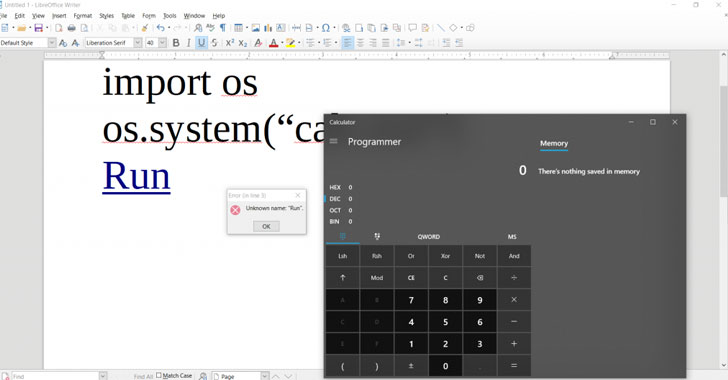
to craft a malicious document that can silently execute arbitrary
python commands without displaying any warning to a targeted user.
“The big problem here is that the code is not translated well and
just supplying python code as the script code often results in the
same code after translation,” Emmerich said.
“Using forms and OnFocus event, it is even possible to get code
execution when the document is opened, without the need for a
mouse-over event.”
for this attack on his blog post.
2.) CVE-2019-9849: This vulnerability,
which you can fix by installing the latest available update, could
allow the inclusion of remote arbitrary content within a document
even when ‘stealth mode’ is enabled.
[4]
The stealth mode is not enabled by default, but users can activate
it to instruct documents retrieve remote resources only from
trusted locations.
How to Protect Your System
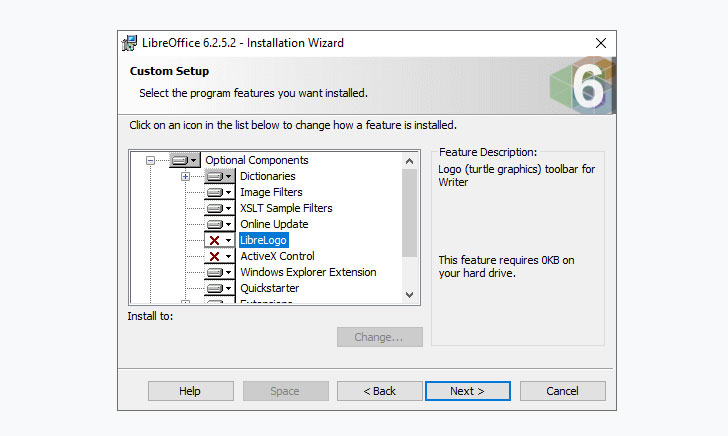
issue, but until the team releases a patch to fix the bypass, users
are recommended to update or reinstall the software without macros
or at least without LibreLogo component, by following the
below-mentioned steps.
- Open the setup to start the installation
- Select “Custom” installation
- Expand “Optional Components”
- Click on “LibreLogo” and select “This Feature Will Not Be
Available” - Click Next and then Install the software
References
- ^
released
(www.libreoffice.org) - ^
claims
(twitter.com) - ^
proof-of-concept for this attack
(insinuator.net) - ^
vulnerability
(www.libreoffice.org)
Read more http://feedproxy.google.com/~r/TheHackersNews/~3/1JOElazahoE/libreoffice-vulnerability.html