
Unknown malware presents a significant cybersecurity threat and
can cause serious damage to organizations and individuals alike.
When left undetected, malicious code can gain access to
confidential information, corrupt data, and allow attackers to gain
control of systems. Find out how to avoid these circumstances and
detect unknown malicious behavior efficiently.
Challenges of new threats’ detection
While known malware families are more predictable and can be
detected more easily, unknown threats can take on a variety of
forms, causing a bunch of challenges for their detection:
- Malware developers use polymorphism, which enables them to
modify the malicious code to generate unique variants of the same
malware. - There is malware that is still not identified and doesn’t have
any rulesets for detection. - Some threats can be Fully UnDetectable (FUD) for some time and
challenge perimeter security. - The code is often encrypted, making it difficult to detect by
signature-based security solutions. - Malware authors may use a “low and slow” approach, which
involves sending a small amount of malicious code across a network
over a long time, which makes it harder to detect and block. This
can be especially damaging in corporate networks, where the lack of
visibility into the environment can lead to undetected malicious
activity.
Detection of new threats
When analyzing known malware families, researchers can take
advantage of existing information about the malware, such as its
behavior, payloads, and known vulnerabilities, in order to detect
and respond to it.
But dealing with new threats, researchers have to start from
scratch, using the following guide:
Step 1. Use reverse engineering to analyze the
code of the malware to identify its purpose and malicious
nature.
Step 2. Use static analysis to examine the
malware’s code to identify its behavior, payloads, and
vulnerabilities.
Step 3. Use dynamic analysis to observe the
behavior of the malware during execution.
Step 4. Use sandboxing to run the malware in an
isolated environment to observe its behavior without harming the
system.
Step 5. Use heuristics to identify potentially
malicious code based on observable patterns and behaviors.
Step 6. Analyze the results of reverse
engineering, static analysis, dynamic analysis, sandboxing, and
heuristics to determine if the code is malicious.
There are plenty of tools from Process Monitor and Wireshark to
ANY.RUN to help you go through the first 5 steps. But how to draw a
precise conclusion, what should you pay attention to while having
all this data?
The answer is simple – focus on indicators of malicious
behavior.
Monitor suspicious activities for effective detection
Different signatures are used to detect threats. In computer
security terminology, a signature is a typical footprint or pattern
associated with a malicious attack on a computer network or
system.
Part of these signatures is behavioral ones. It’s impossible to
do something in the OS and leave no tracing behind. We can identify
what software or script it was via their suspicious activities.
You can run a suspicious program in a sandbox to observe the
behavior of the malware and identify any malicious behavior, such
as:
- abnormal file system activity,
- suspicious process creation and termination
- abnormal networking activity
- reading or modifying system files
- access system resources
- create new users
- connect to remote servers
- execute other malicious commands
- exploit known vulnerabilities in the system
Microsoft Office is launching PowerShell – looks suspicious,
right? An application adds itself to the scheduled tasks –
definitely pay attention to it. A svchost process runs from the
temp registry – something is definitely wrong.
You can always detect any threat by its behavior, even without
signatures.
Let’s prove it.
Use case #1
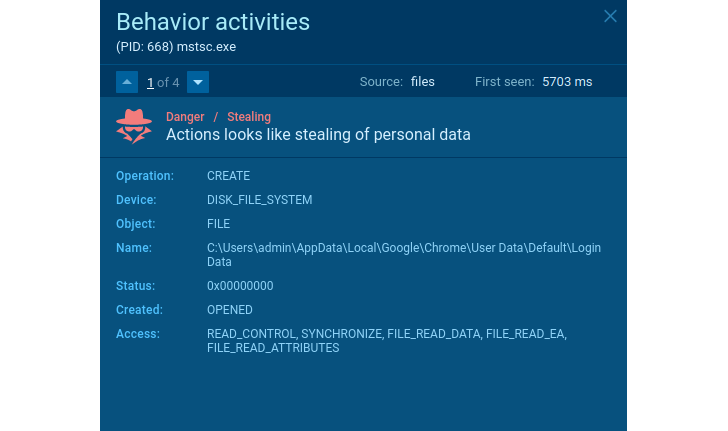
Here is a sample of the stealer[1]. What does it do? Steals
user data, cookies, wallets, etc. How can we detect it? For
example, it reveals itself when the application opens the Chrome
browser’s Login Data file.
 |
| Stealer’s suspicious behavior |
The activity in the network traffic also announces the threat’s
malicious intentions. A legitimate application would never send
credentials, OS characteristics, and other sensitive data collected
locally.
In the case of traffic, malware can be detected by well-known
features. Agent Tesla[2]
in some cases does not encrypt data sent from an infected system
like in this sample[3].
 |
| Suspicious activity in the network traffic |
Use case #2
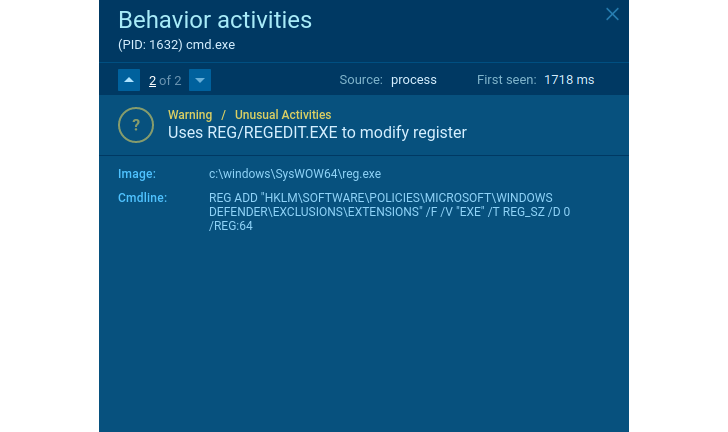
There are not many legitimate programs that need to stop Windows
Defender or other applications to protect the OS or make an
exclusion for itself. Every time you encounter this kind of
behavior – that’s a sign of suspicious activity.
 |
| Suspicious behavior |
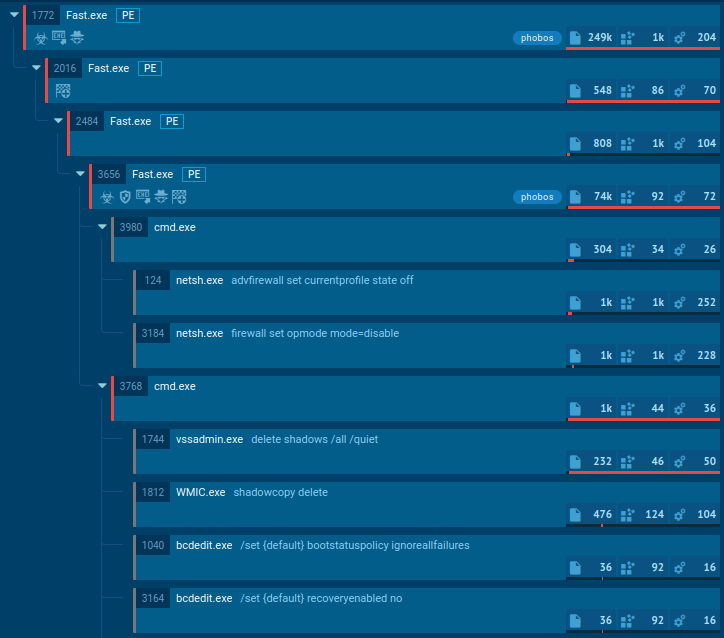
Does the application delete shadow copies? Looks like
ransomware. Does it remove shadow copies and create a TXT/HTML file
with readme text in each directory? It’s one more proof of it.
If the user data is encrypted in the process, we can be sure it
is ransomware. Like what happened in this malicious example[4]. Even if we do not know
the family, we can identify what kind of security threat this
software poses and then act accordingly and take measures to
protect working stations and the organization’s network.
 |
| Ransomware suspicious behavior |
We can draw conclusions about almost all kinds of malware based
on the behavior observed in the sandbox. Try ANY.RUN online interactive
service[5] to monitor it – you can
get the first results immediately and see all malware’s action in
real time. Exactly what we need to catch any suspicious
activities.
Write the “HACKERNEWS2” promo code at
support@any.run using your business email address and get 14
days of ANY.RUN premium subscription for free!
Wrapping up
Cybercriminals can use unknown threats to extort businesses for
money and launch large-scale cyberattacks. Even if the malware
family is not detected – we can always conclude the threat’s
functionality by considering its behavior. Using this data, you can
build information security to prevent any new threats. Behavior
analysis enhances your ability to respond to new and unknown
threats and strengthens your organization’s protection without
additional costs.
Found this article interesting? Follow us on Twitter [6]
and LinkedIn[7]
to read more exclusive content we post.
References
- ^
sample
of the stealer (app.any.run) - ^
Agent
Tesla (any.run) - ^
sample
(app.any.run) - ^
malicious example
(app.any.run) - ^
ANY.RUN
online interactive service (any.run) - ^
Twitter
(twitter.com) - ^
LinkedIn
(www.linkedin.com)
Read more https://thehackernews.com/2023/02/how-to-detect-new-threats-via.html