There is no question that attackers are going after your
sensitive account data. Passwords have long been a target of those
looking to compromise your environment.
Why would an attacker take the long, complicated way if they
have the keys to the front door?
No matter how extensive your security solutions are, protecting
the various systems in your environment, your organization may
likely be an easy target without proper password security. An
especially vulnerable type of password is a breached
password, a.k.a “pwned” password.
What is a breached password? How do you discover breached
passwords in your environment? How can organizations effectively
protect their end-users from using these types of passwords?
The Danger of Compromised Accounts
The IBM Cost of a Data Breach Report[1] 2020 noted compromised
credentials as one of the primary contributors to malicious data
breaches in the report’s key findings. It noted:
“Stolen or compromised credentials were the most expensive
cause of malicious data breaches. One in five companies (19%) that
suffered a malicious data breach was infiltrated due to stolen or
compromised credentials, increasing the average total cost of a
breach for these companies by nearly $1 million to $4.77 million.
Overall, malicious attacks registered as the most frequent root
cause (52% of breaches in the study), versus human error (23%) or
system glitches (25%), at an average total cost of $4.27
million.”
This data helps to underscore the criticality of protecting
account credentials and ensuring the protective measures are in
place to prevent the use of risky and even dangerous passwords in
your organization. A single stolen set of credentials may be all an
attacker needs to compromise your data.
What Are Breached or “pwned” Passwords?
When talking about breached passwords in your environment, are
we saying your organization has been actively breached? No, not
necessarily. However, identifying user accounts in your environment
using passwords that have been breached in other
organizations is extremely important for your
environment’s overall security.
Hackers can access massive databases of breached passwords from
previous data leaks or large scale dumps of account data. Databases
of breached passwords are readily found on the dark web as
cybercriminals post treasure troves of account information for
others to use and exploit. They use these to perform brute force or
password spraying attacks against your organization’s user accounts
and many others.
You may wonder how using breached passwords from a previous data
breach or hack can be effective against your environment. It comes
down to how humans think, no matter which organization is their
employer. Users tend to use the same types of patterns that others
use when choosing passwords. The fact of the matter is a breached
user password in one environment may exist for a different user in
another organization. Using breached password databases, attackers
have easy access to large numbers of passwords to use against any
number of accounts across various organizations.
It is imperative to protect your organization from the use of
previously breached passwords.
If a password becomes breached after being selected as
a user password, it is vital to have visibility of this risk in the
environment and proactively remediate the threat.
How can your organization gain visibility to and protect against
breached user passwords?
Native Tools Are Not Enough
Microsoft Active Directory provides many tools and management
utilities for interacting with end-user accounts and managing
passwords. However, none of the built-in tools provided by
Microsoft Active Directory provide visibility to breached
passwords. IT admins can download free PowerShell tools[2]
to check passwords against small lists of breached passwords.
However, these tools may not be actively updated with the latest
breach information and must be run in an ad-hoc fashion to check
the environment periodically.
Using these free PowerShell tools to scan your environment for
potential breached passwords helps to provide some visibility.
However, at best, these provide a reactive approach and only give
visibility to breached passwords in the environment, but offer no
active protection. These types of tools do not prevent users from
using breached passwords when configuring a password.
Is there a way to avoid breached password use altogether? What
about proactively discovering breached passwords and forcing users
to change passwords that have become compromised?
Specops Breached Password Protection
Specops Password Policy[3]
provides the tools that businesses need to meet the challenge of
breached passwords head-on. A potent component of Specops Password
Policy is the Breached Password Protection. By using Specops
Password Policy, companies can easily augment existing Active
Directory password policies to include proactive breached password
protection.
Key features of Specops Breached Password
Protection[4]:
- Provides a list of breached passwords – Includes a combination
of thousands of different sources of leaked passwords from
well-known sources such as haveibeenpwned.com as well as obscure
breached lists, - Contains several billion breached passwords that are checked in
your environment, - Immediately prevents users from using passwords that are
contained on the breached password list, - With Specops Breached Password Protection Complete, if a user
changes their password to one in the leaked list of passwords, they
are notified by email or SMS, - Their account is also flagged, forcing the user to change the
password the next time they log in.
There are a couple of ways that Specops can retrieve the latest
password list. Using Complete API, the Specops
Arbiters communicates with the Specops API in real-time to ensure
users are not using a password found on the latest breached list
curated by Specops.
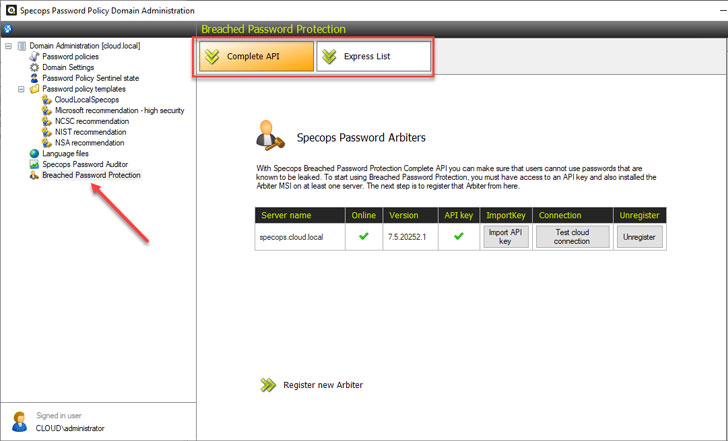 |
| Specops Breached Password Protection with Complete API checks |
IT administrators can also download the latest breached password
list using the Express List option. Specops notes
when new lists are available. Once the newest list is downloaded,
it is checked locally for breached entries found in Active
Directory.
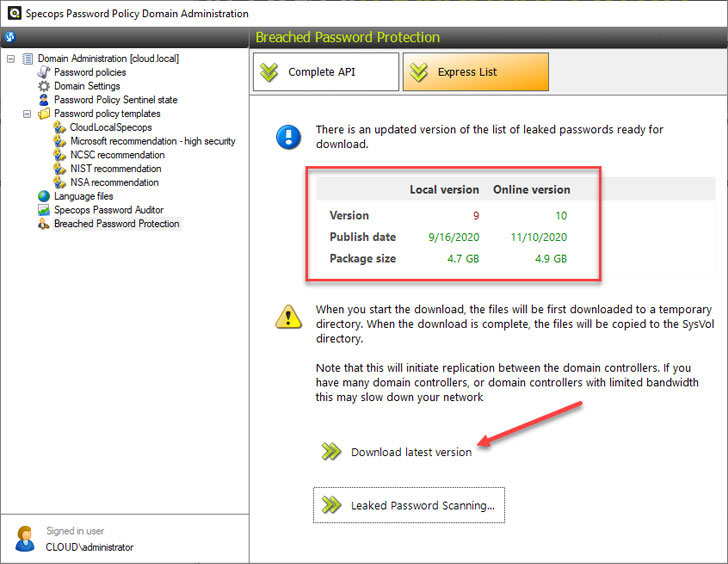 |
| Using the Specops Express List to download the breached password list locally |
Preventing users from using breached passwords
How do you make use of Specops Breached Password Protection to
prevent end-users from using these? Specops Password Policy makes
this easy. In the Specops Password Policy settings, you can
configure the password policy to do the following:
- Prevent users from changing to a leaked password
- Force users to change leaked passwords when the Breached
Password Protection Express list is updated - Notify users when they are forced to change password
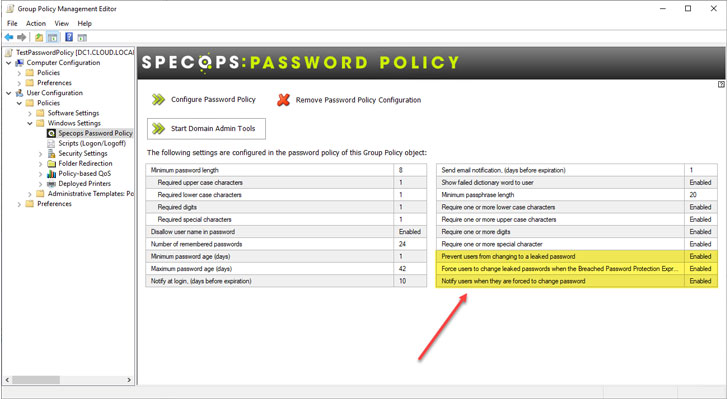 |
| Specops Password Policy with Breached Password Protection |
Specops Password Policy helps transmit the password requirements
to end-users in a much more intuitive way than the native Windows
password change messages end-users typically see.
Below is an example of the message received by a user when
attempting to change their password to one on the breached password
list.
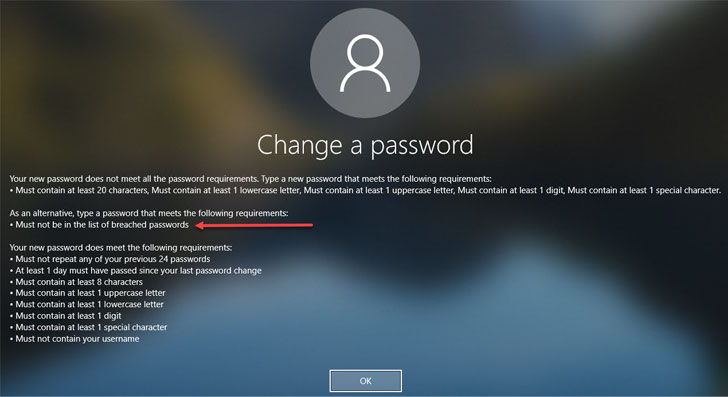 |
| Password change message for a failed password change request due to a breached password |
Conclusion
Protecting your environment from the use of breached passwords
is critical to ensuring user accounts are safe, and
business-critical data is protected. There are no built-in native
Active Directory tools that give visibility to these dangerous user
account passwords. While you can download and use custom PowerShell
scripts to scan your Active Directory environment, these require
manual processes, and the code or lists may be outdated.
Specops Password Policy with Breached Password Protection is a
great solution to proactively protect against the use of breached
passwords in the environment. It seamlessly integrates with your
existing Active Directory password policies configured by Group
Policy Objects (GPOs) and provides real-time protection against
breached passwords.
References
- ^
IBM Cost
of a Data Breach Report (www.ibm.com) - ^
free
PowerShell tools (www.ncsc.gov.uk) - ^
Specops
Password Policy (specopssoft.com) - ^
Specops
Breached Password Protection
(specopssoft.com) - ^
here
(specopssoft.com)