Modern password policies are comprised of many different
elements that contribute to its effectiveness. One of the
components of an effective current password policy makes use of
what is known as a custom dictionary that filters
out certain words that are not allowed as passwords in the
environment.
Using custom dictionaries, organizations can significantly
improve their cybersecurity posture and filter out obvious
passwords that provide poor security for user accounts.
When using password dictionaries in your password policy, there
are many different approaches to consider. First, let’s consider
crafting a custom dictionary for your password policy, including
general guidance on how these are created, configured, and how you
can easily use custom dictionaries in an active directory
environment.
Why customize your dictionary?
Custom dictionaries are born from the need to “think as a hacker
thinks.” Compromised credentials are one of the leading causes of
malicious data breaches across the board. They are also one of the
most expensive to organizations. IBM’s Cost of a Data Breach Report
2020[1], compromised credentials
increased the average total cost of a breach by nearly $1 million
to $4.77 million.
Hackers often use credential-based attacks to compromise weak
passwords, passwords that have been previously breached, common
passwords used in a specific business sector, or common spelling
transformations.
Unfortunately, all of us tend to use passwords that we can
easily remember. In addition, end-users often add common numbers or
symbol patterns to the beginning or end of passwords to get around
password complexity requirements.
Both human nature and the technology tools available allow
easily cracking or guessing weak, standard, or expected passwords.
While attackers have access to large databases of breached and
otherwise common or weak passwords, the “good guys” can implement a
password file in a good way – the custom dictionary.
The custom password dictionary works in favor of securing the
passwords in your environment.
When implemented, the custom dictionary provides a means to
filter the chosen password or end-users in such a way as to
disallow passwords or variations of the passwords contained in the
custom dictionary.
So, aren’t all passwords that meet the Active Directory Password
Policy requirements secure? Not exactly.
While password policy requirements defined by Active Directory
Password Policy are a good starting point, they leave much to be
desired when considering the cracking and other password tools that
cybercriminals are using today.
As an example, a password policy may require that an end-user
meet the following requirements:
- Minimum of 8 characters
- Password must meet complexity requirements (Must contain
uppercase, lowercase, numbers, and non-alphabetic characters such
as symbols)
 |
| A password policy defined in Active Directory Domain Services |
Using the native Active Directory Password Policy settings
above, a user could potentially set passwords such as:
- P@$$w0rd123
- MybusinessName123!
- Letmein1$
The above passwords meet all the criteria defined as part of the
length and complexity requirements.
However, they are weak and easily guess due to different
reasons. As the above examples show, these could be known variants
of common words such as “Password,” related to your specific
business name or industry, or a common phrase contained in a
cracked password database such as “Letmein1$.”
Downloadable custom password dictionaries
You may not want to “reinvent the wheel” when it comes to
gathering passwords to use in a custom dictionary for your password
policy. There are out-of-the-box password dictionaries and password
files that can be freely downloaded as the basis for a custom
password dictionary. An example includes the Have I Been
Pwned password list: Have I Been Pwned:
Pwned Passwords[2].
Companies can also use readily available tools such as
Crunch, available in Kali Linux or installable from your
Linux distribution repository. In Ubuntu, you can install Crunch
using the command:
- sudo apt-get install crunch
It allows creating a wordlist that can be used for brute force
or password strength auditing by SecOps teams in your organization.
In addition, these readily available tools can provide the basis
for creating your own custom password lists in your
environment.
Employing a Password filter .dlls
However, there is more involved than simply creating a password
dictionary file. Organizations that want to implement their own
custom password filter .dll, along with words containing their
business name or industry-specific keywords, must have the
development talent and resources available to create the .dll file
needed for the password filter functionality in Active
Directory.
Microsoft outlines the process of registering and installing a
password filter .dll here: Installing and Registering a Password Filter
DLL – Win32 apps | Microsoft Docs[3].
Custom dictionary solutions in your password policy tools
Is there an easy way to craft a custom dictionary for your
password policy? Specops Password Policy[4]
takes the harder work out of implementing custom dictionaries for
your password policies and allows for the negation of over 2
billion known breached passwords plus any customized terms like
your company name, or location, to be added to a password policy
tool.
High-quality password policy tools like this integrate with your
native Active Directory Password Policies implemented at the Group
Policy level.
With simple checkboxes, the Specops solution allows IT admins to
easily and quickly implement multiple password dictionaries as part
of the password rules configured for their organization.
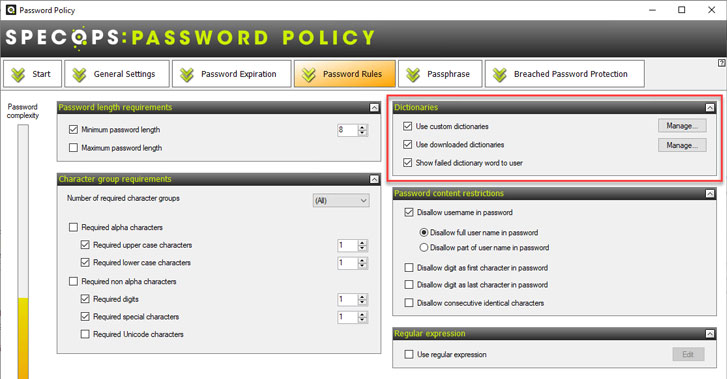 |
| Specops Password Policy dictionary settings |
| Configuring the custom dictionaries setting in Specops Password Policy |
Configuring the Use custom dictionaries allows
importing password files, hash files, or creating new dictionaries
right from the interface.
Under the downloaded dictionaries configuration, admins have
access to readily available password dictionary files that can be
downloaded directly from the Specops Password Policy interface.
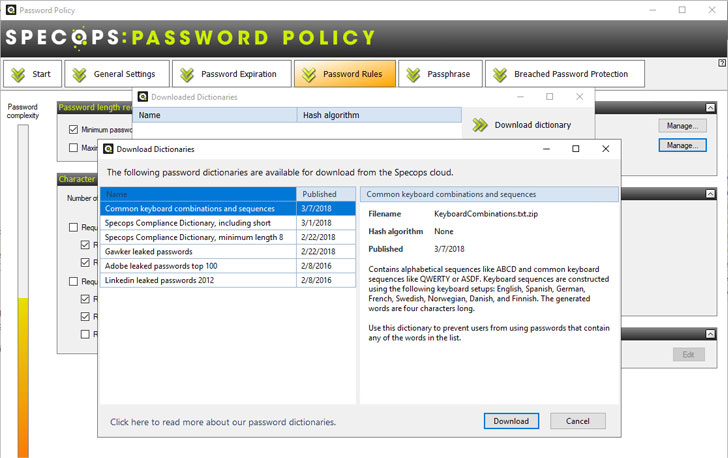 |
| Downloading password dictionary files from the Specops Password Policy interface |
Specops Password Policy makes configuring, implementing, and
maintaining custom dictionary files for your organization’s
password policy easier—with no programming knowledge or expertise
required.
Get started using a custom dictionary in your password
policy
Organizations today must bolster the security of account
passwords to strengthen their overall cybersecurity posture. Using
custom dictionaries as part of their password policies is a great
way to factor in an offensive strategy to your cybersecurity
efforts.
However, implementing a custom password filter .dll in the
environment requires developing the custom password filter .dll
file required by Active Directory. This development can present
roadblocks to businesses implementing custom dictionaries like
cost, maintenance, and efficiency blockers.
Specops Password Policy allows implementing multiple custom
dictionary files with just a few clicks, eliminating the complexity
and security issues involved with implementing this correctly.
Learn more about Specops Password Policy or start your free
trial[5].
References
- ^
Cost of
a Data Breach Report 2020 (www.ibm.com) - ^
Have I
Been Pwned: Pwned Passwords
(haveibeenpwned.com) - ^
Installing and Registering a Password
Filter DLL – Win32 apps | Microsoft Docs
(docs.microsoft.com) - ^
Specops
Password Policy (specopssoft.com) - ^
Specops
Password Policy or start your free trial
(specopssoft.com)