Even as Microsoft expanded patches[1]
for the so-called PrintNightmare vulnerability for Windows 10
version 1607, Windows Server 2012, and Windows Server 2016, it has
come to light that the fix for the remote code execution exploit in
the Windows Print Spooler service can be bypassed in certain
scenarios, effectively defeating the security protections and
permitting attackers to run arbitrary code on infected systems.
On Tuesday, the Windows maker issued an emergency out-of-band update[2] to address CVE-2021-34527[3]
(CVSS score: 8.8) after the flaw was accidentally disclosed by
researchers from Hong Kong-based cybersecurity firm Sangfor late
last month, at which point it emerged that the issue was different
from another bug — tracked as CVE-2021-1675[4]
— that was patched by Microsoft on June 8.
“Several days ago, two security vulnerabilities were found in
Microsoft Windows’ existing printing mechanism,” Yaniv Balmas, head
of cyber research at Check Point, told The Hacker News. “These
vulnerabilities enable a malicious attacker to gain full control on
all windows environments that enable printing.”
“These are mostly working stations but, at times, this relates
to entire servers that are an integral part of very popular
organizational networks. Microsoft classified these vulnerabilities
as critical, but when they were published they were able to fix
only one of them, leaving the door open for explorations of the
second vulnerability,” Balmas added.
PrintNightmare stems from bugs in the Windows Print Spooler[5]
service, which manages the printing process inside local networks.
The main concern with the threat is that non-administrator users
had the ability to load their own printer drivers. This has now
been rectified.
“After installing this [update] and later Windows updates, users
who are not administrators can only install signed print drivers to
a print server,” Microsoft said[6], detailing the
improvements made to mitigate the risks associated with the flaw.
“Administrator credentials will be required to install unsigned
printer drivers on a printer server going forward.”
Post the update’s release, CERT/CC vulnerability analyst Will
Dormann cautioned that the patch “only appears to address the
Remote Code Execution (RCE via SMB and RPC) variants of the
PrintNightmare, and not the Local Privilege Escalation (LPE)
variant,” thereby allowing attackers to abuse the latter to gain
SYSTEM privileges on vulnerable systems.
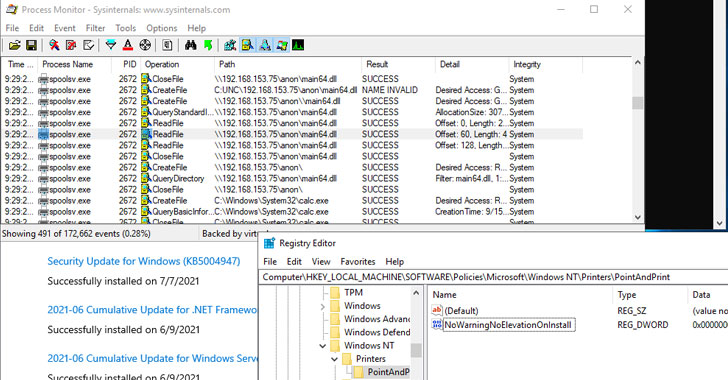
Now, further testing of the update has revealed that exploits
targeting the flaw could bypass[7]
the remediations[8]
entirely to gain both local privilege escalation and remote code
execution. To achieve this, however, a Windows policy[9]
called ‘Point and Print Restrictions[10]‘ must be enabled
(Computer Configuration\Policies\Administrative Templates\Printers:
Point and Print Restrictions), using which malicious printer
drivers could be potentially installed.
“Note that the Microsoft update for CVE-2021-34527 does not
effectively prevent exploitation of systems where the Point and
Print NoWarningNoElevationOnInstall is set to 1,” Dormann said[11] Wednesday. Microsoft,
for its part, explains in its advisory[12] that “Point and Print
is not directly related to this vulnerability, but the technology
weakens the local security posture in such a way that exploitation
will be possible.”
While Microsoft has recommended the nuclear option of stopping
and disabling the Print Spooler service, an alternative workaround[13] is to enable security
prompts for Point and Print, and limit printer driver installation
privileges to administrators alone by configuring the
“RestrictDriverInstallationToAdministrators” registry value to
prevent regular users from installing printer drivers on a print
server.
References
- ^
expanded
patches (docs.microsoft.com) - ^
emergency out-of-band update
(thehackernews.com) - ^
CVE-2021-34527
(thehackernews.com) - ^
CVE-2021-1675
(thehackernews.com) - ^
Print
Spooler (docs.microsoft.com) - ^
said
(support.microsoft.com) - ^
bypass
(twitter.com) - ^
remediations
(twitter.com) - ^
Windows
policy (docs.microsoft.com) - ^
Point
and Print Restrictions (docs.microsoft.com) - ^
said
(www.kb.cert.org) - ^
explains in its advisory
(msrc.microsoft.com) - ^
alternative workaround
(support.microsoft.com)