Apple on Monday announced a number of privacy and security-centric
features[1] to its upcoming versions
of iOS[2]
and macOS[3]
at its all-online Worldwide Developers Conference.
Here is a quick look at some of the big-ticket changes that are
expected to debut later this fall:
1 — Just Patches, Not Entire OS Update Every
Time: As rumored before[4], users now have a choice
between two software update versions in the Settings app. Users can
either opt to update to the latest version of iOS 15 for all the
latest features and most complete set of security updates or
continue on iOS 14 and still get important security updates until
they are ready to migrate to the next major version.
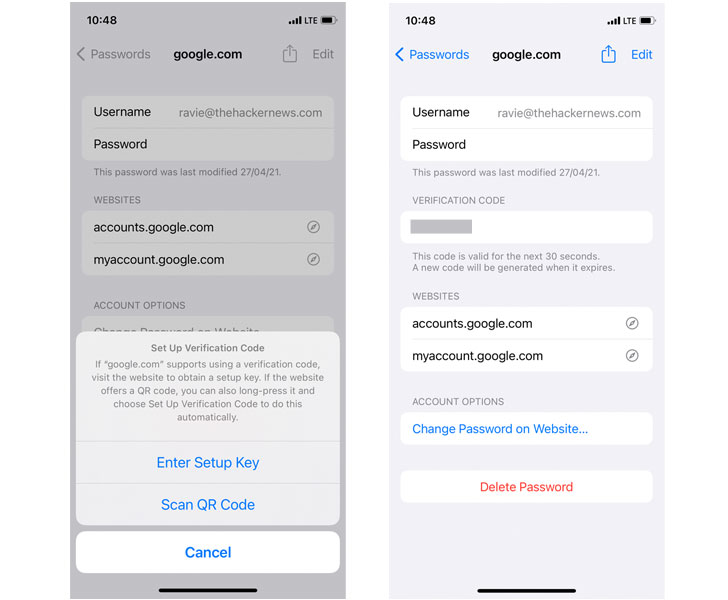
2 — Built-in 2-Factor
Authenticator: The new versions of iOS and macOS come
with new options that allow users to generate two-factor
authentication codes for each of the online accounts saved to
iCloud Keychain (Settings > Passwords) without the need for
downloading additional apps like Google Authenticator or Authy.
3 — Private
Relay: To come as part of Apple iCloud+ for existing
iCloud subscribers at no extra cost, Private Relay is akin to a VPN
in that it routes users’ internet traffic on Safari browser through
two relays in order to mask who’s browsing and where that data is
coming from.
Unlike traditional VPNs who are still privy to users’ real IP
addresses and the websites they visit, iCloud Private Relay employs
a dual-hop architecture that effectively shields IP address,
location, and browsing activity that can be used to create a
detailed profile.
The feature ensures that traffic leaving the device is encrypted
before forwarding the requests through two internet relays, thus
creating a simplified version of Tor, which employs at least a
minimum of three relays to achieve anonymity.
“All the user’s requests are then sent through two separate
internet relays,” Apple says. “The first assigns the user an
anonymous IP address that maps to their region but not their actual
location. The second decrypts the web address they want to visit
and forwards them to their destination. This separation of
information protects the user’s privacy because no single entity
can identify both who a user is and which sites they visit.”
The feature, however, will not be available[5]
in China, Belarus, Colombia, Egypt, Kazakhstan, Saudi Arabia, South
Africa, Turkmenistan, Uganda, and the Philippines due to regulatory
reasons.
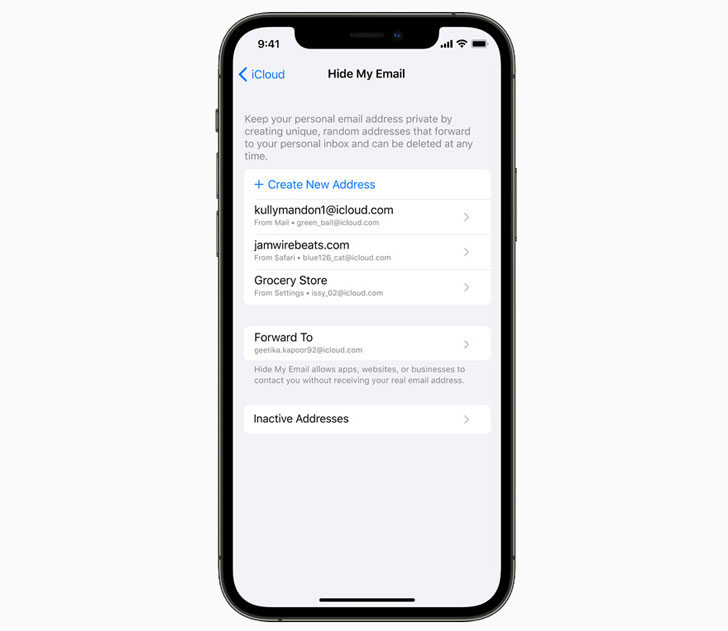
4 — Hide My
Email: Also included as part of the iCloud+ bundle
and built into Safari and Mail apps, the feature enables the
ability to generate one-off burner emails when signing up for a
service on the web without having to give away the actual email
address. Apple already offers a similar feature through Sign In
With Apple.
5 — Mail Privacy
Protection: Apple is taking on the invisible tracking
pixels embedded in emails with its new Mail Privacy Protection
feature. A tracking pixel — typically a single-pixel image — is how
marketers know whether an email gets opened. When an email
containing an invisible pixel is opened, the image connects to the
sender’s server, while also funneling back sensitive data like
users’ IP address, device location, and the email client used.
Should users choose to turn the feature on, “it hides your IP
address so senders can’t link it to your other online activity or
determine your location. And it prevents senders from seeing if
you’ve opened their email.”
6 — Improved Intelligent
Tracking Prevention: Intelligent Tracking Prevention,
which is Apple’s privacy feature aimed at reducing
fingerprinting and cross-site tracking[6]
on Safari, is getting stronger protections by also hiding the
user’s IP address from trackers, thereby curtailing their ability
to utilize the user’s IP address as a unique identifier to connect
their activity across websites and build a profile about them.
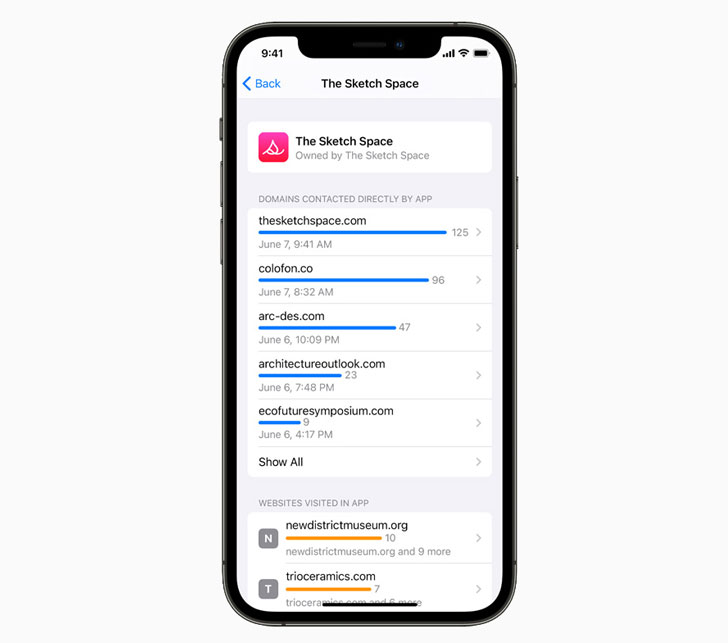
7 — App Privacy
Report: Similar to the new Privacy dashboard[7]
Google introduced in Android 12, this new section in Settings lets
users check how often apps have accessed sensitive data such as
location, photos, camera, microphone, and contacts during the last
seven days, in addition to highlighting “which apps have contacted
other domains and how recently they have contacted them.” App
Privacy Report is set to arrive as part of a future software update
to iOS 15, iPadOS 15, and watchOS 8 later this year.
8 — On-Device Speech
Processing: Not only is Siri now capable of handling
offline requests, but the audio requests are also now fully
processed on the device itself, with the virtual voice assistant
putting “on-device personalization” to use in order to tailor
content based on device usage patterns. “This addresses one of the
biggest privacy concerns for voice assistants, which is unwanted
audio recording,” Apple notes.
9 — Microphone indicator
in macOS: Starting with macOS Monterey, users can
also see which apps have access to their Mac’s microphone in the
Control Center. A new orange-color recording indicator is displayed
whenever an app has access to the microphone, mirroring similar
changes[8] Apple introduced in iOS
14.
10 — Find
My: While Apple didn’t elaborate on the
implementation specifics, Find My[9]
— the company’s Bluetooth-powered location tracking system — is
gaining two new features that allows device owners to locate their
iPhones, iPads, or Airtags even when the devices have been powered
off or erased.
It’s no surprise that Apple has used privacy as a crucial weapon
to differentiate itself from its data-hungry rivals, projecting
itself as a privacy-sensitive company that treats privacy as a
“fundamental human right.” The newly announced features make it
clear that Apple is building a scaling a business model that
revolves around privacy.
By once again taking aim at the digital advertising industry and
baking privacy into its design, Apple’s privacy infrastructure
allows it to expand into new markets as well as launch new
services, while also strengthening its position as a gatekeeper, a
move that could further put it at odds with Facebook.
References
- ^
privacy
and security-centric features
(www.apple.com) - ^
iOS
(www.apple.com) - ^
macOS
(www.apple.com) - ^
rumored
before (thehackernews.com) - ^
will not
be available (www.reuters.com) - ^
reducing
fingerprinting and cross-site tracking
(webkit.org) - ^
Privacy
dashboard
(android-developers.googleblog.com) - ^
similar
changes (support.apple.com) - ^
Find
My (thehackernews.com)