
No, we’re not talking about ‘coronavirus,’ the current global
pandemic because of which Apple—for the very first time in
history—organized its Worldwide Developer Conference (WWDC[1]) virtually.
Here we’re talking about a world in which we are all connected
and constantly sharing data, also known as the new oil, with
something called “privacy” for which we still have to fight on
several fronts together.
During WWDC 2020 on Monday, the world’s most valuable company
announced the next versions of its operating systems — iOS 14 for iPhones,
iPadOS 14 for iPads, watchOS 7 for Apple Watches, and macOS Big Sur
for MacBooks — with new features and enhancements.
[2][3]
What’s important is that the company also highlighted a few new
security and privacy features that have been added to the upcoming
iOS 14 and macOS Big Sur systems, categorically aiming to help
users:
- better control which apps installed on their devices can access
their data, - identify shady apps that don’t respect privacy, and share data
with others without any disclosure, - spot malicious apps that secretly spy on users’ data and
activities.
“Privacy is a fundamental human right and at the core of everything
we do. That’s why with iOS 14, we’re giving you more control over
the data you share and more transparency into how it’s used,” the
company says in a statement.
New Security and Privacy Features in macOS and iOS
Below we have summarized some of the new important privacy and
security features that are really worth knowing:
1.) Not Every App Can Access Your Precise Geo location

your location, but now the latest iOS version will also allow you
to share an approximate location with apps you are using instead of
giving them access to your precise geolocation coordinates when
granting any app location access.
2.) An Indicator to Spot if Microphone/Camera is Recording
iPhone users will now see a yellow dot indicator in the status bar
whenever their microphone or camera is recording.

camera recently.
3.) Upgrade App Account to “Sign-in with Apple”
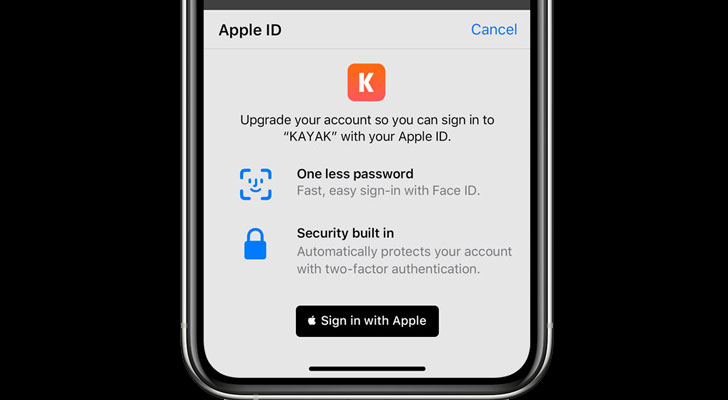
accounts to Sign in with Apple so users can enjoy improved Privacy,
security, and ease of use without setting up a new account.
4.) Limited Photos Library Access for Selected App
With iOS 14, you do not need to share your entire photo library
with apps with whom you want to share a few photos.
You can now choose to share only selected items with an app that
asks access to your photos, or granting access is essential to use
a related functionality.
5.) Safari Browser Added Password Monitoring and Privacy
Report
Apple added two new security features to its Safari web browser for
iOS and macOS, one of which aims to help users learn if they are
using a compromised password for any online account.
may have been involved in a data breach. Using advanced
cryptographic techniques, Safari periodically checks a derivation
of your passwords against an updated list of compromised
credentials. If a breach is discovered, Safari helps you upgrade
your existing passwords. All this is done without revealing your
password information to anyone — including Apple,” the company
said.
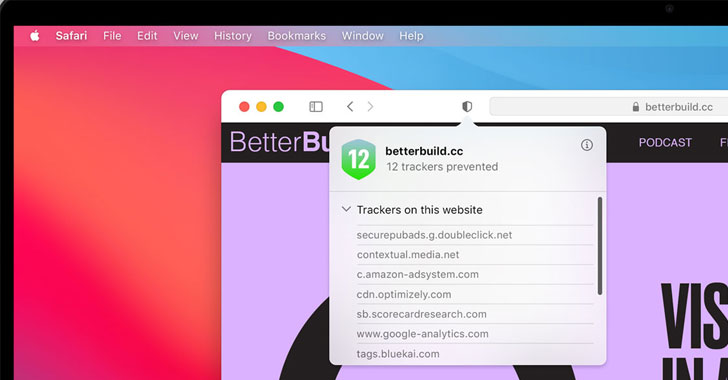
Whereas the second feature in Safari uses Intelligent Tracking
Prevention to identify and prevent trackers from profiling or
following you across the web.
Besides this, the system also generates a weekly Privacy Report,
showing users how Safari protects their browsing across all the
websites they visit.
6.) Cross-App Tracking: Control and Transparency
To make tracking transparent and under the user’s control, Apple
now requires app developers to get users’ consent before tracking
them across third-party applications and websites.
This means now you can choose which apps have permission to
track you.
You can see which apps you have given permission to track in
settings, letting you change your preferences accordingly.
7.) Privacy Information on the App Store
Apple now also requires developers to display a summary of the
privacy practices of their apps on their pages in the App Store,
which will help users review it before downloading.
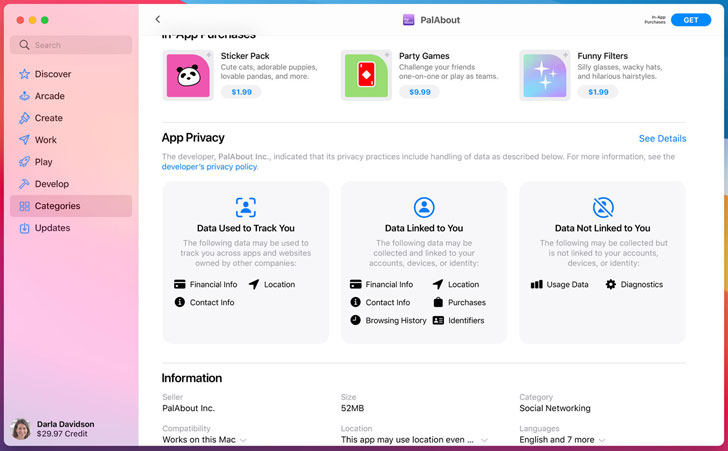
collected by the developer, and used to track you across companies
in a simple, easy-to-read format.
8.) Bye, Bye, Intel! Apple to Use ARM-based Processors in Mac
Devices
Besides announcing new features and improvements for iOS and macOS,
Apple also made a big announcement at WWDC 2020 — the company is
officially switching from Intel processors to its in-house “Apple
Silicon” processors.

from over a decade, Apple is eager to bring Apple-designed silicon
for the Mac, which will maximize the performance of the device
while also being energy efficient.
“With its powerful features and industry-leading performance,
Apple silicon will make the Mac stronger and more capable than
ever,” said Apple CEO Tim Cook. “I’ve never been more excited about
the future of the Mac.”
The company plans to ship the first Mac with Apple silicon by
the end of this year and complete the transition in about two
years.
To help developers get started with Apple silicon, Apple is
launching the Universal App Quick Start Program, which provides
access to documentation, forums support, beta versions of macOS Big
Sur and Xcode 12, and the limited use of a Developer Transition Kit
(DTK), a Mac development system based on Apple’s A12Z Bionic System
on a Chip (SoC).
Read more http://feedproxy.google.com/~r/TheHackersNews/~3/omItuPCNQMw/ios14-macos-big-sur-privacy.html