access location service “can” continually collect your real-time
location secretly, even in the background when you do not use them.
Do you know? — Installing the Facebook app on your Android and
iOS smartphones automatically gives the social media company your
rightful consent to collect the history of your precise
location.
If you are not aware, there is a setting called “Location
History” in your Facebook app that comes enabled by default,
allowing the company to track your every movement even when you are
not using the social media app.
So, every time you turn ON location service/GPS setting on your
smartphone, let’s say for using Uber app or Google Maps, Facebook
starts tracking your location.
Users can manually turn Facebook’s Location History option OFF
from the app settings to completely prevent Facebook from
collecting your location data, even when the app is in use.
However, unfortunately, disabling Location History would also
break some Facebook features that rely on location data like
checking into a nearby location, tagging locations in an uploaded
photo or while using Nearby Friends, a feature that lets friends
share their locations with each other.
over such situations at device level where users don’t want to
completely stop an app from using location, allowing them to choose
if an app can also access location data in the background or not.
However, people using Facebook on Android have an all-or-nothing
option when it comes to location sharing, which means either they
have to grant Facebook full access to their location data or
completely prevent the social network from seeing your location at
all, without any option for accessing your location data only when
the app is open.
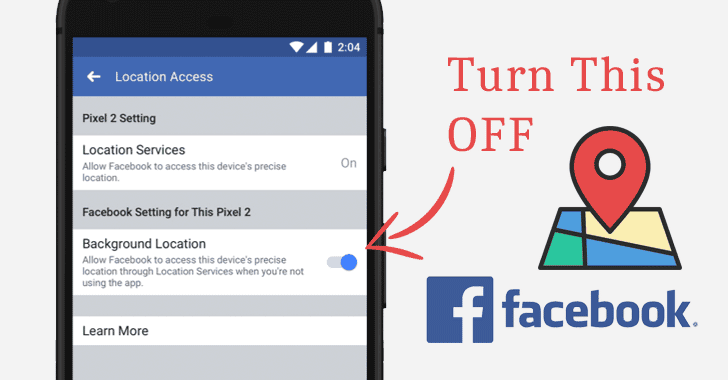
How to Stop Facebook From Tracking You When Not in Use
Facebook has finally changed this behavior by introducing a new
privacy setting
to its Android app, giving users more explicit, granular control
over background collection of their location data.
Here’s how you can prevent Facebook from tracking your location
when the app is not in use:
- Open the Facebook app on your Android smartphone
- Go to the Settings menu on the top right corner (looks like
this ☰) - Tap on Settings & Privacy
- Choose Privacy Shortcuts
- Select Manage your location settings
- Now, toggle “Background Location” to OFF
If you enable this setting, two things will happen—”you would share
your location when you weren’t using the app, and you would allow
Facebook to store a history of your precise locations.”
“We’re not making any changes to the choices you’ve previously made
nor are we collecting any new information as a result of this
update,” Facebook’s post reads.
“For people who previously chose to turn their Location History
setting ‘on,’ the new background location setting is ‘on.’ For
people who had turned Location History ‘off’ – or never turned it
on in the first place – the new background location setting is
‘off.'”
whether or not to share their location when they are not using the
social media app.
iOS users need not worry about such features, as Apple already
offers iPhone users an option to block an app from using their
location in the background when the app is not open.
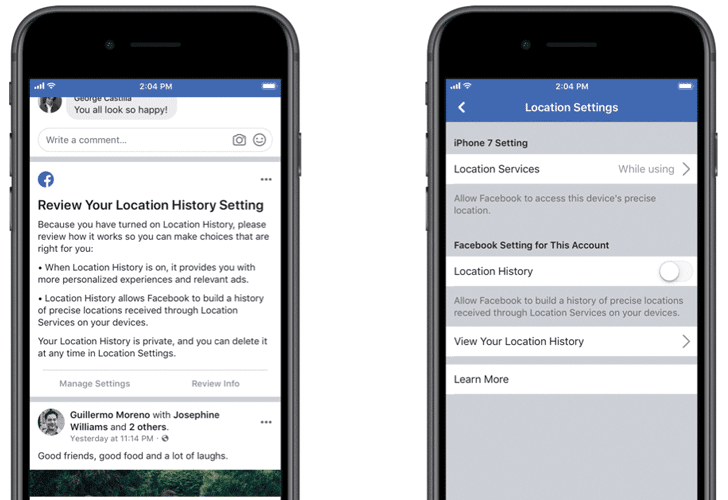
If you are an iPhone user and have not already stop Facebook—or
any other app—from tracking your location in the background, you
can follow these simple steps:
- Go to Settings
- Select Privacy
- Choose “Location Services”
- If you want to completely stop all apps from tracking you, turn
Location Services off. If you want to limit this setting depending
on every app, tap each app and choose “Never” or “While
Using.”
Make sure apps that don’t require your location, like most games,
photo sharing apps and editors, are set to “Never.”
Meanwhile, Facebook is also sending out alerts to both Android
and iOS users, asking them to review their location settings.
References
- ^
privacy setting
(newsroom.fb.com)
Read more http://feedproxy.google.com/~r/TheHackersNews/~3/K_P95Pk2kbA/facebook-location-tracking.html