installed on your Android device, you are advised to uninstall it
immediately.
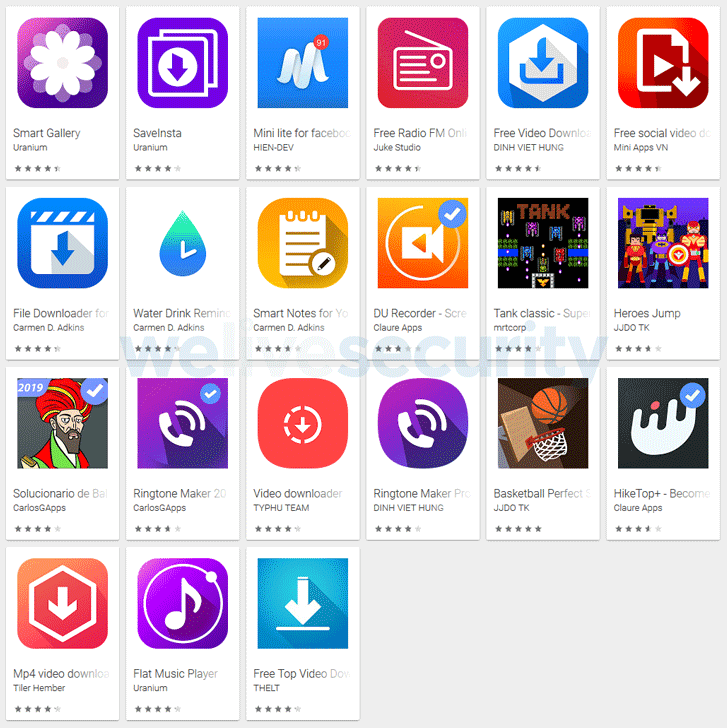
Cybersecurity researchers have identified 42 apps on the Google
Play Store with a total of more than 8 million downloads, which
were initially distributed as legitimate applications but later
updated to maliciously display full-screen advertisements to their
users.
Discovered by ESET security researcher Lukas Stefanko, these
adware Android applications were developed by a Vietnamese
university student, who easily got tracked likely because he never
bothered to hide his identity.
The publicly available registration details of a domain associated
with the adware apps helped find the identity of the rogue
developer, including his real name, address, and phone number,
which eventually led the researcher to his personal accounts on
Facebook, GitHub, and YouTube.
“Seeing that the developer did not take any measures to protect his
identity, it seems likely that his intentions weren’t dishonest at
first,” Stefanko said in a blog
post[1] published today.
“At some point in his Google Play career, he apparently decided to
increase his ad revenue by implementing adware functionality in his
apps’ code.”
promised, like Radio FM, video downloader, or games, it is quite
difficult for most users to spot rogue apps or find anything
suspicious.
Adware Tricks for Stealth and Resilience
Dubbed “Ashas” adware family, the malicious component
connects to a remote command-and-control server operated by the
developer and automatically sends basic information about the
Android device with one of the adware apps installed.
responsible for displaying ads as per the attacker’s choice and
applying a number of tricks for stealth and resilience, some of
which are mentioned below.
In order to hide its malicious functionality from the Google
Play security mechanism, the apps first check for the IP address of
the infected device, and if it falls within the range of known IP
addresses for Google servers, the app will not trigger the adware
payload.
To prevent users from immediately associating the unwanted ads
with his app, the developer also added functionality to set a
custom delay between displaying ads and the installation of the
app.
menu and create a shortcut in an attempt to prevent uninstallation.
“If a typical user tries to get rid of the malicious app, chances
are that only the shortcut ends up getting removed. The app then
continues to run in the background without the user’s knowledge,”
Stefanko said.
button to check which app is serving ads, the adware displays
Facebook or Google icon to look legitimate and avoid suspicion,
tricking users into believing the ads are being displayed by a
legitimate service.
Though Stefanko did not talk much about the kind of
advertisements this adware serves to the infected users, adware
typically bombards infected devices with advertisements, mostly
leading to scam, malicious, and phishing websites.
Stefanko reported the Google security team of his findings, and
the company removed the apps in question from its Play Store
platform.
However, if you have downloaded any of the above-listed rogue
apps on your Android device, immediately remove it by going into
your device settings.
Apple iOS users are also advised to check their iPhones for
these apps, as the malicious developer also has apps on Apple’s App
Store. However, as for now, none of them contain any adware
functionality.