Jan 27, 2023The Hacker News

Orcus[1]
is a Remote Access Trojan with some distinctive characteristics.
The RAT allows attackers to create plugins and offers a robust core
feature set that makes it quite a dangerous malicious program in
its class.
RAT is quite a stable type that always makes it to the top.
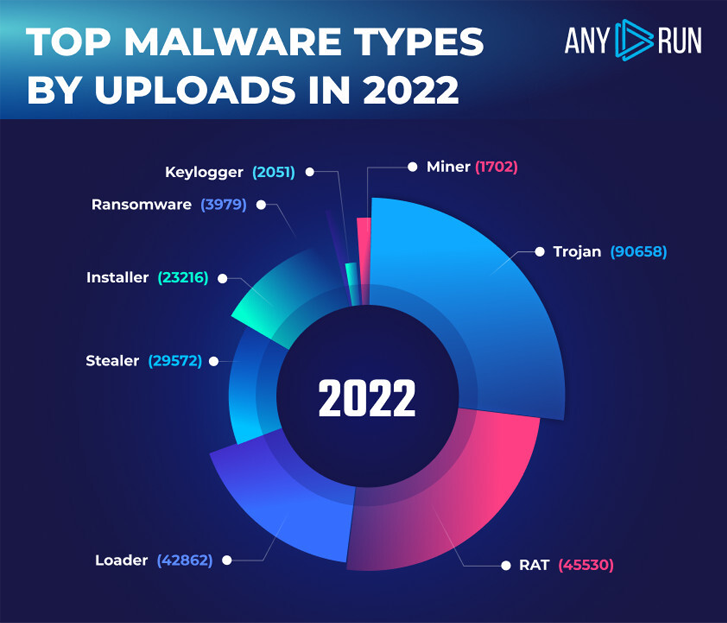 |
| ANY.RUN’s top malware types in 2022 |
That’s why you’ll definitely come across this type in your
practice, and the Orcus family specifically. To simplify your
analysis, we have collected 3 lifehacks you should take advantage
of. Here we go.
What is Orcus RAT?
Definition. Orcus RAT is a type of malicious
software program that enables remote access and control of
computers and networks. It is a type of Remote Access Trojan (RAT)
that has been used by attackers to gain access to and control
computers and networks.
Capabilities. Once downloaded onto a computer
or network, it begins to execute its malicious code, allowing the
attacker to gain access and control. It is capable of stealing
data, conducting surveillance, and launching DDoS attacks.
Distribution. The malware is usually spread via
malicious emails, websites, and social engineering attacks. It is
also often bundled with other malicious software programs, such as
Trojans, worms, and viruses.
Lifehacks for Orcus RAT malware analysis
The malware is designed to be difficult to detect, as it often
uses sophisticated encryption and obfuscation techniques to prevent
detection. And if you need to get to the core of Orcus, the RAT
configuration has all the data you need.
And there are several lifehacks that you should pay attention to
while performing the analysis of Orcus RAT.
Today we investigate the .NET sample that you can download for
free in ANY.RUN database[2]:
SHA-256:
258a75a4dee6287ea6d15ad7b50b35ac478c156f0d8ebfc978c6bbbbc4d441e1
1 — Get to know Orcus classes
You should start with checking malware classes where you can get
the hidden program’s characteristics. A bunch of data that classes
contain is exactly what will be helpful for your research.
An Orcus.Config namespace has these classes:
- Consts: Orcus’s files and directories data,
e.g. the path to the file where user keystrokes are saved or to the
directory where the plugins used by a sample reside. - Settings: contain wrapper methods for decrypting the
malware configuration and its plugins. - SettingsData: is a static class only with the encrypted
malware and plugin configuration fields.
2 — Find Orcus RAT resources
Once you dive into the Settings class, you can
notice the GetDecryptedSettings method. Later, it
calls out the AES.Decrypt. And it looks like your
job is done and the malware configuration is finally found. But
hold on – the assembly doesn’t contain an
Orcus.Shared.Encryption namespace.
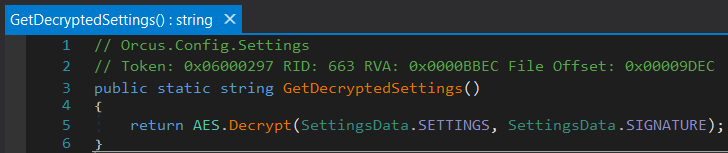 |
| GetDecryptedSettings method |
Orcus RAT stores additional assemblies inside the malware
resources using a ‘deflate’ algorithm. You can go to the resources
to find the necessary assembly. Unpacking them will let you reveal
the decryption algorithm that an Orcus sample uses. That brings one
more lifehack for today.
3 — Decrypt data
Our treasure hunt goes on, as configuration data is
encrypted.
Orcus RAT encrypts data using the AES algorithm and then encodes
the encrypted data using Base64.
How to decrypt data:
- generate the key from a given string using Microsoft’s PBKDF1
implementation - decode the data from Base64
- apply the generated key to decrypt the data via the AES256
algorithm in CBC mode.
As a result of decoding, we get the malware configuration in the
XML format. And all Orcus secrets are in your hands now.
4 — Get all at once in a malware sandbox
Malware analysis is not a piece of cake, it definitely takes
time and effort to crack a sample. That’s why it’s always great to
cut the line: get all at once and in a short time. The answer is
simple – use a malware sandbox.
ANY.RUN malware sandbox[3]
automatically retrieves the Orcus RAT configuration. It’s a much
easier way to analyze a malicious object. Try it now – the service
has already retrieved all data from this Orcus sample[4], so you can enjoy smooth
research.
⚡ Write the “hackernews1” promo code at support@any.run
using your business email address and get 14 days of ANY.RUN
premium subscription for free!
Conclusion
The Orcus RAT masquerades as a legitimate remote administration
tool, although it is clear from its features and functionality that
it is not and was never intended to be. Analysis of the malware
helps to get information for the cybersecurity of your company.
Protect your business from this threat – implement a
comprehensive security strategy, train employees to recognize and
avoid malicious emails and websites, and use reliable anti-virus
and ANY.RUN malware sandbox to detect and analyze Orcus.
Found this article interesting? Follow us on Twitter [5]
and LinkedIn[6]
to read more exclusive content we post.
References
- ^
Orcus (any.run) - ^
ANY.RUN
database (app.any.run) - ^
ANY.RUN
malware sandbox (any.run) - ^
Orcus
sample (app.any.run) - ^
Twitter
(twitter.com) - ^
LinkedIn
(www.linkedin.com)
Read more https://thehackernews.com/2023/01/3-lifehacks-while-analyzing-orcus-rat.html