
managers and photography apps installed on your Android phone—even
if downloaded from the official Google Store store—you have been
hacked and being tracked.
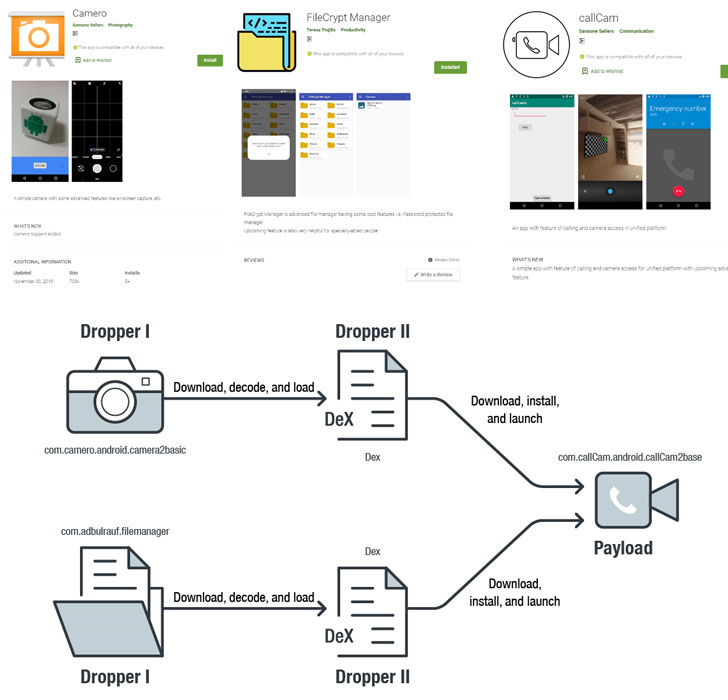
These newly detected malicious Android apps are Camero,
FileCrypt, and callCam that are believed to be linked
to Sidewinder APT, a sophisticated hacking group specialized in
cyber espionage attacks.
According to cybersecurity researchers at Trend Micro, these
apps were exploiting a critical use-after-free vulnerability in
Android[1] at least since March
last year—that’s 7 months before the same flaw was first
discovered as zero-day when Google researcher analysed a separate
attack developed by Israeli surveillance vendor NSO Group.
“We speculate that these apps have been active since March 2019
based on the certificate information on one of the apps,” the
researchers said.
[2]
Tracked as CVE-2019-2215[3], the vulnerability is a
local privilege escalation issue that allows full root compromise
of a vulnerable device and could also be exploited remotely when
combined with a separate browser rendering flaw.
This Spyware Secretly Root Your Android Phone
According to Trend Micro, FileCrypt Manager and Camero act as
droppers and connect to a remote command and control server to
download a DEX file, which then downloads the callCam app and tries
to install it by exploiting privilege escalation vulnerabilities or
abusing accessibility feature.
To evade detection, it uses many techniques such as obfuscation,
data encryption, and invoking dynamic code,” the researchers said.
Once installed, the callCam hides its icon from the menu,
collects the following information from the compromised device, and
sends it back to the attacker’s C&C server in the
background:
- Location
- Battery status
- Files on device
- Installed app list
- Device information
- Sensor information
- Camera information
- Screenshot
- Account
- Wifi information
- Data from WeChat, Outlook, Twitter, Yahoo Mail, Facebook,
Gmail, and Chrome.
Besides CVE-2019-2215, the malicious apps also try to exploit a
separate vulnerability in the MediaTek-SU driver to get root
privilege and stay persistent on a wide range of Android
handsets.
Based on the overlap in location of the command and control
servers, researchers have attributed the campaign to SideWinder,
believed to be an Indian espionage group that historically targeted
organizations linked to the Pakistani Military.
How to Protect Android Phone from Malware
Google has now removed all the above-mentioned malicious apps from
Play Store, but since Google systems are not sufficient to keep bad
apps out of the official store, you have to be very careful about
downloading apps.
To check if your device is being infected with this malware, go
to Android system settings → App Manager, look for listed package
names and uninstall it.
To protect your device against most cyber threats, you are
recommended to take simple but effective precautions like:
- keep devices and apps up-to-date,
- avoid app downloads from unfamiliar sources,
- always pay close attention to the permissions requested by
apps, - frequently back up data, and
- install a good antivirus app that protects against this malware
and similar threats.
To prevent yourself from being targeted by such apps, always beware
of fishy apps, even when downloading from Google Play Store, and
try to stick to the trusted brands only. In addition, always look
at the app reviews left by other users who have downloaded the app,
and also verify app permissions before installing any app and grant
only those permissions that are relevant for the app’s
purpose.
References
- ^
vulnerability in Android
(thehackernews.com) - ^
said
(blog.trendmicro.com) - ^
CVE-2019-2215
(thehackernews.com)
Read more http://feedproxy.google.com/~r/TheHackersNews/~3/gXdTFvgA_as/android-zero-day-malware-apps.html