fake or legit to log in?
By checking if the URL is correct?
By checking if the website address is not a homograph?
By checking if the site is using HTTPS?
Or using software or browser extensions that detect phishing
domains?
Well, if you, like most Internet users, are also relying on
above basic security practices to spot if that
“Facebook.com” or “Google.com” you have been served
with is fake or not, you may still fall victim to a newly
discovered creative phishing attack and end up in giving away your
passwords to hackers.
Antoine Vincent
Jebara[1], co-founder and CEO of
password managing software Myki[2], told The Hacker News
that his team recently spotted[3] a new phishing attack
campaign “that even the most vigilant users could fall for.”
Vincent found that cybercriminals are distributing links to
blogs and services that prompt visitors to first “login using
Facebook account” to read an exclusive article or purchase a
discounted product.
That’s fine. Login with Facebook or any other social media
service is a safe method and is being used by a large number of
websites to make it easier for visitors to sign up for a
third-party service quickly.
Generally, when you click “log in with Facebook” button
available on any website, you either get redirected to facebook.com
or are served with facebook.com in a new pop-up browser
window, asking you to enter your Facebook credentials to
authenticate using OAuth and permitting the service to access your
profile’s necessary information.
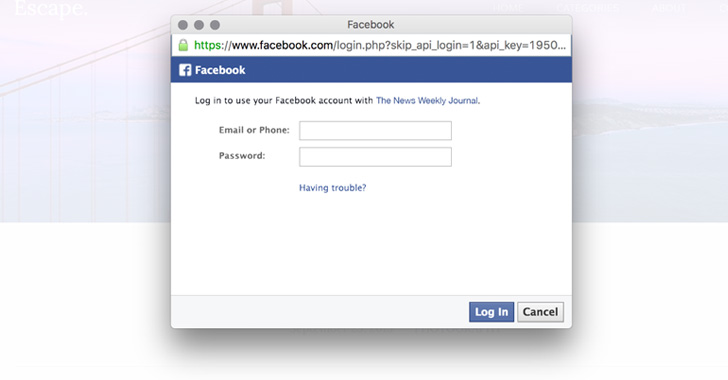
However, Vincent discovered that the malicious blogs and online
services are serving users with a very realistic-looking fake
Facebook login prompt after they click the login button which has
been designed to capture users’ entered credentials, just like any
phishing site.
As shown in the video demonstration Vincent shared with The
Hacker News, the fake pop-up login prompt, actually created with
HTML and JavaScript, are perfectly reproduced to look and feel
exactly like a legitimate browser window—a status bar, navigation
bar, shadows and URL to the Facebook website with green lock pad
indicating a valid HTTPS.
Moreover, users can also interact with the fake browser window,
drag it here-and-there or exit it in the same way any legitimate
window acts.
The only way to protect yourself from this type of phishing
attack, according to Vincent, “is to actually try to drag the
prompt away from the window it is currently displayed in. If
dragging it out fails (part of the popup disappears beyond the edge
of the window), it’s a definite sign that the popup is fake.”
Besides this, it is always recommended to enable two-factor
authentication with every possible service, preventing hackers from
accessing your online accounts if they somehow manage to get your
credentials.
Phishing schemes are still one of the most severe threats to
users as well as companies, and hackers continue to try new and
creative ways to trick you into providing them with your sensitive
and financial details that they could later use to steal your money
or hack into your online accounts.
Stay tuned, stay safe!
Read more http://feedproxy.google.com/~r/TheHackersNews/~3/w9PXH4XRNHk/advance-phishing-login-page.html