
A team of researchers today unveils two critical security
vulnerabilities it discovered in Dell Wyse Thin clients that could
have potentially allowed attackers to remotely execute malicious
code and access arbitrary files on affected devices.
The flaws, which were uncovered[1]
by healthcare cybersecurity provider CyberMDX and reported to Dell
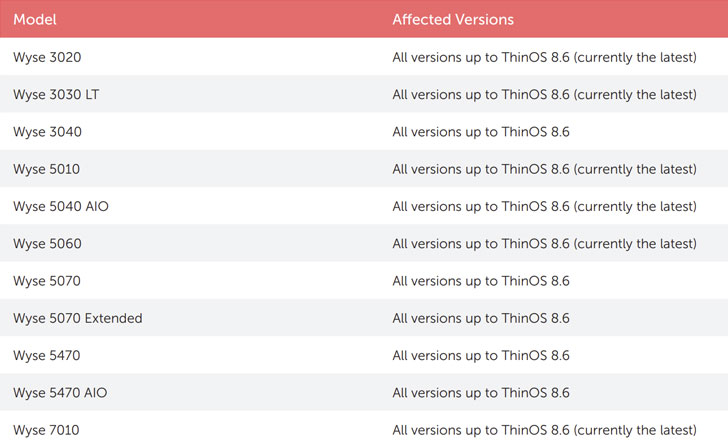
in June 2020, affects all devices running ThinOS versions 8.6 and
below.
Dell has addressed both the vulnerabilities in an update[2]
released today. The flaws also have a CVSS score of 10 out of 10,
making them critical in severity.
Thin clients are typically computers that run from resources
stored on a central server instead of a localized hard drive. They
work by establishing a remote connection to the server, which takes
care of launching and running applications and storing relevant
data.
Tracked as CVE-2020-29491 and CVE-2020-29492, the
security shortcomings in Wyse’s thin clients stem from the fact
that the FTP sessions used to pull firmware updates and
configurations from a local server are unprotected sans any
authentication (“anonymous”), thus making it possible for an
attacker in the same network to read and alter their
configurations.
The first flaw, CVE-2020-29491, enables the user to access the
server and read configurations (.ini files[3]) belonging to other
clients.
A second consequence of having no FTP credentials is that anyone
on the network can access the FTP server and directly alter the
.ini files holding the configuration for other thin client devices
(CVE-2020-29492).
Most devastatingly, the configuration may include sensitive
data, including potential passwords and account information that
could be used to compromise the device.
Given the relative ease of exploitation of these flaws, it’s
recommended that the patches are applied as soon as possible to
remediate the risk.
CyberMDX also recommends updating compatible clients to ThinOS 9[4], which removes the INI
file management feature. In the event an upgrade is not feasible,
it’s advised to disable the use of FTP for fetching the vulnerable
files and instead rely on an HTTPS server[5]
or Wyse Management Suite[6].
“Reading or altering those parameters [in the .ini files] opens
the door to a variety of attack scenarios,” CyberMDX researchers
said. “Configuring and enabling VNC[7]
for full remote control, leaking remote desktop credentials, and
manipulating DNS results are some of the scenarios to be aware
of.”
References
- ^
uncovered
(www.cybermdx.com) - ^
update
(www.dell.com) - ^
.ini
files (topics-cdn.dell.com) - ^
ThinOS
9 (www.dell.com) - ^
HTTPS
server (www.dell.com) - ^
Wyse
Management Suite (www.dell.com) - ^
VNC
(en.wikipedia.org)