Kali Linux is a sophisticated, modern-day Linux distribution
aimed at penetration testers and security experts. It’s a
Debian-based system developed and maintained by Offensive Security, a pioneer of the
information security industry. Kali is a descendant of BackTrack, a popular but now obsolete
security-focused distribution. It comes with a pre-installed set of
advanced, security-focused tools such as Nmap, Aircrack-ng, and Wireshark. If
you’re a security enthusiast or a starting ethical hacker, this can
be the ideal platform for you. Our editors have compiled this guide
outlining the 15 essential things about Kali to help you understand
this OS more clearly. [1][2][3]
Essential Facts about Kali
Linux
Kali has become the de-facto platform for security professionals
due to a number of reasons. It includes most of the tools required
in modern penetration testing[4], such as tools for
reconnaissance and delivering payloads. You’ll learn the basics of
Kali and the reasons behind its ever-growing popularity from this
guide.
1. Origin
The developers of Kali Linux created it as a replacement for the
earlier BackTrack distribution. BackTrack was a powerful platform
that provided the tools required for successful penetration testing
and was based on Knoppix Linux. Kali is a revamp of BackTrack built
around Debian and provides a robust set of additional features.
Kali is developed for providing a full-fledged Linux desktop
experience, whereas BackTrack was meant to be a Live OS.
However, you can also use Kali as a live OS like other standard Linux distributions[5] and boot it on the fly
using a CD, DVD, or USB flash drive. It has been a huge success for
the developers and was downloaded more than 100,000 times during
its first week of release. The developers are actively working on
this OS and roll out new features pretty often.
2. Target Audience
Kali offers a fully functional desktop build that can be used by
anyone. However, it’s especially aimed at professionals who are
actively working in the information security industry. Although it
can be easily used by home users, our editors recommend against
this since most of the tools that come with it require escalated
privileges. And it’s generally considered to be a bad idea to
operate your machine as the root user unless you clearly know
exactly what you are doing.
A common misconception regarding Kali is that it’s a hacking
distribution. This is entirely wrong since Kali is just an OS with
common security tools. Most of these tools can be installed in any
traditional Linux distro and would provide the same operations.
Kali just rolls them pre-installed to help security experts save
their valuable time and energy. It doesn’t provide any
click-and-hack facilities. You’ll need to do this using the
old-fashioned way, and the workflow would be identical in any other
system.
3. Installation
You can install the Kali OS in any traditional x86, x86-64, and
ARM platforms. It is an open-source distribution that offers
ready-made ISO images alongside images for VMware and ARM-based
devices. However, you should always download the required images
from the official sources and verify the SHA256 checksums for
making sure the image wasn’t tampered with. Beginners often make
the mistake of downloading the ISO from third-party sources and
make their system vulnerable.
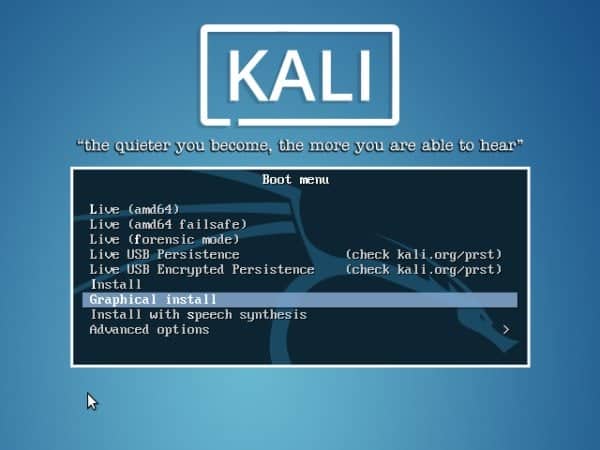
Kali has a medium memory footprint and requires around 3
gigabytes of free disk space for the installation process. You can
run it on legacy machines that have as low as 512MB of RAM.
However, you should install it on an SSD drive and have at least
2GB RAM if you’re looking for a smooth desktop experience.
4. Release Cycle
Kali addresses some major problems related to specialized security
distributions[6]
via implementing a rolling release model. This is similar to
systems like Arch and Gentoo, where the system packages receive
frequent updates with small differences. This helps Kali to make
sure that users always have the latest security tools alongside
patching newfound bugs. Although many people tend to dislike this
release model due to the seemingly unending amount of updates, it
helps security professionals keep their platform up to date.
Additionally, Kali offers development versions that combine the
kali-dev-only, debian-testing, and
kali-debian-picks branches. Other versions include the
kali-last-snapshot, kali-experimental, and
kali-bleeding-edge branches. So, you can choose the
appropriate release based on your requirements pretty easily. Take
a look at this page to find out more
information[7] about specific
releases.
5. Desktop
Environment
GNOME was the default desktop environment[8]
for Kali Linux till last year when it was switched to XFCE.
Although you can still grab a GNOME-based image, new users are
encouraged to download the default one. This new, XFCE-based
environment makes a significant improvement over the last one in
terms of performance and user experience. The GNOME version often
hampered the experience in even modest machines. Thankfully, this
has been solved successfully with the new option.
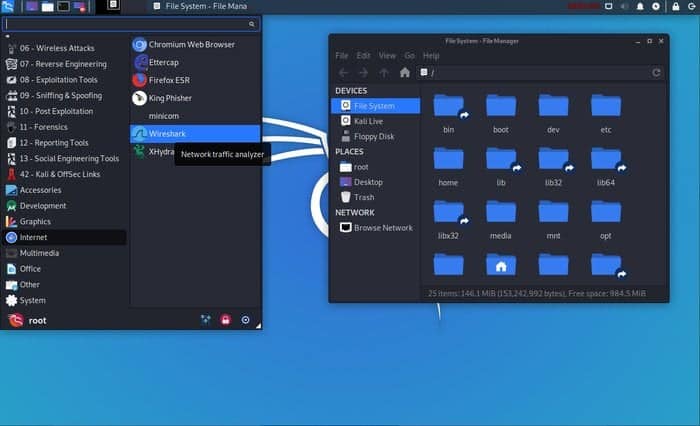
Moreover, Kali also offers KDE environments for experienced
Linux users with access to more beefier machines. If you’re a fan
of cool applications and unlimited customization capabilities, its
worth a try. You also get to choose from Cinnamon, MATE, and the
LXDE environment. So Kali certainly covers this ground pretty
well.
6. Package
Management
Kali uses the Debian-based package manager
dpkg. So you can easily install new applications
that offer a .deb executable. Installing packages that do
not provide a .deb file can be tricky to new users.
However, they’ll still be able to compile the packages from source
using standard Linux development tools like make and install. You
can install RPM files via using tools like “alien[9]” that converts the RPM
package into a DEB one.
The apt command allows users to search and install their
favorite Linux packages[10] directly from the
terminal. Graphical software like the Synaptic Package Manager is
also available as in other distributions. We always recommend users
to install a stable version of Kali if they want uninterrupted
package updates without configuration hassles. However, you should
never add unofficial sources to your
/etc/apt/sources.list file, and else you may
easily mess up your system. Both Debian and Kali recommends this to
users.
7. Drivers and
Firmware
One noted drawback of Kali Linux is that it falls significantly
short when it comes to supporting drivers and firmware. Although
the developers are always trying to roll support for newer drivers,
it’s proven to be a hard job. One notable problem users face
recurring issues with wireless drivers. Sometimes you may even need
to install specific firmware to get around issues with incompatible
drivers.
You may also face problems with GPU drivers. Although Kali
developers try to support commercial Nvidia cards, you will often
encounter compatibility issues. However, since Kali’s target users
are penetration testers and security experts, they often don’t
require GPU supports at all. But if you’re a gamer, it can be
seriously frustrating sometimes.
8. Windows
Compatibility
Although it’s hard to find actual penetration testers who’re
using Windows as their primary system, many people would be happy
to access Kali tools and features from their Windows workstation.
Thankfully, the newly developed WSL(Windows Subsystem for Linux)[11] enables users to do
exactly this. This is a compatibility layer for Windows, which
permits users to run Linux executables directly from their Windows
10 system.
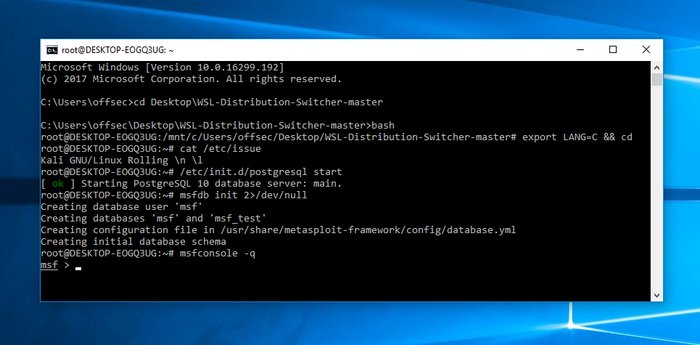
Kali provides good support for this layer and allows
professionals to use applications installed in Kali over WSL. You
can find some excellent pieces of documentation that will walk you
through the environment configurations from their
website[12]. However, you should
bear in mind that by using this feature, you might blow up some of
Kali’s advanced functionality. But it’s a working solution for
people who really need it.
9. Virtualization
Support
Virtualization is the method of using virtual platforms for
running high-demanding computer services. Kali’s virtualization
support includes the ability to reside inside Linux virtual machines, pre-built ISO
images for VMware, VirtualBox, Hyper-V, and Vagrant alongside
support for containerization platforms like Docker and LXC. So, you
can install Kali Linux in any standard platforms that rely on
virtualization without facing additional hassles. [13]
VMware is certainly the best choice for professionals working
with high-performance systems. Kali offers excellent support for
open-vm-tools (OVT) alongside other essential applications.
Moreover, the availability of official images for Docker and LXC
saves significant time for security professionals.
10. Embedded & Android
Support
As discussed earlier, Kali supports a wide variety of ARM-based
embedded devices such as Raspberry Pie, Beaglebone, Odroid, HP &
Samsung Chromebook, among many more. Admins can choose from a
number of lightweight images to set up simple but Kali platforms.
Moreover, support for new embedded devices is increasing every day.
So you can easily set up a low-cost Kali system that allows you to
do all your security-related works from remote locations or the
comfort of your home.
Additionally, Kali now supports the Android operating system
through the Linux Deploy[14] app and the Kali Linux NetHunter ROM[15]. It’s a custom Android
overlay built on top of the ASOP project and provides a versatile
set of Kali features and security tools.
11. Privacy &
Animosity
Kali is very quiet by design. This is one of the primary reasons
why security experts use this instead of traditional Linux
distributions. Standard distributions usually send network packets
over the network at a regular interval and may have several
unmonitored services running on different ports. Thus, they are
prone to network scans and loses the animosity craved by both
security professionals and malicious users.
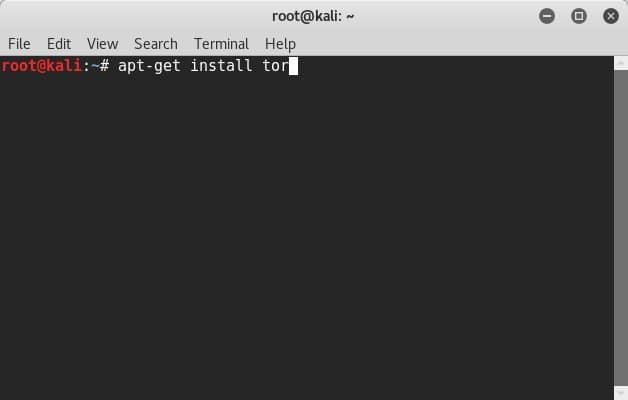
Experts can also rely on Kali’s advanced encryption methods to
keep their machine and data secure. You can even encrypt your
bootable Kali OS if you want. So overall, Kali is an excellent
choice for both security researchers and privacy-concerned
users.
12. Customization
Although most Linux distributions are extremely customizable,
Kali takes this to a whole new level. It allows us to build
personalized systems by changing the source and creating custom
ISOs. You can choose only to keep the packages required by your job
out of the 600 plus available security tools that Kali has to
offer. We’ve already gone over the desktop environments, which
allow users to create personalized user experiences very
easily.
You’ll also have the authority to rebuild source packages, Kali
Linux kernels, and preparing custom Kali ARM chroot. The Kali
website has some excellent documentation to help developers get
started with their customization efforts. You can also find
additional tools and resources for learning advanced modification
methods.
13. Documentation
Good documentation is essential for specialized Linux
distributions like Kali. Thankfully, the developers know this and
provide some excellent resources that contain detailed information
about the essential topics. We really liked the way these resources
are created and can say confidently that it’ll help you learn Kali
much faster.
Additionally, there are a plethora of video tutorials as well as
Kali cookbooks from reputed publications that teach many complex
features of Kali. If you’re a seasoned security professional
looking for mastering advanced Kali functionalities, you can easily
do so by consulting some of these resources.
Kali has a thriving community filled with security experts who
are always willing to help people with their problems. The
development of these communities dates back to BackTrack and offers
excellent advice on starting penetration testers. The Offensive
Security team maintains the official Kali website, blog, forums,
IRC channels, Git repository, and bug tracker for Kali alongside
social media feeds like Twitter and Facebook.
We strongly suggest you consult the community members whenever
you’re stuck on a problem. No matter whether the problem arises
from incompatible hardware or system misconfiguration, you’re very
likely to get expert answers based on facts. Simply be modest and
tell them how the problem occurred and what steps you’ve tried to
solve them. You’ll get a working solution even before you know.
15. Special Features
Kali offers a great list of additional features absent in
traditional Linux distributions. The ISO of Doom is an excellent
example of a special Kali feature. It’s an advanced recipe for
building custom images that can install itself automatically,
reverse VPM auto-connections, and create network bridges, among
others.

The multi-level live USB persistence allows users to create
bootable Kali drives with support for multiple encrypted profiles.
The Kali meta-package collection offers tools for quickly building
minimized system environments. Users can also set up cloud versions
of Kali in the Amazon Elastic Compute Cloud using the Amazon EC2
AWS images. Some other notable features include accessibility for
blind or visually impaired users and the bootable forensic
mode.
Ending Thoughts
Kali Linux is known for its vast collection of security tools as
well as a privacy-focused feature set. If you want to learn
penetration testing from scratch, it can be the ideal companion for
you. Moreover, seasoned ethical hackers can leverage Kali to
perform faster security audits. You can also grab lucrative CS jobs[16] that deal with security
if you’re proficient in Kali or have a professional Kali
certification. Our editors have outlined the 15 essential
information for Kali beginners to help them kickstart their
adventure. Hopefully, you’ve learned a bit or two from this guide.
Don’t forget to leave us your feedback in the comment section.
References
- ^
Offensive Security
(www.offensive-security.com) - ^
BackTrack
(www.backtrack-linux.org) - ^
50
Essential Nmap Commands for System Admins
(www.ubuntupit.com) - ^
Ultimate
List of Ethical Hacking and Penetration Testing Tools for Kali
Linux (www.ubuntupit.com) - ^
standard
Linux distributions (www.ubuntupit.com) - ^
specialized security distributions
(www.ubuntupit.com) - ^
look at
this page to find out more information
(www.kali.org) - ^
Best
Linux Desktop Environment: 15 Reviewed and Compared
(www.ubuntupit.com) - ^
alien
(wiki.debian.org) - ^
How To
Install Software in Ubuntu Linux: A Complete Guide for Newbie
(www.ubuntupit.com) - ^
WSL(Windows Subsystem for Linux)
(en.wikipedia.org) - ^
environment configurations from their
website (www.kali.org) - ^
Linux
virtual machines (www.ubuntupit.com) - ^
Linux
Deploy (play.google.com) - ^
Kali
Linux NetHunter ROM (www.kali.org) - ^
lucrative CS jobs
(www.ubuntupit.com)
Kali Linux is a sophisticated, modern-day Linux distribution
aimed at penetration testers and security experts. It’s a
Debian-based system developed and maintained by Offensive Security, a pioneer of the
information security industry. Kali is a descendant of BackTrack, a popular but now obsolete
security-focused distribution. It comes with a pre-installed set of
advanced, security-focused tools such as Nmap, Aircrack-ng, and Wireshark. If
you’re a security enthusiast or a starting ethical hacker, this can
be the ideal platform for you. Our editors have compiled this guide
outlining the 15 essential things about Kali to help you understand
this OS more clearly. [1][2][3]
Essential Facts about Kali Linux
Kali has become the de-facto platform for security professionals
due to a number of reasons. It includes most of the tools required
in modern penetration testing[4], such as tools for
reconnaissance and delivering payloads. You’ll learn the basics of
Kali and the reasons behind its ever-growing popularity from this
guide.
1. Origin
The developers of Kali Linux created it as a replacement for the
earlier BackTrack distribution. BackTrack was a powerful platform
that provided the tools required for successful penetration testing
and was based on Knoppix Linux. Kali is a revamp of BackTrack built
around Debian and provides a robust set of additional features.
Kali is developed for providing a full-fledged Linux desktop
experience, whereas BackTrack was meant to be a Live OS.
However, you can also use Kali as a live OS like other standard Linux distributions[5] and boot it on the fly
using a CD, DVD, or USB flash drive. It has been a huge success for
the developers and was downloaded more than 100,000 times during
its first week of release. The developers are actively working on
this OS and roll out new features pretty often.
2. Target Audience
Kali offers a fully functional desktop build that can be used by
anyone. However, it’s especially aimed at professionals who are
actively working in the information security industry. Although it
can be easily used by home users, our editors recommend against
this since most of the tools that come with it require escalated
privileges. And it’s generally considered to be a bad idea to
operate your machine as the root user unless you clearly know
exactly what you are doing.
A common misconception regarding Kali is that it’s a hacking
distribution. This is entirely wrong since Kali is just an OS with
common security tools. Most of these tools can be installed in any
traditional Linux distro and would provide the same operations.
Kali just rolls them pre-installed to help security experts save
their valuable time and energy. It doesn’t provide any
click-and-hack facilities. You’ll need to do this using the
old-fashioned way, and the workflow would be identical in any other
system.
3. Installation
You can install the Kali OS in any traditional x86, x86-64, and
ARM platforms. It is an open-source distribution that offers
ready-made ISO images alongside images for VMware and ARM-based
devices. However, you should always download the required images
from the official sources and verify the SHA256 checksums for
making sure the image wasn’t tampered with. Beginners often make
the mistake of downloading the ISO from third-party sources and
make their system vulnerable.
Kali has a medium memory footprint and requires around 3
gigabytes of free disk space for the installation process. You can
run it on legacy machines that have as low as 512MB of RAM.
However, you should install it on an SSD drive and have at least
2GB RAM if you’re looking for a smooth desktop experience.
4. Release Cycle
Kali addresses some major problems related to specialized security
distributions[6]
via implementing a rolling release model. This is similar to
systems like Arch and Gentoo, where the system packages receive
frequent updates with small differences. This helps Kali to make
sure that users always have the latest security tools alongside
patching newfound bugs. Although many people tend to dislike this
release model due to the seemingly unending amount of updates, it
helps security professionals keep their platform up to date.
Additionally, Kali offers development versions that combine the
kali-dev-only, debian-testing, and
kali-debian-picks branches. Other versions include the
kali-last-snapshot, kali-experimental, and
kali-bleeding-edge branches. So, you can choose the
appropriate release based on your requirements pretty easily. Take
a look at this page to find out more
information[7] about specific
releases.
5. Desktop
Environment
GNOME was the default desktop environment[8]
for Kali Linux till last year when it was switched to XFCE.
Although you can still grab a GNOME-based image, new users are
encouraged to download the default one. This new, XFCE-based
environment makes a significant improvement over the last one in
terms of performance and user experience. The GNOME version often
hampered the experience in even modest machines. Thankfully, this
has been solved successfully with the new option.
Moreover, Kali also offers KDE environments for experienced
Linux users with access to more beefier machines. If you’re a fan
of cool applications and unlimited customization capabilities, its
worth a try. You also get to choose from Cinnamon, MATE, and the
LXDE environment. So Kali certainly covers this ground pretty
well.
6. Package
Management
Kali uses the Debian-based package manager
dpkg. So you can easily install new applications
that offer a .deb executable. Installing packages that do
not provide a .deb file can be tricky to new users.
However, they’ll still be able to compile the packages from source
using standard Linux development tools like make and install. You
can install RPM files via using tools like “alien[9]” that converts the RPM
package into a DEB one.
The apt command allows users to search and install their
favorite Linux packages[10] directly from the
terminal. Graphical software like the Synaptic Package Manager is
also available as in other distributions. We always recommend users
to install a stable version of Kali if they want uninterrupted
package updates without configuration hassles. However, you should
never add unofficial sources to your
/etc/apt/sources.list file, and else you may
easily mess up your system. Both Debian and Kali recommends this to
users.
7. Drivers and
Firmware
One noted drawback of Kali Linux is that it falls significantly
short when it comes to supporting drivers and firmware. Although
the developers are always trying to roll support for newer drivers,
it’s proven to be a hard job. One notable problem users face
recurring issues with wireless drivers. Sometimes you may even need
to install specific firmware to get around issues with incompatible
drivers.
You may also face problems with GPU drivers. Although Kali
developers try to support commercial Nvidia cards, you will often
encounter compatibility issues. However, since Kali’s target users
are penetration testers and security experts, they often don’t
require GPU supports at all. But if you’re a gamer, it can be
seriously frustrating sometimes.
8. Windows
Compatibility
Although it’s hard to find actual penetration testers who’re
using Windows as their primary system, many people would be happy
to access Kali tools and features from their Windows workstation.
Thankfully, the newly developed WSL(Windows Subsystem for Linux)[11] enables users to do
exactly this. This is a compatibility layer for Windows, which
permits users to run Linux executables directly from their Windows
10 system.
Kali provides good support for this layer and allows
professionals to use applications installed in Kali over WSL. You
can find some excellent pieces of documentation that will walk you
through the environment configurations from their
website[12]. However, you should
bear in mind that by using this feature, you might blow up some of
Kali’s advanced functionality. But it’s a working solution for
people who really need it.
9. Virtualization
Support
Virtualization is the method of using virtual platforms for
running high-demanding computer services. Kali’s virtualization
support includes the ability to reside inside Linux virtual machines, pre-built ISO
images for VMware, VirtualBox, Hyper-V, and Vagrant alongside
support for containerization platforms like Docker and LXC. So, you
can install Kali Linux in any standard platforms that rely on
virtualization without facing additional hassles. [13]
VMware is certainly the best choice for professionals working
with high-performance systems. Kali offers excellent support for
open-vm-tools (OVT) alongside other essential applications.
Moreover, the availability of official images for Docker and LXC
saves significant time for security professionals.
10. Embedded & Android
Support
As discussed earlier, Kali supports a wide variety of ARM-based
embedded devices such as Raspberry Pie, Beaglebone, Odroid, HP &
Samsung Chromebook, among many more. Admins can choose from a
number of lightweight images to set up simple but Kali platforms.
Moreover, support for new embedded devices is increasing every day.
So you can easily set up a low-cost Kali system that allows you to
do all your security-related works from remote locations or the
comfort of your home.
Additionally, Kali now supports the Android operating system
through the Linux Deploy[14] app and the Kali Linux NetHunter ROM[15]. It’s a custom Android
overlay built on top of the ASOP project and provides a versatile
set of Kali features and security tools.
11. Privacy &
Animosity
Kali is very quiet by design. This is one of the primary reasons
why security experts use this instead of traditional Linux
distributions. Standard distributions usually send network packets
over the network at a regular interval and may have several
unmonitored services running on different ports. Thus, they are
prone to network scans and loses the animosity craved by both
security professionals and malicious users.
Experts can also rely on Kali’s advanced encryption methods to
keep their machine and data secure. You can even encrypt your
bootable Kali OS if you want. So overall, Kali is an excellent
choice for both security researchers and privacy-concerned
users.
12. Customization
Although most Linux distributions are extremely customizable,
Kali takes this to a whole new level. It allows us to build
personalized systems by changing the source and creating custom
ISOs. You can choose only to keep the packages required by your job
out of the 600 plus available security tools that Kali has to
offer. We’ve already gone over the desktop environments, which
allow users to create personalized user experiences very
easily.
You’ll also have the authority to rebuild source packages, Kali
Linux kernels, and preparing custom Kali ARM chroot. The Kali
website has some excellent documentation to help developers get
started with their customization efforts. You can also find
additional tools and resources for learning advanced modification
methods.
13. Documentation
Good documentation is essential for specialized Linux
distributions like Kali. Thankfully, the developers know this and
provide some excellent resources that contain detailed information
about the essential topics. We really liked the way these resources
are created and can say confidently that it’ll help you learn Kali
much faster.
Additionally, there are a plethora of video tutorials as well as
Kali cookbooks from reputed publications that teach many complex
features of Kali. If you’re a seasoned security professional
looking for mastering advanced Kali functionalities, you can easily
do so by consulting some of these resources.
Kali has a thriving community filled with security experts who
are always willing to help people with their problems. The
development of these communities dates back to BackTrack and offers
excellent advice on starting penetration testers. The Offensive
Security team maintains the official Kali website, blog, forums,
IRC channels, Git repository, and bug tracker for Kali alongside
social media feeds like Twitter and Facebook.
We strongly suggest you consult the community members whenever
you’re stuck on a problem. No matter whether the problem arises
from incompatible hardware or system misconfiguration, you’re very
likely to get expert answers based on facts. Simply be modest and
tell them how the problem occurred and what steps you’ve tried to
solve them. You’ll get a working solution even before you know.
15. Special Features
Kali offers a great list of additional features absent in
traditional Linux distributions. The ISO of Doom is an excellent
example of a special Kali feature. It’s an advanced recipe for
building custom images that can install itself automatically,
reverse VPM auto-connections, and create network bridges, among
others.
The multi-level live USB persistence allows users to create
bootable Kali drives with support for multiple encrypted profiles.
The Kali meta-package collection offers tools for quickly building
minimized system environments. Users can also set up cloud versions
of Kali in the Amazon Elastic Compute Cloud using the Amazon EC2
AWS images. Some other notable features include accessibility for
blind or visually impaired users and the bootable forensic
mode.
Ending
Thoughts
Kali Linux is known for its vast collection of security tools as
well as a privacy-focused feature set. If you want to learn
penetration testing from scratch, it can be the ideal companion for
you. Moreover, seasoned ethical hackers can leverage Kali to
perform faster security audits. You can also grab lucrative CS jobs[16] that deal with security
if you’re proficient in Kali or have a professional Kali
certification. Our editors have outlined the 15 essential
information for Kali beginners to help them kickstart their
adventure. Hopefully, you’ve learned a bit or two from this guide.
Don’t forget to leave us your feedback in the comment section.
References
- ^
Offensive Security
(www.offensive-security.com) - ^
BackTrack
(www.backtrack-linux.org) - ^
50
Essential Nmap Commands for System Admins
(www.ubuntupit.com) - ^
Ultimate
List of Ethical Hacking and Penetration Testing Tools for Kali
Linux (www.ubuntupit.com) - ^
standard
Linux distributions (www.ubuntupit.com) - ^
specialized security distributions
(www.ubuntupit.com) - ^
look at
this page to find out more information
(www.kali.org) - ^
Best
Linux Desktop Environment: 15 Reviewed and Compared
(www.ubuntupit.com) - ^
alien
(wiki.debian.org) - ^
How To
Install Software in Ubuntu Linux: A Complete Guide for Newbie
(www.ubuntupit.com) - ^
WSL(Windows Subsystem for Linux)
(en.wikipedia.org) - ^
environment configurations from their
website (www.kali.org) - ^
Linux
virtual machines (www.ubuntupit.com) - ^
Linux
Deploy (play.google.com) - ^
Kali
Linux NetHunter ROM (www.kali.org) - ^
lucrative CS jobs
(www.ubuntupit.com)
Read more https://www.ubuntupit.com/things-to-know-before-using-kali-linux/
