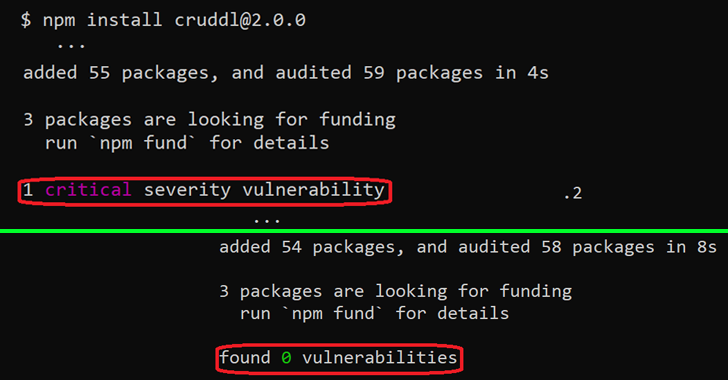
New findings from cybersecurity firm JFrog show that malware
targeting the npm ecosystem can evade security checks by taking
advantage of an “unexpected behavior” in the npm command line
interface (CLI) tool.
npm CLI’s install[1]
and audit[2]
commands[3]
have built-in capabilities to check a package and all of its
dependencies for known vulnerabilities, effectively acting as a
warning mechanism for developers by highlighting the flaws.
But as JFrog established, the security advisories are not
displayed when the packages follow certain version formats,
creating a scenario where critical flaws could be introduced into
their systems either directly or via the package’s
dependencies.
Specifically, the problem arises only when the installed package
version contains a hyphen (e.g., 1.2.3-a), which is included to
denote a pre-release version[4]
of an npm module.
While the project maintainers treat the discrepancy between
regular npm package versions and pre-release versions as an
intended functionality, this also makes it ripe for abuse by
attackers looking to poison the open source ecosystem.
“Threat actors could exploit this behavior by intentionally
planting vulnerable or malicious code in their innocent-looking
packages which will be included by other developers due to valuable
functionality or as a mistake due to infection techniques such as
typosquatting or dependency confusion,” Or Peles said[5].
In other words, an adversary could publish a seemingly benign
package that’s in the pre-release version format, which could then
be potentially picked up by other developers and not be alerted to
the fact that the package is malicious despite evidence to the
contrary.
The development once again reiterates how the software supply
chain is built as a chain of trust between various parties, and how
a compromise of one link can affect all downstream applications
that consume the rogue third-party dependency.
To counter such threats, it’s recommended that developers avoid
installing npm packages with a pre-release version, unless the
source is known to be completely reliable.
References
Read more https://thehackernews.com/2022/11/researchers-find-way-malicious-npm.html