you are searching for a free ransomware decryption tool to unlock
or decrypt your files—your search might end here.
Security researcher Mike Bautista at Cisco’s Talos cyber
intelligence unit have released[1] a free decryption tool
that makes it possible for victims infected with the PyLocky
ransomware to unlock their encrypted files for free without paying
any ransom.
The decryption tool works for everyone, but it has a huge
limitation—to successfully recover your files, you must have
captured the initial network traffic (PCAP file) between the
PyLocky ransomware and its command-and-control (C2) server, which
generally nobody purposely does.
This is because the outbound connection—when the ransomware
communicates with its C2 server and submit decryption key related
information—contains a string that includes both Initialization
Vector (IV) and a password, which the ransomware generates randomly
to encrypt the files.
“If the initial C2 traffic has not been captured, our decryption
tool will not be able to recover files on an infected machine. This
is because the initial callout is used by the malware to send the
C2 servers information that it uses in the encryption process,” the
researcher explain.
Micro in July last year, PyLocky ransomware found spreading through
spam emails, like most malware campaigns, designed to trick victims
into running the malicious PyLocky payload.
ransomware sleeps for 999.999 seconds—or just over 11 and a half
days—if the affected system’s total visible memory size is less
than 4GB. The file encryption process only executes if it is
greater than or equal to 4GB.
Written in python and packaged with PyInstaller, PyLocky
ransomware first converts each file into the base64 format and then
uses randomly generated Initialization Vector (IV) and password to
encrypt all the files on an infected computer.
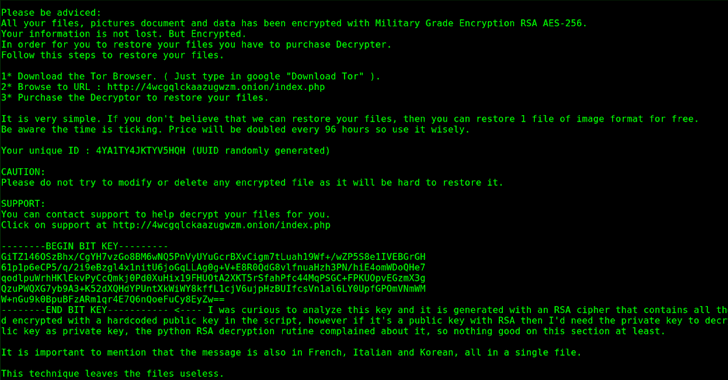
Once a computer is encrypted, PyLocky displays a ransom note
claiming to be a variant of the well-known Locky
ransomware[3] and demands a ransom in
cryptocurrency to “restore” the files.
The note also claims to double the ransom every 96 hours if they
don’t pay to scare victims into paying up the ransom sooner rather
than later.
PyLocky primarily targeted businesses in Europe, particularly in
France, though the ransom notes were written in English, French,
Korean, and Italian, which suggested that it may also have targeted
Korean- and Italian-speaking users.
You can download the PyLocky ransomware
decryption tool[4]
from GitHub for free and run it on your infected Windows
computer.
Though ransomware may not be as high profile as the Locky[5], WannaCry[6], NotPetya[7], and LeakerLocker[8]
widespread 2017 ransomware attacks, both individuals and
enterprises are strongly recommended to follow below-mentioned
prevention measures to protect themselves.
Beware of Phishing emails: Always be suspicious of
uninvited documents sent over an email and never click on links
inside those documents unless verifying the source.
Backup Regularly: To always have a tight grip on all your
important files and documents, keep a good backup routine in place
that makes their copies to an external storage device that is not
always connected to your PC.
Keep your Antivirus software and system up-to-date:
Always keep your antivirus software and systems updated to protect
against latest threats.
References
Read more http://feedproxy.google.com/~r/TheHackersNews/~3/DzyAb8lniqg/pylocky-free-ransomware-decryption.html