
Forget watercooler conspiracies or boardroom battles. There’s a
new war in the office. As companies nudge their staff to return to
communal workspaces, many workers don’t actually want to – more
than 50 percent of employees would rather quit, according to
research by EY[1].
While HR teams worry over the hearts and minds of staff, IT
security professionals have a different battle plan to draft – how
to make the new normal of the hybrid workplace secure.
The Trade-off Between Usability and
Security
A company’s biggest vulnerability continues to be its people. In
a hybrid workplace, a Zero Trust strategy means ever-tightening
security. The MFA a company chooses[2] affects the difficulty
of logging into email, dashboards, workflow tools, client
documentation, and so on. Or, conversely, how porous access
security is.
Now imagine this scenario. An employee opens a company portal,
confirms a prompt on a company app on her phone, and that’s it. She
has been authenticated seamlessly by a strong possession factor
using her company registered mobile number against the SIM. Nothing
to remember, nothing to forget, no tokens, and no codes to type
against a countdown.
‘End Points’ Are Human
In order to implement a Zero Trust policy that’s both effective
and accessible, it’s time to stop thinking of employees as ‘end
points’, and address the human habits in security. For example, a
Twitter poll[3]
by tru.ID revealed that 40% of people use a ‘mental system’ for
passwords.
These mental systems are in a race between complexity and
memory. Passwords now need to be long, complicated,
and nonsensical[4]
– and even those still get breached, thanks to database leaks or
phishing scams. This just isn’t sustainable.
Inherence factors such as biometrics still involve friction to
set up and use. As we know from the face or fingerprint recognition
on our phones, biometrics don’t always work first-time and still
require a passcode failover. Plus, not all levels of access require
such stringent security.
Possession Factor using Mobile Network
Authentication
On the spectrum between passwords and biometrics lies the
possession factor – most commonly the mobile phone. That’s how SMS
OTP and authenticator apps came about, but these come with fraud
risk, usability issues, and are no longer the best solution.
The simpler, stronger solution to verification has been with us
all along – using the strong security of the SIM card that is in
every mobile phone. Mobile networks authenticate customers all the
time to allow calls and data. The SIM card uses advanced
cryptographic security, and is an established form of real-time
verification that doesn’t need any separate apps or hardware
tokens.
However, the real magic of SIM-based authentication is that it
requires no user action. It’s there already.
Now, APIs by tru.ID open up SIM-based network
authentication[5]
for developers to build frictionless, yet secure verification
experiences.
Any concerns over privacy are alleviated by the fact that tru.ID
does not process personally identifiable information between the
network and the APIs. It’s purely a URL-based lookup.
Passwordless Login: Zero User Effort and Zero Trust
Security
One of the ways to use tru.ID APIs is to build a passwordless
solution for remote login using a companion app to access an
enterprise system. By implementing a one-tap interaction on a
mobile phone, businesses can remove user friction from step-up
security, and the risk of human error.
Here’s an example workflow for an enterprise login
companion app using tru.ID APIs:
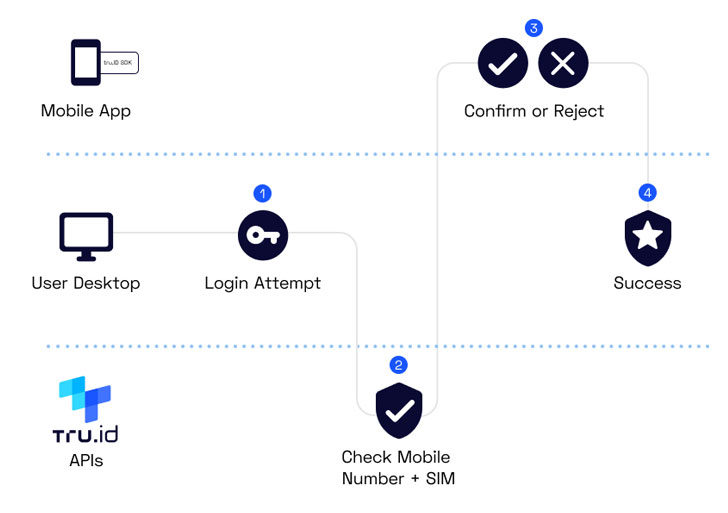
Preface: user has the official company app installed on their
phone. The enterprise app has tru.ID verification APIs
embedded.
- User attempts to login to a company system (email, data
dashboard etc.). This can be on desktop or mobile. - The system identifies the user attempting to login and sends a
Push Notification. - The mobile device and the company app receive the Push
Notification, and the user is prompted to Confirm or Reject the
login attempt. If it is them that’s logging in, they will
approve. - When the user approves, a request is made to the tru.ID API via
a backend to create a Check URL for that user’s registered phone
number. - The company app will then request that Check URL over the
mobile data connection using a tru.ID SDK. This is the stage when
the mobile network operator and tru.ID verify that the phone number
for the current device matches the phone number the user has
registered on the login system. Note that no PII is exchanged. This
is purely a URL-based lookup. - Once the request has completed, the system will be informed by
tru.ID whether the Check URL request and phone number match was
successful. This is achieved via a webhook. - If the phone number verification was successful, the user is
logged in.
Although there are a number of steps in this approach, it’s
important to note that the user only has one action: to Confirm or
Reject the login.
Get Started
You can start testing for free and make your first API call
within minutes – just sign up with tru.ID or check the documentation[6]. tru.ID is keen to hear
from the community to discuss case studies.
References
- ^
research
by EY (www.ey.com) - ^
The MFA
a company chooses (tru.id) - ^
Twitter
poll (twitter.com) - ^
Passwords now need to be long,
complicated, and nonsensical (tru.id) - ^
APIs by
tru.ID open up SIM-based network authentication
(tru.id) - ^
documentation
(developer.tru.id)