Jan 05, 2023The Hacker News
The latest breach announced by LastPass is a major cause for
concern to security stakeholders. As often occurs, we are at a
security limbo – on the one hand, as LastPass has noted, users who
followed LastPass best practices would be exposed to practically
zero to extremely low risk. However, to say that password best
practices are not followed is a wild understatement. The reality is
that there are very few organizations in which these practices are
truly enforced. This puts security teams in the worst position,
where exposure to compromise is almost certain, but pinpointing the
users who created this exposure is almost impossible.
To assist them throughout this challenging time, Browser
Security solution LayerX has launched a free offering of its
platform, enabling security teams to gain visibility into all
browsers on which the LastPass extension is installed and mitigate
the potential impacts of the LastPass breach on their environments
by informing vulnerable users and require them to implement MFA on
their accounts and if required, roll out a dedicated Master
Password reset procedure to eliminate adversaries’ abilities to
leverage a compromised Master Password for malicious access
(To request access to the free tool, fill
this form[1])
Recapping LastPass’s Announcement: What Data Do Adversaries
Have and What’s the Risk?
Per LastPass’s website[2], ‘The threat actor was
also able to copy a backup of customer vault data from the
encrypted storage container which is stored in a proprietary binary
format that contains both unencrypted data, such as website URLs,
as well as fully-encrypted sensitive fields such as website
usernames and passwords, secure notes, and form-filled data.’
The derived risk is that ‘the threat actor may attempt to use
brute force to guess your master password and decrypt the copies of
vault data they took. Because of the hashing and encryption methods
we use to protect our customers, it would be extremely difficult to
attempt to brute force guess master passwords for those customers
who follow our password best practices.’
Not Implementing LastPass Password Best Practices Exposes the
Master Password to the Vault
The last section about ‘best practices’ is the most alarming
one. Password best practices? How many people maintain password
best practices? The realistic – yet unfortunate – answer is: not
many. That holds true even in the context of corporate-managed
applications. When it comes to personal apps, it’s not an
exaggeration to assume that password reuse is the norm rather than
the outlier. The risk LastPass’s breach introduces apply to both
use cases. Let’s understand why.
The Actual Risk: Malicious Access to Corporate Resources
Let’s divide organizations into two types:
Type A: Organizations where LastPass is used as
part of the company policy for vaulting passwords to access
corporate-managed apps, either for all users or in specific
departments. In that case, the concern is straightforward – an
adversary that manages to crack or obtain an employee’s LastPass
Master Password could easily access the corporate’s sensitive
resources.
Type B: Organizations where LastPass is used
independently by employees (whether for personal or work use) or by
specific groups in the organization, without IT knowledge, for apps
of choice. In that case, the concern is that an adversary who
manages to crack or obtain an employee’s LastPass Master Password
would take advantage of users’ tendency for password reuse and,
after compromising the passwords in the vault, will find one that
is also used to access corporate apps.
The CISO’s Dead End: Certain Threat but Extremely Low
Mitigation Capabilities
Regardless of whether an organization falls into type A or B,
the risk is clear. What intensifies the challenge for the CISO in
this situation is that while there is high probability – not to say
certainty – that there are employees in her or his environment
whose user accounts are likely to become compromised, the CISO has
very limited ability to know who these employees are, let alone
take the required steps to mitigate the risk they impose.
LayerX Free Offering: 100% Visibility into LastPass Attack
Surface as Well as Proactive Protection Measures
LayerX has released a free tool that assists security teams in
understanding their organization’s exposure to the LastPass breach,
maps all the vulnerable users and applications, and applies
security mitigations.
LayerX’s tool is delivered as an enterprise extension to the
browser your employees are using and hence provides immediate
visibility into all browser extensions and browsing activities of
every user. This enables CISOs to gain the following:
- LastPass Usage Mapping: End-to-end visibility
into all browsers on which the LastPass extension is installed,
regardless of whether it’s part of the corporate policy (type A) or
personally used (type B). The tool maps all applications and web
destinations whose credentials are stored in LastPass. It should be
noted that the visibility challenges for type B organizations are
much more severe than for type A and cannot be addressed by any
solution except for LayerX’s tool.
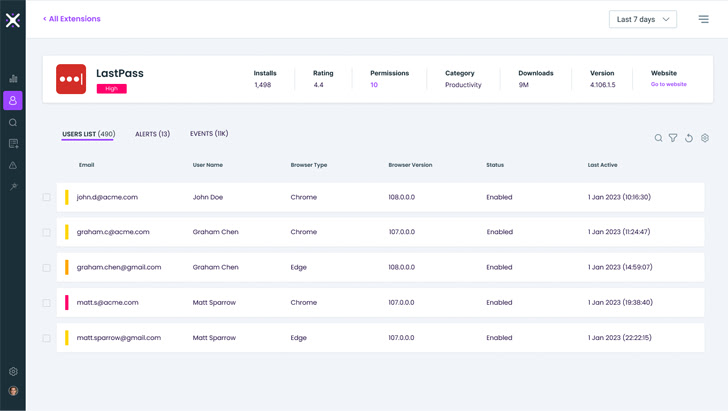 |
| LayerX’s LastPass Report |
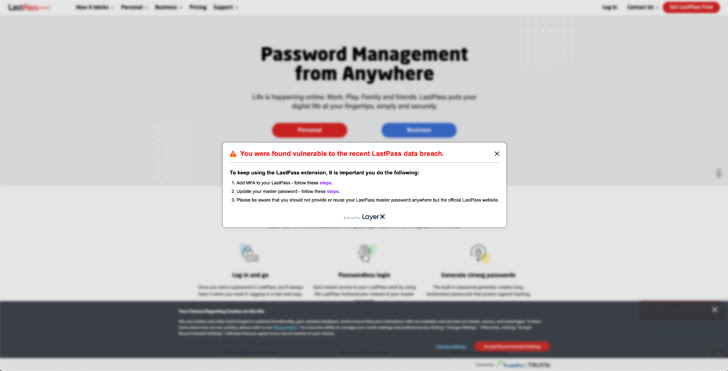 |
| The LayerX notification sent to vulnerable users |
- Identifying Users at Risk: Leveraging this
knowledge, security teams can inform vulnerable users and require
them implement MFA on their accounts. They can also roll out a
dedicated Master Password reset procedure to eliminate adversaries’
abilities to leverage a compromised Master Password for malicious
access.
Found this article interesting? Follow us on Twitter [4]
and LinkedIn[5]
to read more exclusive content we post.
References
- ^
To
request access to the free tool, fill this form
(layerxsecurity.com) - ^
website
(blog.lastpass.com) - ^
To get
access to the free tool, fill this form
(layerxsecurity.com) - ^
Twitter
(twitter.com) - ^
LinkedIn
(www.linkedin.com)
Read more https://thehackernews.com/2023/01/mitigate-lastpass-attack-surface-in.html