
defence when it comes to application security for a while now. Many
organizations have adopted WAF in one form or the other and most
cases, compliance has been the driver for adoption.
But unfortunately, when it comes to the efficacy of WAF in
thwarting attacks, it has not lived up to the expectations. In most
organizations, WAF has always remained in log mode with a little
process to monitor and react, rendering the solution
ineffective.
The major challenge with effective deployment of WAF is:
- Applications are unique, and there is no silver bullet set of
rules that will protect them all, - Most WAF’s do not try to understand the risk profile of the
application; they end up providing common out of box vanilla rules
that seldom works. Each application has its own intricacies and the
out of the box rules that many WAF vendors provide create a lot of
FPs (False Positives) or FNs (False Negatives), - For proper implementation of WAF, there is a need to understand
the context of the application and constant fine-tuning of rules to
reduce FPs and FNs, - But this is easier said than done. Fine-tuning of the rules
need expertise, and its efficacy depends on how well the solution
can understand the context of the application and how effectively
rules can be tweaked to meet the applications need and act as an
effective first line of defence.
Not many organizations have this expertise, with the constantly
changing applications, in-house security team tends to take a
reactive approach, and in case of any issues, they usually tend to
open up the rules or move the rules to log mode, without
understanding the consequences of making the entire solution
ineffective.
Only way WAF deployments will work as an effective defence
against attacks is to have it managed by experts who know what they
are doing, and it cannot be a one-time activity, it needs to be
constant monitoring and fine-tuning.
Welcome to the world of AppTrana – the only fully managed
Application security solution.
How is AppTrana different?
AppTrana is the only solution in the market, as claimed by
the company, that takes a more comprehensive approach when it comes
to application security.
Unlike traditional vendors, AppTrana does not give default rules
and ask the customer to manage them, instead it starts with
understanding the risk profile of application through its detection
module which scans the application for vulnerabilities, based on
the detection, rules are written and tweaked to meet the
application need ensuring there are no FPs with very little
FNs.
The rules are tweaked by AppTrana’s security experts who have
years of experience handling WAF security for thousands of sites,
so they know what they are doing. And it does not stop there; the
team of experts continuously monitors the security space and keep
the rules updated, ensuring all zero-day vulnerabilities are
immediately protected.
Not only that, in case of FPs due to any new changes in the
application, the team would immediately tweak the rules to ensure
the issue are immediately resolved without the need for opening up
WAF and moving the rules to log mode. Generally, all application
under AppTrana protection has its rules in block mode.
Under the hood:
Let’s look under the hood and see what kind of managed services do
AppTrana actually provide.
Proof-of-concept (PoC)
Anyone who has used any application security testing solution will
be aware that the biggest concern is the FPs. If scanners provide
reports about vulnerabilities which are not present, then it could
be very costly, as it might mean the application team is forced
into a wild goose chase with no actual returns.
That said, it is the nature of application scanning that there
will be some FP’s. If the solution tries to avoid all FPs, it will
lead to FNs, which is more dangerous.
It is to solve this conundrum that Indusface has introduced POC.
One might be aware of the term “Proof of concept,” Apptrana has
extended this concept to vulnerability findings.
For vulnerabilities found by Apptrana scanner, customers can
request for Proof of concept from the portal.

verify the vulnerability found and provide a proof for the presence
of vulnerability.
They would provide screenshots and/or steps to reproduce so that
proof is present that the vulnerability exists.
In case the vulnerability does not exist, the team ensures the
alert is removed so that it does not show up in the next scan. This
way, the FP’s are effectively weaved out without compromising on
FNs.
Premium Rules
A site that is onboard for AppTrana protection is onboard with
Advance Rules in block mode. This means protection for the site
will start immediately.
To avoid FP’s and disruption of normal service, any rules that
we suspect that can be prone to FP’s are put in log mode at this
point of time.
Once a site is onboard, a service request is sent to MSS team
who would monitor the traffic pattern for 14 days and based on logs
observed for these rules, will determine if these rules in log mode
are triggered for any genuine users/requests.
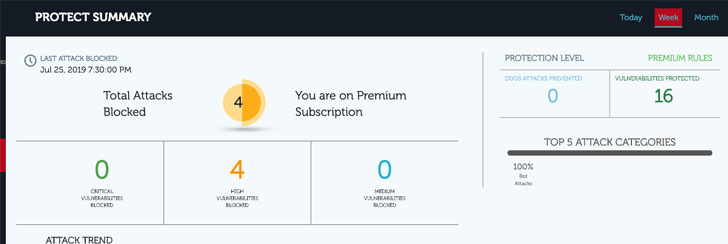
application to avoid FPs without causing FNs. Once the changes are
made, these rules are moved to block mode, and the site is
considered to be under protection with Premium Rules. Users can
check the status of this from the portal.
As the name goes, Only Premium customers are moved to Premium
Rules.
Custom Rules
As already mentioned, AppTrana helps you understand the risk
profile of the site and then protect them. When a website is
onboard, automated scans start immediately, and vulnerabilities
found will be displayed in the detect page.
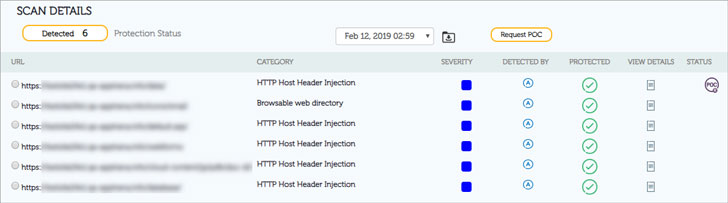
customers can also see the protection status against these
vulnerabilities. They will tell if the vulnerabilities are
protected or not.
A green tick means the vulnerabilities are already protected. If
they show a red icon as shown below, then it is not protected.

vulnerability can be protected.

icons:
- CR- Can be protected by Custom Rule
- AR- Can be protected by Advance Rule
- PR – Can be protected by Premium Rule.
Under the protection status, if they see ‘Applied,’ it means the
rules are already applied.
In case a rule is not applied then ‘Custom Rule’ button will
show up, in which case a customer can click on custom rule button
at which point a service request will be sent to our Managed
service team who would write a tailor-made custom rule for the site
to protect against the vulnerability detected.
There is no need for customers to write any rule or have any
expertise to understand the integrity of how rules need to be
written.
Monitoring
Last but not least, the job of AppTrana’s managed service team
never ends, our managed team continuously monitors the traffic, and
in case of any abnormalities take necessary corrective actions.
The team also constantly monitors the security landscape for any
new vulnerabilities (zero-day vulnerabilities) and continuously
keep the security posture updated. The rules are updated
continuously, and, on average, rules will be updated every week for
any site.

page in the portal. In case of any FPs reported the team
immediately jumps in and tweaks the rule ensuring business
continuity without compromising security.
Get started with AppTrana’s[1]
fully managed application security solution with a 14-day free
trial and experience its uniqueness first-hand.
References
- ^
AppTrana’s
(apptrana.indusface.com)
Read more http://feedproxy.google.com/~r/TheHackersNews/~3/oiiS745oEg4/apptrana-waf-vulnerability-scanner.html