
There are many different types of accounts in a typical Active
Directory environment. These include user accounts, computer
accounts, and a particular type of account called a service
account.
A service account is a special type of account that serves a
specific purpose for services, and ultimately, applications in the
environment.
These special-purpose Active Directory accounts are also the
subject of cybersecurity risks in the environment.
What is a service account? What special privileges does it have
on local systems? What cybersecurity risks can relate to service
accounts used in the environment? How can IT admins find weak or
non-expiring passwords used in Active Directory for service
accounts?
What is a Windows service?
As mentioned at the outset, specific Active Directory accounts
serve different purposes in Active Directory Domain Services
(ADDS). You can assign Active Directory accounts as service
accounts, a special-purpose account that most organizations create
and use to run Windows services located on Windows Servers in their
environment.
To understand the role of the service account, what is a Windows
service? The Windows Service is a component of Microsoft Windows
operating systems, both client and server, that allows long-running
processes to execute and run for the duration of the time the host
is running.
Unlike an application executed by an end-user, a Windows Service
is not executed by an end-user logged into the system. Services run
in the background and start when the Windows host initially starts
up, depending on the service’s configured behavior.
What is a Windows Service account?
Even though a Windows Service is not run interactively by an
end-user who logs into the Windows system, it needs to have a
Windows service account to allow the service to
run under a specific user’s context with special permissions.
A Windows Service, like any other process, has a security
identity. This security identity determines the rights and
privileges that it inherits both on the local machine and across
the network.
It is essential to keep this security identity in mind as this
determines how much potential the service account has to damage the
local system where it is running and across the network. Following
the least privileged best practice model regarding
service, accounts help to ensure the service account does not have
overprovisioned permissions, both locally and across the
network.
The Windows Service can run under a local Windows user account,
an Active Directory domain user account, or the special
LocalSystem account. What differences exist between
running a Windows Service account under a local Windows user
account, an Active Directory domain user account, or the special
LocalSystem account?
- Local Windows user account – A local Windows
user is a user that exists only on the local SAM database of the
local Windows Server or client operating system. The account is
only local and not tied to Active Directory in any way. There are
limitations to using a local Windows user for a service. These
include the inability to support Kerberos mutual authentication and
challenges when the service is directory-enabled. The local Windows
Service account, however, cannot damage the local Windows system.
The local Windows user is limited when used for a service
account.
Active Directory domain user account – A domain
user account that resides in Active Directory Domain Services
(ADDS) is the preferred type of account for a Windows Service. It
allows taking advantage of various security features found in
Windows and ADDS. The Active Directory user assumes all the
permissions both locally and across the network and permissions
granted to groups to which it belongs. Also, it can support
Kerberos mutual authentication. Keep in mind that Active Directory
domain user accounts used for Windows Service accounts should never
be a member of administrator groups.
- When a domain account is selected to run a Windows Service, it
is granted the logon as a service right on the
local computer where the service will run.
- LocalSystem account – Using
the special LocalSystem account is a dual-edged sword. On
the one hand, using the LocalSystem account for a Windows Service
allows the service to have unrestricted access to the Windows
system, which may help prevent issues interacting with Windows
components. However, this serves as a tremendous security
disadvantage since the service could potentially damage the system
or be the subject of a cyberattack. If compromised, a Windows
Service running under LocalSystem has administrator access across
the board.
Windows Service accounts are critical accounts in the
environment. Choosing the right type of user account to run a
Windows Service helps ensure the service functions correctly and
has the appropriate permissions. What are common service account
practices that can introduce cybersecurity risks in the
environment?
Common service account practices
Since service accounts are special-purpose accounts that
determine the security identity of business-critical applications
in the environment, it is typical for service account passwords to
have the flag set for password never
expires[1].
The thought is that a service account password that expires will
cause the business application to fail once the logon times out and
the logon session refreshes with the domain controller. It is true.
An expired password can certainly cause unwanted behavior with an
application backed by the service account.
With the number of Windows Service accounts found in most
environments, it can become difficult to manage service accounts
with expiring passwords. However, it is certainly best from a
security perspective.
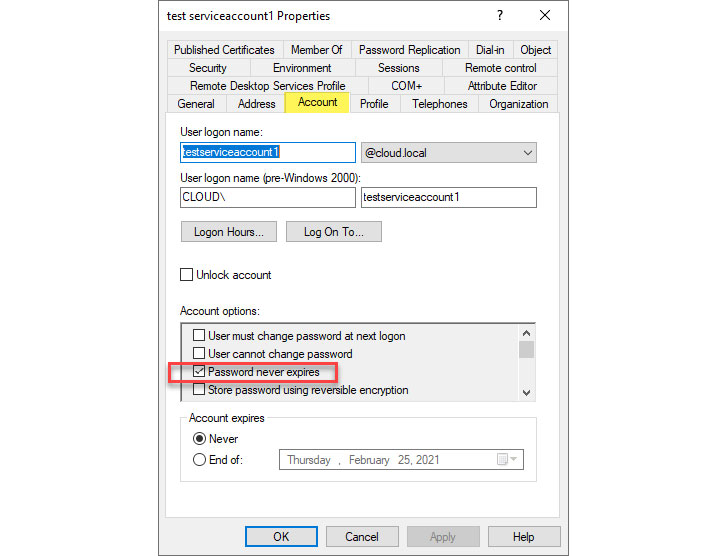 |
| Setting a service account password to never expire |
It may also be common in some organizations to see service
accounts with the same passwords set for multiple service
accounts[2]. The thought is that
having the same password set for multiple service accounts helps to
ease the burden of documenting passwords since it is shared between
multiple accounts.
However, this can also be a dangerous practice. If an
organization has a breach of a single service account, accounts
with the same password are also at risk. It is best to keep
passwords unique between all Active Directory accounts, including
service accounts.
Overall, managing service accounts and service account passwords
can become overwhelming even in small environments running a large
number of Windows Services controlling business-critical
applications.
It can be a challenge merely identifying service accounts with
passwords set not to expire and those service accounts that may
have the same password set. How can organizations easily maintain
visibility to these types of account security issues?
Managing and Maintaining Service Accounts with Specops Password
Auditor
Specops Password Auditor[3] is a great free tool
that helps to gain visibility to Active Directory account security
issues in the environment. It can help quickly identify accounts,
including service accounts, that may have the password set not to
expire flag and configured with identical passwords.
Below, Specops Password Auditor points out several service
account security issues, including:
- Breached passwords
- Identical passwords
- Password never expires
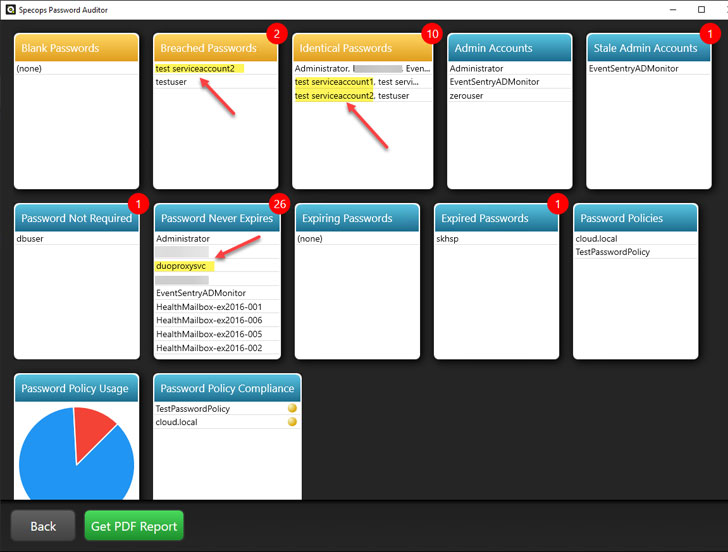 |
| Specops Password Auditor gives visibility to weak service account practices |
You can get further detail from Specops Password Auditor by
drilling into the various categories to see a more detailed view of
the account issues. Below is a detailed view of the
password never expires accounts. It is easy to
pinpoint service accounts configured with a static, non-expiring
password.
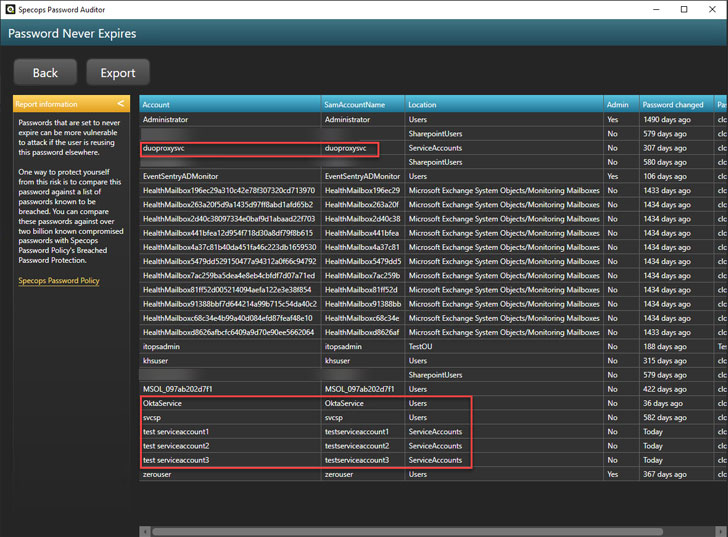 |
| Viewing service accounts with password never expires flag set |
Using Specops Password Auditor, you can quickly get a handle on
service accounts in Active Directory that may have security issues
that need to be corrected.
Wrapping Up
Managing and securing service accounts in your Active Directory
environment is an essential step in your environment’s overall
security. Service accounts are vital as they provide the security
context, rights, and permissions to both local resources and
network resources for the services they back.
There are many common, insecure practices in dealing with
service accounts in many enterprise environments, including
passwords that do not expire, identical passwords, and even
breached passwords configured. a
Specops Password Auditor[4] helps to gain quick
visibility to all account security issues in your environment,
including service accounts, so IT admins can quickly remediate
these.
References
- ^
password
never expires (specopssoft.com) - ^
same
passwords set for multiple service accounts
(specopssoft.com) - ^
Specops
Password Auditor (specopssoft.com) - ^
Specops
Password Auditor (specopssoft.com)