While working on my laptop, I usually prefer sitting at a corner
in the room from where no one should be able to easily stare at my
screen, and if you’re a hacker, you must have more reasons to be
paranoid.
Let’s go undercover:
If you’re in love with the Kali Linux operating system for
hacking and penetration testing, here we have pretty awesome news
for you.
Offensive Security today released a new and the final version of
Kali Linux for 2019 that includes a special theme to transform your
Xfce desktop environment into a Windows look-a-like
desktop.
Dubbed ‘Kali Undercover,’ the theme has been designed for
those who work in public places or office environments and don’t
want people to spot that you’re working on Kali Linux, an operating
system popular among hackers, penetration testers, and
cybersecurity researchers.
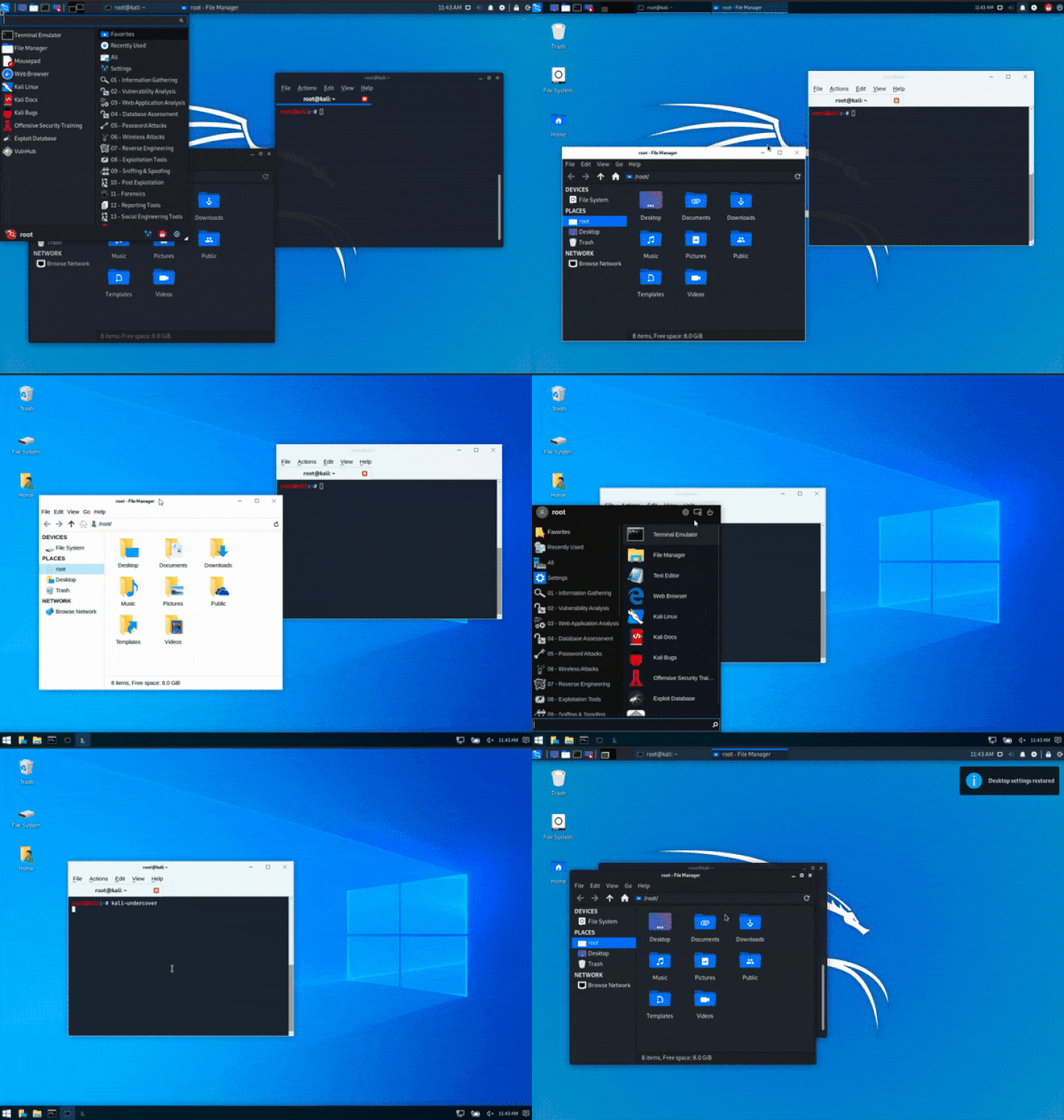
As shown in the demo below, simply enabling “Kali Undercover
Mode” from the menu would immediately turn your distinctive Kali
dragon theme to the boring bluish version of the Windows operating
system.
release, powered by Linux kernel 5.3.9, now also includes some new
exciting updates, including:
- Xfce Desktop — A new default, lightweight desktop
environment aiming to improve the performance and user
experience. - PowerShell Support — This gives you the ability to
execute PowerShell scripts directly on Kali. - Kali NetHunter KeX – This allows you to attach your
Android device to an HDMI output along with Bluetooth keyboard and
mouse and get a full Kali desktop on your smartphone. - New GTK3 theme — A new desktop theme for both Xfce and
GNOME desktops. - Kali Documentation — Moved Kali docs to “/docs/,” which
is now Git powered where anyone can contribute for better public
documentation. - BTRFS during setup — Supports setting BTRFS as your root
file system allowing you to perform file system rollbacks after
upgrades.
The Offensive Security ARM images have also been updated to the
latest 2019.4 version that will support 8GB sd cards on
ARM.
which is due in the new year, a 16GB sd card will be the minimum
supported one, though users will be able to create their own images
that support smaller cards.
Moreover, RaspberryPi kernel for Kali Linux was updated to
version 4.19.81, and the firmware package was updated to include
the eeprom updates for the RaspberryPi 4.
You can download the latest Kali Linux 2019.4 from its official
website[2] or from the Torrent
network. If you are already running an existing Kali installation,
you can simply upgrade it to the latest Kali release by running the
command: apt update && apt -y full-upgrade.
References
- ^
Kali Linux 2019.4
(www.kali.org) - ^
official website
(www.kali.org)
Read more http://feedproxy.google.com/~r/TheHackersNews/~3/LHtBTxvG7KY/kali-linux-undercover-mode.html