When you own a local business or a company, you need to have a
website to run your business. And most importantly, you need to
have a secure website so that it can defend cyber-attacks. In order
to make your website secure and safe, you need to get a secure
sockets layer (SSL) certificate. The certificate will contain a set
of information about your website. The Certificate Signing Request
(CSR) is a coded set of data secured with asymmetric cryptography.
The CSR file records the data about the name of your organization,
country, state name, email address, and the name of your website.
By using Linux distributions, you can generate a Certificate
Signing Request for your website.
Certificate Signing
Request
SSL certificate can be used for both local file transfer
protocol (FTP) server and commercial websites. The Secure Sockets
Layer (SSL) creates a secure connection between the website and the
visitors. To get the SSL security clearance, you need to generate a
certificate signing request (CSR) key for your website. In this
post, we will see how to generate a CSR (Certificate Signing
Request) in Linux.
Step 1: Installing OpenSSL on Your
Distributions
In Linux distributions, you can generate the Certificate Signing
Request (CSR) through an OpenSSL (Secure Sockets Layer) protocol.
The SSL is an internet protocol that can make your website more
secure and protected for visitors. It can encrypt the data packet
even before it leaves your computer. The entire SSL operation works
with the combination of a public key and a private key.
The certificate authority can verify the pair of encryption
keys. Till now, OpenSSL is the best method to get your private key
to generate a certificate signing request. So, now we are going to
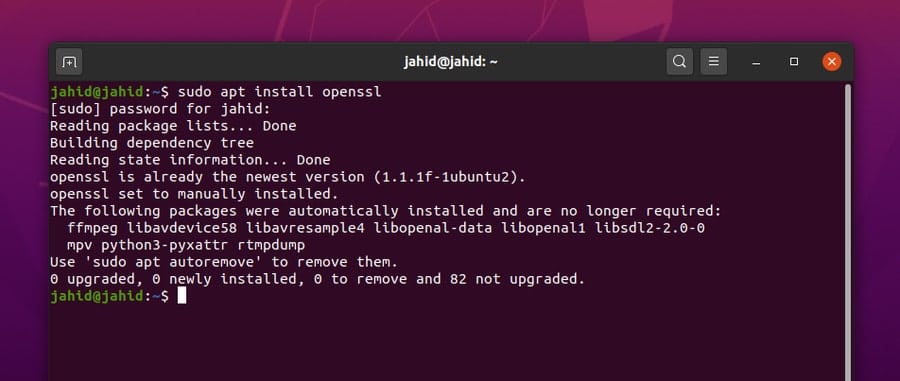
install the OpenSSL on our Linux machine. Here, the terminal
commands to install the OpenSSL for different Linux distributions
are given below.
Install OpenSSL on Ubuntu/Debian Linux
$ sudo apt install openssl
Install OpenSSL on Red Hat Enterprise Linux
$ sudo yum install openssl
Install OpenSSL on CentOS and Fedora
Linux
$ sudo dnf install openssl
You can check the version of OpenSSL to make sure that the
package is installed successfully inside your system.
$ openssl version
Step 2: Generating a New Private
Key for Certificate Signing Request
After installing the OpenSSL service, you can now go for further
procedures to generate a certificate signing request from your
Linux system. You can check the manual of OpenSSL to get the basic
idea about how the OpenSSL works.
$ man openssl
We must remember that the certificate signing request key must
be in RSA format, and the size of the key
should be 2048-bits. Be careful about using the CSR key; every time
you generate a CSR key request, you will get a different CSR key.
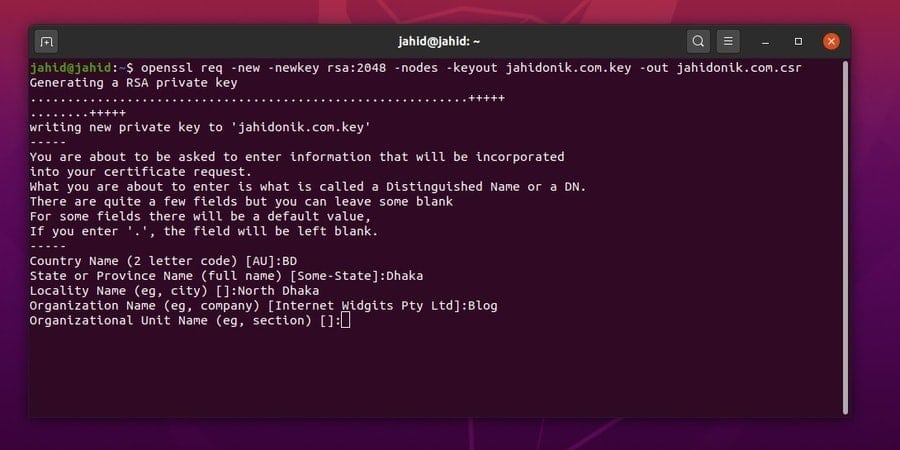
Here, I will use the terminal command-line interface to generate a
new private key request for my website. You can check the command
line below. [1]
$ openssl req -new -newkey rsa:2048 -nodes -keyout jahidonik.com.key -out jahidonik.com.csr
Step 3: Getting the Certificate
Signing Request Key
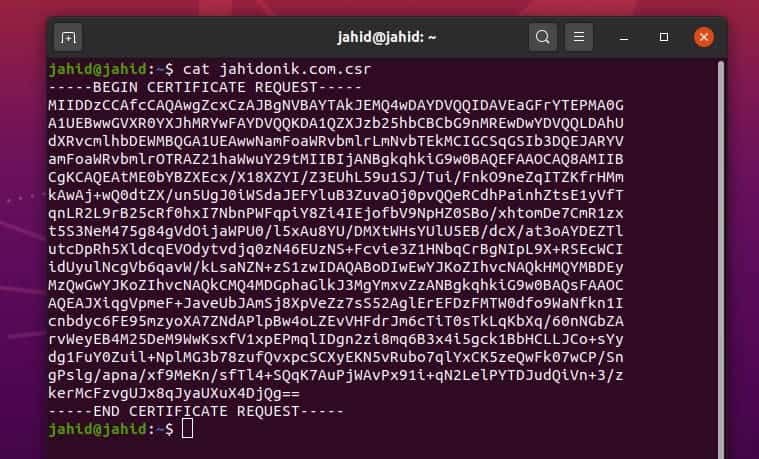
After getting the private key, now its time to get the
certificate signing request key for your website. In Linux,
normally, the CSR key is generated and stored inside the
home directory. You can open the CSR key using the
cat command in the terminal shell.
Here, a sample of a CSR key is given for better understanding
and to know how does a CSR key appear. Be mindful; don’t share your
CSR key with anyone else. Once you have got the CSR key, you should
keep your key safe and secure.
$ cat jahidonik.com.csr
Additional Technique: Certificate
Signing Request from cPanel
cPanel[2]
is the most used and user-friendly website management tool for all
beginners to the expert level website or server administrators.
cPanel is written in Perl programming language[3] and built with the base
of Linux kernel. If you are familiar with the back-end of websites,
you must know that there is a control panel unit to maintain the
website, named cPanel.
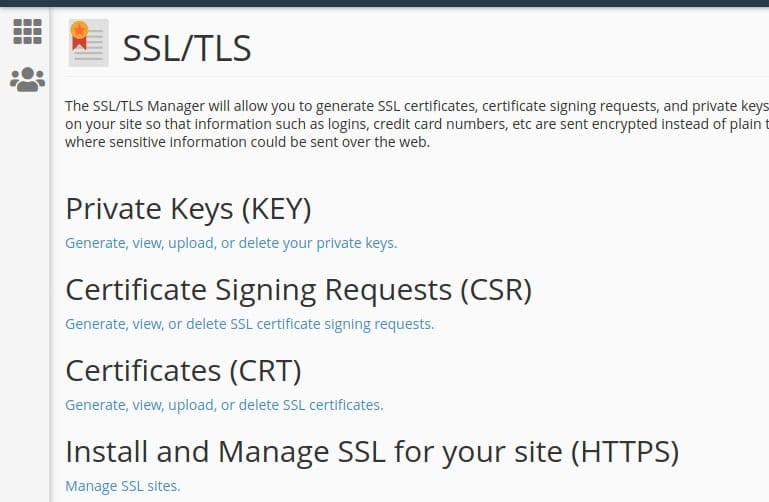
You can generate, view, and delete the CSR (Certificate Signing
Request) requests from the Security option of the cPanel. To get
the cPanel privileges, you need to login to the cPanel of your
website. After logging in, you can find the Secure Sockets Layer
(SSL) and Transport Layer Security (TLS) settings under the
Security settings of the WHM (Web Host Manager) configuration
unit.
Final Thoughts
Getting an SSL certificate is important because it can make your
website safe, and it also brings customer satisfaction. An SSL
certificate is the identification of its owner. Moreover, an SSL
certificate can rank your site up at search engine ranking. In the
entire post, I have explained the notion of the SSL certificate and
the relation between the SSL certificate and the CSR key. I have
demonstrated the method of how to generate a Certificate Signing
Key (CSR) in Linux distributions.
If you find this post useful and convenient, please share it
with your friends and Linux geeks. We also encourage you to write
your valuable comment in the comment segment. Happy Linuxing.
References
- ^
RSA
format (www.cryptosys.net) - ^
cPanel
(www.ubuntupit.com) - ^
Perl programming language
(www.perl.org)
Read more https://www.ubuntupit.com/how-to-generate-a-csr-certificate-signing-request-in-linux/