
According to the 2022 Malwarebytes Threat review, 40M Windows
business computers’ threats were detected in 2021. And malware
analysis is necessary to combat and avoid this kind of attack. In
this article, we will break down the goal of malicious programs’
investigation and how to do malware analysis[1]
with a sandbox.
What is malware analysis?
Malware analysis is a process of studying a malicious sample.
During the study, a researcher’s goal is to understand a malicious
program’s type, functions, code, and potential dangers. Receive the
information organization needs to respond to the intrusion.
Results of analysis that you get:
- how malware works: if you investigate the code of the program
and its algorithm, you will be able to stop it from infecting the
whole system. - characteristics of the program: improve detection by using data
on malware like its family, type, version, etc. - what is the goal of malware: trigger the sample’s execution to
check out what data it is targeted at, but of course, do it in a
safe environment. - who is behind the attack: get the IPs, origin, used TTPs, and
other footprints that hackers hide. - a plan on how to prevent this kind of attack.
Types of malware analysis
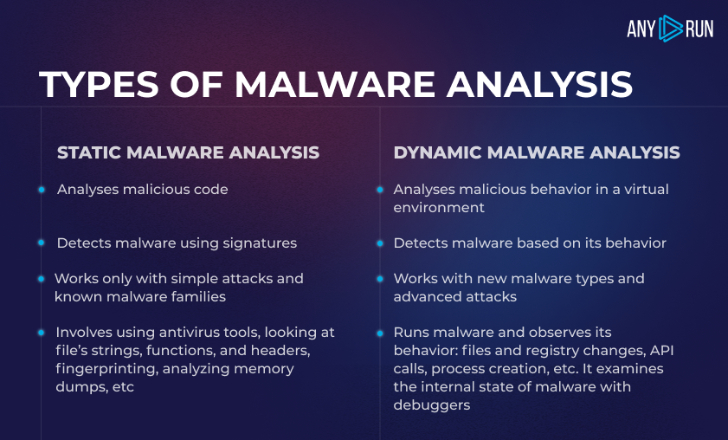 |
| Static and dynamic malware analysis |
Key steps of malware analysis
Across these five steps, the main focus of the investigation is
to find out as much as possible about the malicious sample, the
execution algorithm, and the way malware works in various
scenarios.
We believe that the most effective method to analyze malicious
software is to mix static and dynamic methods. Here is a short
guide on how to do malware analysis. Just follow the following
steps:
Step 1. Set your virtual machine
You can customize a VM with specific requirements like a
browser, Microsoft Office, choose OS bitness, and locale. Add tools
for the analysis and install them in your VM: FakeNet, MITM proxy,
Tor, VPN. But we can do it easily in ANY.RUN sandbox.[2]
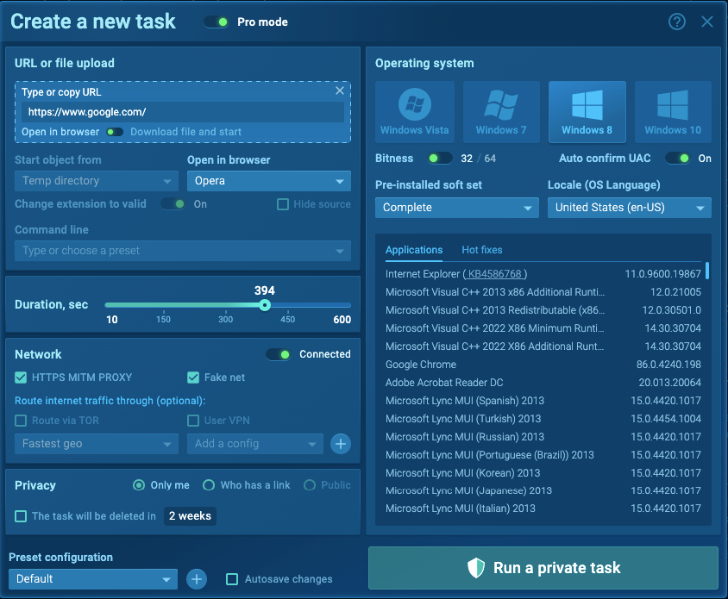 |
| VM customization in ANY.RUN |
Step 2. Review static properties
This is a stage for static malware analysis. Examine the
executable file without running it: check the strings to understand
malware’s functionality. Hashes, strings, and headers’ content will
provide an overview of malware intentions.
For example, on the screenshot, we could see hashes, PE Header,
mime type, and other info of the Formbook sample. To take a brief
idea about functionality, we can take a look at the Import section
in a sample for malware analysis[3], where all imported DLLs
are listed.
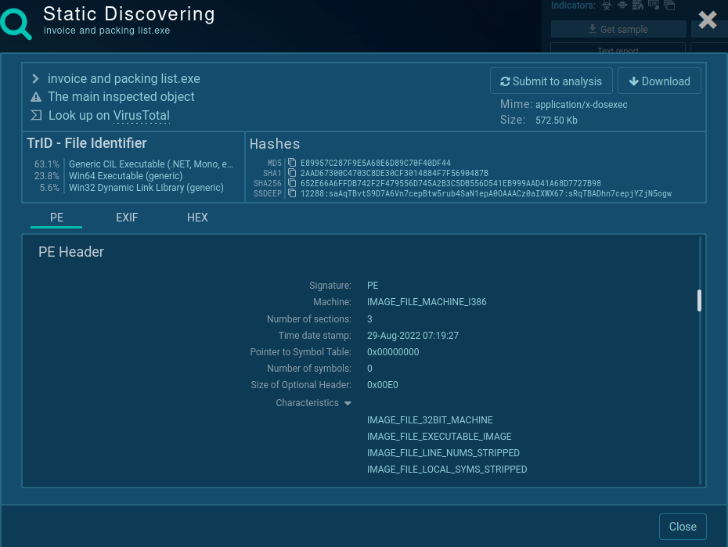 |
| Static discovering of the PE file |
Step 3. Monitor malware behavior
Here is the dynamic approach to malware analysis. Upload a
malware sample in a safe virtual environment. Interact with malware
directly to make the program act and observe its execution. Check
the network traffic, file modifications, and registry changes. And
any other suspicious events.
In our online sandbox sample[4], we may take a look
inside the network stream to receive the crook’s credentials info
to C2 and information that was stolen from an infected machine.
 |
| Attacker’s credentials |
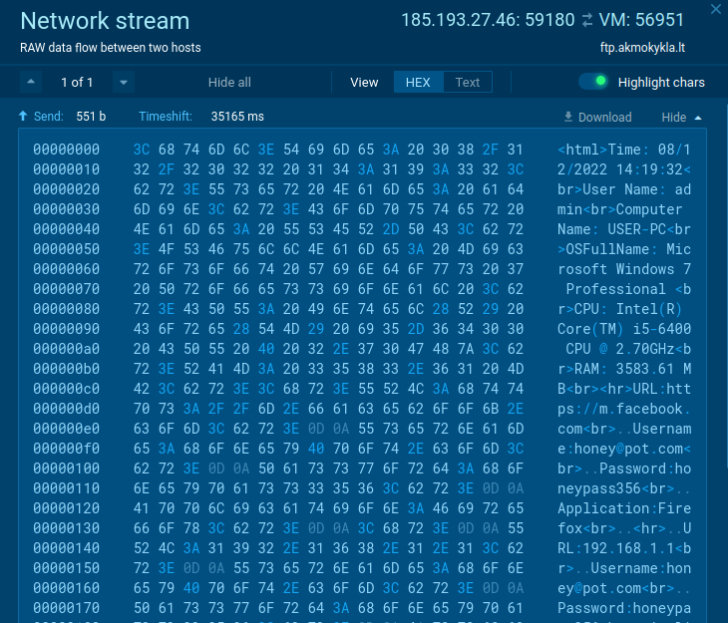 |
| Review of the stolen data |
Step 4. Break down the code
If threat actors obfuscated or packed the code, use
deobfuscation techniques and reverse engineering to reveal the
code. Identify capabilities that weren’t exposed during previous
steps. Even just looking for a function used by malware, you may
say a lot about its functionality. For example, function
“InternetOpenUrlA” states that this malware will make a connection
with some external server.
Additional tools, like debuggers and disassemblers, are required
at this stage.
Step 5. Write a malware report.
Include all your findings and data that you found out. Provide
the following information:
- Summary of your research with the malicious program’s name,
origin, and key features. - General information about malware type, file’s name, size,
hashes, and antivirus detection capacities. - Description of malicious behavior, the algorithm of infection,
spreading techniques, data collection, and ways of С2
communication. - Necessary OS bitness, software, executables and initialization
files, DLLs, IP addresses, and scripts. - Review of the behavior activities like where it steals
credentials from, if it modifies, drops, or installs files, reads
values, and checks the language. - Results of code analysis, headers data.
- Screenshots, logs, string lines, excerpts, etc.
- IOCs.
Interactive malware analysis
The modern antiviruses and firewalls couldn’t manage with
unknown threats such as targeted attacks, zero-day vulnerabilities,
advanced malicious programs, and dangers with unknown signatures.
All these challenges can be solved by an interactive sandbox.
Interactive is the key advantage of our service. With ANY.RUN
you can work with a suspicious sample directly as if you opened it
on your personal computer: click, run, print, reboot. You can work
with the delayed malware execution and work out different scenarios
to get effective results.
During your investigation, you can:
- Get interactive access: work with VM as on
your personal computer: use a mouse, input data, reboot the system,
and open files. - Change the settings: pre-installed soft set,
several OSs with different bitness and builds are ready for
you. - Choose tools for your VM: FakeNet, MITM proxy,
Tor, OpenVPN. - Research network connections: intercept
packets and get a list of IP addresses. - Instant access to the analysis: the VM
immediately starts the analysis process. - Monitor systems processes: observe malware
behavior in real-time. - Collect IOCs: IP addresses, domain names,
hashes, and others are available. - Get MITRE ATT@CK matrix: review TTP in
detail. - Have a process graph: evaluate all processes in a graph.
- Download a ready-made malware report: print
all data in a convenient format.
All of these features help to reveal sophisticated malware and
see the anatomy of the attack in real-time.
Write the “HACKERNEWS” promo code in the email subject at
support@any.run and get 14 days of ANY.RUN premium subscription for
free!
Try to crack malware using an interactive approach. If you use
ANY.RUN sandbox, you can do malware analysis and enjoy fast
results, a simple research process, investigate even sophisticated
malware, and get detailed reports. Follow the steps, use smart
tools and hunt malware successfully.
References
- ^
malware
analysis (any.run) - ^
ANY.RUN
sandbox. (app.any.run) - ^
a sample
for malware analysis (app.any.run) - ^
online
sandbox sample (app.any.run)
Read more https://thehackernews.com/2022/09/how-to-do-malware-analysis.html