
Malware analysis is an essential part of security researcher’s
work. But working with malicious samples can be dangerous — it
requires specialized tools to record their activity, and a secure
environment to prevent unintended damage.
However, manual lab setup and configuration can prove to be a
laborious and time-consuming process.
In this article, we’ll look at 4 ways to create a reverse
engineering lab, discuss how to save time, and, potentially,
improve the detection rate using a cloud service, and a recommended
list of tools for a comprehensive setup.
What is a malware analysis lab?
In essence, a malware analysis lab provides a safe, isolated
space for examining malware.
The setup can range from a straightforward virtual machine using
VirtualBox to a more intricate network of interconnected machines
and actual networking hardware.
But in this article, we’ll look at building a lab tailored for
static analysis, so what we will need is a secure environment where
we can run disassemblers, edit binary files and debug.
There are a couple of ways we can go about creating it:
1 — Virtualization
Perhaps the simplest way to create a secure and isolated
environment is by using a virtual machine.
A popular option is Virtual Box, open-source software from
Oracle. If you are on Linux, to install it, just use the command
sudo apt install virtualbox. VMWare is another
popular choice — it’s a commercial program, but there is a free
tier.
Set up is easy — download and install the software, create a
virtual machine, configure the settings to make sure it doesn’t
have network access or shared folders with the host, and then boot
it with an .ISO file of your chosen operating system.
But this approach has some drawbacks: you will have to establish
custom detection rules for identifying suspicious or malicious
entities, independently research emerging techniques, maintain
configurations, and determine logging policies using available
tools. This increased focus on maintenance and configuration
detracts from the time spent on analysis.
Pros
- Free or available at a low cost
- The setup is easy
- Provides an isolated environment if configured correctly
Cons
- The performance takes a hit
- Limited scalability bottlenecked by your CPU
- The malware could escape to the host
- Requires to manually configure detection rules
2 — Dedicated hardware
In case you have an old laptop lying around or you have the
means to get one or build a PC, this is definitely an option. You
don’t have to break the bank either — the 11-13th generation of
Intel processors make even budget machines more than a viable
option.
The main upside of opting for a physical computer is better
performance and higher security since you can make sure the machine
is truly isolated from all devices and networks.
Pros:
- Most performant option
- Completely isolated environment
- Can be endlessly customized
Cons:
- High-end hardware is pricey
- Requires software and hardware maintenance
- Needs to be configured to work
3 — A cloud lab
Creating a malware lab in the cloud actually isn’t as difficult
as it might sound. Also — it is free! All you need is an account at
AWS, or any comparable cloud service provider, and a machine to
connect to it. The setup may be slightly more complicated than a
local virtual machine, but there are numerous tutorials that you
can use as a guide.
If you choose to work with AWSs, look for Kali in the
marketplace to set up a Kali Linux Virtual Machine. To use the GUI,
you can create a VNC server and connect to your lab with a tool
like VNC Viewer.
One of the downsides of this approach is that it’s free until it
isn’t. If you exceed the boundaries of the free tier, your cloud
bill could balloon quickly.
Occasionally, cloud providers may also restrict malware
execution, posing legal risks. Additionally, cloud machines demand
support, burdening IT operations. While suitable for novice
independent researchers, this approach presents drawbacks in
corporate settings. Crucially, it lacks the ability to counteract
malware’s VM detection and bypass anti-evasion tactics.
Pros:
- Scalability
- No hardware maintenance
- Isolated from your network for better security
Cons:
- Potential legal risks.
- Difficult setup
- Needs to be configured to work
- Latency decreases the quality of work
- Advanced setups are pricey
- Susceptible to anti-avastin techniques
4 — Sandbox-as-a-Service
One significant advantage of cloud-based sandbox services is
their built-in resilience against VM detection. This reduces the
likelihood of a malware sample recognizing it’s in a virtual
machine and halting its execution, a feature that requires manual
configuration in other sandboxes.
Also, in a service like this, detection rules are written by
specialists utilizing vast malware and threat intel databases. As a
result, the software can enrich analysis outcomes with techniques
and IOCs, yielding more comprehensive output compared to raw data
from cloud or on-prem VMs.
Furthermore, cloud-based sandbox services streamline environment
configurations. For instance, instead of creating separate
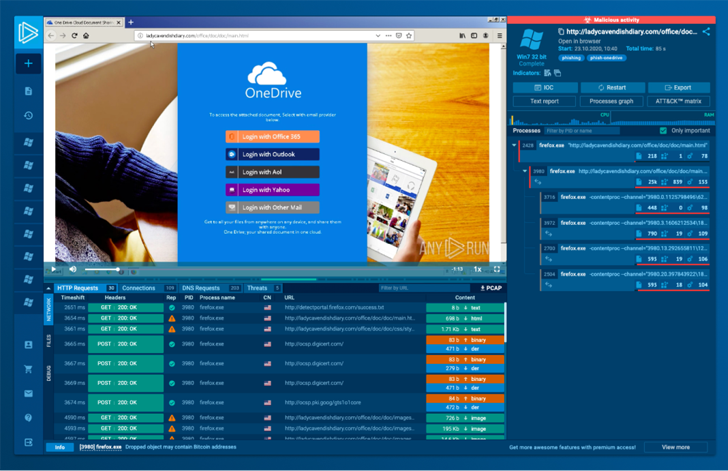
snapshots in a VM, ANY.RUN’s cloud service[1] allows easy environment
setup through a user-friendly menu every time a lab is
initiated.
Pros
- Saves time
- Ease of use
- Secure and completely isolated from your network
- Hardened against VM detection
- Simple configuration of the execution environment
Cons
- Isn’t optimized to work with your toolset
- Certain solutions on the market may be laggy
- Virtual machine instances are time-constrained
Using an online, interactive sandbox such as ANY.RUN instead of
a lab offers convenience and speed. It can help automate parts of
static analysis, like extracting malware configurations.
If you’d like to try ANY.RUN for yourself, they are currently
running a special promo for Hacker News readers:
Types of software for reverse engineering
Here are some essential tools that will help to you
reverse-engineer malware:
- Disassemblers. Disassemblers are a must-have
for reverse engineering. They allow you to transform machine
language into assembly code that’s easy for humans to understand,
so you can gain insight into how malware functions. IDA Pro,
Ghidra, and Binary Ninja are all popular disassemblers. To run
Ghidra on Linux, first, install JDK and download Ghidra itself to
your machine. No installation is needed, just execute these
commands inside the Ghidra directory: chmod +x
ghirdRun and ./ghirdaRun.
- Decompilers. Decompilers are similar to
disassemblers, in that they can convert machine code into source
code. It can be useful for understanding the malware’s architecture
and figuring out specific functions or modules. Popular decompilers
include IDA Pro, Ghidra, and Hex-Rays.
- Debuggers. Debuggers help programmers locate
errors and troubleshoot them by letting them go through the code
line by line, set breakpoints, and observe the way the malware
functions. Several of the most commonly used debuggers are OllyDbg,
x64dbg, and WinDbg. x64dbg is one of the most popular options right
now: it’s free and available to download from x64dbg.com
- HEX editors. Hex editors are useful for
getting a closer look at binary files, understanding how they’re
arranged, spotting particular values, and manipulating the file as
a way of seeing how the virus responds. Common hex editors include
HxD and Hex Workshop.
- Network analysis tools. Certain malware
requires an online connection in order to work. Network analysis
programs like Wireshark can help you identify and examine the
traffic sent and received by that malware.
Essential malware analysis tools
It’s up to the analyst to decide what software to install, but,
in our opinion, the list of essential tools looks like this:
- Detect It Easy. For determining types of
files - Process Hacker. Helps you monitor system
resources, debug software and detect malware - Process Monitor. A Monitoring tool for Windows
that shows real-time file system, Registry, and process/thread
activity - Wireshark. For analyzing network activity
- x64dbg and Ghidra. Required
for both static and dynamic analysis.
Oh, and if you want to get a lab that’s been pre-configured, you
can use a specialized distribution kit like Remnux, which comes
with most of those programs already installed.
There is also FLARE VM — a collection of software installation
scripts for Windows-based systems that allows you to easily set up
and maintain a reverse engineering environment on a virtual
machine.
Wrapping up
We have discussed four different methods for creating an
analysis lab: utilizing virtualization, building a dedicated
machine, deploying a cloud lab, or subscribing to a sandbox-as-a-service[2].
Each of these approaches comes with its own set of benefits and
drawbacks, and the correct choice depends on what you are trying to
achieve and the resources available to you.
Thankfully, most of these options are totally free, so just try
them all out and see what works best!
Found this article interesting? Follow us on Twitter [3]
and LinkedIn[4]
to read more exclusive content we post.
References
- ^
ANY.RUN’s cloud service
(any.run) - ^
sandbox-as-a-service
(any.run) - ^
Twitter
(twitter.com) - ^
LinkedIn
(www.linkedin.com)
Read more https://thehackernews.com/2023/03/how-to-build-research-lab-for-reverse.html