
One of the determining factors of how much damage a cyber-attack
cause is how fast organizations can respond to it. Time to response
is critical for security teams, and it is a major hurdle for leaner
teams.
To help improve this metric and enhance organizations’ ability
to respond to attacks quickly, many endpoint detection and response
(EDR) and extended detection and response (XDR) vendors have
started including some form of automation in their platforms to
reduce the need for manual intervention.
XDR provider Cynet claims that they go beyond existing solutions
when it comes to security automation. More than automating
individual components, the Cynet 360 platform (see a live demo
here[1]) offers automation
across every phase of incident response – from detection through
remediation. The company uses a variety of tools and techniques to
keep organizations safe and quickly respond to any emerging
threat.
How Cynet removes the guesswork from Incident Response
Cynet fully automates the response workflow from start to
finish. It also eliminates or greatly minimizes the need for manual
efforts and ensures key response details and tasks are performed
quickly and effectively.
The platform starts by grouping alerts logically into incidents
that create a better picture of a potential attack. This helps
reduce alert fatigue and offers greater threat context.
The platform also provides an Incident Engine that
automates:
- Investigation – automated root cause and impact analysis
- Findings – actionable conclusions on attack components and
their affected entities - Remediation – removing any malicious presence and activity
across users, networks, endpoints, and infrastructure.
Deploying preset remediation actions
One way Cynet helps organizations speed their time to response
is by deploying a wide range of remediation tools for infected
hosts, compromised user accounts, and attacker-controlled network
traffic. The company provides a broad set of remediation actions
directly out of the box. As a result, it significantly raises the
number of attacks the system can respond to automatically.
Using and building playbooks
Another automation-focused feature offered by Cynet is its
ability to use both pre-built and customized playbooks. These are
chains of remediation actions that can be automatically executed
upon detection of specific threats and attacks. Cynet comes
pre-packaged with multiple ready-made playbooks, but users can
quickly build their own chains based on organizational needs,
specific threats, and protocols.
 |
| Custom Remediations |
Teams can create playbooks that trigger on specific alerts, or
suspicious activities. Playbooks are bult using drag-and-drop,
letting teams quickly build the right flows of response actions to
ensure a fast and thorough resolution.
The Incident Engine
Cynet’s Incident Engine is another unique tool the company
offers to give teams much greater visibility into attacks and their
causes. The engine lays out the incident in a visual timeline to
help teams better determine the attack’s root cause and scope, to
its eventual resolution.
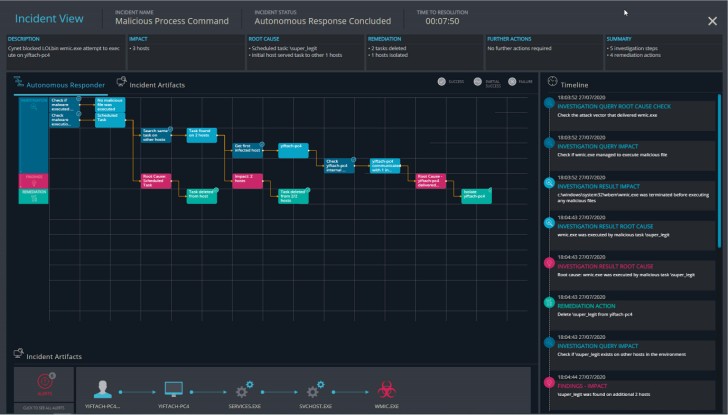 |
| The Incident Engine |
The Incident Engine starts by asking a series of questions to
determine the cause and scale of the attack. Once it has findings,
it can take the automated actions necessary to remediate a threat.
On the timeline, users can view each specific remediation and the
event or alert that triggered it.
Especially for lean security teams that don’t always have the
resources or bandwidth available to investigate an attack after the
fact, the Incident Engine offers an excellent way to understand
threats and ensure dangerous attack components are not
overlooked.
The engine will also search the entire environment to check for
similar threat components. If found, the Incident Engine can act
automatically to remove any remaining threats.
You can learn more about Cynet’s automated response capabilities
by requesting a live demo here[2].
References
- ^
see a
live demo here (www.cynet.com) - ^
requesting a live demo here
(www.cynet.com)