
energy, which otherwise you’d spend on managing your business.
If you’re looking to cut down on the hours, you spend
troubleshooting WordPress technical and security problems, better
managing and monitoring your website and users, or your customers,
you need a WordPress activity
log plugin[1].
This post explains how to use the WP Security Audit Log plugin
to keep a WordPress security audit log (aka activity log). It also
highlights five ways an activity log helps you better manage your
website and users and improve its security.
WordPress Security Audit Logs – Introduction and Benefits
An activity log is a record of everything that happens on your
WordPress website. This includes a record of plugins, themes, and
WordPress core changes, users activity (such as content changes),
site settings changes, break-in attempts, WooCommerce store, and
product changes, and everything else that happens on your website.
WordPress does not have any built-in logging mechanisms. So the
best way to keep a security audit log on your website is to install
the WP Security Audit Log plugin. It is the most comprehensive
activity log/audit trail plugin with the broadest coverage.
The benefits of keeping an activity log on WordPress
WordPress site administrators enjoy a lot of benefits when they
keep an activity log. To mention a few, with activity logs you can:
- Ease troubleshooting, as you can pin down the source of the
problem quickly, - Know exactly what is happening on your site and take full
control of it, - Improve user accountability and productivity,
- Meet mandatory regulatory compliance requirements,
- Learn how attackers are trying to break into your website,
allowing to improve its security, - Set up an intrusion detection system (IDS) to be instantly
alerted via SMS or emails of critical site changes or
problems, - and much more!
How activity logs help you better manage your WordPress site
and users
1. Know who is logged into your site and what they are
doing
WordPress is a multi-user web application. So it is imperative to
know from where users are logging in, when, and what they are
doing. This is a must, especially when running a remote team and
also for the security of your website. Since WP Security Audit Log
keeps a log of everything, this information is close to
hand:

Log can also show who is logged in to the website and their latest
change, in real-time.
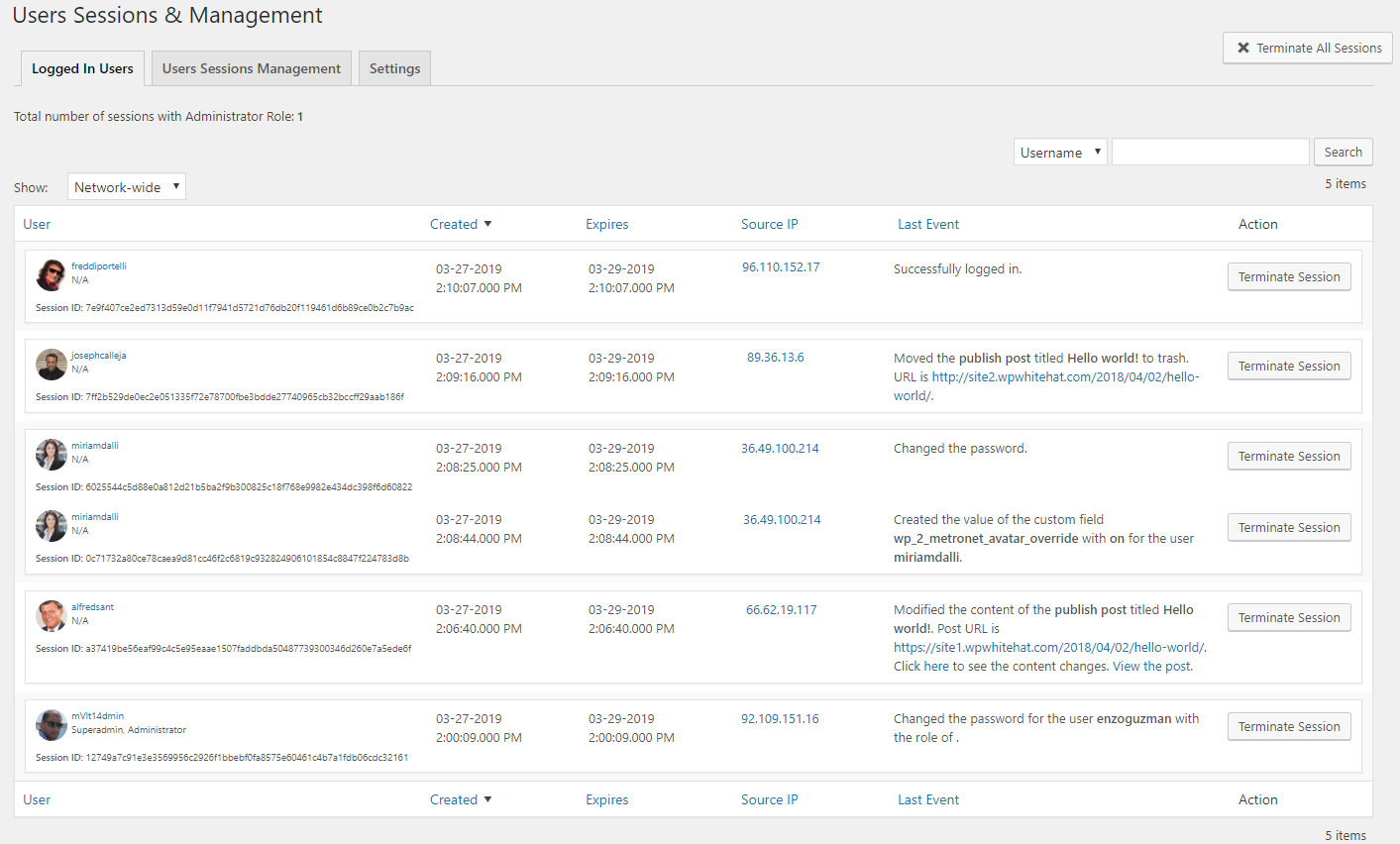
manage your team and website better. You’ll also be able to easily
spot suspicious behavior, login attempts, and more.
2. Note website core, plugins & themes installations and
updates
A fundamental security best practice is to keep your WordPress
core, plugins, themes, and all the software you use up-to-date.
However, sometimes, updates can also lead to compatibility and
technical issues. Or even worse, it is not uncommon for attackers
who manage to gain unauthorized access to install malicious
plugins, or infect already installed ones.
By keeping track of all your website updates, the activity log
is the tool that will point you in the right direction. In it, you
will find the source of the problem, which helps you resolve the
problem quickly. Be it a hacker or well-intentioned user, with
audit trails you can track down unauthorized and problematic
changes without doing any guesswork.
3. Keep track of WordPress settings changes
Some WordPress settings changes can have a significant impact on
the behavior of a website. Some others go unnoticed. What if
someone changes the default role of new users to administrators by
mistake, or intentionally? You won’t be able to notice such change
until a new user finds out they have admin access.
WordPress audit logs enable you to be aware of everything that’s
happening on your site, including WordPress settings changes. This
means you’ll be able to identify the issue, who did it and when.
And till also allows you to reverse unwanted changes with ease.
4. Build a WordPress Intrusion Detection System (IDS)
An activity log is an excellent asset in a post hack scenario. It
helps you recover after an attack. Though more importantly, it
enables you to prevent WordPress hack attacks from happening. Audit
logs are the core of a WordPress Intrusion
Detection System (IDS).
When you set up an IDS, it will alert you to suspicious
activity. Therefore it helps you avoid successful hack attacks, so
you do not have to deal with the aftermath and the
expenses.
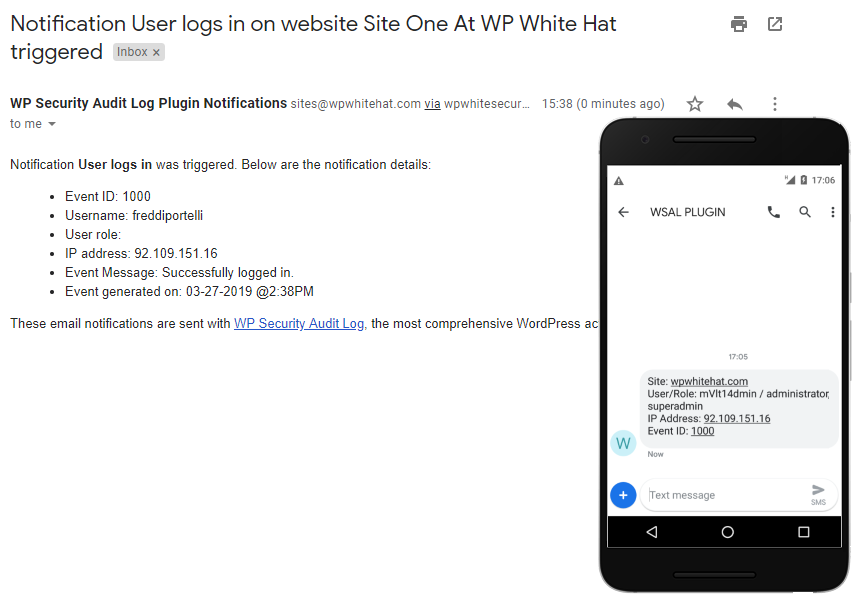
are login attempts outside regular working hours, or from
unfamiliar IP addresses. You can also set up notifications for when
there are critical WordPress settings changes that alter the
website’s functionality.
Bonus: Activity logs for WooCommerce / eCommerce stores
Activity logs are also very popular on eCommerce websites powered
with WooCommerce. Audit trails make managing your online store
smoother and increase users’ accountability.
The WP Security Audit Log is also an activity log for
WooCommerce. It keeps plugin keeps a log of WooCommerce store,
products, orders, and other changes.
[3]
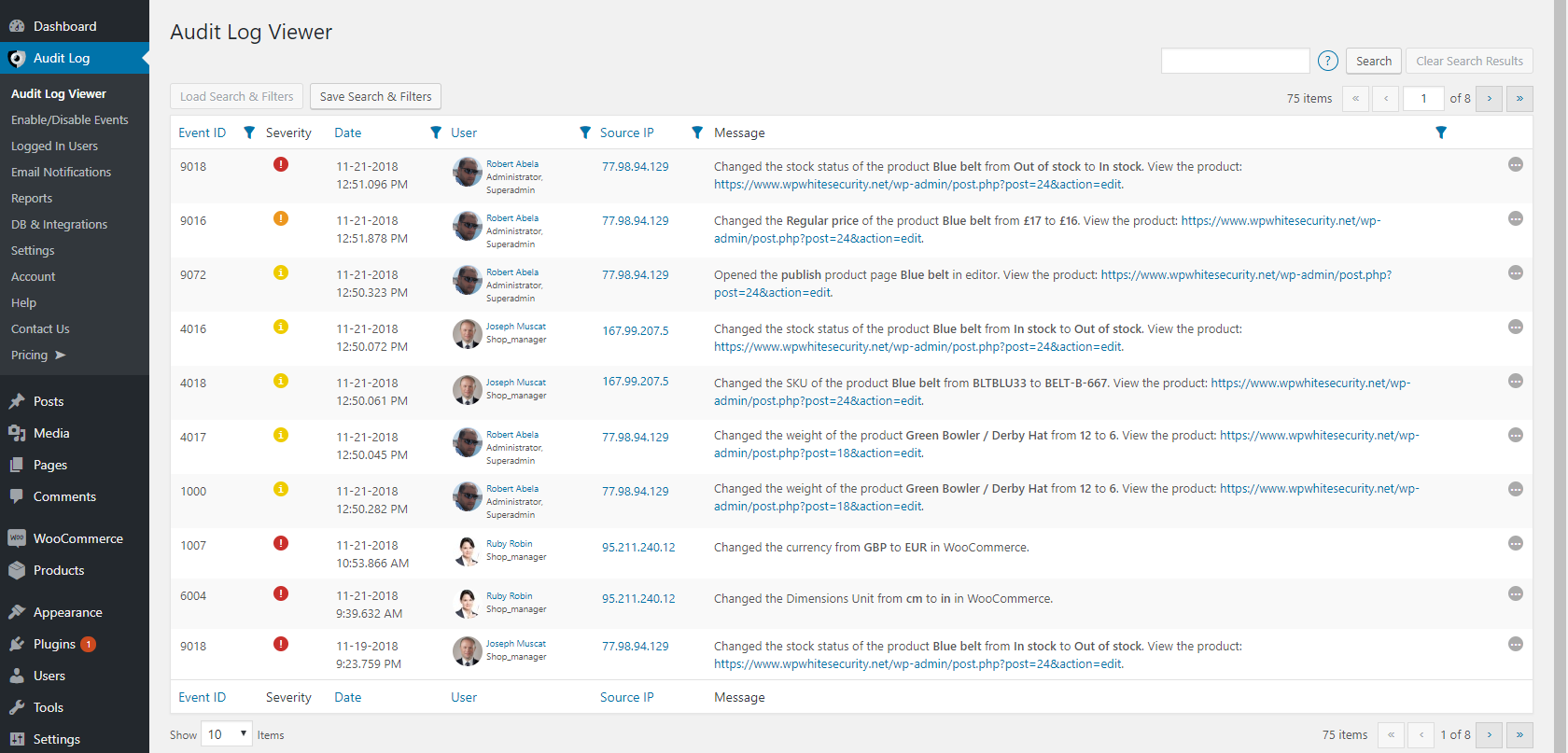
game. The plugin keeps a log of what actually changed and which
store manager changed an order, a store setting, a discount coupon,
or a product. It reports if it was a quantity change, price change,
or stock quantities adjustments.
Improving WordPress website management & security with activity
logs
WordPress management is a necessity; however, it can take away from
other business responsibilities. Activity logs
help you gain a full overview of what is happening on your site,
better manage your team, and improve its security.
In return, you’ll have time to take care of your business
matters faster and more effectively. This includes the ability
to:
- Know who is logged into your site and what they are doing
- Note website core, plugins & themes installations and
updates - Keep track of WordPress settings changes
- Build a WordPress Intrusion Detection System (IDS)
- Keep track of your WooCommerce store, orders, and shop
managers.
References
- ^
WordPress activity log plugin
(www.wpsecurityauditlog.com) - ^
WordPress Intrusion Detection
System (www.wpsecurityauditlog.com) - ^
activity log for WooCommerce
(www.wpsecurityauditlog.com) - ^
Activity logs
(www.wpsecurityauditlog.com)
Read more http://feedproxy.google.com/~r/TheHackersNews/~3/FSiqK7png1I/wordpress-activity-logs.html