technique that cybercriminals and email scammers are already being
using in the wild to bypass security features of Microsoft Office
365, including Safe Links, which are originally designed to protect
users from malware and phishing attacks.
Safe Links has been included by Microsoft in Office 365 as part
of its ATP (Advanced Threat Protection) solution that works by
replacing all URLs in an incoming email with Microsoft-owned secure
URLs.
Therefore, every time users click on a link provided in an
email, Safe Links first sends them to a Microsoft owned domain,
where it immediately checks the original link for anything
suspicious. If Microsoft’s security scanners detect any malicious
element, it then warns the users about it, and if not, it redirects
them to the original link.
However, researchers at the cloud security company Avanan have
revealed how attackers have been bypassing both Office 365’s URL
reputation check and Safe Links URL protection features by using
Zero-Width SPaces (ZWSPs).
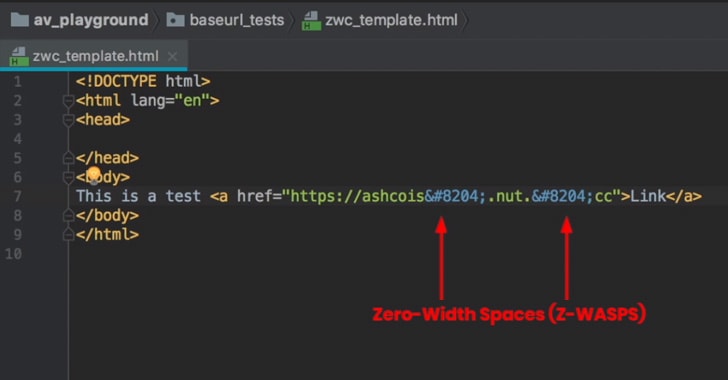
Supported by all modern web browsers, zero-width spaces (listed
below) are non-printing Unicode characters that typically used to
enable line wrapping in long words, and most applications treat
them as regular space, even though it is not visible to the
eye.

Zero-Width Space Phishing Attack Demonstration
According to the researchers, attackers are simply inserting
multiple zero-width spaces within the malicious URL mentioned in
their phishing emails, breaking the URL pattern in a way that
Microsoft does not recognize it as a link.
“Microsoft email processing did not recognize this URL as a
legitimate URL, and neither applied URL reputation checking nor
converted it with Safe Links for post-click checking,” the
researchers say in a blog post
published Wednesday.
“The email was delivered to the intended recipient; but in their
inbox, users did not see the ZWSPs in the URL.”
were landed to a credential harvesting phishing website.
Researchers also provided a video demonstration showing what
happened when they sent a malicious URL to an Office 365 inbox
without any ZWSP characters inserted in the URL and with ZWSP
characters inserted into the URL.
The Z-WASP attack is another chain in a list of exploits, including
the baseStriker[2] and ZeroFont
attacks[3], that are designed
to obfuscate malicious content and confuse Microsoft Office 365
security.
The security firm discovered the Z-WASP attack on more than 90
percent of Avanan’s Office 365 customers and reported the issue to
Microsoft on November 10th last year after confirming its
nature.
Avanan then worked with the Microsoft security team continuously
on assessing the scope of the vulnerability, which was then
addressed on January 9th.
References
- ^
blog post
(www.avanan.com) - ^
baseStriker
(thehackernews.com) - ^
ZeroFont attacks
(thehackernews.com)
Read more http://feedproxy.google.com/~r/TheHackersNews/~3/-ZVuwsTbhI8/phishing-zero-width-spaces.html