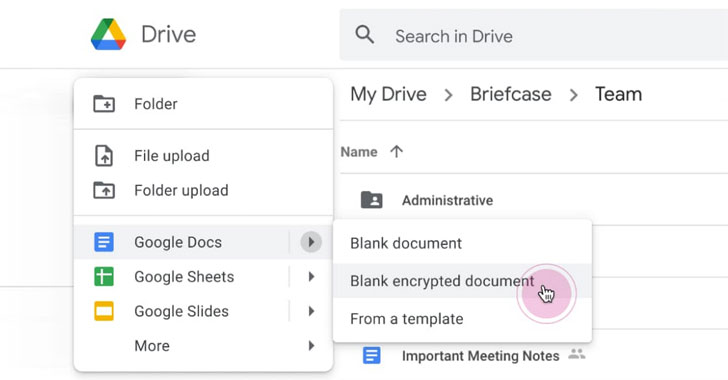
Google on Monday announced that it’s rolling out client-side
encryption to Google Workspace (formerly G Suite), thereby giving
its enterprise customers direct control of encryption keys and the
identity service they choose to access those keys.
“With client-side encryption, customer data is indecipherable to
Google, while users can continue to take advantage of Google’s
native web-based collaboration, access content on mobile devices,
and share encrypted files externally,” the search giant said[1].
“When combined with our other encryption capabilities, customers
can add new levels of data protection for their Google Workspace
data.”
The development coincides with the Google Workspace and Google
Chat’s broader availability to all users[2] with a Google account.
Workspace is the company’s enterprise offering consisting of Gmail,
Chat, Calendar, Drive, Docs, Sheets, Slides, Meet, and other
tools.
Businesses using Google Workspace have the choice of storing
their encryption keys with one of four partners — Flowcrypt,
Futurex, Thales, or Virtru — which the company said offer both key
management and access control capabilities that are compatible with
Google’s specifications.
The access service then holds the key responsible for
deciphering encrypted Google Workspace files, putting them out of
reach of Google unless it comes in possession of the key.
The move is aimed at organizations that deal with sensitive or
regulated data, like intellectual property, healthcare records, or
financial information, thus enabling them to meet stringent privacy
and compliance requirements.
What’s more, Google intends to publish the key access service
API specifications that can be used in conjunction with client-side
encryption later this year in a bid to allow enterprises to build
their own in-house key solutions and give them full control over
the encryption keys.
Along with client-side encryption, the company is also setting
new “trust rules” when it comes to how files can be shared, both
within and outside of their organization, letting administrators
“enforce restrictions that limit internal and external
sharing.”

Additionally, Google is turning on phishing and malware content
protection for Google Drive to block malicious files from being
shared within organizations.
“If abusive content is found, the relevant file is flagged and
made visible only to admins and the file’s owner,” Google said.
“This prevents sharing and reduces the number of users potentially
impacted by the abusive content.”
References
- ^
said
(cloud.google.com) - ^
broader
availability to all users (blog.google)