
GandCrab ransomware decryption tool that could allow millions of
affected users to unlock their encrypted files for free without
paying a ransom to the cybercriminals.
GandCrab is one of the most prolific families of
ransomware to date that has infected over 1.5 million computers
since it first emerged in January 2018.
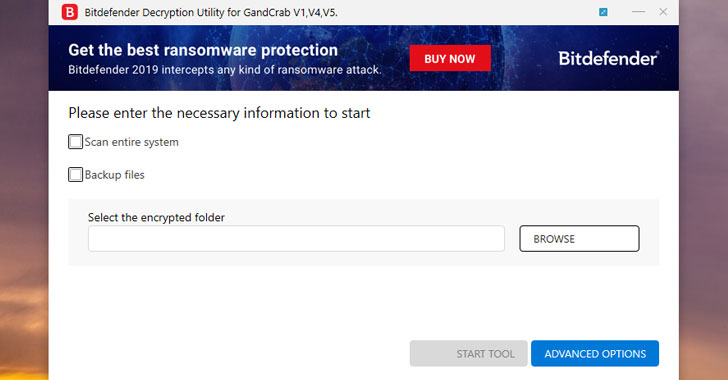
Created by BitDefender, the new GandCrab decryption
tool [download] can
now unlock files encrypted by the latest versions of the
ransomware, from 5.0 to 5.2, as well as for the older GandCrab
ransomware versions.
[1]
As part of the “No More Ransom[2]” Project, BitDefender
works in partnership with the FBI, Europol, London Police, and
several other law enforcement agencies across the globe to help
ransomware affected users.
The cybersecurity company in recent months released ransomware
removal tools for some older GandCrab versions that helped nearly
30,000 victims recover their data for free, saving roughly $50
million in unpaid ransoms.
The GandCrab creators recently announced retirement of their
Ransomware-as-a-Service (RaaS) operations that allowed
criminal
hackers affiliated with the organized crime extort more than a
total of $2 billion from victims.
[3]
operation was prolific enough to score enough revenue to allow its
masters to retire,” researchers at BitDefender[4]
said. “The shutdown will be followed by deletion of all keys,
leaving the victims unable to retrieve the ransomed data even if
they do pay a ransom.”
“Launched in January 2018, GandCrab quickly became the go-to
tool for hackers for affiliate-based ransomware, holding a 50%
share of all the ransomware market by mid-2018,” the Europol
explained[5].
“Set as a ransomware-as-a-service licensing model, distributors
could buy the ransomware on dark web markets and spread it among
their victims. In exchange, they would pay 40% of their profits to
the GandCrab developers and keep 60% for themselves.”
Most computer viruses make their way into your systems due to lack
of simple security practices. Here below, we have listed some
simple tips you should always follow to protect your computers
against ransomware attacks:
- Beware of Phishing Emails — Always be suspicious of
uninvited documents sent over an email and never click on links
inside those documents unless verifying the source. - Backup Regularly — To always have a tight grip on
all your important files and documents, keep a good backup routine
in place that makes their copies to an external storage device that
is not always connected to your PC. - Keep your Antivirus Software and System
Up-to-Date — Always keep your antivirus software and
systems updated to protect against the latest threats.
References
- ^
download
(labs.bitdefender.com) - ^
No More Ransom
(www.nomoreransom.org) - ^
criminal hackers
(thehackernews.com) - ^
BitDefender
(labs.bitdefender.com) - ^
explained
(www.europol.europa.eu)