The cybersecurity world is constantly evolving to new forms of
threats and vulnerabilities. But ransomware proves to be a
different animal—most destructive, persistent, notoriously
challenging to prevent, and is showing no signs of slowing
down.
Falling victim to a ransomware attack can cause significant data
loss, data breach, operational downtime, costly recovery, legal
consequences, and reputational damage.
In this story, we have covered everything you need to know about
ransomware and how it works.
What is ransomware?
Ransomware is a malicious program that gains control over the
infected device, encrypts files, and blocks user access to the data
or a system until a sum of money, or ransom, is paid.
Crooks’ scheme includes a ransom note—with amount and
instructions on how to pay a ransom in return for the decryption
key—or direct communication with the victim.
While ransomware impacts businesses and institutions of every
size and type, attackers often target healthcare, education, IT,
government, and finance sectors with deeper pockets—causing damages
ranging from hundreds of millions to billions of dollars.
Ransomware attacks started picking up in 2012, and since then,
it has become the most pervasive cyber-attacks across the
world.
For instance, HelloKitty ransomware hit Polish video game
developer CD Projekt Red last week with quite a popular tactic,
i.e., attackers threatened the company to leak the source code of
games, including Cyberpunk 2077, Witcher 3, Gwent, and along with
confidential files in the company.
And it’s actually happened! After CD Projekt announced that they
would not be paying the ransom, attackers created an auction for
the stolen data on a hacker forum.
And it isn’t the only example. Ransomware has always been one of
the most popular kinds of malicious samples uploaded in malware analysis sandbox ANY.RUN[1]. Over 124,00 interactive
sessions with ransomware were analyzed online only in 2020.
From a locker to the enterprise
One of the ways to protect from attacks is awareness. We believe
it is a must for enterprise executives and employees to understand
this type of threat.
In this article, we’ll take a look at the history of
ransomware:
The first ransomware
The first known ransomware attack was carried out in 1989 by an
AIDS researcher, Joseph Popp, who distributed malicious 20,000
floppy disks to AIDS researchers spanning more than 90 countries,
claiming that the disks contained a survey program. Since then, the
ransomware threat has evolved a lot and acquired more features.
Locker ransomware
In 2007, Locker ransomware, a new category of ransomware
malware, appeared that does not encrypt files; instead, it locks
the victim out of their device, preventing them from using it.
Similar to this, WinLock demanded a $10 ransom for the unlocking
code. Later, Citadel, Lyposit, and Reveton worm controlled a screen
with a fine message from a fake law enforcement agency.
This typically takes the form of locking the computer’s or
device’s user interface and then asking the user to pay a fee to
restore access to it.
Scareware
In later years, attackers changed their strategy to capitalize
on fear by spreading faking applications and antivirus (AV)
programs. The attack involves a pop-up message displayed to victims
saying that their computers have been infected with viruses. It
lures victims to a website where they’re asked for money to pay for
software to fix the problem. Everything looked trustworthy: logos,
color schemes, and other copyrighted materials.
From that moment, criminals understood that it was much easier
to compromise several websites, focus on phishing, and get the
whole process automated.
Crypto ransomware
In 2013, CryptoLocker emerged as the first cryptographic malware
that typically arrives as an email attachment. The Gameover ZeuS
botnet was responsible for these attacks. CryptoLocker encrypts
files, and after that, a bitcoin payment was required to unlock
them.
If the ransom wasn’t received in 3 days, the ransom doubled.
CryptorBit, CryptoDefense, CryptoWall, WannaCry enlarged decoy
variations and even used system weaknesses to infect computers.
The latest step in that evolution is the arrival of
ransomware-as-a-service, which first appeared in 2015 with the Tox
toolkit launch. It gave would-be cybercriminals the option to
develop custom ransomware tools with advanced evasion
capabilities.
Enterprise ransomware
Ransomware attackers leveled up and went to the enterprise
stage. They preferred to deal with large organizations and scare
them of a possible outbreak.
For example, a target got an email with a threat of distributed
denial-of-service (DDoS) attack. To avoid it, victims needed to pay
a ransom.
One more case is the data compromise ransom. A criminal
threatens a target to exploit compromised information to the public
unless a ransom is paid. The following tactic is effective on the
enterprise level, as companies don’t want to put their reputation
at stake.
Now it’s clear that malware will continue to evolve. And maybe
it will acquire hybrid attacks, including other malware
families.
Attack in details
As we now know the history and types of ransomware, now it’s
time to understand how it works.
- Deployment: In the first step, attackers distribute
essential components used to infect, encrypt, or lock the system,
downloaded without the user’s knowledge, using phishing, or after
exploiting targeted system flaws. - Installation: When the payload is downloaded, the next
step is infection. The malware drops a small file that is often
capable of defense evasion. The ransomware executes and attempts to
gain persistence on the infected system by putting itself to
autorun the registry keys, allowing remote attackers to control the
system. - Command-and-Control: The malware then connects to the
attackers’ command and control (C2) server to receive instructions
and, primarily, to deposit the asymmetric private encryption key
out of the victim’s reach. - Destruction: Once files get encrypted, the malware
deletes original copies on the system, and the only way to restore
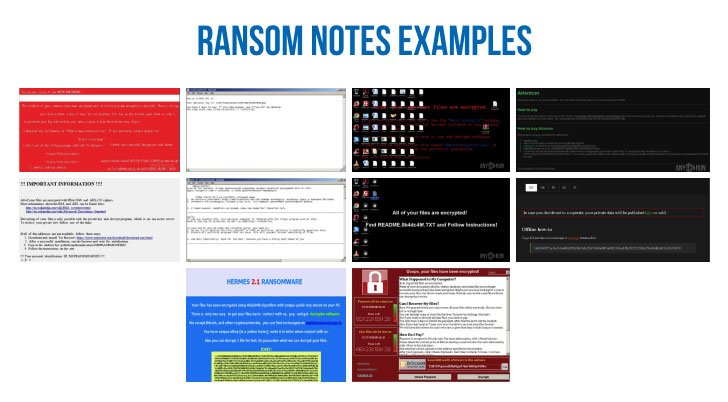
them is to decrypt encoded files. - Extortion: Here come ransom notes. The victim gets to
know that his data is compromised. The payment range varies
according to the type of target. To confuse and scare a victim,
attackers may delete several files from the computer. However, if a
user pays the ransom, it isn’t a guarantee that the information
will be restored or ransomware itself will be deleted.
Popular families and operators
Several types of malware are famous in the ransomware world.
Let’s look through them and talk about popular operators that stand
out in malware history:
1) GandCrab ransomware[2]
is one of the most notorious ransomware releases in the last few
years that amassed nearly $2 billion in payments from its
victims.
Believed to be a product of a Russian hacker group, GandCrab was
discovered in 2018 as a part of Ransomware-as-a-Service (RaaS) sold
to other cybercriminals.
Though GandCrab announced “retirement” in 2019, some researchers
claim that it returned with a new strain, called Sodinokibi, with a
similar codebase. Sodinokibi[3]
targets Microsoft Windows systems and encrypts all files except
configuration files.
2) Next, Maze[4]
ransomware, which made headlines in the last two years, is known
for releasing stolen data to the public if the victim does not pay
to decrypt it.
It was the first ransomware attack that combined data encryption
with information theft. Moreover, they threatened to make the data
public if the ransom was not paid. When the COVID-19 started, Maze
announced that they would leave hospitals alone. But later, they
broke that promise as well.
In 2020 Maze announced they shut down its operations. But it’s
more likely that they just moved to another malware.
3) Netwalker[5]
used process hollowing and code obfuscation to target corporate
victims. But in January 2021, law enforcement agencies teamed up
against Netwalker and took over domains in a dark web used by
malware actors.
4) Wannacry[6]
spreads autonomously from computer to computer using EternalBlue,
an exploit supposedly developed by the NSA and then stolen by
hackers.
It is the most uploaded type of ransomware in ANY.RUN service in
2020. It hit top malware with 1930 tasks. You can investigate them
in the public submission library[7], search by the
“wannacry” tag.
5) Avaddon’s malspam usually contains the only smiley to lure
users into downloading the attachment. The malware also checks the
user’s locale before infecting. If it is Russian or Cherokee,
Avaddon doesn’t encrypt systems.
6) Babuk is a new malware targeting enterprises in 2021. Babuk
comprises secure encryption that makes it impossible to restore
files for free.
Targets of ransomware attacks
There are several reasons attackers first choose what kind of
organizations they want to target with ransomware:
- Easy to evade defense. Universities, small
companies that have small security teams are an easy target. File
sharing and an extensive database make the penetration simple for
attackers. - Possibility of a quick payment. Some
organizations are forced to pay a ransom quickly. Government
agencies or medical facilities often need immediate access to their
data. Law firms and other organizations with sensitive data usually
want to keep a compromise a secret.
And some ransomware spreads automatically, and anyone can become
its victim.
The Rapid Growth of Ransomware
The main reason why this type of malware has become successful
is the attacks that bring results to cybercriminals. Markets let
crooks buy advanced ransomware for making money.
Malware authors provide several ways to pack the ransomware.
Malicious software encrypts systems quickly and stealthily. As soon
as the ransom is received, it is no challenge to cover the tracks.
These points lead to a significant increase.
Now criminals go bald and expect to get hundreds or thousands of
dollars as companies don’t want to risk data loss and outages.
Ransomware distribution methods
Here are several ways of how ransomware spreads:
- Email (spam)
- Watering Hole attack
- Malvertising
- Exploit kits
- USB and removable media
- Ransomware as a service
- Zero days
Ransomware analysis in ANY.RUN
Let’s investigate a sample of ransomware[8]
together.
Here is a task with Sodinokibi malware. Thanks to ANY.RUN
interactivity, we can follow the user’s path:
First of all, we wait for the malicious program to finish
file-encrypting on the disc. The distinguishable feature of
Sodinokibi is the desktop wallpaper with text.

Then we open a text file on the desktop. Yes, we can interact
with files and folders in the virtual Machine during the task
execution.
There we can see instructions with the URL address. We can copy
it and open it in the browser. On the new page, we need to enter
the key; each key is unique for every infected Machine.
There is ours in the text file so that we can enter it. And then
a page with the sum of the ransom payment appears and a countdown.
Finally, we open the file with an image for test decryption and
open it.
Prevention measures
2021 started with arrests of ransomware gangs. The Egregor
hacker group has been taken down by French and Ukrainian police
last week.
That is a good tendency that law enforcement agencies keep
defeating malware actors. However, we need to be cautious and try
to stop attacks, too.
To protect against ransomware, companies should have an
elaborate plan against malware, including backup data. Since
ransomware is very difficult to detect and fight, different
protection mechanisms should be used.
ANY.RUN is one of them that helps to identify malware early and
prevent infections. Besides that, the most important protection is
the training of staff. They need to avoid any suspicious links or
files. Employees who know that ransomware exists and how it works
can detect such attacks.
References
- ^
malware analysis sandbox ANY.RUN
(any.run) - ^
GandCrab
ransomware (any.run) - ^
Sodinokibi
(any.run) - ^
Maze
(any.run) - ^
Netwalker
(any.run) - ^
Wannacry
(any.run) - ^
the public submission library
(app.any.run) - ^
sample
of ransomware (app.any.run)
Read more http://feedproxy.google.com/~r/TheHackersNews/~3/zYlm0nH1BAY/everything-you-need-to-know-about.html