Q, the next upcoming version of Google’s popular mobile operating
system, with a lot of new privacy improvements and other security
enhancements.
Android Q, where Q has not yet been named, offers more control
over installed apps, their access, and permissions, and location
settings; more support for passive authentication like face ID, and
warnings when you install a new app targeting Android Marshmallow
or older.
Instead of directly going through dozens of different pages
Google published about Android Q, here I have summarized all new
privacy and security features of the new version of Android you can
quickly learn from:
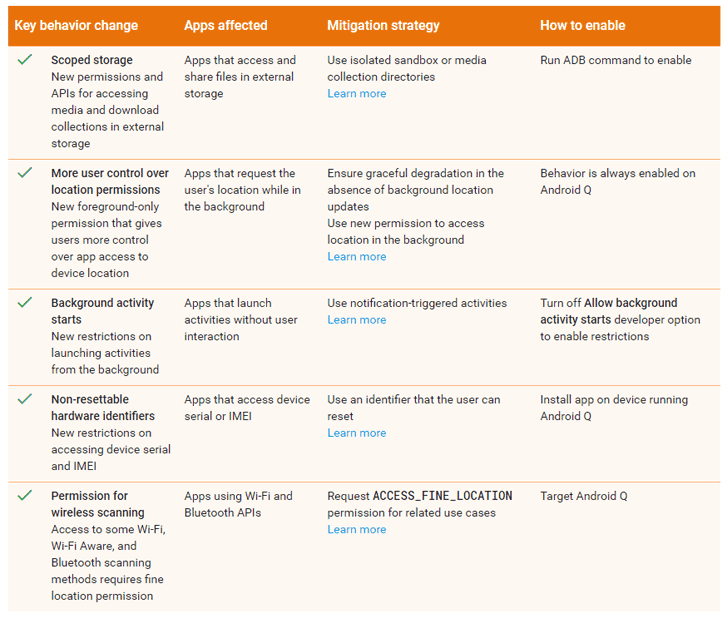
1) Stop Android Apps From Tracking Your Location in the
Background
Android Q gives you more control over how an app can use your
device location information. Currently, you have a single option to
either allow or deny an app access to your device location, doesn’t
matter if it is in-use or running in the background.
However, starting from Android Q, you can choose between three
options, just like iOS: allowing an app to access location “all the
time,” “while in use,” i.e., when the app is in the foreground, or
“Deny.”
“The new location control allows users to decide when device
location data is provided to an app and prevents an app from
getting location data that it may not need,” Google
says[1].
location data when running in the background, you must declare the
new permission in your app’s manifest file.
“Your app’s use case relies on periodic checks of a user’s location
all the time, such as geofencing or location sharing. In that case,
your app should explain to the user that they need to allow your
app to access their location all the time in order to operate
correctly, then request access to background location,” Google
warns Android developers.
2) New Restrictions On Apps’ Access to Device Identifiers
A) Contacts Affinity — Starting from Android Q, the
operating system will no longer keep the track of contacts affinity
information, meaning that apps searching for user’s contacts will
not be able to do so.
B) Making MAC Address Randomization a Default
Feature — Introduced in Android 6.0 Marshmallow, the
feature will now come enabled by default with Android Q, preventing
app developers, location analytics firms, stores, and others from
using MAC addresses to build a history of your device
activity.
For those unaware, MAC address randomization works by replacing the
number that uniquely identifies your device’s wireless hardware
with randomly generated values, preventing your device from being
tracked when connected to different Wi-Fi networks.
C) Non-Resettable Device Identifiers — From Android
Q, only some apps with the READ_PRIVILEGED_PHONE_STATE privileged
permission will be able to access your device’s non-resettable
identifiers, such as your phone’s IMEI and serial number.
D) Restricting Access to Clipboard Data — With
Android Q, Google also restricted apps from accessing the operating
system’s clipboard data. Only apps that are running in the
foreground (on screen) or apps that are the default input method
editor, or IME (e.g., default keyboard apps) can access the
clipboard data.
State — Android Q also removes access to the
information about a device’s network state. Apps that require
access to this information, like Virtual Private Network (VPN)
apps, can refer to the NetworkStatsManager and ConnectivityManager
classes.
F) Access to USB serial — Apps running Android
Q will only be able to read the serial number of a USB device after
users themselves grant permissions to access the USB device or
accessory.
3) Background Apps Can’t Start A New Activity Without User
Interaction
Android Q also comes with new restrictions, preventing apps from
launching activities while in the background without user
interaction, keeping users more in control of what’s shown on their
screen.
“As long as your app starts activities as a direct result of user
interaction, however, your app most likely isn’t affected by this
change. In fact, the majority of apps are unaffected by this
change,” Google
says[2].
are in the background to create notifications in order to provide
information to users instead of directly starting an activity.
App developers who want user’s attention urgently can create
high-priority notifications and provide a full-screen intent.
4) Apps Can’t Change Location and Network Settings
Android Q makes it mandatory for apps to have the
ACCESS_FINE_LOCATION permission to use several methods within the
Wi-Fi, Wi-Fi Aware, or Bluetooth APIs.
This means now third-party apps will not be able to make changes
to your device Wi-Fi (enable or disable); instead apps have to
prompt users to enable or disable Wi-Fi in the device settings
manually.
To protect user privacy, performing manual configuration of the
list of Wi-Fi networks will now be only restricted to system
apps.
5) Scoped Storage to Protect Data Stored by One App from
Others
Android Q will give each app an isolated storage sandbox into an
external storage device so that no other app can directly access
data saved by other apps on your device.
That means, apps don’t require any special permissions to save
and access their own sandboxed files on external storage. However,
if an app needs to access or modify files that other apps have
created, it must first request the appropriate permission.
“Because files are private to your app, you no longer need any
permissions to access and save your own files within external
storage,” Google notes[3]. “This change makes it
easier to maintain the privacy of users’ files and helps reduce the
number of permissions that your app needs.”
available[4] for developers, Google
has allowed anyone to sign up and install the beta operating system
as far as they own Google’s Pixel phones, including the original
Pixel, Pixel XL, Pixel 2, Pixel 2 XL, Pixel 3 and Pixel 3 XL.
Android Q is scheduled to be made available to end users
sometime in the third quarter of this year, according to the
company’s timeline — likely at the end of August.
References
- ^
Google says
(android-developers.googleblog.com) - ^
Google says
(developer.android.com) - ^
notes
(developer.android.com) - ^
Android Q Beta 1 available
(developer.android.com)
Read more http://feedproxy.google.com/~r/TheHackersNews/~3/XjJ69C7nb1g/android-q-security-privacy.html