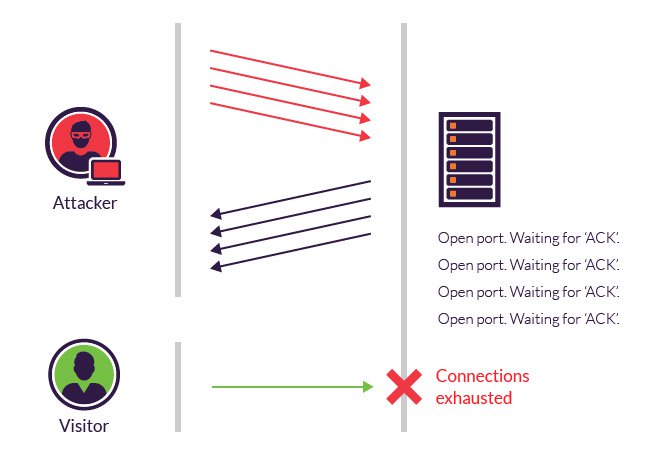
A SYN flood is a type of cyberattack that targets the three-way handshake process used by TCP/IP to establish a connection between a client and a server. In a typical three-way handshake, the client sends a SYN (synchronize) request to the server, the server acknowledges the request with a SYN-ACK (synchronize-acknowledge), and finally, the client sends an ACK (acknowledge) to complete the connection.
In a SYN flood attack, the attacker floods the target server with a large number of SYN requests, but does not complete the handshake by sending the final ACK. This causes the server to keep resources tied up waiting for the final acknowledgment, which can eventually lead to a denial of service (DoS) situation, where legitimate users are unable to connect to the server.
To mitigate SYN flood attacks, network administrators can implement various measures such as SYN cookies, which are a method to ensure that resources are only allocated when a full three-way handshake is completed, or by using specialized hardware or software solutions designed to handle DDoS (Distributed Denial of Service) attacks. Firewalls and intrusion prevention systems can also help in identifying and blocking malicious SYN flood traffic.
It’s important to note that defending against SYN flood attacks is just one aspect of overall network security, and a comprehensive security strategy should include other measures such as firewall rules, intrusion detection systems, and regular security audits.
bard
Query: SYN floods
SYN floods are a type of denial-of-service (DoS) attack that exploits the TCP three-way handshake to overwhelm a server with half-open connections. In a SYN flood attack, the attacker sends a large number of SYN (synchronize) packets to the target server, often using spoofed IP addresses. The server responds to each SYN packet with a SYN-ACK (synchronize acknowledgment) packet. However, the attacker never sends the final ACK (acknowledgment) packet, leaving the connection half-open.
The server eventually times out on the half-open connections, but this can take several seconds or even minutes. During this time, the server is unable to accept new connections from legitimate clients. A SYN flood attack can be used to make a server unavailable to legitimate users, or to slow it down to the point where it is unusable.
SYN flood attacks are often carried out by botnets, which are networks of thousands or even millions of compromised computers. The attacker can use these computers to send a massive number of SYN packets to the target server, overwhelming its defenses.
How to protect against SYN floods
There are a number of things that organizations can do to protect themselves against SYN floods, including:
- Use a firewall or intrusion prevention system (IPS) to filter out SYN packets from spoofed IP addresses.
- Increase the SYN timeout on the server. This will give the server more time to receive the ACK packet from the client before timing out the connection.
- Use a load balancer to distribute traffic across multiple servers. This will make it more difficult for an attacker to overwhelm all of the servers at once.
- Use a cloud-based DDoS protection service. These services can filter out SYN flood attacks before they reach the server.
If you are experiencing a SYN flood attack, the first thing you should do is contact your ISP or cloud provider. They may be able to help you mitigate the attack. You may also need to take steps to protect your own servers, such as increasing the SYN timeout or using a firewall or IPS.
import asyncio
async def make_request(url):
async with asyncio.ClientSession() as session:
async with session.get(url) as response:
return await response.read()
async def main():
tasks = []
for i in range(100):
task = make_request(“https://example.com/”)
tasks.append(task)
await asyncio.gather(*tasks)
if __name__ == “__main__”:
asyncio.run(main())
Response
To generate an async flood, you can use the following steps:
- Choose an async library, such as
asyncioortrio. - Create a list of tasks to perform, such as HTTP requests or database queries.
- Schedule each task to be executed asynchronously.
- Wait for all of the tasks to complete.
Here is an example of how to generate an async flood using asyncio:
import asyncio
async def make_request(url):
async with asyncio.ClientSession() as session:
async with session.get(url) as response:
return await response.read()
async def main():
tasks = []
for i in range(100):
task = make_request(“https://example.com/”)
tasks.append(task)
await asyncio.gather(*tasks)
if __name__ == “__main__”:
asyncio.run(main())
This code will create 100 tasks that will each make an HTTP request to https://example.com/. The tasks will be executed asynchronously, meaning that they will all be started at the same time. The code will then wait for all of the tasks to complete before exiting.
You can adjust the number of tasks and the type of tasks that you perform to generate a flood of any size. For example, you could generate a flood of database queries, DNS lookups, or even just simple calculations.
It is important to note that generating an async flood can have a negative impact on the server that you are targeting. If you are not careful, you could overload the server and cause it to become unresponsive. Please use this information responsibly.