Fail Closed, Fail Open, Fail Safe and Failover: ABCs of Network Visibility
One of the important issues in network operations is how the potential failure of a component will affect overall network performance. Physical and virtual devices deployed on the network can be configured to fail open or fail closed. These conditions impact the delivery of secure, reliable, and highly-responsive IT services.
FAIL CLOSED
Simply stated, failing closed is when a device or system is set, either physically or via software, to shut down and prevent further operation when failure conditions are detected.
This strategy is common in situations where security concerns override the need for access. We encounter this every day when we forget the password to a seldom-used personal account and are denied entry. A physical example is the failure of a metal detector at the entrance to a federal courthouse, which leads to a long line of people waiting to get in at a second door, while a technician tries to repair the first door. In these situations, access is a second priority to security.
Benefits of Fail Closed
To prioritize security: In an IP network, security appliances like firewalls can be configured to fail closed, to prevent incoming Internet traffic from being passed into your internal network when the firewall is unable to confirm that the packet is allowed. The network outage that results from a firewall outage can be minimal if a backup firewall quickly takes over processing duties (like the second door at the courthouse). The fail closed condition generally provides greater confidence that a cyber threat or attack will not sneak in while a firewall is offline.
It’s important to note that the fail closed strategy, even for a device like a firewall, has not always been the rule. In some environments, network interruption can be a greater concern than security, leading to the choice to fail open. This was more frequently the case in the early days of firewall deployment, when organizations were learning how to balance the need for security inspection with network availability.
FAIL OPEN
A system set to fail open does not shut down when failure conditions are present. Instead, the system remains “open” and operations continue as if the system were not even in place.
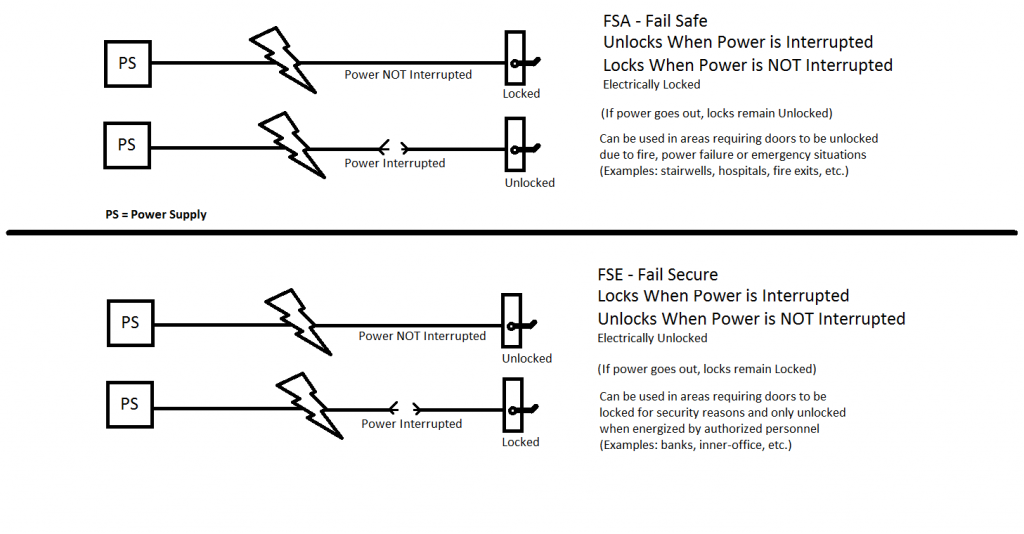
This strategy is used when access is deemed more important that authentication. Healthcare systems are sometimes operated on a fail open basis, such as when emergency care is provided even without authentication of insurance coverage or the ability to pay. The risk (of non-payment in this case) is essentially mitigated by performing authentication after-the-fact. Another example often cited is when a door with an electronic locking mechanism is automatically unlocked when the system fails and is unable to authenticate access credentials. This ensures an exit is made available, particularly in the event of a fire or natural disaster that disables electronic systems.
Benefits of Fail Open
To protect access: Historically, some organizations considered inline deployment of a network firewall to be a “nice-to-have,” rather than an essential element of IT security. When a firewall failed, they preferred to have it fail open and let Internet traffic proceed on into the internal network without authentication. The thinking was that, the majority of traffic was safe and the risk of a network breach was low, so it did not make good business sense to interrupt network operations. The business risk was minimized by prioritizing firewall restoration to limit potential exposure and by analyzing copies of network traffic (using out-of-band tools) to detect suspicious activity after the fact. The fail open condition prevailed in situations where access was deemed more important than security.
To supplement another security appliances: There are other security solutions that organizations may want to operate in a fail open condition to supplement the function of existing security appliances. One example is an advanced malware protection (AMP) sandbox, which is used to execute unknown files in a safe environment and provide the results to anti-malware solutions. Since the sandbox is supplementing the main device, it’s failure may not require a complete shutdown of processing.
For deployment and testing: Another practical use for fail open is during the initial deployment and testing period of a new security appliance. Configuring a new device to fail open allows the team to become comfortable with the operation and learn how to respond to alert situations without becoming overwhelmed. Once the team feels confident, the device can be switched over to a fail closed condition, for greater risk management.
FAIL SAFE
Another definition is relevant here and that is fail safe, which refers to a device that is configured to protect all other components in the system from failure, in the event the device itself fails. Practically, this can have the same result as failing open, but fail safe is often achieved through addition of a separate device, known as a bypass switch.
Bypass switches are deployed “in front of” network devices and work by establishing a direct connection to the device and monitoring its ability to receive and process traffic. This is achieved by sending a very small network packet, called a heartbeat packet, to the device at very fast intervals—generally one every couple microseconds. If the packet is returned, the bypass remains open; if the packet is not returned, traffic is bypassed around the device and moved along to the next switch in the network.
Many network security appliances, such as next generation firewalls and IPS solutions, now include an internal bypass function. However, internal bypasses do not provide all of the functionality of an external bypass switch.
An external bypass switch deployed in front of a network device can be activated proactively by the IT staff, to take a device offline for regular maintenance, periodic troubleshooting, or repositioning in the network. The external bypass essentially removes a particular device temporarily from the active network, eliminating the need to wait for a network maintenance window to perform upgrades or respond to support issues.
FAILOVER
A final concept to consider is failover, the ability to recover the functionality of network devices that fail. This is a broader concept than fail safe, which only specifies only no adverse impact to other components. Failover implies recovery of functionality, achieved through redundancy. External bypass switches are now available with the ability to designate an alternative path for traffic in the event of a network device failure. For example, should the primary IPS appliance fail, when the external bypass switch detects the failure (within microseconds of the event), the switch can automatically begin sending traffic to a secondary, backup appliance. This can be a cost-effective solution for achieving resiliency.
Summary
Depending on an organization’s priorities, the failure of a security appliance or other network device can be handled by halting the flow of network traffic (configuring to fail closed) or moving the traffic around the offline device (fail open or fail safe), or directing to a backup appliance (failover). These choices enable an enterprise to deliver secure, reliable, and highly-responsive IT services.
Security Fundamentals Part 1: Fail Open vs. Fail Closed
An understanding of core security fundamentals should not be limited to security teams and penetration testers, but it should also be essential knowledge for developers and application teams. Whether testing an application for security vulnerabilities or coding functions of a new system, core security concepts should be deep-rooted in one’s mind.
Many application teams have not been through core security training. During development of new applications, they often make incorrect assumptions that lead to security vulnerabilities. This seems to be particularly true of mobile development teams who are often rapidly building apps.
In this series we will explore several core security concepts and discuss how they relate not just to security teams but also to software development teams. Part one covers the concept of Fail Open vs. Fail Closed.
In application development the concept of Fail Open vs. Fail Closed typically relates to how an application should behave when errors and exceptions are encountered. When exceptions are thrown, Fail Open systems allow access as opposed to Fail Closed systems that block access.
When handling errors, developers need to carefully choose what actions to take. In deciding whether to fail open or to fail closed, the outcomes of each must be considered. There are situations where each could be considered more secure than the other. These cases differ and must be decided on an individual basis.
Consider a shopping application that sells music. If a user is purchasing a digital album that will be immediately available for download, what should the application do if an error is encountered while attempting to verify the user’s credit card? Most likely, the application should fail closed and not allow the user access to the digital download. The store would likely not want to give the music away until payment is verified.
In the same application, suppose a user purchases a vinyl album that will be shipped after purchase. If an error is again encountered during the verification of the user’s credit card, the application may wish to fail open. In this case, the music store may be able to reattempt the credit card verification before the vinyl album is shipped. Failing closed in this situation could cost the music store business.
As illustrated in the music store example, there are situations where it is more appropriate to fail open and situations where it is more appropriate to fail closed. If these situations are not analyzed, serious logical security flaws could be introduced.
Often during application development, explicit error handling behaviors are not thought out. When there is not a detailed fail open or fail closed requirement, error handling behaviors could introduce logical security flaws.
Developers and application teams need to be trained in core security concepts. Making incorrect security assumptions could lead to serious vulnerabilities. Understanding the idea of Fail Open vs. Fail Closed helps ensure secure development.