Organizations and security teams work to protect themselves from
any vulnerability, and often don’t realize that risk is also
brought on by configurations in their SaaS apps that have not been
hardened. The newly published GIFShell attack method, which occurs
through Microsoft Teams, is a perfect example of how threat actors
can exploit legitimate features and configurations that haven’t
been correctly set. This article takes a look at what the method
entails and the steps needed to combat it.
The GifShell Attack Method
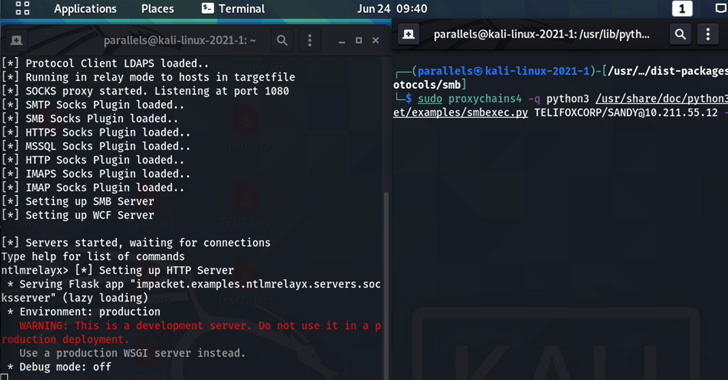
Discovered by Bobby Rauch[1], the GIFShell attack
technique enables bad actors to exploit several Microsoft Teams
features to act as a C&C for malware, and exfiltrate data using
GIFs without being detected by EDR and other network monitoring
tools. This attack method requires a device or user that is already
compromised.
Learn how an SSPM can assess, monitor and
remediate SaaS misconfigurations and Device-to-SaaS user
risk[2].
The main component of this attack allows an attacker to create a
reverse shell that delivers malicious commands via base64 encoded
GIFs in Teams, and exfiltrates the output through GIFs retrieved by
Microsoft’s own infrastructure.
How does it work?
- To create this reverse shell, an attacker must first compromise
a computer to plant the malware — which means the bad actor needs
to convince the user to install a malicious stager[3], like with phishing,
that executes commands and uploads command output via a GIF url to
a Microsoft Teams web hook. - Once the stager is in place, the threat actor creates their own
Microsoft Teams tenant and contacts other Microsoft Teams users
outside of the organization. - The threat actor can then use a GIFShell Python script[4]
to send a message to a Microsoft Teams user that contains a
specially crafted GIF. This legitimate GIF image has been modified
to include commands to execute on a target’s machine. - When the target receives the message, the message and the GIF
will be stored in Microsoft Team’s logs. Important to note:
Microsoft Teams runs as a background process, so the GIF does not
even need to be opened by the user to receive the attacker’s
commands to execute. - The stager monitors the Teams logs and when it finds a GIF, it
extracts and runs the commands. - Microsoft’s servers will connect back to the attacker’s server
URL to retrieve the GIF, which is named using the base64 encoded
output of the executed command. - The GIFShell server running on the attacker’s server will
receive this request and automatically decode the data allowing the
attackers to see the output of the command run on the victim’s
device.
Microsoft’s response
As reported[5]
by Lawrence Abrams in BleepingComputer, Microsoft agrees that this
attack method is a problem, however, it “does not meet the bar for
an urgent security fix.” They “may take action in a future release
to help mitigate this technique.” Microsoft is acknowledging this
research but asserting that no security boundaries have been
bypassed.
While Rauch claims that indeed “two additional vulnerabilities
discovered in Microsoft Teams, a lack of permission enforcement and
attachment spoofing”, Microsoft argues, “For this case… these all
are post exploitation and rely on a target already being
compromised.” Microsoft is asserting that this technique is using
legitimate features from the Teams platform and not something they
can mitigate currently.
In accordance with Microsoft’s assertions, indeed this is the
challenge many organizations face — there are configurations and
features that threat actors can exploit if not hardened. A few
changes to your tenant’s configurations can prevent these inbound
attacks from unknown Teams tenants.
How to Protect Against the GIFShell Attack
There are security configurations within Microsoft that, if
hardened, can help to prevent this type of attack.
1 — Disable External Access: Microsoft Teams, by default,
allows for all external senders to send messages to users within
that tenant. Many organization admins likely are not even aware
that their organization allows for External Teams collaboration.
You can harden these configurations:
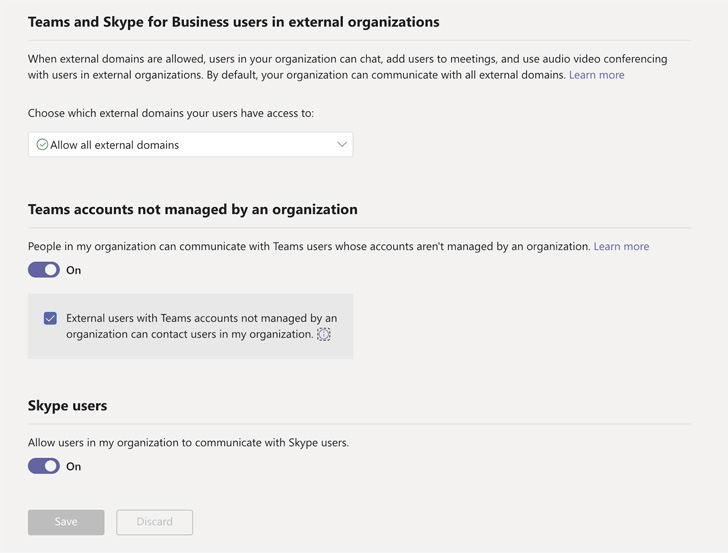 |
| Figure 1: Microsoft Teams External Access Configurations |
- Disable external domain access — Prevent people in your
organization from finding, calling, chatting, and setting up
meetings with people external to your organization in any domain.
While not as seamless of a process as through Teams, this better
protects the organization and is worth the extra effort.
- Disable unmanaged external teams start conversation — Block
Teams users in your organization from communicating with external
Teams users whose accounts are not managed by an organization.
2 — Gain Device Inventory Insight: You can ensure your
entire organization’s devices are fully compliant and secure by
using your XDR / EDR / Vulnerability Management solution, like
Crowdstrike or Tenable. Endpoint security tools are your first line
of defense against suspicious activity such as accessing the
device’s local teams log folder which is used for data exfiltration
in GIFShell.
You can even go a step further and integrate an SSPM (SaaS
Security Posture Management) solution, like Adaptive Shield, with
your endpoint security tools to gain visibility and context to
easily see and manage the risks that stem from these types of
configurations, your SaaS users, and their associated devices.
How to Automate Protection Against These Attacks
There are two methods to combat misconfigurations and harden
security settings: manual detection and remediation or an automated
SaaS Security Posture Management (SSPM) solution. With the
multitudes of configurations, users, devices, and new threats, the
manual method is an unsustainable drain on resources, leaving
security teams overwhelmed. However, an SSPM solution, such as
Adaptive Shield[6], enables security teams
to gain complete control over their SaaS apps and configurations.
The right SSPM automates and streamlines the process of monitoring,
detection and remediation for SaaS misconfigurations, SaaS-to-SaaS
access, SaaS related IAM, and Device-to-SaaS user risk in
compliance with both industry and company standards.
In cases such as the GifShell attack method, Adaptive Shield’s
misconfiguration management features enables security teams to
continuously assess, monitor, identify and alert for when there is
a misconfiguration (see figure 1). Then they can quickly remediate
through the system or use a ticketing system of choice to send the
pertinent details for fast remediation.
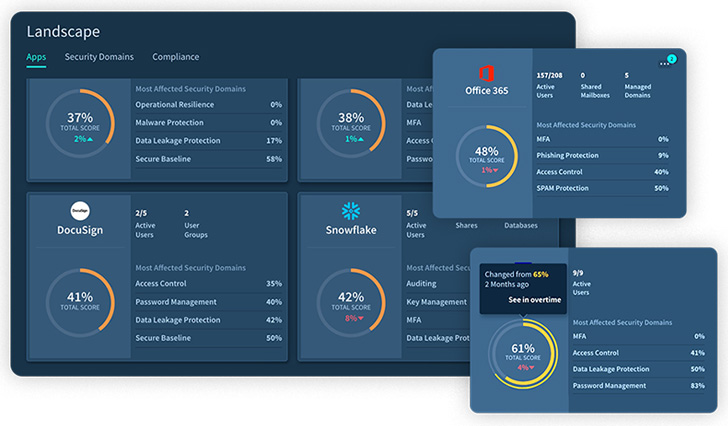 |
| Figure 2. Landscape View of SaaS App Hygiene |
Similarly, Adaptive Shield’s Device Inventory feature (seen in
figure 2) can monitor devices being used company-wide and flag any
Device-to-SaaS risk[7]
while correlating that information with the user roles and
permissions and the SaaS apps in use. This enables security teams
to gain a holistic view of user-device posture to protect and
secure high-risk devices that can serve as a critical threat in
their SaaS environment.
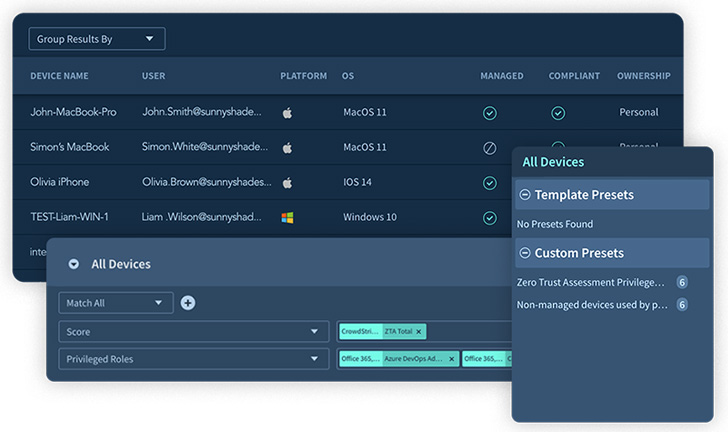 |
| Figure 3. Device Inventory |
Learn more about how the Adaptive Shield
SSPM can protect your SaaS app ecosystem.[8]
References
- ^
Discovered by Bobby Rauch
(medium.com) - ^
Learn
how an SSPM can assess, monitor and remediate SaaS
misconfigurations and Device-to-SaaS user risk
(www.adaptive-shield.com) - ^
malicious stager
(medium.com) - ^
GIFShell
Python script (github.com) - ^
reported
(www.bleepingcomputer.com) - ^
Adaptive
Shield (www.adaptive-shield.com) - ^
Device-to-SaaS risk
(thehackernews.com) - ^
Learn
more about how the Adaptive Shield SSPM can protect your SaaS app
ecosystem. (www.adaptive-shield.com)
Read more https://thehackernews.com/2022/09/microsoft-teams-gifshell-attack-what-is.html