
Every once in a while, an industry term will get overused by
marketing to the point of becoming a cliche. “Zero Trust” may have
reached this threshold.
In some ways, we understand why this is happening. Security
perimeters have become obsolete as people use mobile devices and
cloud applications to work from anywhere. Zero Trust deployment —
moving all your apps and data to the cloud and assuming no user or
device is trustworthy until proven otherwise in order to gain
access — has been rapidly introduced as a result of the
pandemic.
However, most attempts at achieving Zero Trust access today are
a patchwork of disparate products from different vendors connected
to virtual private networks (VPN), with rudimentary on-off access
controls based on limited visibility.
Cloud security company, Lookout[1], believes a modern
approach to Zero Trust needs to take into account the fact that
data has moved to the cloud and users are working from anywhere, on
any device, and connecting over their own network.
Lookout’s has announced its latest milestone — the expansion of
Lookout Continuous Conditional Access (CCA) by integrating security
and access platforms. This enables organizations to make detailed
and ongoing risk assessments of endpoints and users, and apply that
information to very granular access controls (as opposed to a
simple yes-no access decision) that ensures business continues
securely.
To see this in action, register for Lookout’s webinar[2] on September 30th[3]. Lookout will illustrate
how integrating Mobile Endpoint Security[4], Cloud Access Security Broker
(CASB)[5] and Zero Trust Network Access (ZTNA)[6] solutions to deliver a
modern Zero Trust architecture[7].
Pandemic Response and the Current State of the Art
Most of us are tired of talking about the impact of the
pandemic, but it was a watershed event in remote working. Most
organizations had to rapidly extend their existing enterprise apps
to all their employees, remotely. And since many have already
embraced the cloud and had a remote access strategy in place,
typically a VPN, they simply extended what they had to all
users.
CEO’s and COO’s wanted this to happen quickly and securely, and
Zero Trust was the buzzword that most understood as the right way
to make this happen. So vendors all started to explain how their
widget enabled Zero Trust or at least a part of it.
But remember, the idea of Zero Trust was conceived way back in
2014. A lot has changed over the last seven years. Apps and data
that have moved to the cloud do not adhere to corporate
domain-oriented or file-based access controls. Data is structured
differently or unstructured. Communication and collaboration tools
have evolved. And the endpoints people use are no longer limited to
corporate-issued and managed domain-joined Windows laptops. Equally
the types of attacks Lookout are trying to stop have evolved. So
the concept of Zero Trust has also had to evolve as well.
Extending VPNs was the default response to remote work and many
organizations included it as part of their Zero Trust strategy. But
bolting two-factor authentication and network access control (NAC)
onto VPN is the opposite of least-privilege access. NAC is a
2-decade-old technology that only detects whether an endpoint is
managed and has antivirus and VPNs that gives anyone that connects
unlimited access.
It Starts with Better Telemetry
Many access products on the market today check the security
posture of users or endpoints at the moment they connect to the
infrastructure. But that’s not enough. Just because a user
remembers their password, provides a second factor of
authentication, and uses a managed device with antivirus, doesn’t
mean they are trustworthy.
To make smart access decisions that safeguard sensitive data and
do not hinder productivity, you need deep visibility into all
endpoints, data, and apps within your organization.
Device Telemetry:
To deploy a modern Zero Trust architecture, you need to track
the constant change in risk levels of all user devices, including
iOS, Android, and Chrome OS devices. These endpoints are the
leading targets for advanced persistent threat (APT) reconnaissance
and attacks that steal login credentials due to the effectiveness
of mobile phishing.
Mobile devices are rarely connected to enterprise perimeter
security as they are usually on cellular or public, or home Wi-Fi.
They also frequently have OS and app vulnerabilities that open
doors for exploitation and data leakage.
User Behavioral Analytics:
Users, in many ways, are just as complex and require continuous
risk assessments. For example, it’s critical to understand typical
user behavior for anomaly-based detection. Since access to all apps
and data can occur over the Lookout platform, you can have an
in-depth knowledge of a user and their usual activities.
You can use this to detect anomalous behavior that may indicate
theft of their credentials or an insider threat and control access
accordingly.
Data Sensitivity:
Continuous assessment of your users and endpoints is essential.
But the flip side of that is knowing the sensitivity of the data
they access. To ensure your workers have what they need to stay
productive while also safeguarding sensitive data, policy
enforcement should be able to map risk with data sensitivity.
>>> Check out Lookout CCA in action[8].
Lookout integrated them into a single platform
By integrating security and access platforms, Lookout is able to
extend CCA and provide a modern approach to Zero Trust. With
insights into endpoints, users, networks, apps, and data, to
provide unprecedented visibility to organizations, enabling them to
detect threats and anomalies, support compliance requirements
effectively, and ultimately stop breaches.
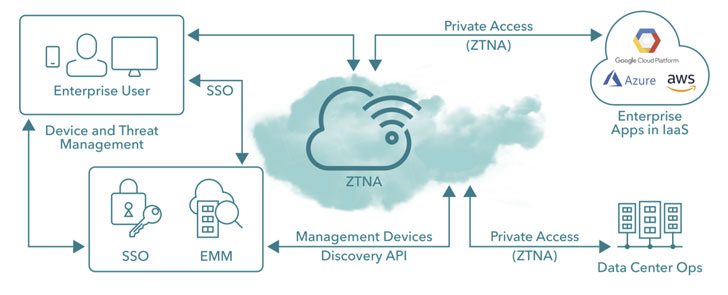
From an endpoint perspective, CCA enables your policies to take
into account all the typical endpoint indicators such as malicious
apps, compromised devices, phishing attacks, app and device
vulnerabilities, and even risky apps. The access platform then adds
indicators of anomalous user behavior such as large downloads,
unusual access patterns, and unusual locations. And data loss
prevention (DLP) capabilities enable us to assign sensitivity to
what the user is attempting to do.
All of this telemetry can then be used to respond appropriately.
Restrict access to sensitive data, request step-up authentication
or take specific action on the content itself, such as masking or
redacting certain keywords, applying encryption and adding
watermarking. And in the event that what is occurring is a breach —
you can shut down access altogether.
As an example: an employee who uses their personal smartphone
for work may have a consumer app that has servers in a foreign
location banned by regulations to hold certain data. Or maybe that
user’s phone has an older operating system with known
vulnerabilities.
Lookout CCA would be able to detect the app and the servers it
connects to. The organization could write a policy that revokes
download privileges for any endpoint with that risky app, so
regulated data cannot be exfiltrated. Alternatively, the
organization could dictate that any regulated data has to be
encrypted by enterprise digital rights management (EDRM) so that
even if they get downloaded or shared, only authenticated and
authorized users can have access.
Lookout will also send remediation instructions to the user,
telling them that they will regain access once they install the
app.
In short, you are in complete control from endpoint to cloud.
That’s the benefit of an integrated security and access platform,
and that’s the way Lookout believes a modern Zero Trust
architecture should be designed.
To learn more about Lookout’s endpoint-to-cloud solution,
join their webinar[9].
References
- ^
Lookout
(www.lookout.com) - ^
register
for Lookout’s webinar
(attendee.gotowebinar.com) - ^
September 30th
(attendee.gotowebinar.com) - ^
Mobile
Endpoint Security (www.lookout.com) - ^
Cloud
Access Security Broker (CASB)
(www.lookout.com) - ^
Zero
Trust Network Access (ZTNA)
(www.lookout.com) - ^
modern
Zero Trust architecture (www.lookout.com) - ^
Check
out Lookout CCA in action (www.youtube.com) - ^
join
their webinar (attendee.gotowebinar.com)