Hackers are scanning the internet for weaknesses all the time,
and if you don’t want your organization to fall victim, you need to
be the first to find these weak spots. In other words, you have to
adopt a proactive approach to managing your vulnerabilities, and a
crucial first step in achieving this is performing a vulnerability
assessment.
Read this guide to learn how to perform vulnerability
assessments in your organization and stay ahead of the hackers.
Vulnerability assessment tools
Vulnerability assessments are automated processes performed by
scanners. This makes them accessible to a wide audience. Many of
the scanners are geared towards cybersecurity experts, but there
are solutions tailored for IT managers and developers in
organizations without dedicated security teams.
Vulnerability scanners come in various types: some excel at
network scanning, others at web applications, IoT devices, or
container security. If you’re a small business, you’re likely to
find a single vulnerability scanner[1] covering all or most of
your systems. However, larger companies with complex networks may
prefer to combine multiple scanners to achieve the desired level of
security.
How do you perform a vulnerability
assessment?
With the right tools in hand, you can perform a vulnerability
assessment by working through the following steps:
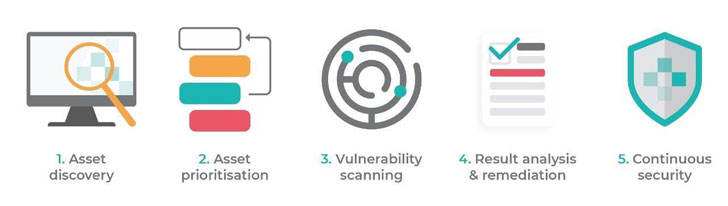
1. Asset discovery
First, you need to decide what you want to scan, which isn’t
always as simple as it sounds. One of the most common cybersecurity
challenges facing organizations is a lack of visibility into their
digital infrastructure and its connected devices. Some reasons for
this include:
- Mobile Devices: Smartphones, laptops, and
similar devices are designed to disconnect and reconnect frequently
from the office, as well as employee’s homes and often other remote
locations. - IoT Devices: IoT devices are part of the
corporate infrastructure but may be connected primarily to mobile
networks. - Cloud-Based Infrastructure: Cloud service
providers make it easy to spin up new servers as needed without IT
involvement.
We’d all love to work in an organization that was perfectly
organized, but the reality is often messier. It can be hard simply
to keep track of what different teams are putting online, or
changing, at any given point. This lack of visibility is
problematic because it’s difficult to secure what you can’t see.
Luckily, the discovery aspect of this process can be largely
automated.
For example, some modern vulnerability assessment tools, such as
Intruder[2], can perform discovery
on public-facing systems and connect directly to cloud providers to
identify cloud-based infrastructure.
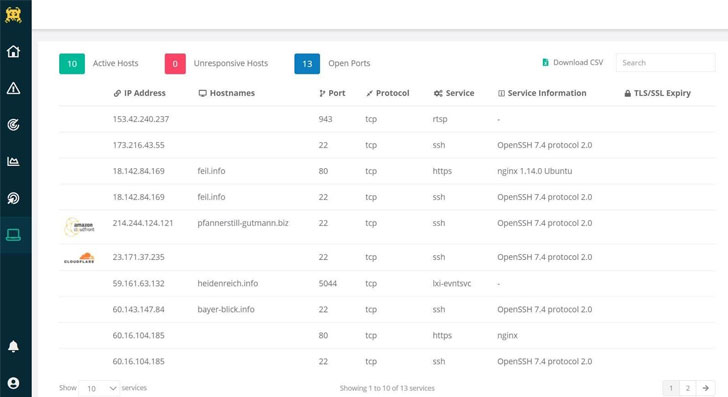 |
| Screenshot of Intruder’s network page showing discovered systems |
2. Prioritization
Once you know what you’ve got, the next question is whether you
can afford to run a vulnerability assessment on all of it. In a
perfect world, you would be running a vulnerability assessment
regularly on all of your systems. However, vendors often charge
per-asset, so prioritization can help where budgets can’t cover
every asset the company owns.
Some examples of where you may wish to prioritize are:
- Internet-facing servers
- Customer-facing applications
- Databases containing sensitive information
It’s worth noting that the two of the most common vectors for
untargeted or mass attacks are:
- Internet-facing systems
- Employee laptops (via phishing attacks)
So if you can’t afford anything else, at least try to get these
covered in the same order.
3. Vulnerability scanning
Vulnerability scanners are designed to identify known security
weaknesses and provide guidance on how to fix them. Because these
vulnerabilities are commonly publicly reported, there is a lot of
information available about vulnerable software.
Vulnerability scanners use this information to identify
vulnerable devices and software in an organization’s
infrastructure. The scanner initially sends probes to systems to
identify:
- Open ports & running services
- Software versions
- Configuration settings
Based on this information, the scanner can often identify many
known vulnerabilities in the system being tested.
In addition, the scanner sends specific probes to identify
individual vulnerabilities, which can only be tested by sending a
safe exploit that proves the weakness is present.
These types of probes may identify common vulnerabilities such
as ‘Command Injection’ or ‘cross-site scripting (XSS)’ or the use
of default usernames and passwords for a system.
Depending on the infrastructure that you’re scanning (and
particularly how expansive any websites are), the vulnerability
scan may take anywhere from a few minutes to a few hours.
4. Result analysis & remediation
After the vulnerability scan is complete, the scanner provides
an assessment report. When reading and developing remediation plans
based on this report, you should consider the following:
- Severity: A vulnerability scanner should label
a potential vulnerability based upon its severity. When planning
for remediation, focus on the most severe vulnerabilities first,
but avoid ignoring the rest forever. It’s not uncommon for hackers
to chain several mild vulnerabilities to create an exploit. A good
vulnerability scanner will suggest timelines for when to fix each
issue. - Vulnerability Exposure: Remembering the
prioritization above – not all vulnerabilities are on public-facing
systems. Internet-facing systems are more likely to be exploited by
any random attacker scanning the internet, making them a higher
priority for remediation. After that, you’ll want to prioritize any
employee laptops with vulnerable software installed. Additionally,
any systems that host particularly sensitive data or could
adversely affect your business may need to be prioritized ahead of
others.
In most cases, there is a publicly released patch to correct a
detected vulnerability, but it can often require a configuration
change or other workaround too. After applying a fix, it’s also a
good idea to rescan the system to ensure the fix was applied
correctly.
If it isn’t, the system may still be vulnerable to exploitation.
Also, if the patch introduces any new security issues, such as
security misconfigurations (although rare), this scan may uncover
them and allow them to be corrected as well.
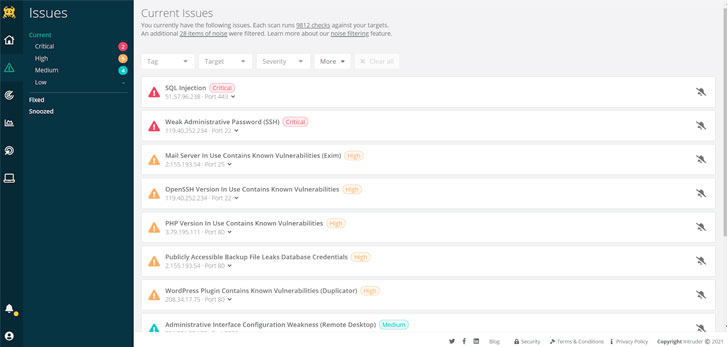 |
| Intruder uses a unique algorithm to prioritize issues that leave your systems exposed, making it particularly easy to find out what presents the highest risk. |
5. Continuous cyber security
A vulnerability scan provides a point-in-time snapshot of the
vulnerabilities present in an organization’s digital
infrastructure. However, new deployments, configuration changes,
newly discovered vulnerabilities, and other factors can quickly
make the organization vulnerable again. For this reason, you must
make vulnerability management a continuous process rather than a
one-time exercise.
Since many vulnerabilities are introduced when software is
developed, the most progressive software development companies
integrate automated vulnerability assessments into their continuous
integration and deployment (CI/CD) pipelines.
This allows them to identify and fix vulnerabilities before the
software is released, avoiding the potential for exploitation and
the need to develop and ship patches for vulnerable code.
To conclude
Regular vulnerability assessments are critical to a strong
cybersecurity posture. The sheer number of vulnerabilities that
exist and the complexity of the average company’s digital
infrastructure mean an organization is almost guaranteed to have at
least one unpatched vulnerability that places it at risk.
Finding these vulnerabilities before an attacker can mean the
difference between a failed attack and a costly and embarrassing
data breach or ransomware infection.
One of the great things about vulnerability assessments is that
you can do it yourself and even automate the process. By getting
the right tools and performing regular vulnerability scans, you can
dramatically decrease your cybersecurity risk.
The Intruder vulnerability assessment
platform
Intruder is a fully automated vulnerability assessment tool
designed to check your infrastructure for upwards of 10,000 known
weaknesses. It’s designed to save you time by proactively running
security scans, monitoring network changes, synchronizing cloud
systems, and more. Intruder generates a report outlining the issues
and offering actionable remediation advice – so you can find and
fix your vulnerabilities before hackers reach them.
Intruder offers a 30-day free
trial[3] of their vulnerability
assessment platform. Visit their website today to take it for a
spin!
References
- ^
a single
vulnerability scanner (www.intruder.io) - ^
Intruder
(www.intruder.io) - ^
Intruder
offers a 30-day free trial
(www.intruder.io)
Read more http://feedproxy.google.com/~r/TheHackersNews/~3/OWMKXQvd4Lk/how-to-conduct-vulnerability.html