
There are many labor-intensive tasks that the IT service desk
carries out on a daily basis. None as tedious and costly as
resetting passwords.
Modern IT service desks spend a significant amount of time both
unlocking and resetting passwords for end-users. This issue has
been exacerbated by the COVID-19 pandemic.
Causes of account lockouts and password resets
End-user password policies, such as those found in Microsoft
Active Directory Domain Services (ADDS), typically define a
password age. The password age is the length of time an
end-user can keep their current password.
While new guidance from NIST[1]
recommends against the long-held notion of forced password changes,
it is still a common and required security mechanism across other
compliance standards and industry certifications such as PCI and
HITRUST.
When the password age is reached for the user account, the user
must change their account password. It is generally prompted at the
next login on their workstation. This scenario creates a series of
likely events. Many end-users procrastinate changing their
password, even if they are notified ahead of time.
Users also have various mobile devices connected to their
accounts. If a user does not synchronize all device passwords when
the account password is eventually changed, this will create issues
that can lead to a lockout. It can create further confusion as the
end-user may be using the correct password on their
workstation.
What are the costs of account lockouts and password
resets?
It might seem like a simple password reset is a trivial matter
with no actual cost to the business. However, the data shows
otherwise. A study by the Gartner Group[2]
found that between 20-50% of all service desk
calls were for performing password resets. Forester
Research adds to this finding by research showing the average help
desk labor cost for a single password reset can cost upwards of
$70 or more.
You may wonder, how is this possible?
First, suppose the organization is conscious of best practice
security processes (which they should be) before a password can be
changed for an end-user. In that case, the identity of the user
requesting the password change must be verified. Why is this? An
attacker may use social engineering tactics to persuade the service
desk to change a legitimate user’s account password. This scenario
hands an attacker legitimate credentials, which leads to a
compromise of the environment. The process to verify end-user
identity by manual means can be time-consuming.
Next, businesses may still be using interconnected legacy
systems that require manually changing passwords in multiple places
rather than a single change flowing across the environment
seamlessly. The manual process required for the helpdesk team to
ensure a password is changed correctly may be labor-intensive.
It can require the helpdesk team to log in and use many
different tools for changing a password in multiple systems for a
single user account. Finally, the end-user may be “dead in the
water” waiting on the IT service desk to assist with unlocking a
locked user account or resetting a password. The time spent where
an end-user is locked out and unable to perform their work duties
in itself will result in impacted business processes and will
ultimately cost the business.
What tools reduce the cost of account lockouts and password
resets?
Organizations looking to reduce the cost of account lockouts and
password resets can significantly benefit from Self-Service Password Reset (SSPR)
tools[3]. Much as the name
implies, an SSPR solution allows end-users to unlock their account
and reset their passwords using a self-service workflow.
End-users have to enroll or be enrolled by system admins ahead
of time in the SSPR solution for onboarding purposes. The user-led
enrollment process allows the end-user to configure the various
multi-factor identification methods needed to verify their identity
to perform the self-service actions. It may include setting up
synchronization with an authenticator app such as Google
Authenticator, mobile verification by text or phone call, or other
means. If led by the admin, this can require pre-filing the
required verifier information in users’ Active Directory
profiles.
Once the end-user enrolls/is enrolled in the solution, they can
visit a web portal to begin the workflows to unlock their account
or reset their password. They can do this without any involvement
or intervention from the IT helpdesk. As you can imagine, this can
reap tremendous benefits in terms of offloading the workflow from
the service desk and allowing the end-user to take care of triaging
their account issues.
SSPR solutions are only as good as the number of end-users who
are enrolled. A good SSPR solution allows administrators to have
the tools needed to onboard users programmatically. This capability
includes pre-enrolling users, which doesn’t require effort from
admins or end-users as the system would rely on existing Active
Directory identifier data to enable users to use authentication
methods that rely on that data. When this option is present in SSPR
solutions, it can dramatically increase the adoption of the SSPR
solution across the board.
Lowering password reset costs with Specops uReset SSPR
An effective SSPR solution provides the tools and capabilities
needed for businesses to quickly give end-users easy enrollment
capabilities and perform self-service account workflows. Specops uReset[4]
is a robust Self-Service Password Reset solution that effectively
allows companies to eliminate password reset calls to their IT
helpdesk.
It provides the following capabilities:
- Enables users to reset their Active Directory passwords
securely - Users can use any device and can reset their password from
anywhere - Enrollment enforcement
- Users can initiate the password reset process from a browser,
mobile device, or right from the Windows logon screen - It allows companies to implement a series of multi-factor
authentication requirements that align with the business
cybersecurity policies - It includes geo-blocking
- Administrators have access to PowerShell scripts to quickly
onboard users into uReset.
Specops uReset self-service workflow
When users are locked out of their account or have forgotten
their password, the Specops web portal allows them to unlock their
account quickly.
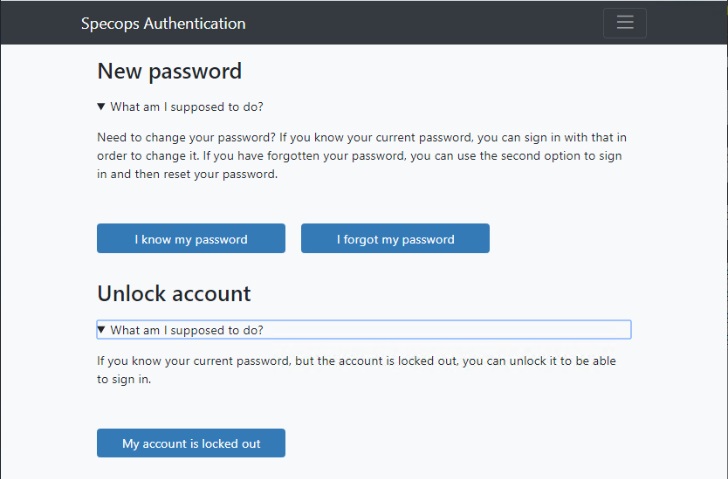 |
| Specops uReset allows quickly unlocking accounts and resetting passwords |
The end-user is asked to verify their identity using the first
of the configured multi-factor verification methods.
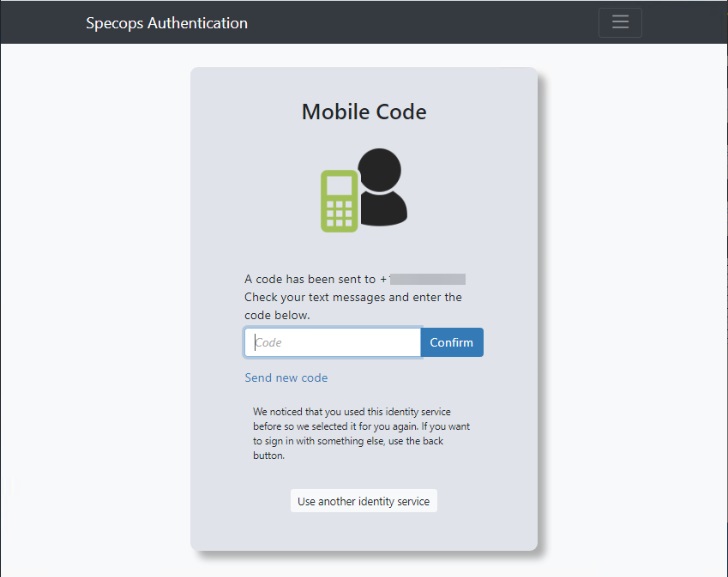 |
| Mobile Code verification in Specops uReset |
The user is prompted for the second form of multi-factor
authentication configured. If you notice below, Specops uses a
means to accumulate the required number of “stars” using the
multi-factor authentication mechanisms configured. Below, three
stars are needed for verification. However, this is configurable
and can include multiple verification methods.
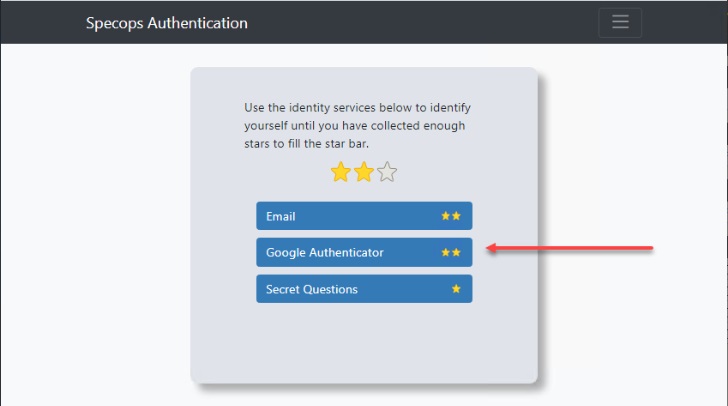 |
| A second form of multi-factor authentication is needed for identity verification |
The end-user enters the code from Google authenticator.
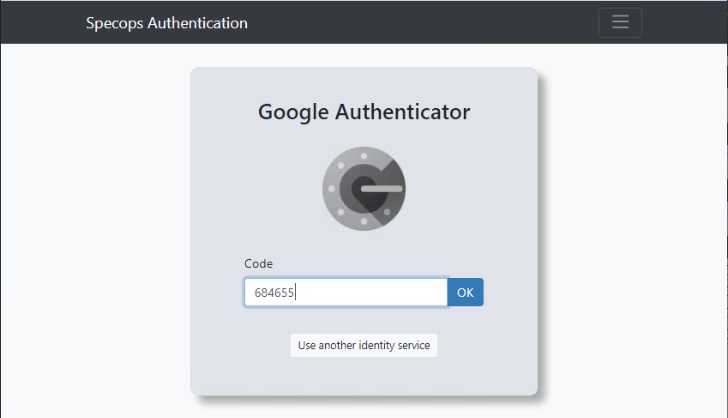 |
| Entering the code from Google authenticator |
Specops uReset mandatory enrollment
Specops provides effective tools to enforce end-user enrollment
into Specops uReset. One of those tools is the Enrollment
reminder mode. Organizations can implement mandatory
enrollment using the option Start unclosable fullscreen
browser.
With an unclosable browser window, end-users will be
helped/mandated to enroll into uReset. This setting can then be
“assigned” to all users via an Active Directory Group Policy
object.
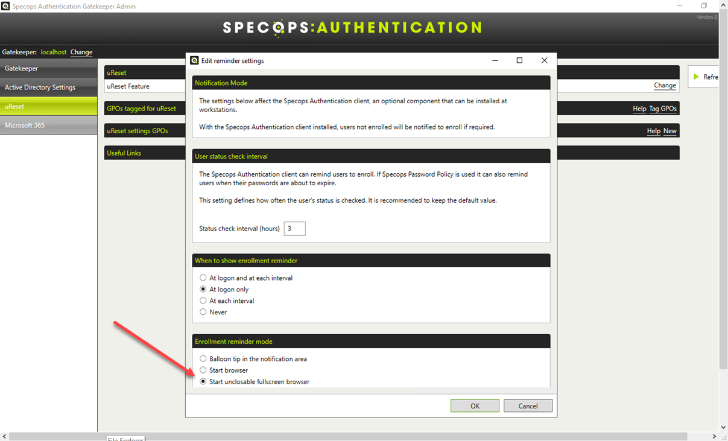 |
| Setting the enrollment reminder mode with Specops |
Wrapping Up
Account unlock and password reset activities are incredibly
costly to IT helpdesk operations. According to researchers, these
activities can add up to over $70 per password reset. Self-Service
Password Reset (SSPR) solutions provide the means to allow
end-users to perform these activities themselves without
involvement from the service desk.
Specops uReset is a robust SSPR solution providing the tools
needed for organizations to effectively implement self-service
capabilities for end-users to triage their account lockouts and
password resets without helpdesk involvement.
It offers robust capabilities, including easy onboarding,
configurable multi-factor authentication, enrollment enforcement,
geo-blocking, and many other capabilities.
References
- ^
new
guidance from NIST (specopssoft.com) - ^
Gartner
Group (www.infosecurity-magazine.com) - ^
Self-Service Password Reset (SSPR)
tools (specopssoft.com) - ^
Specops
uReset (specopssoft.com) - ^
here
(specopssoft.com)