Linux system administrators are people who are responsible for
managing IT infrastructures that are powered by Linux. It is one of
the most sought after positions by modern enterprises. Competetive
sysadmins are always in high demand and will get rewarding
workplace benefits. But, what does it take to become a successful
sysadmin? If you’re a seasoned Linux user who wants to try his hand
at system administration, this guide is for you. Today, we will
discuss some of the key aspects of becoming a Linux admin. You will
find out the things a competitive system admin needs to know from
this guide.
Things to Master for Acing a
Sysadmin Position
Experienced system admins can grab one of the highest paying computer science
jobs[1] very easily. So, if you
want to get hired as a sysadmin, continue reading to find out the
requirements of a modern Linux system administrator. Don’t worry if
you don’t know all of these. Think of them as a reference and start
practicing today.
1. Setting Up The
Environment
As a Linux system admin, you are obliged to set up custom
environments as per corporate requirements. You should be
comfortable at this task since it’s one of the first things most
Linux users do. Although the environment requirements vary from job
to job, you will need to adjust to the task by any means. However,
you will often end up with an already up and running system. Make
sure you tune the system to meet your preferences without
interrupting any required services.
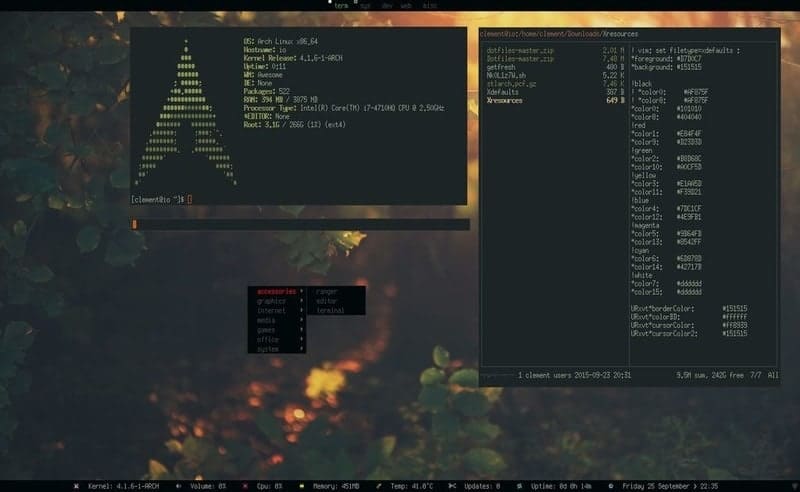
Some essential aspects of environment setup include
partitioning, encryption, BIOS setup, and storage configurations.
Additionally, most companies will follow a strict set of guidelines
for their corporate servers. These include things like network
configurations, security firewalls, IDS configurations, and so on.
The below sections will discuss many of these in detail.
2. Managing Users and
Groups
User management is another major responsibility of a Linux
sysadmin. IT systems usually have a number of users, each with
different roles. Thus, you need to ensure that users can use the
system as intended. Make sure that users don’t have too much or too
little access to the system. Access should be assigned based on the
user’s role, and a solid user policy is mandatory in this
matter.

As a system admin, you will be in charge of creating new users,
setting groups, file permissions, and other user-space attributes.
You also need to ensure that users use strong and secure passwords.
Make sure to set up password expiration as well as the PAM module
and locks on failed logins. You should also incorporate effective
access control strategies by configuring the appropriate setuid,
setgid, and sticky bits.
3. Installing and Configuring
Packages
Linux bundles its applications as packages. By default, most
systems come with a select set of rudimentary tools. However, it’s
the responsibility of the system admin to install all other
required packages as well as configuring and managing them. Package
management takes a significant amount of effort, and thus
professional sysadmins should try to automate the trivial processes
for increasing their productivity.
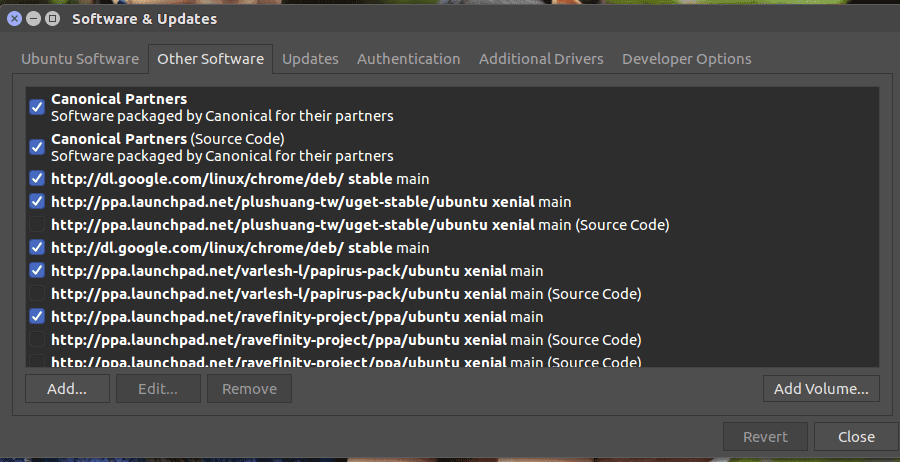 Manage repositories
You should have a well understanding of Linux Cron jobs
alongside standard package managers like apt, dpkg, yum, and
packman. Additionally, Linux system administrators will often need
to install or update packages using repositories. So make sure you
know how that works. If you’re an absolute beginner with little
knowledge of package management, head over to this guide for
learning how to install software in Linux[2], note that configuring
packages often require more work than installation.
4. Linux Shells
The Linux shell[3]
provides a command-based interface to the underlying system. It is
one of the most important things to know if you want to pursue a
career as a sysadmin. Linux supports a large number of shells, both
legacy and contemporary ones. You should at least be proficient at
one of them and have an understanding of some other. Some commonly
used shells for today’s admins include the Bash shell, Zsh, Tcsh,
and Fish.
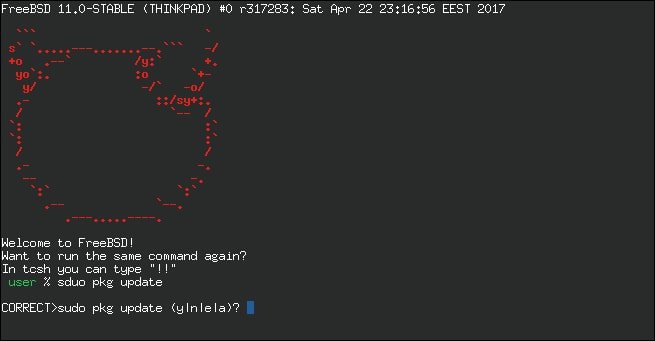
Shells interpret commands as well as shell scripts. As a system
admin, you will be in charge of writing different types of scripts.
You should be able to write shell scripts for system maintenance
tasks such as taking backups, monitoring logs, automation, and so
on. We have prepared an earlier guide on Linux shell scripts for helping
beginners to get better at it. [4]
5. Linux Filesystem
The filesystem sits at the core of Linux systems. It is
essential for admins to have an in-depth understanding of the
filesystem and its operations. Since Unix systems emphasize largely
on the filesystem, most system operations are designed to reflect
this. You need to learn about the filesystem hierarchy, different
filesystem types, permissions, and many more. You can’t become a
successful system administrator without mastering the Linux
filesystem.
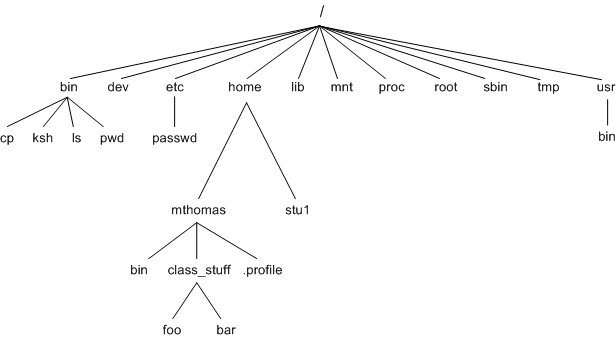
Luckily, there are a lot of good resources out there that teach
the fundamentals of the Unix
filesystem[5]. If you want to learn
the different filesystem attributes and standard commands, check
out our earlier guide on the Linux filesystem. We also suggest
users read the “The UNIX Programming Environment[6]” by Kernighan &
Pike. The authors were directly involved in the UNIX project
and provide design ideas and historical insights on the filesystem
in their book.
6. Configuring and Managing
Networks
Linux system administrators are required to have excellent
networking abilities. In fact, many system admins spend most of
their working hours on network configurations and management. You
need to have a detailed understanding of fundamental networking
concepts such as TCP/IP protocols, routing, switching, bridging,
DNS, and so on. You will often be responsible for setting up new
networks as well as managing existing ones.
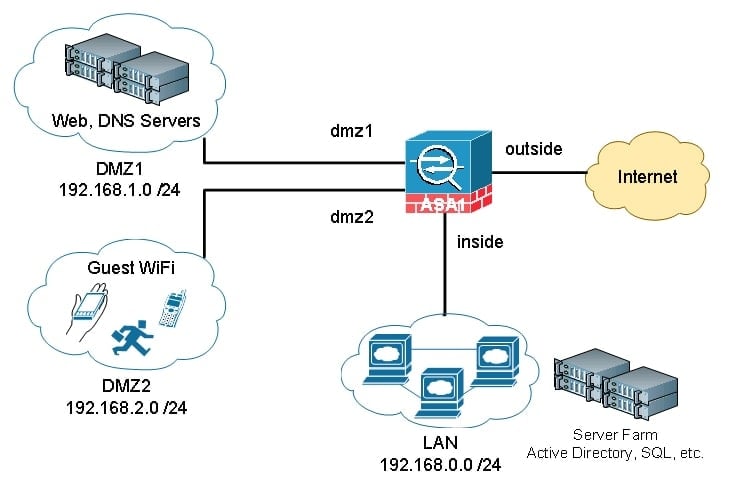
Admins should also be proficient in using standard Linux network tools[7] like ifconfig, ip,
netstat, etc. What tools you use will usually depend on the exact
task. So, sysadmins should be flexible and ready to learn whatever
tools are required. Moreover, having good networking abilities is
not enough. You need to implement the best security practices and
keep your IT infrastructure safe from intruders all the time.
7. Managing Data
Storage
As a system admin, you will be responsible for managing data
storage for your corporation’s IT infrastructure. Data storage is a
broad topic and is extremely crucial. You don’t want to be the one
to mess up sensitive information. That’s why you should be able to
set up appropriate storage solutions and manage them effectively.
Learn the basics of partitioning and disk encryption. You should
also be abler to set up reliable LVM schemes.
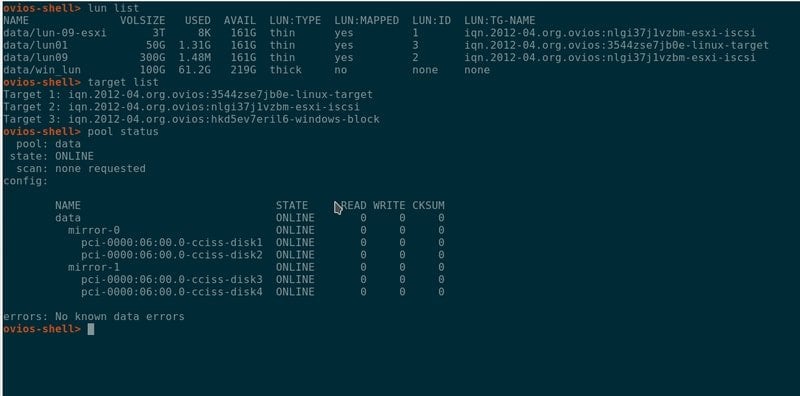
You need back up corporate data conveniently and store them for
future usage. Learn the various RAID configuration models and apply
them based on enterprise requirements. Many companies will also
require you to set up network-based storage solutions like NAS and SAN servers. You can find some
of the best NAS and SAN solutions for Linux from our earlier guide.
Moreover, admins should also be able to implement robust disk
monitoring systems. [8]
8. Virtualization
Technologies
Every major corporation these days use virtualization of one
form or another. So, a Linux system administrator should be fairly
comfortable working with this technology. In simple terms,
virtualization refers to the ability to run multiple operating
system instances on a single physical machine. It not only reduces
hardware costs but also makes scaling systems easier.
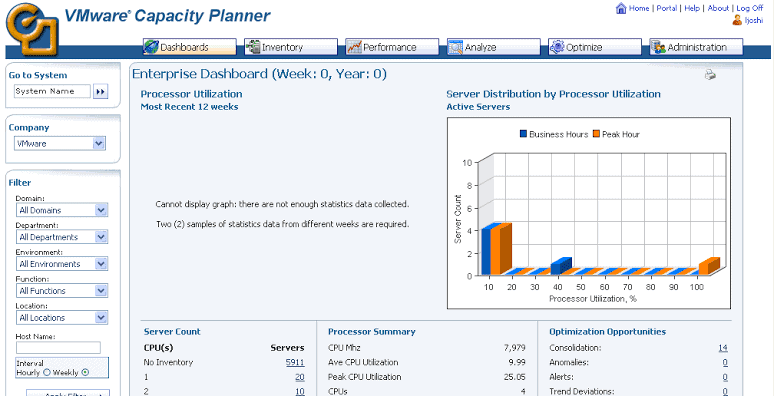
There are primarily two ways to implement virtualization. The
first method utilizes hypervisors-based Virtual
Machines[9]. These act as standalone
systems but uses a considerable amount of CPU resources. The second
method uses containerized technologies like LXC and Docker, to
provide OS-level abstractions. This allows companies to run
hundreds, even thousands of different services on a single machine.
System admins are expected to have a working knowledge of both
technologies.
9. Managing Backups
Data is the driving factor to success, and modern enterprises
deal with a large amount of varying data. As a sysadmin, you will
be responsible for securing this data. The first step for securing
data is taking backups. You need to be familiar with standard backup utilities for Linux as
well as commonly used backup policies. Many companies use some sort
of paid backup solution for bootstrapping
the backing process. [10][11]
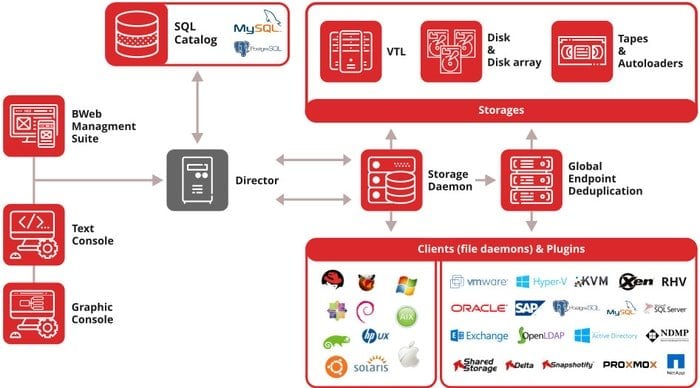
When it comes to creating and managing enterprise backups, you
need to consider things like the backup medium, software, and
policies. You need to devise a plan that keeps the hardware costs
low but still provides optimal backing opportunities. If you’re
relatively new in this field, make yourself familiar with simple
backup methods. Learn using the tar utility, multi-level backups,
compressed backups, and automation policies.
10. Disaster
Recovery
If you’re working in a small to medium-sized office, chances are
you’ll be responsible for additional workload alongside system
administration. Many growing companies do not employ dedicated
disaster recovery professionals and rely on the sysadmin to provide
support in case of service disruption. So, you should have a
concise idea of various disaster recovery models that are used in
the IT industry.
For starters, you should be able to ensure the integrity of data
and services across the organization. This requires planning ahead
and implementing IT assessment policies that are feasible, both
financially and technically. Admins should be capable of
identifying potential disruptions very fast and be ready to get the
services running within minutes. You can always perform and analyze
disaster simulations to learn how to restore services as fast as
possible.
11. Security
Management
Security is one of the most crucial aspects of any IT job. Linux
system administrators need to ensure the security of their
enterprise infrastructure by any means. There are many things
related to security in the IT world. From user authentication to
web servers, vulnerable services to malicious attackers, there’s a
lot to deal with. The first rule of managing corporate security is
to implement proven Linux hardening methods. [12]
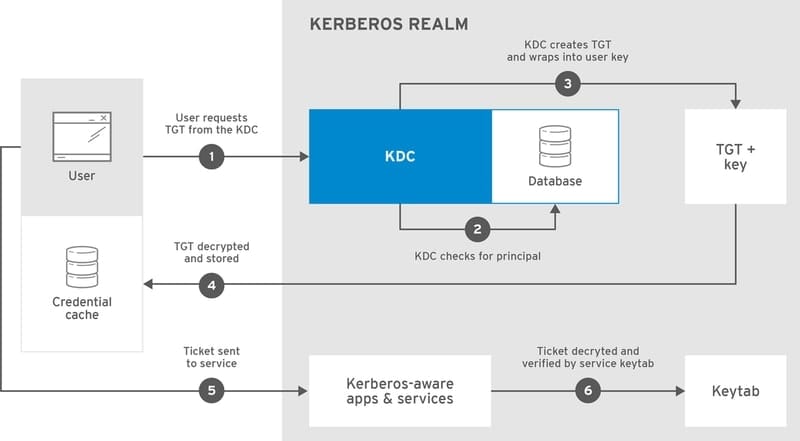
Sysadmins should be able to identify and patch up broken
services before they lead to escalation. Although the latest
updates of many packages offer newer features, they’re often
unstable. So you should stick with stable versions instead. Network
security is another major responsibility of a sysadmin. Try to
implement rock-solid IP security by utilizing the Linux IPtables[13] as well as IDS/IPS
tools. Check our guide on some of the best open-source security tools for
Linux[14].
12. Hardware
Management
Many corporations do not invest in a full-time computer
technician and solely rely on the sysadmin for hardware management.
This is especially true for professionals working in small, growing
businesses. If you ever find yourself in this place, you should be
prepared to tackle solve the issues smartly. Luckily, most
sysadmins are more than capable of identifying hardware problems as
soon as they occur.
Moreover, you don’t need to replace any faulty hardware or fix
them by yourself. Simply notify the administration about the faulty
components and suggest some viable alternatives. Overall, in-depth
knowledge of your systems’ hardware resources is the key to such
problems.
13. Memory
Management
Although today’s systems do not have the resource limitations of
legacy machines, admins need to get the most out of their systems.
Memory management is an essential task for every Linux system
administrator. You should have a clear idea of various memory
management features of the kernel. This includes a working
knowledge of virtual memory, paging, process address space, memory
mapping, NUMA policies, and so on.
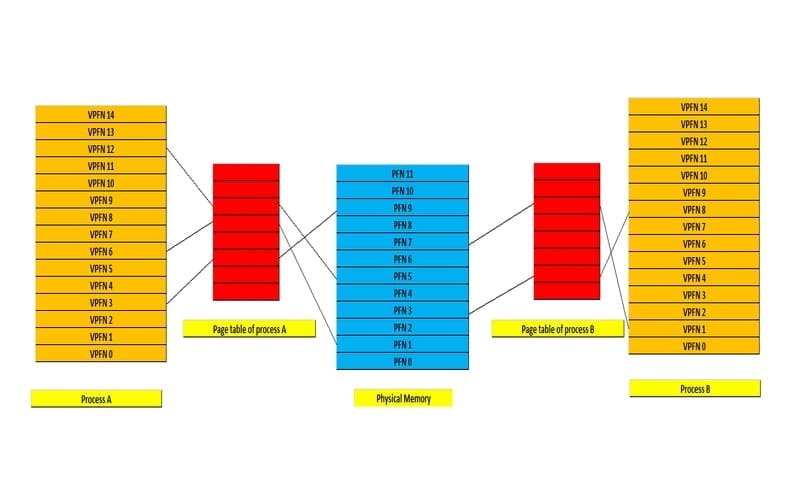
You should be able to create and allocate swap spaces as
required. Sometimes you will be even sharing the swap across
different operating systems. So, learn more about swap as well as
the buffer cache and virtual memory. Memory management becomes much
more crucial when you are working with resource-constrained
platforms. Thus, you should be ready to handle any memory-related
issues in your IT environment.
14. Automation
Automation has become a major part of modern IT jobs. Sysadmins
are also embracing this to level up their game. Efficient
automation makes working hours more productive and takes away
repetitive tasks. Additionally, recent advances in DevOps have
pushed sysadmins to take automation seriously than ever. You should
be familiar with Linux Cron jobs[15] as well as shell
scripting by now. You can automate many aspects of your works using
these simple tools.
To be able to automate your tasks better, you must have a keen
eye for locating patterns. Try breaking down tasks into categories
and devise a solution to tackle them individually. Functional
automation can be easily refactored and offer future customization
abilities. One proven automation model is to lay out the tasks at
hand in terms of a trigger, action, and schedule. We also suggest
you learn professional automation tools like ansible.
15. Troubleshooting
As a Linux system administrator, you will spend considerable
time solving seemingly unnecessary problems. This is
troubleshooting, an integral part of system administration no
matter what your Linux distribution of choice is.
People get better at troubleshooting with experience. This is why
companies pay top money for senior sysadmins. They usually know why
certain problems are happening and the quickest route to fix the
underlying issues. [16]
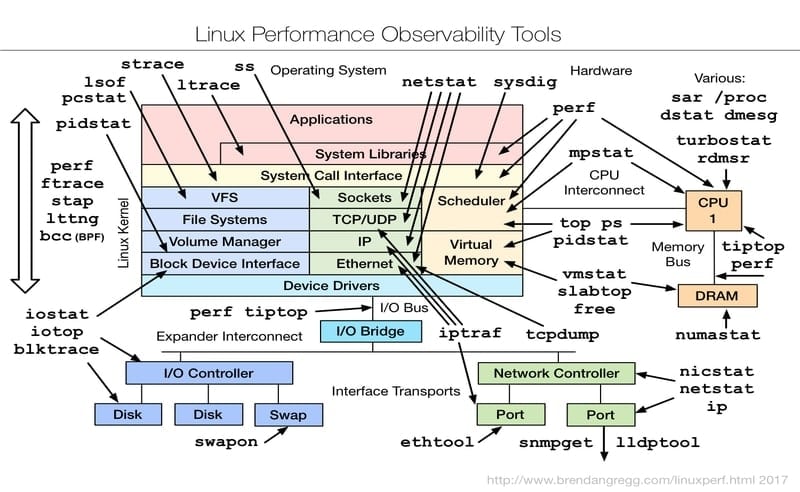
Troubleshooting is one of those areas where many starting users
feel uncomfortable. The only way to increase your problem-solving
capabilities is to spend more time behind your craft. The more you
use a system, the more problems you face. Luckily, each time we
solve a new issue, we can use it as a reference to similar problems
in the future. This is why we suggest beginners complete practical Linux certifications or
courses[17].
16. Monitoring
Monitoring the system, as well as the network, is a routine task
for any professional system admin. If you want to succeed, you need
to be careful about your credibility. Effective monitoring allows
admins to keep ahead of potential screw ups’ and solve issues as
soon as possible. IT professionals use several monitoring methods.
You should automate repetitive tasks like monitoring logs and
emails. Things like networking require more care since even the
simplest of issues here can disrupt hours of business services.
Other things to monitor include user activities, filesystem,
memory, CPU usage, etc. Luckily, a large number of robust monitoring
tools are available to help you with this. Tools like top/htop
make resource monitoring easier while you can use the Linux df command for monitoring the
filesystem. [18][19]
17. Documentation
Documentation is a big part of a sysadmin’s work. It plays a
pivotal role in determining your success as a Linux system
administrator. However, many people find it hard to document their
role and changes in infrastructure, especially starters. There are
different types of documentation, such as public-facing
documentation and internal or organizational documentations. We
will stick our discussion to the latter.
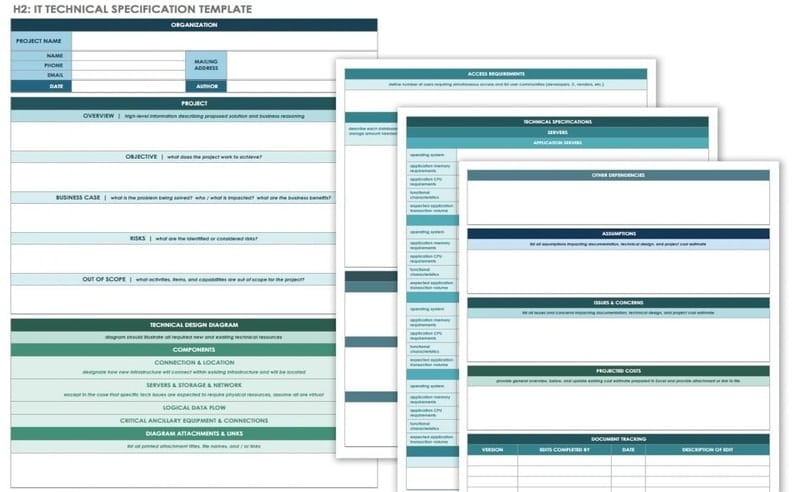
Sysadmins should document their network configurations as well
as technical details clearly. Corporations demand this so that
future recruits can work on existing systems without extra hassle.
Additionally, in-depth documentations allow admins to solve
upcoming disruptions. Documentation methods vary from person to
person. I like to categorize my staff into sections. Some common
parts of my documentation include network information, resources,
third-party tools, commands, and support information.
18. Communication
Effective communication is essential for succeeding in any
profession. However, IT professionals often find it hard to engage
with co-workers, especially with non-technical persons. Many
sysadmins will tell you that communicating with the HR or business
people is much more difficult than the actual technical work. This
can be frustrating and may disrupt your job satisfaction. That’s
why you need to increase your communication efforts.
The key to effective communication is knowing your audience.
People with no technical background will hardly understand why
something is broken and why you are insisting on a specific model.
You need to talk with them using the language they understand. It
can be tough if you’re not good with people. However, like almost
anything, your communication skill only gets better as you try.
19. Education
Like any other computer science jobs, sysadmin positions require
some specific educational qualification. Most companies will likely
ask for a bachelor’s degree in CS or a related field. This
demonstrates the candidates’ ability to perform systems programming[20] as well as networking,
database management, and so on. Some corporations may even ask for
a master’s degree, especially for high paying positions.
However, don’t feel down if you’re a self-taught sysadmin or
have no institutional degree. IT companies usually prefer people
with skills rather than degrees. I know a lot of professional
admins who used have come to the Linux world from entirely
unrelated fields. No matter what your study background is, if you
can meet the technical requirements for a position, you are highly
likely to get the job.
20. Certifications
Certifications can play a pivotal role in the career of a Linux
system administrator. It is especially crucial for starting admins.
If you have no prior job experience, you need to prove your
credibility to potential employers. This is where certifications
come in handy. A widely accepted Linux certification demonstrates
your ability to tackle everyday IT problems. Moreover, many senior
sysadmin positions explicitly demand certain certifications.
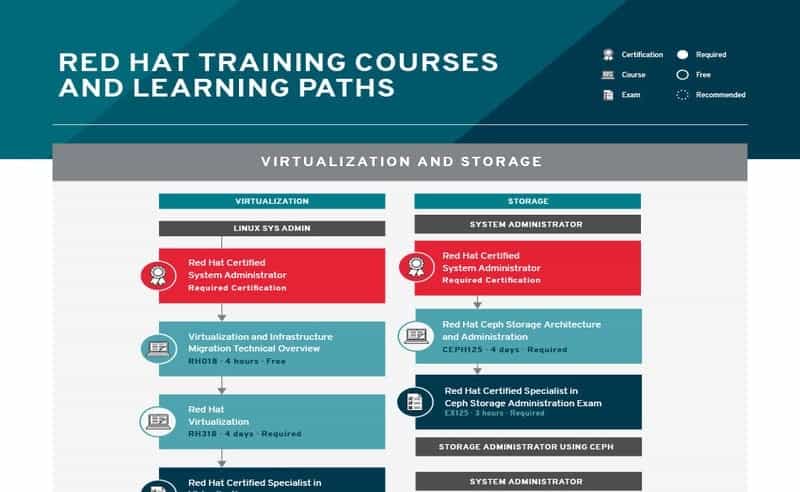
Some of the best certifications for beginners include the
various Red Hat Certifications[21] as well as CompTIA[22] and LPIC[23] ones. We suggest the
RHCSA (Red Hat Certified System Administrator) or RHCE (Red Hat
Certified Engineer) for people looking for their first sysadmin
job. Senior admins can choose from a number of specialized courses
like the Microsoft Certified Solutions Expert (MCSE) or Offensive
Security Certified Professional (OSCP).
Ending Thoughts
Linux system administrator jobs have changed significantly in
the last decade. Modern sysadmins need to possess not only
technical skills but also interpersonal capabilities to succeed in
this demanding industry. Moreover, with the emergence of new
technologies as well as trends, they must adapt to the change.
Luckily, you can go a long way in this field if you have a solid
understanding of the core skills. Our editors have prepared this
guide outlining the 20 things that will help you land a rewarding
sysadmin job. You need to keep putting your effort, and you will be
there in no time.
References
- ^
highest
paying computer science jobs
(www.ubuntupit.com) - ^
how to
install software in Linux
(www.ubuntupit.com) - ^
The
Linux shell (www.ubuntupit.com) - ^
Linux
shell scripts (www.ubuntupit.com) - ^
fundamentals of the Unix filesystem
(www.ubuntupit.com) - ^
The UNIX
Programming Environment (www.ubuntupit.com) - ^
standard
Linux network tools (www.ubuntupit.com) - ^
NAS and
SAN servers (www.ubuntupit.com) - ^
hypervisors-based Virtual Machines
(www.ubuntupit.com) - ^
standard backup utilities for
Linux (www.ubuntupit.com) - ^
paid
backup solution (www.ubuntupit.com) - ^
proven
Linux hardening methods (www.ubuntupit.com) - ^
the
Linux IPtables (www.ubuntupit.com) - ^
best
open-source security tools for Linux
(www.ubuntupit.com) - ^
Linux
Cron jobs (www.ubuntupit.com) - ^
your
Linux distribution of choice is
(www.ubuntupit.com) - ^
practical Linux certifications or
courses (www.ubuntupit.com) - ^
a
large number of robust monitoring tools
(www.ubuntupit.com) - ^
the
Linux df command (www.ubuntupit.com) - ^
perform systems programming
(www.ubuntupit.com) - ^
various Red Hat Certifications
(www.ubuntupit.com) - ^
CompTIA
(www.comptia.org) - ^
LPIC
(www.lpi.org)
Read more https://www.ubuntupit.com/things-to-know-for-becoming-a-successful-linux-system-administrator/