Geoscience or earth science is not only about boring theories.
There are many practical implementations of the knowledge of
geoscience in real life. And, there are some computer programs
which will help you to simulate the ideas of this important field
of science. Normally, students and academicians of geoscience use
these tools. For this reason, common people don’t know much about
these geosciences software. But if you are an avid learner of
geoscience and a Linux user at the same time, you might want some
best geoscience software for your Linux system.
Earth Science or Geoscience
Software for Linux
Many people have a misconception that these specialized tools
are not available for Linux distros. It’s true that there is not a
huge number of geoscience software for Linux, but the number is not
negligible either. So, it’s very difficult for you to choose the
best piece of software for your practical study or research. Don’t
worry, here we are going to introduce you to the 15 best geoscience
software for Linux.
1. GRASS
Geographic Resources Analysis Support System or GRASS is an
open source software[1]
used in geoscience. It is a GIS or Geographic Information System.
That means it will help you with the analysis, image processing and
visualization of geographic data. It was originally developed by
the US Army and then gradually enhanced by the open-source
community. GRASS is regarded as the most advanced GIS software and
hence it is used by different government and private officials all
over the world.

Key Features of GRASS
- Easy to use wxPython graphical user-interface included with
Layer Manager, Map Display Window and Module Dialogue. - It has around 400 built-in modules for data analysis and image
processing. - It has a large community-driven library of free downloadable
add-in modules. - GRASS has an integrated 2D/3D vector processing engine with
support for SQL based database management system. - The Python interface to the C library helps you creating
powerful modules of your own. - This program can be used as the backend of other GIS
software.
2. Quantum GIS
Quantum GIS is yet another GIS software for Linux. This Linux
geoscience software is mostly known as QGIS. The main aspect of
this tool is its user-friendliness. The initial goal of this tool
was to provide a GIS data viewer. But over the time it has become a
complete package for GIS functionalities. It will help you to
create, analyze, query and view geospatial data.

Key Features of Quantum GIS
- It has support for a wide range of formats for viewing raster
and vector data. Another interesting this is that it doesn’t need
to convert data to a common format for doing so. - QGIS supports all the formats from two very popular libraries,
such as the OGR library and the GDAL library. - Quantum GIS has a very user-friendly graphical UI with some
important built-in, including a map composer, spatial bookmarking,
feature labeling, overview panel, etc. - Users can perform spatial analysis using integrated GRASS
tools, including map algebra, terrain analysis, hydraulic modeling,
network analysis, and many others. - It has got a plethora of plugins for installing and add extra
functionalities like decorations, georeferencer, GPS tools, GRASS,
Python console, etc.
3. Survex
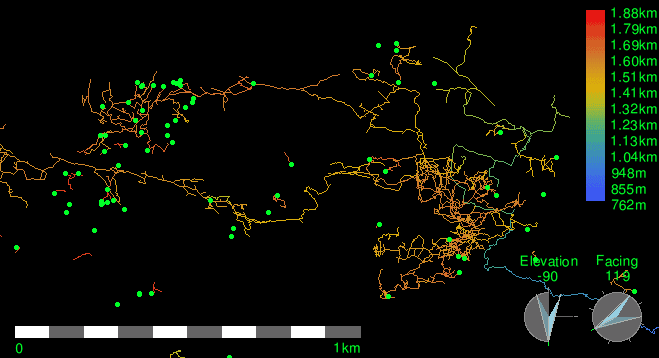
The tool Survex is an open-source software package for analyzing
and viewing cave-survey data. Surveying a cave is not an easy task
but this tool makes it easier to analyze the survey data. The
real-time cave viewer integrated with it helps you to the panning,
rotating and zooming inside the cave using your standard input
device like mouse and keyboard. Many important governments and
non-government survey projects rely on this software.
Key Features of Survex
- Integrated lag-free and super smooth cave viewer with redraw
and bank-switching techniques, - Inbuilt instrument simulators have an optional scale and zero
correction. - Users can specify magnetic deviations separately where
needed. - Survex has support for almost all the common input units like
meters, feet, degrees, mils, grads, minutes, etc. - This tool supports a wide range of languages including French,
Spanish, Portuguese and Slovak. - This tool has integrated printer drivers for almost all the
common models including Epson, Canon, HP, etc.
4. SAGA – System for Automated
Geoscientific Analyses
It is free and open-source geoscience software for Linux. All
the functionalities of this program can be easily accessible by
using the GUI or by writing command lines. You can also program it
by using C++ API. This API system allows you to write new
algorithms for analyzing geographical data. It features an
exchangeable modules library for geoscientific methods.

Key Features of SAGA – System for Automated
Geoscientific Analyses
- SAGA supports various formats for inputting data like grids,
tables, vectors, images, etc. - This tool supports interpolation for various vector data using
triangulation, nearest neighbor and inverse distance. - Users can use various geostatistics methods like residual
analysis, ordinary and universal kriging, single and multiple
regression analysis, variance analysis, etc. - It features some intelligent functions like box classification,
maximum likelihood, and pattern recognition. - Users can simulate various dynamic processes with this
tool. - The advanced terrain analysis feature of this tool helps you to
analyze slope, curvature, flow path, solar radiation, etc.
5. uDig
The name of this tool is derived from the catchphrase
“User-friendly Desktop Internet GIS”. Just like its name this tool
is very userfriendly. It is an open-source geospatial data viewer.
Though it is a stand-alone desktop program for Linux, it has many
online GIS services built-in. This software is written in Java and
developed with Eclipse Rich Client (RCP) technology.

Key Features of uDig
- The Eclipse Rich Client or RCP technology helps to add and
develop new functionality for this program. - It has a feature-rich Java toolkit that can be used by the
developers to develop this open-source tool. - GRASS is used for vector operations in this program that helps
the users already familiar with GRASS. - The desktop client supports drag and drops feature to interact
with file explorer and web browser. - It supports GeoServer, MapServer and other kinds of web map
servers. - Users will get a fast user experience while working with maps
and links because of its embedded web browser.
6. Therion
Therion is an advanced cave surveying tool. It is a command-line
based application. It takes input in text files but the output can
be retrieved as a 3D map and visualization. But other than that the
uses of this application are pretty simple. It is fully compatible
with Survex and the data can be stored either in the form of a
Survex file or a Therion file.

Key Features of Therion
- The map drawing is fully independent of the survey data. So you
can draw partial maps if you want to. - It completes maps with all the details. No additional ink
stroke is needed for this. - The dynamic map drawing system refreshes the output map
automatically with the change in scale or value. - The 3D model of the cave can be split into layers and can be
displayed as individual items separately. - The 2D map input generates a 3D map as output.
- Therion supports a lot of commonly used file formats for
exporting data or visualization. - It has built-in translation support for many languages.
7. GrADS – Grid Analysis and
Display System
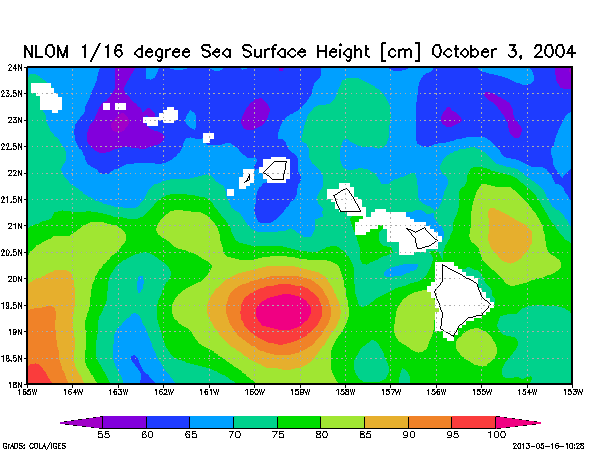
GrADS is a very advanced tool for access, manipulation, and
visualization of geographical data. This tool uses
four-dimensional datasets for analyzing earth science data. It has
also an optional 5th dimension for grids that are generally
implemented but designed to be used for ensembles. It has a rich
set of built-in functions for different operations. Besides users
and developers can add extra functions by using any programming language. [8][9]
Key Features of GrADS
- This program displays data in different types of graphical
forms. Lines, Bars, Scatter Plots, Smoothed Contours, etc are some
of them. - GrADS can read different types of datasets including GRIB,
gridded binary, BUFR, GrADS station data, NetCDF, HDF4-SDS, HDF5,
and OPeNDAP. - It has a programmable scripting interface for displaying
complex operations. - Its advanced scripting language enables users to map buttons
using scripts and take actions based on clicks. - It has a data server named GDS which uses OPeNDAP protocol to
analysis service across the internet.
8. GPlates
GPlates is a very useful geoscience software for Linux. The
desktop client gives users an interactive visualization of
plate-tectonics. This tool is written in the C++ programming
language. GPlates uses the OpenGL framework for displaying 3D map
output. The graphical user interface of this program uses Qt as its
framework.

Key Features of GPlates
- GPlates supports the loading and saving of different geographic
and tectonic data in different formats including GPML, Plates4
line-format, ESRI Shapefile, etc. - It records and restores the previous session of the user. This
is a very convenient feature of this tool. - The tool supports the loading of raster images in different
formats like JPEG and NetCDF. - The visualizer tool supports different types of map projections
including 3D Orthographic Globe, Rectangular, Mercator, Mollweide,
etc. - Users can control the perspective camera by dragging the mouse
or by using the keyboard arrow keys. - You can choose different coloring schemes for vector features
and NetCDF grids data.
9. Generic Mapping
Tools
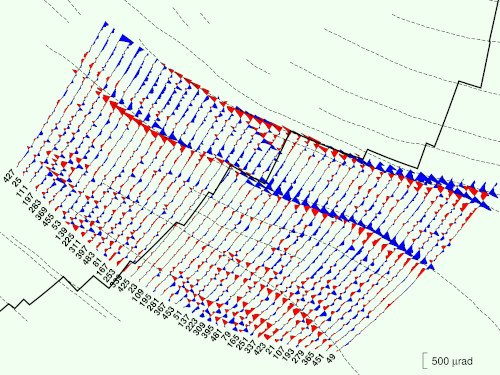
GMT is a collection of over 80 tools for creating and
manipulating geographical data. All the tools are open-source. The
tools are mainly command-line based. But there are some graphical
user interfaces available from third-party developers such as iGMT,
Mirone, SEATREE, etc. This tool comes integrated with a free
comprehensive collection of free GIS data, such as coastlines,
rivers, political borders, etc.
Key Features of Generic Mapping
Tools
- The tools can manipulate cartesian and geographic data sets
including filtering, trend fitting, gridding, projecting, etc. - It can produce PostScript illustrations ranging from simple x–y
plots via contour maps to artificially illuminated surfaces and 3D
perspective views. - The package contains 40 more tools for specialized
discipline-specific works. - The tools have native support for more than thirty mapping
projections. - Linear, log10, and power scaling features are also supported by
the tools.
Get Generic Mapping
Tools [12]
10. OpenJUMP
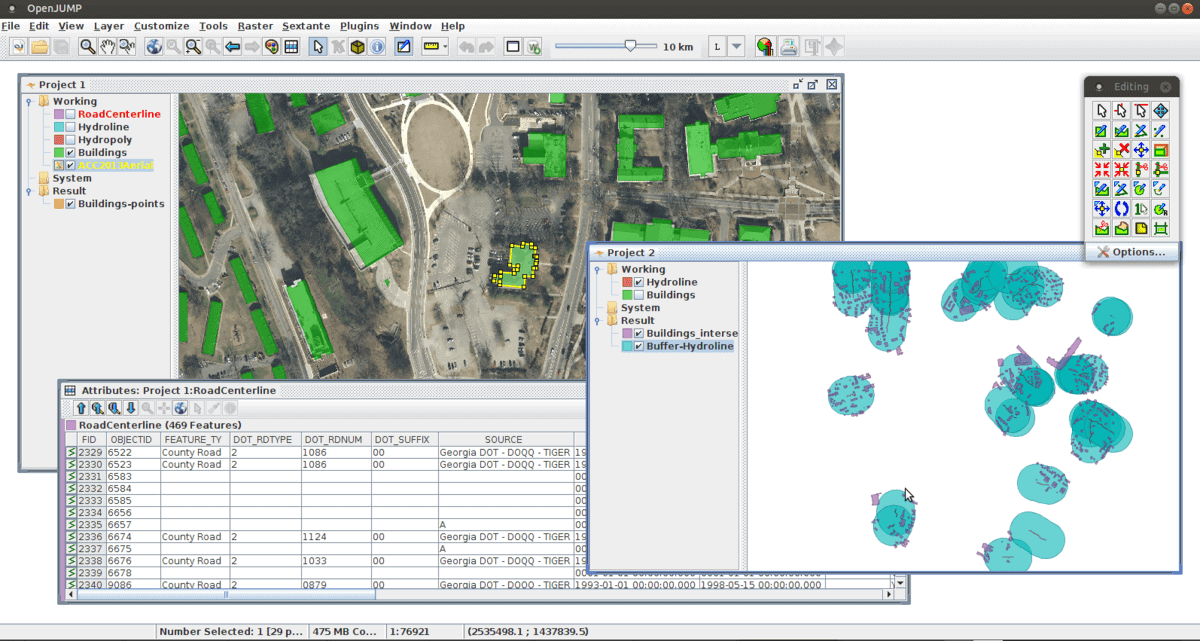
This is an open-source Geographical Information System or GIS.
It is written in the Java programming language. It is considered as
a unified mapping platform. Maybe some of you are familiar with the
software named “Java Unified Mapping Platform.” That was developed
by VividSolutions and was released in 2003. OpenJUMP is the
open-source fork of that software.
Key Features of OpenJUMP
- It has integrated vector GIS support which can also read raster
files. - This tool provides open API and plugin system which can be
scripted by using BeanShell and Java Python. - It has support for plenty of vector and raster file
formats. - OpenJUMP has some built-in topology tools like line noder,
polygonizer, planar graph, etc. - The advanced measurement tool can calculate length, area,
centroid, buffer, convex hull, etc pretty well. - The advanced printing system makes it easier to print out
sophisticated maps.
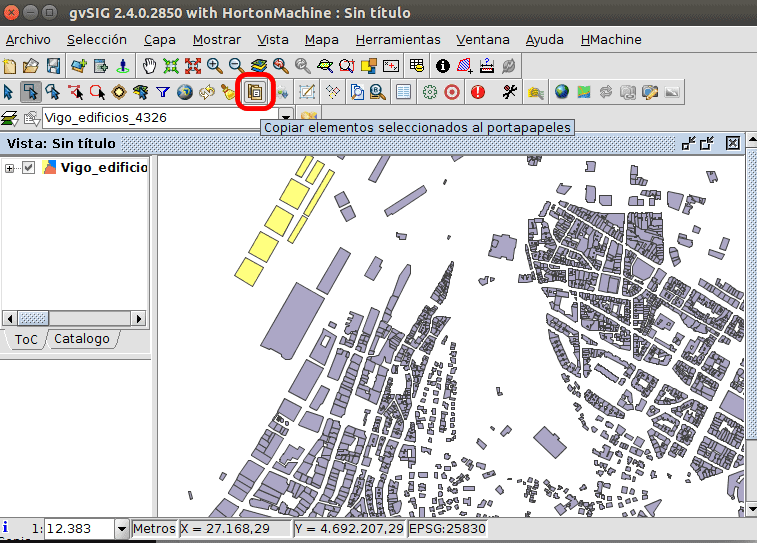
11. gvSIG Desktop
gvSIG Desktop offers numerous tools for analyzing geospatial
data. gvSIG supports a wide range of vector and raster files, as
well as databases and remote services. This geoscience software has
some bonus tools integrated with it including Coordinates Reference
Systems manager, import from/export to WMC, scripting and
translations manager.
Key Features of gvSIG Desktop
- It gives users access to remote services like OGC, ArclMS,
Ecwp, etc. - It has different types of graphical editing options like adding
event layers, snapping, grid, flatness, command stack, undo/redo,
copy, move, symmetry, rotate, scale, edit vertex, etc. - The advanced vector representation system can display different
unique symbols, categories, legends, etc. - It has a printing system integrated that can export files as
PDF or as image files and print them instantly. - gvSIG Desktop can be seamlessly integrated with online map
servers to publish maps online. - The 3D viewing tool built-in with it can display from different
perspectives and can make animations automatically.
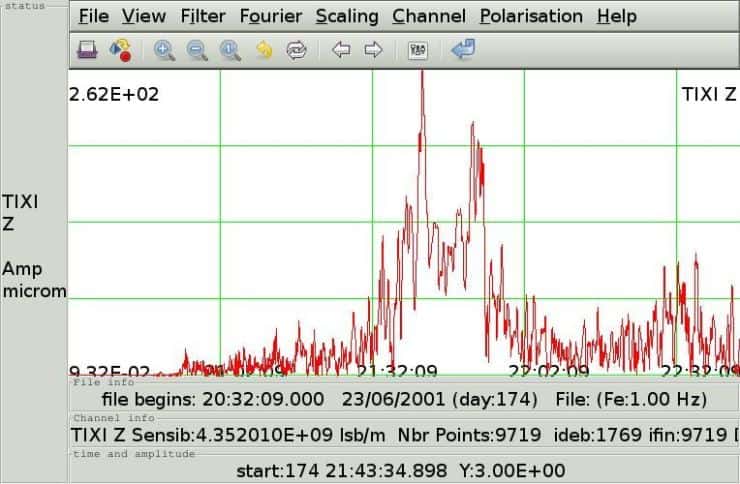
12. Seismic Toolkit
The Seismic Toolkit is an open-source seismic data analyzer.
This tool can perform filtering, spectral analysis, polarization
analysis, time-frequency representation, Hilbert transform, and
singular value decomposition. Thus it has become a go-to tool for
the experts in the field of studying earthquakes. Apart from
different seismological analysis, this tool can plot graphs
according to the provided data.
Key Features of Seismic
Toolkit
- The powerful raster engine integrated with it supports
different display properties including wiggle, variable area,
variable density, color-filled modes, etc. - This tool supports over 200 datum and seven different
projection modes. - Users can overlay any number of seismic datasets and display
interpretation or annotate data. - Seismic Toolkit offers granular control over trace highlight,
polarity, visibility, color, etc. - Image pre-rasterizing system helps bufferless zooming and
scrolling over maps. - The toolkit supports the Qt framework for extended
functionality.
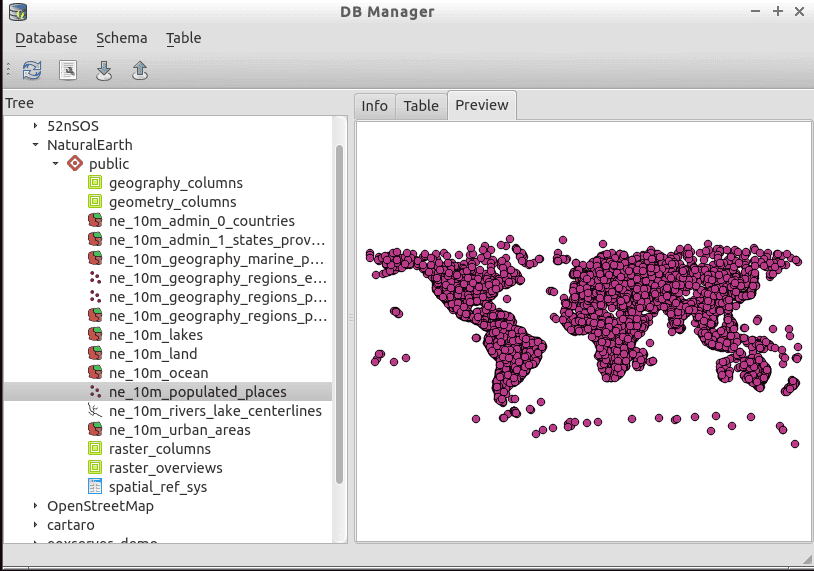
13. PostGIS
PostGIS is a spatial database extender for the PostgreSQL
object-relational database. It allows running geographic location
queries in SQL. It also adds functions, operators and index
enhancements into the geospatial datasets. All these
functionalities rather make it a database management tool than an
analysis software. PostGIS also includes additional toolkits to
process and analysis of Geographic Information System Data.
Key Features of PostGIS
- PostGIS splices, dices, morphs and reclassifies both vector and
raster data with the power of Structured Query Language or
SQL. - It uses a raster map algebra algorithm[16] for faster and detailed
raster image processing. - It supports importing and exporting ESRI shapefiles for vector
analysis via command line or graphical user interface. - The support for file formats can be extended via using
different third party open-source tools. - It has native support for 3D objects, functions and spacial
index.
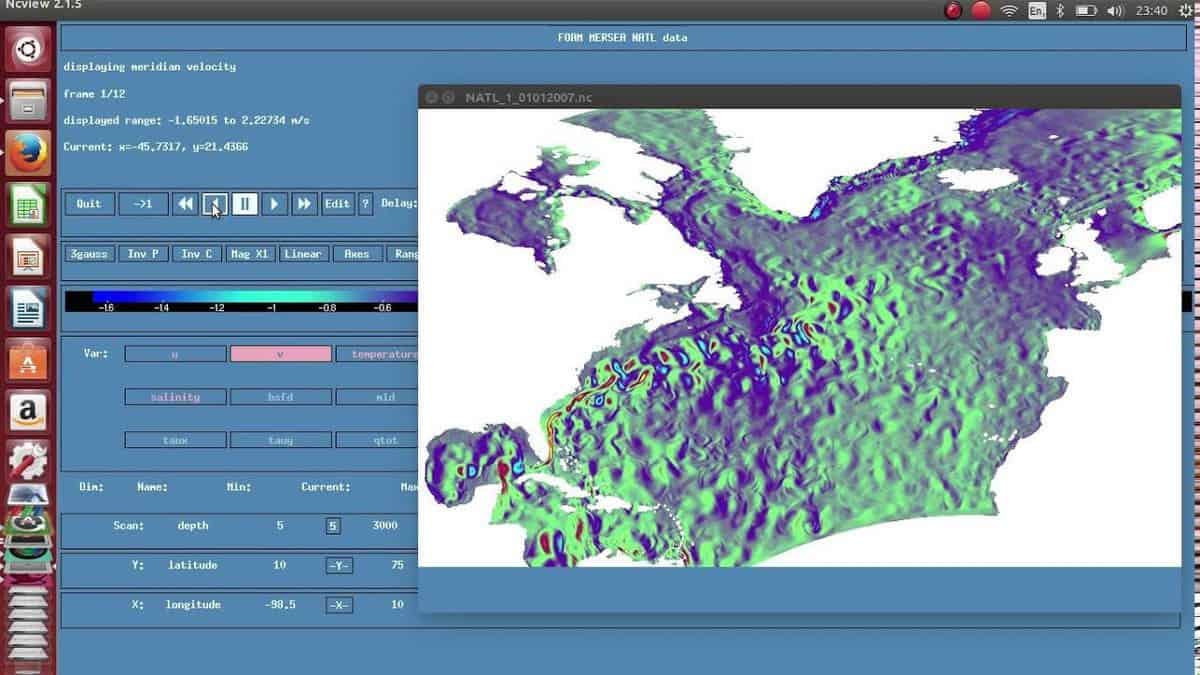
14. ncview
This is a simple NetCDF file viewer system. ncview is free and
open-source. All the features of a geospatial data viewer are
integrated with this system. NetCDF version 4 with full HDF5
support is needed for running this tool properly.
Key Features of ncview
- It can display a 2-dimensional, color representation of
data in a netCDF file. - ncview can automatically animate the data in time to create
movie loops. - The basic properties like flipping and enlarging are
supported. - This tool can plot data in the X-Y axis and can change the
colormaps.
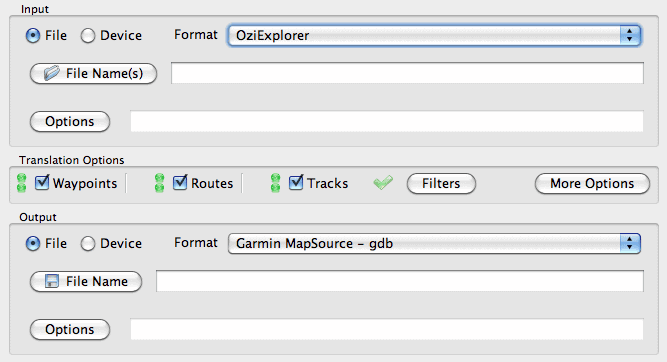
15. GPS Babel
This GPS tool[19] – “GPS Babel” is a
pretty handy tool for geoscientists. Because almost all the persons
working in the field of geoscience need to use Global Positioning
Service or GPS device. This free tool can be considered as a Swiss
Army Knife for GPS. It supports almost all the popular brands of
GPS devices.
Key Features of GPS Babel
- It converts waypoints, routes, and tracks between popular GPS
receivers such as Garmin, Magellan, etc. - GPS Babel can plot retrieved coordinates into mapping programs
like Google Earth and Basecamp. - It has support for more than 100 GPS devices.
- It can also be used as the backend for other tools.
Final Thoughts
We all know that there are different divisions of geoscience.
All of the above tools are the best earth science or geoscience
software for Linux in their respective categories. So you may not
need to use every software from the above list. You can undoubtedly
choose any of the software based on your academic or career needs.
If you have any favorite geoscience software you think we missed to
mention, you can let us know by commenting below.
References
- ^
Best
Linux Software: Our Editorial List of Essential Linux Apps
(www.ubuntupit.com) - ^
Get
GRASS (grass.osgeo.org) - ^
Get Quantum GIS
(www.qgis.org) - ^
Get Survex
(survex.com) - ^
Get SAGA
(www.saga-gis.org) - ^
Get uDig
(udig.refractions.net) - ^
Get Therion
(therion.speleo.sk) - ^
tool for
access, manipulation, and visualization
(www.ubuntupit.com) - ^
Top 20
Most Popular Programming Languages To Learn For Your Open-source
Project (www.ubuntupit.com) - ^
Get GrADS
(cola.gmu.edu) - ^
Get GPlates
(www.gplates.org) - ^
Get
Generic Mapping Tools
(www.generic-mapping-tools.org) - ^
Get OpenJUMP
(www.openjump.org) - ^
Get
gvSIG Desktop (www.gvsig.com) - ^
Get
Seismic Toolkit
(seismic-toolkit.sourceforge.net) - ^
Top 20
Best Computer Algebra Systems for Linux in 2020
(www.ubuntupit.com) - ^
Get PostGIS
(postgis.net) - ^
Get
ncview (meteora.ucsd.edu) - ^
Top 15
Best GPS Tools For Linux To Make Your Navigation Perfect
(www.ubuntupit.com) - ^
Get
GPS Babel (www.gpsbabel.org)
Geoscience or earth science is not only about boring theories.
There are many practical implementations of the knowledge of
geoscience in real life. And, there are some computer programs
which will help you to simulate the ideas of this important field
of science. Normally, students and academicians of geoscience use
these tools. For this reason, common people don’t know much about
these geosciences software. But if you are an avid learner of
geoscience and a Linux user at the same time, you might want some
best geoscience software for your Linux system.
Earth Science or Geoscience Software for
Linux
Many people have a misconception that these specialized tools
are not available for Linux distros. It’s true that there is not a
huge number of geoscience software for Linux, but the number is not
negligible either. So, it’s very difficult for you to choose the
best piece of software for your practical study or research. Don’t
worry, here we are going to introduce you to the 15 best geoscience
software for Linux.
1. GRASS
Geographic Resources Analysis Support System or GRASS is an
open source software[1]
used in geoscience. It is a GIS or Geographic Information System.
That means it will help you with the analysis, image processing and
visualization of geographic data. It was originally developed by
the US Army and then gradually enhanced by the open-source
community. GRASS is regarded as the most advanced GIS software and
hence it is used by different government and private officials all
over the world.
Key Features of GRASS
- Easy to use wxPython graphical user-interface included with
Layer Manager, Map Display Window and Module Dialogue. - It has around 400 built-in modules for data analysis and image
processing. - It has a large community-driven library of free downloadable
add-in modules. - GRASS has an integrated 2D/3D vector processing engine with
support for SQL based database management system. - The Python interface to the C library helps you creating
powerful modules of your own. - This program can be used as the backend of other GIS
software.
2. Quantum GIS
Quantum GIS is yet another GIS software for Linux. This Linux
geoscience software is mostly known as QGIS. The main aspect of
this tool is its user-friendliness. The initial goal of this tool
was to provide a GIS data viewer. But over the time it has become a
complete package for GIS functionalities. It will help you to
create, analyze, query and view geospatial data.
Key Features of Quantum GIS
- It has support for a wide range of formats for viewing raster
and vector data. Another interesting this is that it doesn’t need
to convert data to a common format for doing so. - QGIS supports all the formats from two very popular libraries,
such as the OGR library and the GDAL library. - Quantum GIS has a very user-friendly graphical UI with some
important built-in, including a map composer, spatial bookmarking,
feature labeling, overview panel, etc. - Users can perform spatial analysis using integrated GRASS
tools, including map algebra, terrain analysis, hydraulic modeling,
network analysis, and many others. - It has got a plethora of plugins for installing and add extra
functionalities like decorations, georeferencer, GPS tools, GRASS,
Python console, etc.
3. Survex
The tool Survex is an open-source software package for analyzing
and viewing cave-survey data. Surveying a cave is not an easy task
but this tool makes it easier to analyze the survey data. The
real-time cave viewer integrated with it helps you to the panning,
rotating and zooming inside the cave using your standard input
device like mouse and keyboard. Many important governments and
non-government survey projects rely on this software.
Key Features of Survex
- Integrated lag-free and super smooth cave viewer with redraw
and bank-switching techniques, - Inbuilt instrument simulators have an optional scale and zero
correction. - Users can specify magnetic deviations separately where
needed. - Survex has support for almost all the common input units like
meters, feet, degrees, mils, grads, minutes, etc. - This tool supports a wide range of languages including French,
Spanish, Portuguese and Slovak. - This tool has integrated printer drivers for almost all the
common models including Epson, Canon, HP, etc.
4. SAGA – System for Automated
Geoscientific Analyses
It is free and open-source geoscience software for Linux. All
the functionalities of this program can be easily accessible by
using the GUI or by writing command lines. You can also program it
by using C++ API. This API system allows you to write new
algorithms for analyzing geographical data. It features an
exchangeable modules library for geoscientific methods.
Key Features of SAGA – System for Automated
Geoscientific Analyses
- SAGA supports various formats for inputting data like grids,
tables, vectors, images, etc. - This tool supports interpolation for various vector data using
triangulation, nearest neighbor and inverse distance. - Users can use various geostatistics methods like residual
analysis, ordinary and universal kriging, single and multiple
regression analysis, variance analysis, etc. - It features some intelligent functions like box classification,
maximum likelihood, and pattern recognition. - Users can simulate various dynamic processes with this
tool. - The advanced terrain analysis feature of this tool helps you to
analyze slope, curvature, flow path, solar radiation, etc.
5. uDig
The name of this tool is derived from the catchphrase
“User-friendly Desktop Internet GIS”. Just like its name this tool
is very userfriendly. It is an open-source geospatial data viewer.
Though it is a stand-alone desktop program for Linux, it has many
online GIS services built-in. This software is written in Java and
developed with Eclipse Rich Client (RCP) technology.
Key Features of uDig
- The Eclipse Rich Client or RCP technology helps to add and
develop new functionality for this program. - It has a feature-rich Java toolkit that can be used by the
developers to develop this open-source tool. - GRASS is used for vector operations in this program that helps
the users already familiar with GRASS. - The desktop client supports drag and drops feature to interact
with file explorer and web browser. - It supports GeoServer, MapServer and other kinds of web map
servers. - Users will get a fast user experience while working with maps
and links because of its embedded web browser.
6. Therion
Therion is an advanced cave surveying tool. It is a command-line
based application. It takes input in text files but the output can
be retrieved as a 3D map and visualization. But other than that the
uses of this application are pretty simple. It is fully compatible
with Survex and the data can be stored either in the form of a
Survex file or a Therion file.
Key Features of Therion
- The map drawing is fully independent of the survey data. So you
can draw partial maps if you want to. - It completes maps with all the details. No additional ink
stroke is needed for this. - The dynamic map drawing system refreshes the output map
automatically with the change in scale or value. - The 3D model of the cave can be split into layers and can be
displayed as individual items separately. - The 2D map input generates a 3D map as output.
- Therion supports a lot of commonly used file formats for
exporting data or visualization. - It has built-in translation support for many languages.
7. GrADS – Grid Analysis and
Display System
GrADS is a very advanced tool for access, manipulation, and
visualization of geographical data. This tool uses
four-dimensional datasets for analyzing earth science data. It has
also an optional 5th dimension for grids that are generally
implemented but designed to be used for ensembles. It has a rich
set of built-in functions for different operations. Besides users
and developers can add extra functions by using any programming language. [8][9]
Key Features of GrADS
- This program displays data in different types of graphical
forms. Lines, Bars, Scatter Plots, Smoothed Contours, etc are some
of them. - GrADS can read different types of datasets including GRIB,
gridded binary, BUFR, GrADS station data, NetCDF, HDF4-SDS, HDF5,
and OPeNDAP. - It has a programmable scripting interface for displaying
complex operations. - Its advanced scripting language enables users to map buttons
using scripts and take actions based on clicks. - It has a data server named GDS which uses OPeNDAP protocol to
analysis service across the internet.
8. GPlates
GPlates is a very useful geoscience software for Linux. The
desktop client gives users an interactive visualization of
plate-tectonics. This tool is written in the C++ programming
language. GPlates uses the OpenGL framework for displaying 3D map
output. The graphical user interface of this program uses Qt as its
framework.
Key Features of GPlates
- GPlates supports the loading and saving of different geographic
and tectonic data in different formats including GPML, Plates4
line-format, ESRI Shapefile, etc. - It records and restores the previous session of the user. This
is a very convenient feature of this tool. - The tool supports the loading of raster images in different
formats like JPEG and NetCDF. - The visualizer tool supports different types of map projections
including 3D Orthographic Globe, Rectangular, Mercator, Mollweide,
etc. - Users can control the perspective camera by dragging the mouse
or by using the keyboard arrow keys. - You can choose different coloring schemes for vector features
and NetCDF grids data.
9. Generic Mapping
Tools
GMT is a collection of over 80 tools for creating and
manipulating geographical data. All the tools are open-source. The
tools are mainly command-line based. But there are some graphical
user interfaces available from third-party developers such as iGMT,
Mirone, SEATREE, etc. This tool comes integrated with a free
comprehensive collection of free GIS data, such as coastlines,
rivers, political borders, etc.
Key Features of Generic Mapping
Tools
- The tools can manipulate cartesian and geographic data sets
including filtering, trend fitting, gridding, projecting, etc. - It can produce PostScript illustrations ranging from simple x–y
plots via contour maps to artificially illuminated surfaces and 3D
perspective views. - The package contains 40 more tools for specialized
discipline-specific works. - The tools have native support for more than thirty mapping
projections. - Linear, log10, and power scaling features are also supported by
the tools.
Get Generic Mapping
Tools [12]
10. OpenJUMP
This is an open-source Geographical Information System or GIS.
It is written in the Java programming language. It is considered as
a unified mapping platform. Maybe some of you are familiar with the
software named “Java Unified Mapping Platform.” That was developed
by VividSolutions and was released in 2003. OpenJUMP is the
open-source fork of that software.
Key Features of OpenJUMP
- It has integrated vector GIS support which can also read raster
files. - This tool provides open API and plugin system which can be
scripted by using BeanShell and Java Python. - It has support for plenty of vector and raster file
formats. - OpenJUMP has some built-in topology tools like line noder,
polygonizer, planar graph, etc. - The advanced measurement tool can calculate length, area,
centroid, buffer, convex hull, etc pretty well. - The advanced printing system makes it easier to print out
sophisticated maps.
11. gvSIG Desktop
gvSIG Desktop offers numerous tools for analyzing geospatial
data. gvSIG supports a wide range of vector and raster files, as
well as databases and remote services. This geoscience software has
some bonus tools integrated with it including Coordinates Reference
Systems manager, import from/export to WMC, scripting and
translations manager.
Key Features of gvSIG Desktop
- It gives users access to remote services like OGC, ArclMS,
Ecwp, etc. - It has different types of graphical editing options like adding
event layers, snapping, grid, flatness, command stack, undo/redo,
copy, move, symmetry, rotate, scale, edit vertex, etc. - The advanced vector representation system can display different
unique symbols, categories, legends, etc. - It has a printing system integrated that can export files as
PDF or as image files and print them instantly. - gvSIG Desktop can be seamlessly integrated with online map
servers to publish maps online. - The 3D viewing tool built-in with it can display from different
perspectives and can make animations automatically.
12. Seismic Toolkit
The Seismic Toolkit is an open-source seismic data analyzer.
This tool can perform filtering, spectral analysis, polarization
analysis, time-frequency representation, Hilbert transform, and
singular value decomposition. Thus it has become a go-to tool for
the experts in the field of studying earthquakes. Apart from
different seismological analysis, this tool can plot graphs
according to the provided data.
Key Features of Seismic
Toolkit
- The powerful raster engine integrated with it supports
different display properties including wiggle, variable area,
variable density, color-filled modes, etc. - This tool supports over 200 datum and seven different
projection modes. - Users can overlay any number of seismic datasets and display
interpretation or annotate data. - Seismic Toolkit offers granular control over trace highlight,
polarity, visibility, color, etc. - Image pre-rasterizing system helps bufferless zooming and
scrolling over maps. - The toolkit supports the Qt framework for extended
functionality.
13. PostGIS
PostGIS is a spatial database extender for the PostgreSQL
object-relational database. It allows running geographic location
queries in SQL. It also adds functions, operators and index
enhancements into the geospatial datasets. All these
functionalities rather make it a database management tool than an
analysis software. PostGIS also includes additional toolkits to
process and analysis of Geographic Information System Data.
Key Features of PostGIS
- PostGIS splices, dices, morphs and reclassifies both vector and
raster data with the power of Structured Query Language or
SQL. - It uses a raster map algebra algorithm[16] for faster and detailed
raster image processing. - It supports importing and exporting ESRI shapefiles for vector
analysis via command line or graphical user interface. - The support for file formats can be extended via using
different third party open-source tools. - It has native support for 3D objects, functions and spacial
index.
14. ncview
This is a simple NetCDF file viewer system. ncview is free and
open-source. All the features of a geospatial data viewer are
integrated with this system. NetCDF version 4 with full HDF5
support is needed for running this tool properly.
Key Features of ncview
- It can display a 2-dimensional, color representation of
data in a netCDF file. - ncview can automatically animate the data in time to create
movie loops. - The basic properties like flipping and enlarging are
supported. - This tool can plot data in the X-Y axis and can change the
colormaps.
15. GPS Babel
This GPS tool[19] – “GPS Babel” is a
pretty handy tool for geoscientists. Because almost all the persons
working in the field of geoscience need to use Global Positioning
Service or GPS device. This free tool can be considered as a Swiss
Army Knife for GPS. It supports almost all the popular brands of
GPS devices.
Key Features of GPS Babel
- It converts waypoints, routes, and tracks between popular GPS
receivers such as Garmin, Magellan, etc. - GPS Babel can plot retrieved coordinates into mapping programs
like Google Earth and Basecamp. - It has support for more than 100 GPS devices.
- It can also be used as the backend for other tools.
Final Thoughts
We all know that there are different divisions of geoscience.
All of the above tools are the best earth science or geoscience
software for Linux in their respective categories. So you may not
need to use every software from the above list. You can undoubtedly
choose any of the software based on your academic or career needs.
If you have any favorite geoscience software you think we missed to
mention, you can let us know by commenting below.
References
- ^
Best
Linux Software: Our Editorial List of Essential Linux Apps
(www.ubuntupit.com) - ^
Get
GRASS (grass.osgeo.org) - ^
Get Quantum GIS
(www.qgis.org) - ^
Get Survex
(survex.com) - ^
Get SAGA
(www.saga-gis.org) - ^
Get uDig
(udig.refractions.net) - ^
Get Therion
(therion.speleo.sk) - ^
tool for
access, manipulation, and visualization
(www.ubuntupit.com) - ^
Top 20
Most Popular Programming Languages To Learn For Your Open-source
Project (www.ubuntupit.com) - ^
Get GrADS
(cola.gmu.edu) - ^
Get GPlates
(www.gplates.org) - ^
Get
Generic Mapping Tools
(www.generic-mapping-tools.org) - ^
Get OpenJUMP
(www.openjump.org) - ^
Get
gvSIG Desktop (www.gvsig.com) - ^
Get
Seismic Toolkit
(seismic-toolkit.sourceforge.net) - ^
Top 20
Best Computer Algebra Systems for Linux in 2020
(www.ubuntupit.com) - ^
Get PostGIS
(postgis.net) - ^
Get
ncview (meteora.ucsd.edu) - ^
Top 15
Best GPS Tools For Linux To Make Your Navigation Perfect
(www.ubuntupit.com) - ^
Get
GPS Babel (www.gpsbabel.org)
Read more https://www.ubuntupit.com/earth-science-or-geoscience-software-for-linux/